
Free inventory list template
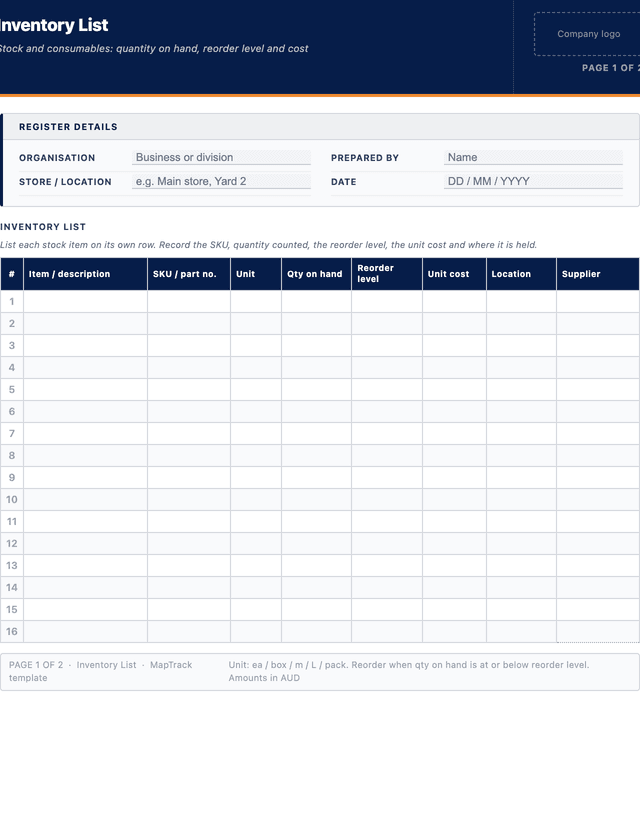
Free inventory list template (PDF). Track stock and consumables by item, SKU, quantity on hand, reorder level, unit cost, location and supplier.
Updated 4 June 2026
How to use: download the PDF, print or complete digitally on any device.
- PDF format, ready to print or fill on screen
- Use as-is or customise to suit your operation
- Go digital in MapTrack for photos, reminders and audit trails
Download free PDF template
Use in MapTrack →



Trusted by teams across Australia and New Zealand
We respect your privacy. Unsubscribe anytime.
Or set it up in MapTrack
- Fill it in on a phone, attach photos to any check
- Automatic reports and audit trails
- Upload the PDF and MapTrack drafts the form for you
Free 30-day trial. No credit card. Personal email accepted.
Don't just download it - use it live. Start a free workspace, upload this inventory list template and MapTrack drafts it as a form your crew can run from a phone.

Co-Founder & Commercial Director
Key takeaways
- The MapTrack inventory list template has 8 columns and room for 28 entries. Columns: Item / description, SKU / part no., Unit, Qty on hand, Reorder level, Unit cost, Location, Supplier.
- An inventory list counts how many of each stock item you hold, with quantity on hand, reorder level, unit cost, location and supplier on one line.
- It tracks consumables and stores by quantity, not individual assets by custody, which is what an asset inventory does. Use the right one for the job.
- Setting a minimum or reorder level against each item turns the list into a simple reorder prompt that prevents stockouts and rush freight.
- Reconcile the list against a physical count regularly; a cycle count of fast-moving lines monthly keeps the numbers trustworthy between full stocktakes.
Enter your email below to download this inventory list template as a ready-to-use PDF.
Used by construction, mining and field service teams










What is an inventory list template?
An inventory list template is a structured register used to record the stock and consumable items an organisation holds, with the quantity of each on hand. For every line it captures an item name, a SKU or part number, the unit of measure, the quantity counted, a minimum or reorder level, the unit cost, the storage location and the supplier. Unlike an asset inventory, which tracks individual assets and who holds them, an inventory list answers a simpler question: how much of each item do we have, and what needs reordering. It is the working list a store, warehouse or site office uses to keep consumables and parts in stock without over-ordering.
Inventory lists are used across construction, manufacturing, facilities, trades and field service wherever consumables, fasteners, PPE, cleaning supplies, fluids or general stores are kept on a shelf or in a container. Without one, teams run out of fast-moving items at the worst moment, double-order things already in stock and tie up cash in dead stock no one is watching. In MapTrack, this list becomes a live record: each item carries a barcode or QR label, quantities update as stock is issued or received on a phone, and items that drop below their reorder level are flagged automatically. Australian organisations working to ISO 55001 are expected to know and control the resources they hold, and an accurate inventory list is the practical starting point for stores and consumables.
Learn more about asset tracking in MapTrack.
Benefits of using this inventory list template
- Stockout prevention: a reorder level against each item flags what to reorder before a fast-moving line runs out and stops the job.
- Less dead stock: a visible quantity-on-hand list stops crews ordering items already sitting on the shelf and ties up less cash.
- Reorder discipline: minimum and reorder levels turn a count sheet into a simple, repeatable purchasing prompt for the store.
- Cost visibility: a unit cost against each line gives the total value of stock on hand for budgeting and insurance at a glance.
- Faster counts: a structured list with SKUs and locations reconciles cleanly against a physical or cycle count, especially when items are tagged.
- Supplier clarity: recording the supplier and SKU against each item makes reordering and price checks quick and removes guesswork.
- Multi-site control: a consistent list per store or site shows where stock sits so items can be moved instead of bought twice.
Benefits of digitising forms in MapTrack
When you move your inventorys from paper to MapTrack, you get:
- Field users can easily scan a QR code to complete a form on mobile. Unlimited users.
- Email the right people when a form is submitted, with an automation you set up.
- File every completed form against the asset, location or person it covers.
- Download any completed form as a PDF, with failed answers listed at the top.
- Fill in forms offline; they upload when the device is back online.
- Build conditional logic (show or hide questions based on answers).
- Take pictures or attach photos. Not possible with a paper-based form.
- Electronic signatures.
- Edit forms later without reprinting.
- Set who can view, fill in or edit forms with user roles.
- Upload a paper form (PDF, Word, Excel or a photo) and MapTrack's AI builds a digital version for you to check.
- Keep one asset register with each asset's location, condition and custody history.
- Schedule calibration and record certification and warranty expiry dates against each asset.
- See each asset's value over time in the Asset Depreciation report.
Book a demo to see how MapTrack handles inventorys.
Try MapTrack free for 30 days
Full access to every feature. No credit card required. Per-asset pricing so you scale as your fleet grows.
- No credit card required
- 30 days free trial
- Cancel anytime
1-2 days/week saved
“Bloody amazing! We used to spend 1-2 days a week tracking and managing our generators alone.”

Steve McAllister
Asset Coordinator, Saunders International
What to include in an inventory list template
This inventory list template covers 11 key areas:
- List details: organisation, prepared by, store or site location, and the date of the count.
- Item description: a clear name for the stock or consumable item.
- SKU or part number: the internal code, manufacturer part number or barcode used to identify the line.
- Category: stock group such as consumables, fasteners, PPE, fluids or cleaning, for filtering and reporting.
- Unit of measure: each, box, metre, litre or pack, so quantities are unambiguous.
- Quantity on hand: the counted quantity currently held in the location.
- Minimum or reorder level: the threshold at which the item should be reordered.
- Reorder quantity: the standard quantity to order when the item hits its reorder level.
- Unit cost: the cost per unit, used to value stock on hand and support budgeting.
- Location: the shelf, bin, store or site where the item is held.
- Supplier: the preferred supplier for reordering the item.
How to use this inventory list template
- Define the scope and agree the columns before you start counting.: Decide which stores, sites and stock categories the list will cover, then confirm the columns you need such as SKU, unit of measure, quantity, reorder level and location. Agreeing the scope first prevents gaps, double counting and arguments over what belongs on the list.
- Give every item a SKU or part number and label its location.: Assign a consistent code to each line and label the shelf or bin where it lives, ideally with a barcode or QR label. Codes and labelled locations remove ambiguity between similar items and make every future count far quicker and more accurate.
- Count the quantity on hand for each item and record it against the line.: Work systematically through each shelf, bin and store, counting the quantity of each item in its unit of measure and writing it against the matching line. Count one location fully before moving on so nothing is missed or counted twice.
- Set a minimum or reorder level and reorder quantity for each item.: For each line, decide the level at which it should be reordered, based on how fast it is used and the supplier lead time, and the standard quantity to order. This single step turns a static count into a working reorder prompt for the store.
- Record the unit cost and supplier for each item.: Enter the cost per unit and the preferred supplier against each line from the latest invoice or price list. Unit cost lets you value the total stock on hand, and the supplier and SKU together make reordering quick and accurate when a line runs low.
- Reconcile, store the list and keep it current as stock moves.: Compare the count against the previous list or system records, investigate large differences and correct the numbers. Save the list as the baseline, then update it as stock is issued and received, and recount fast-moving lines on a cycle so the data stays reliable.
In MapTrack, you can manage your full asset register digitally. Each submission is stored as a timestamped PDF against the asset record.
Get the free templateEnter your email above to download the full inventory list template as a PDF.Back to download formHow often should you complete this inventory?
Run a full inventory count at least once a year, and reconcile it before audits or end of financial year. Between full counts, cycle count fast-moving or high-value lines more often, for example monthly, so the numbers do not drift. Update quantities continuously as stock is issued to jobs and received from suppliers, and review reorder levels whenever usage or lead times change. In MapTrack, quantities update in real time as items are scanned in and out, and lines below their reorder level are flagged automatically, so the list never goes stale between counts.
Frequently asked questions
Applicable regulatory standards
This template is a starting point. Check the current requirements that apply to your equipment, work and location. The template alone does not establish compliance.
- ISO 55001 - Asset Management Systems (systematic control over the resources an organisation holds)
- AASB 102 - Inventories (measurement and valuation of inventory held for use or sale)
- ISO 55000 - Asset Management (overview and principles of managing physical resources)
Check the current source
Inventory list template preview
The numbers behind this inventory list template
Every figure below is sourced and dated, so you can quote it in a toolbox talk, a budget case or a board paper without having to chase the original report.
Embed this free template on your website
Run an industry blog, trade association site, or training resource? Drop a preview of this free inventory list template straight into your page. The snippet is self-contained, needs no scripts, and links readers back to the full free template.
<div style="max-width:480px;font-family:system-ui,-apple-system,'Segoe UI',Roboto,sans-serif;border:1px solid #E5E7EB;border-radius:12px;padding:20px;background:#ffffff;">
  <p style="font-size:12px;font-weight:700;letter-spacing:0.05em;text-transform:uppercase;color:#071D49;margin:0;">Free template</p>
  <p style="font-size:18px;font-weight:700;color:#071D49;margin:6px 0 0;">Inventory list template</p>
  <ul style="margin:12px 0 0;padding-left:18px;color:#374151;font-size:14px;line-height:1.6;">
    <li style="margin:4px 0;">List details: organisation, prepared by, store or site location, and the date of the count.</li>
    <li style="margin:4px 0;">Item description: a clear name for the stock or consumable item.</li>
    <li style="margin:4px 0;">SKU or part number: the internal code, manufacturer part number or barcode used to identify the line.</li>
    <li style="margin:4px 0;">Category: stock group such as consumables, fasteners, PPE, fluids or cleaning, for filtering and reporting.</li>
    <li style="margin:4px 0;">Unit of measure: each, box, metre, litre or pack, so quantities are unambiguous.</li>
    <li style="margin:4px 0;">Quantity on hand: the counted quantity currently held in the location.</li>
  </ul>
  <p style="font-size:13px;color:#6B7280;margin:14px 0 0;padding-top:12px;border-top:1px solid #E5E7EB;">Free <a href="https://www.maptrack.com/templates/inventory-list-template" style="color:#071D49;font-weight:600;text-decoration:none;">Inventory list template</a> by MapTrack</p>
</div>Free to reuse, including commercially. This template is published under a Creative Commons Attribution 4.0 licence. Copy it, adapt it, put it on your own site or in your own docs. All we ask is that you credit MapTrack with a link back to this page. The snippet above already includes that credit, so if you use it as-is you’re covered.
Cite this template
Writing about this topic? You’re welcome to quote this checklist. Here’s the wording to use so your readers can find the original.
The MapTrack inventory list template has 8 columns and room for 28 entries.
- Short attribution
- MapTrack Inventory list template, https://www.maptrack.com/templates/inventory-list-template
- Reference list
- MapTrack. (2026). Inventory list template [Checklist template]. Retrieved from https://www.maptrack.com/templates/inventory-list-template
Free to reuse with credit under a Creative Commons Attribution 4.0 licence. If you’d rather link straight to it, the page is https://www.maptrack.com/templates/inventory-list-template.
Need to manage your full asset register digitally?
Register every asset in MapTrack, attach digital forms, and get a complete history of every inspection, service and compliance record.