
Free drivers daily log with duty status grid
Free driver's daily log with 24-hour duty status grid (off duty, sleeper berth, driving, on duty). FMCSA 49 CFR 395.8 RODS. Print-ready PDF.
Updated 7 May 2026
How to use: download the PDF, print or complete digitally on any device.
- PDF format, ready to print or fill on screen
- Use as-is or customise to suit your operation
- Go digital in MapTrack for photos, reminders and audit trails
Download free PDF template
Use in MapTrack →



Trusted by teams across Australia and New Zealand
We respect your privacy. Unsubscribe anytime.
Or set it up in MapTrack
- Fill it in on a phone, attach photos to any check
- Automatic reports and audit trails
- Upload the PDF and MapTrack drafts the form for you
Free 30-day trial. No credit card. Personal email accepted.
Don't just download it - use it live. Start a free workspace, upload this drivers daily log with duty status grid and MapTrack drafts it as a form your crew can run from a phone.

Co-Founder & Commercial Director
Enter your email below to download this drivers daily log with duty status grid as a ready-to-use PDF.
Used by construction, mining and field service teams











What is a drivers daily log with duty status grid?
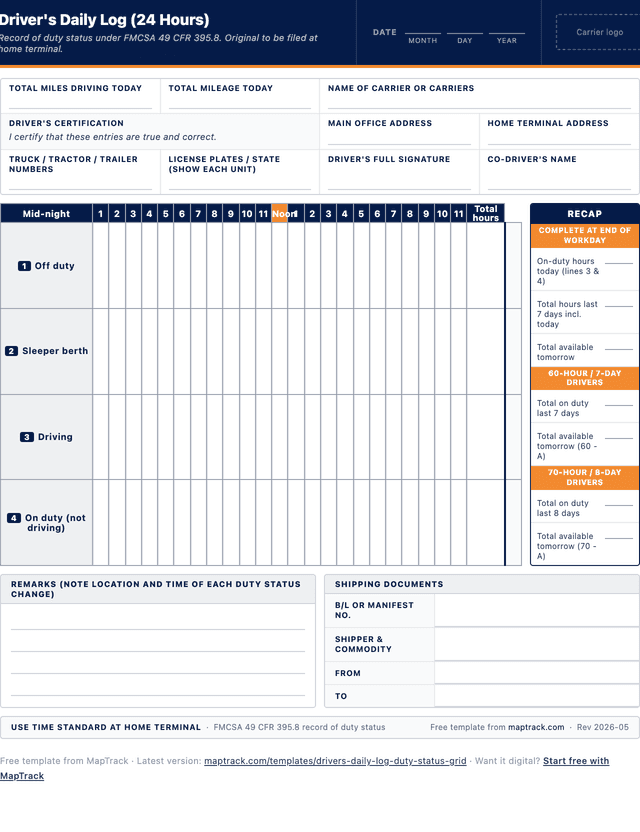
A driver's daily log with the 24-hour duty status grid is the standard format used by commercial motor vehicle drivers in the United States to record their record of duty status (RODS) under FMCSA 49 CFR 395.8. The grid uses four horizontal rows, one for each duty status category: 1. Off duty, 2. Sleeper berth, 3. Driving, and 4. On duty (not driving). Each row spans 24 hours from midnight to midnight, subdivided into 15-minute increments, so the driver can mark a continuous line on the appropriate row for the time spent in each status. A right-hand totals column captures hours per status, and a recap block on the right side calculates 60-hour / 7-day and 70-hour / 8-day cumulative on-duty time.
Under FMCSA 49 CFR Part 395, drivers of commercial motor vehicles operating in interstate commerce are subject to the hours of service rules: an 11-hour driving limit, a 14-hour on-duty window, mandatory 30-minute breaks before the eighth consecutive hour of driving, and 60-hour / 7-day or 70-hour / 8-day weekly limits. Most CMV drivers must use a registered electronic logging device (ELD) to record their RODS automatically under the ELD mandate (49 CFR 395.8(a) and Part 395 Subpart B). Drivers who fall under one of the short-haul exemptions, drive pre-2000 model year vehicles, or drive driveaway-towaway operations may continue using paper logs in this format.
Even where ELDs are mandated, this paper template remains useful for ELD malfunction reconstruction (drivers must reconstruct RODS for the current day and previous seven days when an ELD fails, per 49 CFR 395.34), driver training, audit preparation, and supporting document reconciliation. The template also helps owner-operators and small carriers running short-haul exemption vehicles maintain a clean paper record without subscribing to an ELD platform. Filing the original at the home terminal and giving the duplicate to the driver to carry for eight days satisfies the retention pattern required by 49 CFR 395.8(k).
Learn more about GPS and fleet tracking in MapTrack.
Benefits of using this drivers daily log with duty status grid
- FMCSA-aligned format: matches the four-row, 24-hour duty status grid required under 49 CFR 395.8 for property-carrying CMV drivers.
- ELD malfunction backup: provides the paper format drivers must use to reconstruct RODS for the current day and prior seven days when an ELD fails (49 CFR 395.34).
- Driver self-monitoring: visualises driving hours, on-duty window and remaining time, helping drivers stay within the 11-hour, 14-hour and 60/70-hour limits.
- Audit readiness: the standard grid layout is what FMCSA auditors and roadside inspectors expect, reducing friction during compliance reviews and inspections.
- Training aid: an effective tool for new driver orientation, helping trainees learn duty status categories and HOS rules before their first revenue trip.
- Short-haul exemption support: gives owner-operators and carriers running short-haul exempt operations a structured RODS without the cost of an ELD platform.
Benefits of digitising forms in MapTrack
When you digitise commercial vehicle log / registers in MapTrack, you get:
- Field users can easily scan a QR code to complete a form on mobile. Unlimited users.
- Email the right people when a form is submitted, with an automation you set up.
- File every completed form against the asset, location or person it covers.
- Download any completed form as a PDF, with failed answers listed at the top.
- Fill in forms offline; they upload when the device is back online.
- Build conditional logic (show or hide questions based on answers).
- Take pictures or attach photos. Not possible with a paper-based form.
- Electronic signatures.
- Edit forms later without reprinting.
- Set who can view, fill in or edit forms with user roles.
- Upload a paper form (PDF, Word, Excel or a photo) and MapTrack's AI builds a digital version for you to check.
- Schedule services by odometer, engine hours or date for every vehicle.
- Keep fuel receipts and service records with each vehicle's inspections.
- Record repair costs on each work order against the vehicle.
Book a demo to see how MapTrack handles commercial vehicle log / registers.
Try MapTrack free for 30 days
Full access to every feature. No credit card required. Per-asset pricing so you scale as your fleet grows.
- No credit card required
- 30 days free trial
- Cancel anytime
Intuitive for field crews
“MapTrack's a great platform - intuitive for the guys out in the field and also has fantastic support.”

Matthew Anderson
Maintenance Planning Supervisor, Supagas
What to include in a drivers daily log with duty status grid
This drivers daily log with duty status grid covers 9 key areas:
- Date fields: month, day and year for the 24-hour period covered by the log.
- Carrier details: total miles driving today, total mileage today, name of carrier or carriers, main office address and home terminal address.
- Driver and vehicle: truck/tractor/trailer numbers, licence plates and state for each unit, driver's full signature, co-driver name and total hours.
- Driver certification: signature line confirming the entries are true and correct, as required by 49 CFR 395.8(c).
- 24-hour duty status grid: four rows (off duty, sleeper berth, driving, on duty not driving) with hourly columns from midnight to midnight, each subdivided into 15-minute increments.
- Total hours column: per-status total for the 24-hour period, used for recap calculations.
- Remarks section: notes the location and time of every duty status change as required under 49 CFR 395.8(h).
- Shipping documents: B/L or Manifest number, shipper and commodity, from and to fields linking the log to specific freight movements.
- Recap block: on-duty hours today (lines 3 + 4), totals for last 7 days, totals for last 8 days, available hours tomorrow under both 60-hour and 70-hour rules.
How to use this drivers daily log with duty status grid
- Fill in the date, carrier details, vehicle and driver header before starting the duty period.: Record the month, day and year. Enter the carrier name, main office address and home terminal address. List every truck, tractor and trailer number along with their licence plates and states. The driver should print their name and certify the entries before signing at the end of the day.
- Mark each duty status change on the grid as it occurs, using a continuous line on the appropriate row.: Draw a horizontal line on the row matching the current duty status (1 off duty, 2 sleeper berth, 3 driving, or 4 on duty not driving). When the status changes, draw a vertical line at the exact time of the change and continue the horizontal line on the new row. Use the 15-minute subdivisions to mark the change time accurately to the nearest quarter hour.
- Note the location and reason for each duty status change in the remarks section.: For every status change, record the city and state (or highway mile marker) and a brief description such as fuel stop, loading, rest break or post-trip inspection. This satisfies the 49 CFR 395.8(h) requirement to identify the location of duty status changes and supports later reconciliation against fuel receipts and bills of lading.
- Complete the shipping documents block when carrying a load.: Enter the bill of lading or manifest number, the shipper and commodity, the origin (from) and the destination (to). This links the duty status record to the freight movement and supports supporting-document reconciliation during audits.
- At the end of the duty period, total each row, complete the recap and sign the certification.: Sum the hours spent in each duty status (rows 1 to 4) and write the totals in the right-hand column. Complete the recap block: on-duty hours today (lines 3 + 4), totals for the last 7 and 8 days, and available hours tomorrow under the applicable 60- or 70-hour rule. Print the driver name, sign the certification and submit the original to the home terminal within 13 days.
- File the original at the home terminal and retain duplicates as required.: The motor carrier must retain the original RODS for at least six months from the date of receipt under 49 CFR 395.8(k). The driver must keep the duplicate for the most recent eight consecutive days while on duty so it can be presented during a roadside inspection.
In MapTrack, you can track your fleet with GPS and digital pre-starts. Each submission is stored as a timestamped PDF against the asset record.
Get the free templateEnter your email above to download the full drivers daily log with duty status grid as a PDF.Back to download formHow often should you complete this log / register?
Drivers must complete a record of duty status for every 24-hour period in which they are subject to FMCSA hours of service rules. The 24-hour period runs from midnight to midnight at the home terminal time zone. CMV drivers operating under one of the short-haul exemptions in 49 CFR 395.1(e) (the 150 air-mile radius exemption or the non-CDL short-haul exemption) are not required to complete a RODS provided their employer maintains time records for them. Drivers using ELDs satisfy the daily RODS requirement automatically through the device, but should reconstruct on this paper format whenever the ELD malfunctions, for the current day and prior seven days, until the device is repaired or replaced (49 CFR 395.34).
Frequently asked questions
Applicable regulatory standards
This template is a starting point. Check the current requirements that apply to your equipment, work and location. The template alone does not establish compliance.
- FMCSA 49 CFR 395.8 (Driver record of duty status)
- FMCSA 49 CFR 395.3 (Maximum driving time for property-carrying vehicles)
- FMCSA 49 CFR 395.5 (Maximum driving time for passenger-carrying vehicles)
- FMCSA 49 CFR Part 395 Subpart B (Electronic Logging Devices / ELD mandate)
- FMCSA 49 CFR 395.34 (ELD malfunctions and data diagnostic events)
Check the current source
Drivers daily log with duty status grid preview
The numbers behind this drivers daily log with duty status grid
Every figure below is sourced and dated, so you can quote it in a toolbox talk, a budget case or a board paper without having to chase the original report.
Embed this free template on your website
Run an industry blog, trade association site, or training resource? Drop a preview of this free drivers daily log with duty status grid straight into your page. The snippet is self-contained, needs no scripts, and links readers back to the full free template.
<div style="max-width:480px;font-family:system-ui,-apple-system,'Segoe UI',Roboto,sans-serif;border:1px solid #E5E7EB;border-radius:12px;padding:20px;background:#ffffff;">
  <p style="font-size:12px;font-weight:700;letter-spacing:0.05em;text-transform:uppercase;color:#071D49;margin:0;">Free template</p>
  <p style="font-size:18px;font-weight:700;color:#071D49;margin:6px 0 0;">Drivers daily log with duty status grid</p>
  <ul style="margin:12px 0 0;padding-left:18px;color:#374151;font-size:14px;line-height:1.6;">
    <li style="margin:4px 0;">Date fields: month, day and year for the 24-hour period covered by the log.</li>
    <li style="margin:4px 0;">Carrier details: total miles driving today, total mileage today, name of carrier or carriers, main office address and home terminal address.</li>
    <li style="margin:4px 0;">Driver and vehicle: truck/tractor/trailer numbers, licence plates and state for each unit, driver's full signature, co-driver name and total hours.</li>
    <li style="margin:4px 0;">Driver certification: signature line confirming the entries are true and correct, as required by 49 CFR 395.8(c).</li>
    <li style="margin:4px 0;">24-hour duty status grid: four rows (off duty, sleeper berth, driving, on duty not driving) with hourly columns from midnight to midnight, each subdivided into 15-minute increments.</li>
    <li style="margin:4px 0;">Total hours column: per-status total for the 24-hour period, used for recap calculations.</li>
  </ul>
  <p style="font-size:13px;color:#6B7280;margin:14px 0 0;padding-top:12px;border-top:1px solid #E5E7EB;">Free <a href="https://www.maptrack.com/templates/drivers-daily-log-duty-status-grid" style="color:#071D49;font-weight:600;text-decoration:none;">Drivers daily log with duty status grid</a> by MapTrack</p>
</div>Free to reuse, including commercially. This template is published under a Creative Commons Attribution 4.0 licence. Copy it, adapt it, put it on your own site or in your own docs. All we ask is that you credit MapTrack with a link back to this page. The snippet above already includes that credit, so if you use it as-is you’re covered.
Cite this template
Writing about this topic? You’re welcome to quote this checklist. Here’s the wording to use so your readers can find the original.
- Short attribution
- MapTrack Drivers daily log with duty status grid, https://www.maptrack.com/templates/drivers-daily-log-duty-status-grid
- Reference list
- MapTrack. (2026). Drivers daily log with duty status grid [Checklist template]. Retrieved from https://www.maptrack.com/templates/drivers-daily-log-duty-status-grid
Free to reuse with credit under a Creative Commons Attribution 4.0 licence. If you’d rather link straight to it, the page is https://www.maptrack.com/templates/drivers-daily-log-duty-status-grid.
Need to track your fleet with GPS and digital pre-starts?
Register every commercial vehicle in MapTrack, attach digital forms, and get a complete history of every inspection, service and compliance record.
GPS and fleet tracking · All templates · Pricing · Book a demo