
Free vehicle handover and condition report
Free vehicle handover and condition report (PDF-ready). Record damage, tyres, fuel, accessories, odometer and signatures at allocation and return.
Updated 5 July 2026
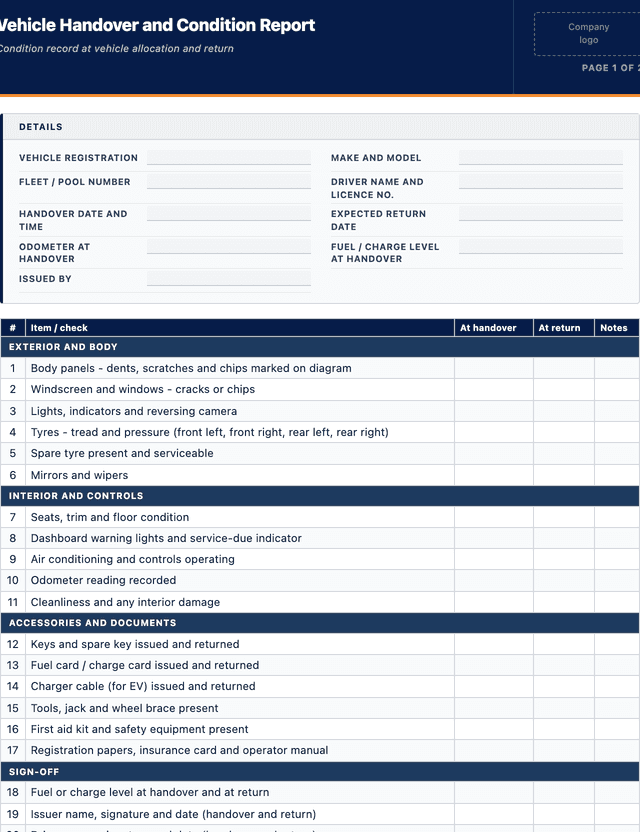
Vehicle Handover and Condition Report
Condition record at vehicle allocation and return
EXTERIOR AND BODY
INTERIOR AND CONTROLS
ACCESSORIES AND DOCUMENTS
SIGN-OFF
How to use: download the PDF, print or complete digitally on any device.
- PDF format, ready to print or fill on screen
- Use as-is or customise to suit your operation
- Go digital in MapTrack for photos, reminders and audit trails
Download free PDF template
Use in MapTrack →



Trusted by teams across Australia and New Zealand
We respect your privacy. Unsubscribe anytime.
Or set it up in MapTrack
- Fill it in on a phone, attach photos to any check
- Automatic reports and audit trails
- Upload the PDF and MapTrack drafts the form for you
Free 30-day trial. No credit card. Personal email accepted.
Don't just download it - use it live. Start a free workspace, upload this vehicle handover and condition report and MapTrack drafts it as a form your crew can run from a phone.

Co-Founder & Commercial Director
Key takeaways
- The MapTrack vehicle handover and condition report contains 20 checks across 4 sections. Sections covered: EXTERIOR AND BODY, INTERIOR AND CONTROLS, ACCESSORIES AND DOCUMENTS, SIGN-OFF.
Enter your email below to download this vehicle handover and condition report as a ready-to-use PDF.
Used by construction, mining and field service teams











What is a vehicle handover and condition report?
A vehicle handover and condition report is a two-point record that captures the exact state of a fleet or pool vehicle when it is allocated to a driver and again when it is returned. It uses a body diagram to mark existing dents, scratches and damage, and records tyre condition, fuel or charge level, odometer reading, accessories and documents handed over, and the signatures of both the person issuing the vehicle and the driver receiving it. The same form is completed on return, so any new damage is obvious against the baseline.
This report matters because a shared vehicle passes through many hands, and without a dated baseline it is impossible to say when damage happened or who was responsible. For a business running a fleet it protects both the driver and the organisation: the driver is not blamed for pre-existing damage, and the organisation has a clear record for insurance, novated-lease returns, and end-of-hire settlements. Under the model WHS laws a work vehicle is a workplace, and a handover that flags a bald tyre, a cracked screen or a warning light before the keys change hands keeps an unsafe vehicle off the road.
Learn more about GPS and fleet tracking in MapTrack.
Benefits of using this vehicle handover and condition report
- Clear damage baseline: a marked-up body diagram at handover settles who is responsible for any new dent or scratch found on return.
- Driver protection: recording pre-existing damage means a driver is not charged for a scratch that was already there when they took the keys.
- Safety gate at changeover: checking tyres, lights and warning indicators before handover keeps an unsafe vehicle off the road.
- Faster hire and lease settlements: a dated condition record with photos supports fair end-of-hire and novated-lease return assessments.
- Accountability for accessories: logging keys, fuel cards, chargers, spare tyre and documents stops items going missing between drivers.
- Odometer and fuel evidence: capturing the reading and fuel level at both ends supports usage records, fuel reconciliation and cost recovery.
Benefits of digitising forms in MapTrack
When you move from paper or static PDFs to digital forms in MapTrack, you get:
- Field users can easily scan a QR code to complete a form on mobile. Unlimited users.
- Email the right people when a form is submitted, with an automation you set up.
- File every completed form against the asset, location or person it covers.
- Download any completed form as a PDF, with failed answers listed at the top.
- Fill in forms offline; they upload when the device is back online.
- Build conditional logic (show or hide questions based on answers).
- Take pictures or attach photos. Not possible with a paper-based form.
- Electronic signatures.
- Edit forms later without reprinting.
- Set who can view, fill in or edit forms with user roles.
- Upload a paper form (PDF, Word, Excel or a photo) and MapTrack's AI builds a digital version for you to check.
- Schedule services by odometer, engine hours or date for every vehicle.
- Keep fuel receipts and service records with each vehicle's inspections.
- Record repair costs on each work order against the vehicle.
Book a demo to see how MapTrack handles forms.
Try MapTrack free for 30 days
Full access to every feature. No credit card required. Per-asset pricing so you scale as your fleet grows.
- No credit card required
- 30 days free trial
- Cancel anytime
Intuitive for field crews
“MapTrack's a great platform - intuitive for the guys out in the field and also has fantastic support.”

Matthew Anderson
Maintenance Planning Supervisor, Supagas
What to include in a vehicle handover and condition report
This vehicle handover and condition report covers 11 key areas:
- Vehicle registration, make, model and fleet or pool number
- Driver name, licence number and contact details
- Date and time of handover, and expected return date
- Odometer reading at handover and at return
- Fuel or charge level at handover and at return
- Body condition diagram with existing damage marked and dated
- Tyre condition and tread, including the spare
- Accessories and items issued: keys, fuel card, charger, tools, spare tyre, first aid kit
- Documents handed over: registration papers, insurance card, operator manual
- Warning lights, service due status and any known faults
- Signatures of the issuer and the driver at both handover and return
How to use this vehicle handover and condition report
- Inspect and mark the body at handover: Walk around the vehicle in good light and mark every existing dent, scratch and chip on the body diagram. Photograph anything notable. This baseline is what any new damage found on return is judged against, so be thorough rather than optimistic.
- Record tyres, fuel and odometer: Check tread and pressure on all tyres including the spare, note the fuel or charge level, and record the odometer reading. These figures anchor safety, cost recovery and usage tracking, and a low tread or a warning light here should stop the handover.
- Issue and log accessories and documents: Hand over keys, fuel card, charger, tools, spare tyre and the registration and insurance documents, ticking each on the form. Recording exactly what went out with the vehicle stops disputes about missing items when the vehicle comes back.
- Both parties sign the handover: The person issuing the vehicle and the driver both sign and date the handover section. A signature against the marked-up diagram means the driver has agreed the recorded condition, which is what makes the report useful if there is a later dispute.
- Complete the return inspection: On return, repeat the walk-around, compare against the handover diagram, and mark any new damage. Record the closing odometer and fuel level, confirm all accessories are back, and have both parties sign the return section to close the record.
In MapTrack, you can track your fleet with GPS and digital pre-starts. Each submission is stored as a timestamped PDF against the asset record.
Get the free templateEnter your email above to download the full vehicle handover and condition report as a PDF.Back to download formHow often should you complete this form?
Complete a handover report every time a vehicle is allocated to a driver and a return report every time it comes back, whether that is daily for a pool car or once for a long-term allocation. A vehicle that moves between drivers without a condition record loses its damage baseline the moment the keys change hands.
For long-term allocations, run a periodic condition check every three to six months so damage, tyre wear and service status do not go unrecorded for the life of the allocation. Keep every completed report against the vehicle in the fleet register so the full condition history travels with the asset.
Frequently asked questions
Applicable regulatory standards
This template is a starting point. Check the current requirements that apply to your equipment, work and location. The template alone does not establish compliance.
- Model Work Health and Safety (WHS) Act and Regulations, as enacted in each state and territory (in Victoria, the Occupational Health and Safety Act 2004 (Vic) and OHS Regulations 2017 (Vic)) - plant and vehicle maintenance duties
- Australian Road Rules and state or territory registration and roadworthiness requirements
- ISO 55001:2024 Asset management - Asset management system - Requirements (asset condition and lifecycle records)
- Model Code of Practice: Managing the risks of plant in the workplace (Safe Work Australia)
Vehicle Handover and Condition Report preview
The numbers behind this vehicle handover and condition report
Every figure below is sourced and dated, so you can quote it in a toolbox talk, a budget case or a board paper without having to chase the original report.
Embed this free template on your website
Run an industry blog, trade association site, or training resource? Drop a preview of this free vehicle handover and condition report straight into your page. The snippet is self-contained, needs no scripts, and links readers back to the full free template.
<div style="max-width:480px;font-family:system-ui,-apple-system,'Segoe UI',Roboto,sans-serif;border:1px solid #E5E7EB;border-radius:12px;padding:20px;background:#ffffff;">
  <p style="font-size:12px;font-weight:700;letter-spacing:0.05em;text-transform:uppercase;color:#071D49;margin:0;">Free template</p>
  <p style="font-size:18px;font-weight:700;color:#071D49;margin:6px 0 0;">Vehicle Handover and Condition Report</p>
  <ul style="margin:12px 0 0;padding-left:18px;color:#374151;font-size:14px;line-height:1.6;">
    <li style="margin:4px 0;">Vehicle registration, make, model and fleet or pool number</li>
    <li style="margin:4px 0;">Driver name, licence number and contact details</li>
    <li style="margin:4px 0;">Date and time of handover, and expected return date</li>
    <li style="margin:4px 0;">Odometer reading at handover and at return</li>
    <li style="margin:4px 0;">Fuel or charge level at handover and at return</li>
    <li style="margin:4px 0;">Body condition diagram with existing damage marked and dated</li>
  </ul>
  <p style="font-size:13px;color:#6B7280;margin:14px 0 0;padding-top:12px;border-top:1px solid #E5E7EB;">Free <a href="https://www.maptrack.com/templates/vehicle-handover-condition-report" style="color:#071D49;font-weight:600;text-decoration:none;">Vehicle Handover and Condition Report</a> by MapTrack</p>
</div>Free to reuse, including commercially. This template is published under a Creative Commons Attribution 4.0 licence. Copy it, adapt it, put it on your own site or in your own docs. All we ask is that you credit MapTrack with a link back to this page. The snippet above already includes that credit, so if you use it as-is you’re covered.
Cite this template
Writing about this topic? You’re welcome to quote this checklist. Here’s the wording to use so your readers can find the original.
The MapTrack vehicle handover and condition report contains 20 checks across 4 sections.
- Short attribution
- MapTrack Vehicle Handover and Condition Report, https://www.maptrack.com/templates/vehicle-handover-condition-report
- Reference list
- MapTrack. (2026). Vehicle Handover and Condition Report [Checklist template]. Retrieved from https://www.maptrack.com/templates/vehicle-handover-condition-report
Free to reuse with credit under a Creative Commons Attribution 4.0 licence. If you’d rather link straight to it, the page is https://www.maptrack.com/templates/vehicle-handover-condition-report.
Need to track your fleet with GPS and digital pre-starts?
Register every asset in MapTrack, attach digital forms, and get a complete history of every inspection, service and compliance record.
GPS and fleet tracking · All templates · Pricing · Book a demo