
Free daily plant report
Free daily plant report template (PDF-ready). Record civil plant hours, SMU, fuel, production, downtime, operator and defects in one running daily record.
Updated 28 Sept 2026
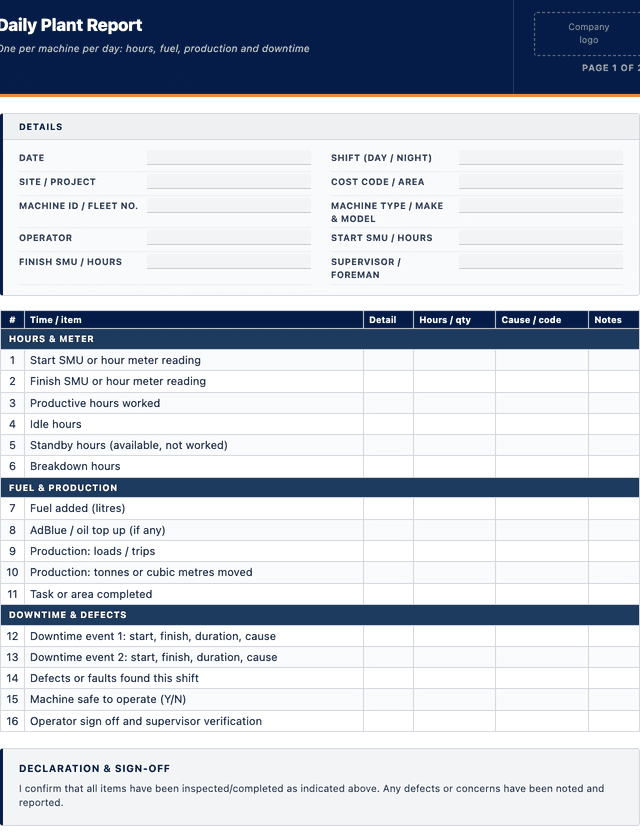
Daily Plant Report
One per machine per day: hours, fuel, production and downtime
HOURS & METER
FUEL & PRODUCTION
DOWNTIME & DEFECTS
How to use: download the PDF, print or complete digitally on any device.
- PDF format, ready to print or fill on screen
- Use as-is or customise to suit your operation
- Go digital in MapTrack for photos, reminders and audit trails
Two ways to use it
Use in MapTrack →Use it digitally instead
Unlimited usersUpload this PDF and MapTrack drafts the form for you.




- Scan the asset’s QR tag with any phone
- Submitted forms can trigger alerts
- Photos on fails, audit-ready records
- Export responses, PDF reports with your logo
Free trial. No credit card needed.
Trusted by teams across Australia and New Zealand
We respect your privacy. Unsubscribe anytime.
These templates are free general guides provided as-is. They do not constitute legal, safety or compliance advice. You are responsible for ensuring any form meets your specific workplace obligations, industry standards and applicable regulations.
Don't just download it - use it live. Start a free workspace, upload this daily plant report and MapTrack drafts it as a form your crew can run from a phone.

Co-Founder & Commercial Director
Key takeaways
- The MapTrack daily plant report contains 16 checks across 3 sections. Sections covered: HOURS & METER, FUEL & PRODUCTION, DOWNTIME & DEFECTS.
Enter your email below to download this daily plant report as a ready-to-use PDF.
Used by construction, mining and field service teams











What is a daily plant report?
A daily plant report is a one per machine per day record that captures how a piece of civil plant was used and how it performed over the shift. It records the machine and operator, the start and finish service meter units or hours, the hours worked broken into productive, idle, standby and breakdown, the fuel added, the production such as loads or volume moved, any downtime and its cause, and any defects the operator found. On a civil or earthworks site it is the primary source of the numbers that drive plant hire reconciliation, production tracking, cost allocation and the maintenance schedule.
Without a consistent daily plant report, hours and fuel get estimated, breakdowns go unrecorded, and there is no reliable link between what a machine cost to run and what it produced. A disciplined daily record turns that into hard data: it feeds accurate hire and cost reconciliation, surfaces the machines that are burning hours in idle or breakdown, and hands the maintenance team the service meter reading that triggers the next scheduled service. Kept against each machine, it also supports the asset management discipline of ISO 55001:2024 and connects the operator pre-start to the day's operating record.
Learn more about GPS and fleet tracking in MapTrack.
Benefits of using this daily plant report
- Accurate hire and cost reconciliation: recorded start and finish SMU per day removes the guesswork from plant hire and internal charging.
- Production visibility: loads, volume and productive hours per machine show what each unit actually moved, not just that it ran.
- Downtime insight: logging idle, standby and breakdown hours with a cause reveals where the shift and the money are being lost.
- Maintenance trigger: the daily SMU reading feeds the service schedule so the next planned service is timed off real hours.
- Fuel control: recording fuel added against hours worked exposes a thirsty machine or a fuel loss before it becomes a big cost.
- Accountability: a named operator and supervisor against each day means every machine and shift has a clear owner and record.
Benefits of digitising forms in MapTrack
When you move from paper or static PDFs to digital forms in MapTrack, you get:
- Field users can easily scan a QR code to complete a form on mobile. Unlimited users.
- Email the right people when a form is submitted, with an automation you set up.
- File every completed form against the asset, location or person it covers.
- Download any completed form as a PDF, with failed answers listed at the top.
- Fill in forms offline; they upload when the device is back online.
- Build conditional logic (show or hide questions based on answers).
- Take pictures or attach photos. Not possible with a paper-based form.
- Electronic signatures.
- Edit forms later without reprinting.
- Set who can view, fill in or edit forms with user roles.
- Upload a paper form (PDF, Word, Excel or a photo) and MapTrack's AI builds a digital version for you to check.
- Schedule services by odometer, engine hours or date for every vehicle.
- Keep fuel receipts and service records with each vehicle's inspections.
- Record repair costs on each work order against the vehicle.
Book a demo to see how MapTrack handles forms.
Try MapTrack free for 30 days
Full access to every feature. No credit card required. Per-asset pricing so you scale as your fleet grows.
- No credit card required
- 30 days free trial
- Cancel anytime
Intuitive for field crews
“MapTrack's a great platform - intuitive for the guys out in the field and also has fantastic support.”

Matthew Anderson
Maintenance Planning Supervisor, Supagas
What to include in a daily plant report
This daily plant report covers 10 key areas:
- Date, shift, site or project and cost code or area
- Machine ID or fleet number, type and make and model
- Operator name and, where relevant, competency or ticket
- Start and finish SMU or hour meter reading and total hours
- Hours split: productive, idle, standby and breakdown
- Fuel added (litres) and, if used, adblue or oil top ups
- Production: loads, tonnes, cubic metres or task completed
- Downtime events with start, finish, duration and cause
- Defects or faults found and whether the machine is safe to operate
- Operator sign off and supervisor or foreman verification
How to use this daily plant report
- Open the report at start of shift: Record the date, shift, site, machine and operator, and read the start SMU or hour meter directly from the machine. Tying the report to the machine and a real starting reading at the outset keeps the day's hours honest and traceable.
- Confirm the pre-start is done: Check the operator has completed the machine pre-start and note any defects it raised. The daily plant report records how the machine was used, so it should sit alongside the safety pre-start rather than replace it, with defects carried across.
- Log hours, fuel and production through the day: As the shift runs, record fuel added, the production such as loads or volume moved, and split the hours into productive, idle, standby and breakdown so the report shows not just total hours but how usefully they were spent.
- Record downtime with a cause: For any stoppage, note the start and finish time, the duration and a clear cause such as breakdown, waiting on trucks, weather or refuelling. Recording the cause is what turns raw downtime into something the site can actually act on.
- Read finish SMU and sign off: At end of shift read the finish SMU, calculate the hours worked, confirm any defects for the maintenance team, then have the operator sign and the supervisor verify so the day's record is complete and owned before it is filed.
In MapTrack, you can track your fleet with GPS and digital pre-starts. Each submission is stored as a timestamped PDF against the asset record.
Get the free templateEnter your email above to download the full daily plant report as a PDF.Back to download formHow often should you complete this form?
Complete one daily plant report per machine per operating day, or per shift where a machine runs multiple shifts, so hours, fuel and production are captured while they are fresh rather than reconstructed later. A machine that sits idle for a day still warrants a short entry noting it was not worked, so the record is continuous.
Reconcile the daily reports weekly against plant hire dockets, fuel deliveries and production targets, and pass the SMU readings to the maintenance team so scheduled services are timed off real hours. Over a job, the daily reports build the utilisation and cost per hour picture that tells you which machines are earning their keep and which are quietly draining the budget.
Frequently asked questions
Applicable regulatory standards
This template is a starting point. Check the current requirements that apply to your equipment, work and location. The template alone does not establish compliance.
- Model Work Health and Safety (WHS) Act and Regulations, as enacted in each state and territory (in Victoria, the Occupational Health and Safety Act 2004 (Vic) and OHS Regulations 2017 (Vic))
- Model WHS Regulations, regulation 213 (maintenance of plant) - the daily report supports this by feeding service meter readings to the maintenance schedule
- ISO 55001:2024 Asset management - Asset management systems - Requirements (asset utilisation and controlled records)
- ISO 9001, clause 8.5.1 Control of production and service provision
Daily Plant Report preview
The numbers behind this daily plant report
Every figure below is sourced and dated, so you can quote it in a toolbox talk, a budget case or a board paper without having to chase the original report.
Embed this free template on your website
Run an industry blog, trade association site, or training resource? Drop a preview of this free daily plant report straight into your page. The snippet is self-contained, needs no scripts, and links readers back to the full free template.
<div style="max-width:480px;font-family:system-ui,-apple-system,'Segoe UI',Roboto,sans-serif;border:1px solid #E5E7EB;border-radius:12px;padding:20px;background:#ffffff;">
  <p style="font-size:12px;font-weight:700;letter-spacing:0.05em;text-transform:uppercase;color:#071D49;margin:0;">Free template</p>
  <p style="font-size:18px;font-weight:700;color:#071D49;margin:6px 0 0;">Daily Plant Report</p>
  <ul style="margin:12px 0 0;padding-left:18px;color:#374151;font-size:14px;line-height:1.6;">
    <li style="margin:4px 0;">Date, shift, site or project and cost code or area</li>
    <li style="margin:4px 0;">Machine ID or fleet number, type and make and model</li>
    <li style="margin:4px 0;">Operator name and, where relevant, competency or ticket</li>
    <li style="margin:4px 0;">Start and finish SMU or hour meter reading and total hours</li>
    <li style="margin:4px 0;">Hours split: productive, idle, standby and breakdown</li>
    <li style="margin:4px 0;">Fuel added (litres) and, if used, adblue or oil top ups</li>
  </ul>
  <p style="font-size:13px;color:#6B7280;margin:14px 0 0;padding-top:12px;border-top:1px solid #E5E7EB;">Free <a href="https://www.maptrack.com/templates/daily-plant-report-template" style="color:#071D49;font-weight:600;text-decoration:none;">Daily Plant Report</a> by MapTrack</p>
</div>Free to reuse, including commercially. This template is published under a Creative Commons Attribution 4.0 licence. Copy it, adapt it, put it on your own site or in your own docs. All we ask is that you credit MapTrack with a link back to this page. The snippet above already includes that credit, so if you use it as-is you’re covered.
Cite this template
Writing about this topic? You’re welcome to quote this checklist. Here’s the wording to use so your readers can find the original.
The MapTrack daily plant report contains 16 checks across 3 sections.
- Short attribution
- MapTrack Daily Plant Report, https://www.maptrack.com/templates/daily-plant-report-template
- Reference list
- MapTrack. (2026). Daily Plant Report [Checklist template]. Retrieved from https://www.maptrack.com/templates/daily-plant-report-template
Free to reuse with credit under a Creative Commons Attribution 4.0 licence. If you’d rather link straight to it, the page is https://www.maptrack.com/templates/daily-plant-report-template.
Need to track your fleet with GPS and digital pre-starts?
Register every asset in MapTrack, attach digital forms, and get a complete history of every inspection, service and compliance record.
GPS and fleet tracking · All templates · Pricing · Book a demo