
Free equipment checkout / sign-out sheet
Free equipment sign out sheet (PDF). Log who took each item, time out, due back, returned and condition out vs in. Download free and start today.
Updated 4 June 2026
Equipment Checkout / Sign-Out Sheet
Custody log: who took what, time out, due back, returned and condition
| # | Item / asset ID | Borrower / crew | Out (date / time) | Due back | Returned | Cond. out | Cond. in | Borrower signature |
|---|---|---|---|---|---|---|---|---|
| e.g. | EXC-102 | - | 12/03/2024 | 10/09/2026 | - | G | G | - |
| 1 | ||||||||
| 2 | ||||||||
| 3 | ||||||||
| 4 | ||||||||
| 5 |
The PDF includes all 18 numbered rows, ready to print or fill on screen.
Store keeper (issuing)
Signature
Print name
Date
Supervisor (reviewing)
Signature
Print name
Date
How to use: download the PDF, print or complete digitally on any device.
- PDF format, ready to print or fill on screen
- Use as-is or customise to suit your operation
- Go digital in MapTrack for photos, reminders and audit trails
Two ways to use it
Use in MapTrack →Use it digitally instead
Unlimited usersUpload this PDF and MapTrack drafts the form for you.




- Scan the asset’s QR tag with any phone
- Submitted forms can trigger alerts
- Photos on fails, audit-ready records
- Export responses, PDF reports with your logo
Free trial. No credit card needed.
Trusted by teams across Australia and New Zealand
We respect your privacy. Unsubscribe anytime.
These templates are free general guides provided as-is. They do not constitute legal, safety or compliance advice. You are responsible for ensuring any form meets your specific workplace obligations, industry standards and applicable regulations.
Don't just download it - use it live. Start a free workspace, upload this equipment checkout / sign-out sheet and MapTrack drafts it as a form your crew can run from a phone.

Co-Founder & Commercial Director
Key takeaways
- The MapTrack equipment checkout / sign-out sheet has 8 columns and room for 18 entries. Columns: Item / asset ID, Borrower / crew, Out (date / time), Due back, Returned, Cond. out, Cond. in, Borrower signature.
- An equipment sign-out sheet is a custody log: it records who took which item, when it went out, when it is due and when it came back.
- Capture condition out and condition in on the same row so any damage is pinned to the person who held the item, not the next user.
- It is a running log of many short-term loans, not a one-off transfer of ownership; use a handover and acceptance form for permanent moves.
- Borrower and store signatures at issue and return are what make the record stand up when a tool goes missing or comes back damaged.
Enter your email below to download this equipment checkout / sign-out sheet as a ready-to-use PDF.
Used by construction, mining and field service teams











What is an equipment checkout / sign-out sheet?
An equipment checkout or sign-out sheet is a running custody log used to record every short-term loan of tools, plant and equipment from a store, crib room or site office. Each row captures the item and its asset ID or tag, the person who took it, the date and time out, the date it is due back, the date it was actually returned, the condition out and the condition in, plus a signature at issue and at return. It answers one question at a glance: who has what right now, and is anything overdue.
Tool stores, site offices, hire desks and workshops across construction, mining, manufacturing and trades use a sign-out sheet so accountability follows the item instead of disappearing the moment it leaves the cage. Without one, gear walks off site, the same drill is bought three times, and no one can say who held a tool when it came back broken. In MapTrack, the paper sheet becomes a live record: each item carries a QR or barcode label, a quick scan checks it out to a named holder, and the due date and condition history sit against the asset. The record-keeping expectations of the WHS Regulations 2011, Chapter 5 assume a duty holder can identify and account for the plant it controls, and a maintained sign-out log is the simplest evidence of that custody.
Learn more about asset tracking in MapTrack.
Benefits of using this equipment checkout / sign-out sheet
- Live custody view: the sheet shows who holds each item right now, so a missing tool has a name against it within seconds.
- Overdue control: a due-back column makes items that have not come back obvious, so chasing happens before the gear is lost.
- Damage accountability: recording condition out and condition in pins any new damage to the person who held the item during the loan.
- Theft deterrent: a signed record at issue makes walking off with tools far less casual and supports any later loss or insurance claim.
- Faster stocktakes: the open rows on the log are exactly the items still out, so reconciling the store against the cage is quick.
- Fair charge-backs: a clear out-versus-in condition trail lets a supervisor decide fairly whether a crew or person is liable for damage.
- Less duplicate spend: when the store can see what is out and to whom, crews stop buying tools the business already owns.
Benefits of digitising forms in MapTrack
When you move your sign-outs from paper to MapTrack, you get:
- Field users can easily scan a QR code to complete a form on mobile. Unlimited users.
- Email the right people when a form is submitted, with an automation you set up.
- File every completed form against the asset, location or person it covers.
- Download any completed form as a PDF, with failed answers listed at the top.
- Fill in forms offline; they upload when the device is back online.
- Build conditional logic (show or hide questions based on answers).
- Take pictures or attach photos. Not possible with a paper-based form.
- Electronic signatures.
- Edit forms later without reprinting.
- Set who can view, fill in or edit forms with user roles.
- Upload a paper form (PDF, Word, Excel or a photo) and MapTrack's AI builds a digital version for you to check.
- Keep one asset register with each asset's location, condition and custody history.
- Schedule calibration and record certification and warranty expiry dates against each asset.
- See each asset's value over time in the Asset Depreciation report.
Book a demo to see how MapTrack handles sign-outs.
Try MapTrack free for 30 days
Full access to every feature. No credit card required. Per-asset pricing so you scale as your fleet grows.
- No credit card required
- 30 days free trial
- Cancel anytime
1-2 days/week saved
“Bloody amazing! We used to spend 1-2 days a week tracking and managing our generators alone.”

Steve McAllister
Asset Coordinator, Saunders International
What to include in an equipment checkout / sign-out sheet
This equipment checkout / sign-out sheet covers 10 key areas:
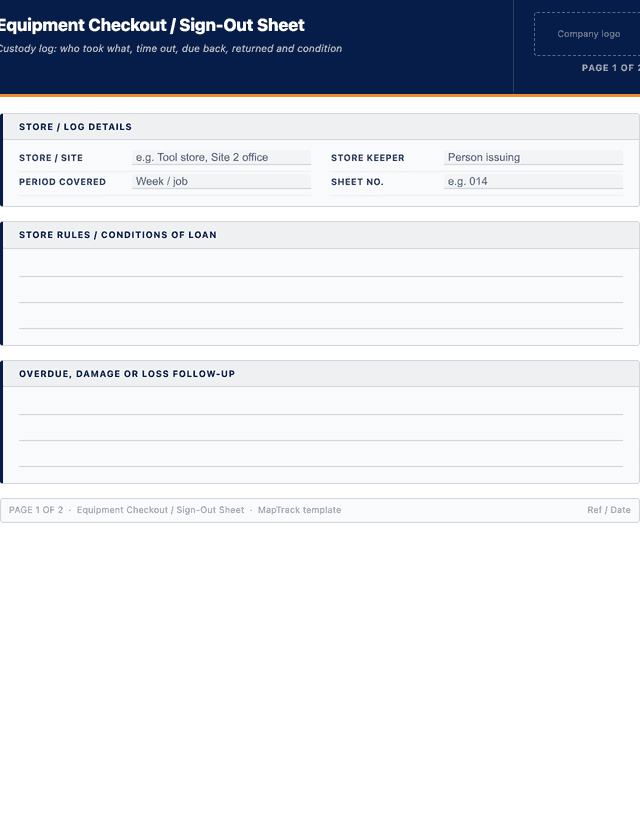
- Log details: store or site, the period the sheet covers, and the store keeper or person responsible for issuing.
- Item and asset ID: a clear name for the tool or equipment plus its tag, barcode or fleet number.
- Borrower: the name and crew, cost centre or company of the person taking the item.
- Date and time out: when the item left the store, so loan duration can be worked out.
- Due back: the date or time the item is expected to be returned.
- Returned: the actual date and time the item came back to the store.
- Condition out: the state of the item at issue (good, fair, poor) and any existing defects noted.
- Condition in: the state of the item at return, flagging any new damage or missing accessories.
- Accessories: chargers, blades, leads, cases or attachments that went out with the item.
- Signatures: borrower signature at issue and store keeper signature at return.
How to use this equipment checkout / sign-out sheet
- Set up the sheet at the store and define what must be signed out.: Decide which items require sign-out, usually anything portable, valuable or shared, and place the sheet or a tablet at the issue point. Record the store, the period covered and who is responsible for issuing so accountability is clear from the first row.
- Record the item and the borrower at the moment of issue.: When a tool leaves the cage, write the item and its asset ID or tag, the borrower name and crew, and the date and time out. Do this at handover, never from memory later, so the log always reflects what has actually left the store.
- Note the condition out and any accessories before it leaves.: Rate the condition of the item at issue as good, fair or poor and list the accessories going with it such as chargers, blades or cases. The borrower signs to confirm they received the item in that condition and accept responsibility for it.
- Set a due-back date and check the sheet for overdue items.: Record when the item is expected back and review the open rows daily or per shift. Any item past its due date with no return entry is overdue, so chase the named borrower before a short loan quietly turns into a lost asset.
- Record the return, condition in and store keeper sign-off.: When the item comes back, enter the return date and time, rate the condition in, and compare it against the condition out. Note any new damage or missing accessories, then the store keeper signs to close the loan and the item is available again.
- Reconcile the sheet regularly and follow up damage or losses.: At the end of each period, review the log for items still out, recurring late returners and any damage trail. Raise repairs, charge-backs or loss reports as needed, then archive the sheet and start a fresh one so the record stays clean and auditable.
In MapTrack, you can manage your full asset register digitally. Each submission is stored as a timestamped PDF against the asset record.
Get the free templateEnter your email above to download the full equipment checkout / sign-out sheet as a PDF.Back to download formHow often should you complete this sign-out?
Use the sign-out sheet every time an item leaves the store, not just at the start of a job. Review the open rows for overdue items at least once a day or each shift change on a busy site, and reconcile the whole sheet against the cage at the end of each week or project phase. High-loss categories such as cordless power tools and survey gear warrant a tighter check. In MapTrack, items check in and out by scanning a QR or barcode label, so who holds what and what is overdue updates in real time without a clipboard at the door.
Frequently asked questions
Applicable regulatory standards
This template is a starting point. Check the current requirements that apply to your equipment, work and location. The template alone does not establish compliance.
- WHS Regulations 2011, Chapter 5 - Plant and Structures (records of plant a duty holder controls)
- ISO 55001 - Asset Management Systems (control and accountability over the assets an organisation holds)
Equipment checkout / sign-out sheet preview
The numbers behind this equipment checkout / sign-out sheet
Every figure below is sourced and dated, so you can quote it in a toolbox talk, a budget case or a board paper without having to chase the original report.
Embed this free template on your website
Run an industry blog, trade association site, or training resource? Drop a preview of this free equipment checkout / sign-out sheet straight into your page. The snippet is self-contained, needs no scripts, and links readers back to the full free template.
<div style="max-width:480px;font-family:system-ui,-apple-system,'Segoe UI',Roboto,sans-serif;border:1px solid #E5E7EB;border-radius:12px;padding:20px;background:#ffffff;">
  <p style="font-size:12px;font-weight:700;letter-spacing:0.05em;text-transform:uppercase;color:#071D49;margin:0;">Free template</p>
  <p style="font-size:18px;font-weight:700;color:#071D49;margin:6px 0 0;">Equipment checkout / sign-out sheet</p>
  <ul style="margin:12px 0 0;padding-left:18px;color:#374151;font-size:14px;line-height:1.6;">
    <li style="margin:4px 0;">Log details: store or site, the period the sheet covers, and the store keeper or person responsible for issuing.</li>
    <li style="margin:4px 0;">Item and asset ID: a clear name for the tool or equipment plus its tag, barcode or fleet number.</li>
    <li style="margin:4px 0;">Borrower: the name and crew, cost centre or company of the person taking the item.</li>
    <li style="margin:4px 0;">Date and time out: when the item left the store, so loan duration can be worked out.</li>
    <li style="margin:4px 0;">Due back: the date or time the item is expected to be returned.</li>
    <li style="margin:4px 0;">Returned: the actual date and time the item came back to the store.</li>
  </ul>
  <p style="font-size:13px;color:#6B7280;margin:14px 0 0;padding-top:12px;border-top:1px solid #E5E7EB;">Free <a href="https://www.maptrack.com/templates/equipment-checkout-sign-out-sheet" style="color:#071D49;font-weight:600;text-decoration:none;">Equipment checkout / sign-out sheet</a> by MapTrack</p>
</div>Free to reuse, including commercially. This template is published under a Creative Commons Attribution 4.0 licence. Copy it, adapt it, put it on your own site or in your own docs. All we ask is that you credit MapTrack with a link back to this page. The snippet above already includes that credit, so if you use it as-is you’re covered.
Cite this template
Writing about this topic? You’re welcome to quote this checklist. Here’s the wording to use so your readers can find the original.
The MapTrack equipment checkout / sign-out sheet has 8 columns and room for 18 entries.
- Short attribution
- MapTrack Equipment checkout / sign-out sheet, https://www.maptrack.com/templates/equipment-checkout-sign-out-sheet
- Reference list
- MapTrack. (2026). Equipment checkout / sign-out sheet [Checklist template]. Retrieved from https://www.maptrack.com/templates/equipment-checkout-sign-out-sheet
Free to reuse with credit under a Creative Commons Attribution 4.0 licence. If you’d rather link straight to it, the page is https://www.maptrack.com/templates/equipment-checkout-sign-out-sheet.
Need to manage your full asset register digitally?
Register every asset in MapTrack, attach digital forms, and get a complete history of every inspection, service and compliance record.