
Free multimeter calibration log template
Free multimeter calibration log covering DC voltage, AC voltage, resistance, current and continuity per AS/NZS 3760 and AS ISO/IEC 17025.
Updated 25 May 2026
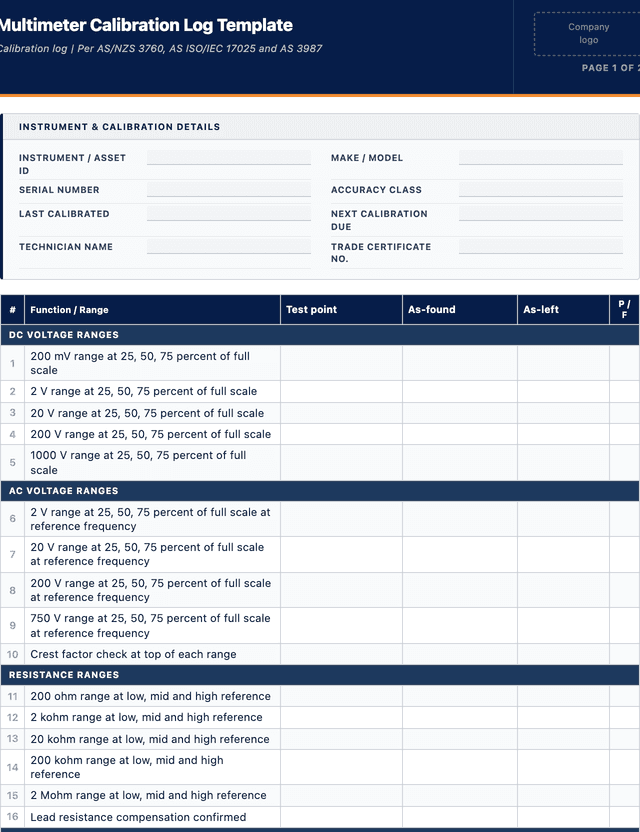
Multimeter Calibration Log Template
Calibration log | Per AS/NZS 3760, AS ISO/IEC 17025 and AS 3987
DC voltage ranges
AC voltage ranges
Resistance ranges
Current ranges
Continuity, diode & capacitance
Certification & labelling
How to use: download the PDF, print or complete digitally on any device.
- PDF format, ready to print or fill on screen
- Use as-is or customise to suit your operation
- Go digital in MapTrack for photos, reminders and audit trails
Two ways to use it
Use in MapTrack →Use it digitally instead
Unlimited usersUpload this PDF and MapTrack drafts the form for you.




- Scan the asset’s QR tag with any phone
- Submitted forms can trigger alerts
- Photos on fails, audit-ready records
- Export responses, PDF reports with your logo
Free trial. No credit card needed.
Trusted by teams across Australia and New Zealand
We respect your privacy. Unsubscribe anytime.
These templates are free general guides provided as-is. They do not constitute legal, safety or compliance advice. You are responsible for ensuring any form meets your specific workplace obligations, industry standards and applicable regulations.
Don't just download it - use it live. Start a free workspace, upload this multimeter calibration log template and MapTrack drafts it as a form your crew can run from a phone.

Co-Founder & Commercial Director
Key takeaways
- The MapTrack multimeter calibration log template contains 30 checks across 6 sections. Sections covered: DC voltage ranges, AC voltage ranges, Resistance ranges, Current ranges, Continuity, diode & capacitance, Certification & labelling.
Enter your email below to download this multimeter calibration log template as a ready-to-use PDF.
Used by construction, mining and field service teams










What is a multimeter calibration log template?
A multimeter calibration log is a formal record used to document the periodic calibration of a digital or analogue multimeter against traceable reference standards. The log captures the instrument identity, the reference equipment used, the environmental conditions during the calibration, the as-found readings before any adjustment, and the as-left readings after adjustment, for each test function the multimeter is rated for. That scope typically includes DC voltage ranges, AC voltage ranges, resistance ranges, DC and AC current ranges, continuity buzzer response, diode test, capacitance and frequency. The log also records the technician identity and trade certificate number, the calibration interval applied, and the next calibration due date so the instrument can be tagged and tracked across the tool register. A separate calibration history register on page 2 tracks every calibration event over the life of the instrument, giving the electrical supervisor a consolidated drift trend across the fleet without having to reconstruct the chain from individual certificates.
In Australia, multimeter calibration sits inside a tight regulatory framework. AS/NZS 3760 in-service safety inspection and testing of electrical equipment requires that the test instruments used to verify portable electrical appliances are themselves calibrated and traceable. AS ISO/IEC 17025 sets the international competence standard for calibration laboratories, including traceability to the National Measurement Institute through an unbroken chain of reference standards. AS 3987 covers the broader instrument calibration package, and the WHS Regulations 2011 Chapter 4 carries the PCBU duty to ensure electrical work is performed with verified instruments. For electrical contractors, instrumentation technicians and electrical fitters on mining sites, a documented multimeter calibration log is the evidence inspectors and quality auditors will ask for first to confirm the test gear used for safety-critical readings, such as proving dead before isolation or verifying residual current device trip time, was within tolerance at the time of the work.
Learn more about compliance and inspections in MapTrack.
Benefits of using this multimeter calibration log template
- Electrical safety assurance: documented calibration confirms multimeter readings are accurate before they verify isolation, prove dead or test residual current devices on energised equipment
- Regulatory compliance: AS/NZS 3760 and AS ISO/IEC 17025 require test instruments to be calibrated and traceable to national standards before being used as compliance evidence
- Detect sensor drift early: trended as-found readings across DC voltage, AC voltage and resistance reveal gradual drift before the instrument falls outside its accuracy class
- NMI traceability evidence: recording the reference standard identity and certificate number links every multimeter reading back to the National Measurement Institute chain
- Identify damaged instruments: repeated calibration failures, blown current ranges or out-of-tolerance resistance readings flag instruments dropped, overloaded or exposed to surge events
- Due diligence record: in the event of an electrical incident, a stamped calibration log demonstrates the test instrument used was verified at the time
- Insurance and warranty support: a current calibration certificate against each multimeter protects warranty claims and supports public liability insurance positions
- Tool register discipline: a fixed calibration cadence forces electrical supervisors to quarantine out-of-date instruments rather than letting them drift across the fleet
Benefits of digitising forms in MapTrack
When you digitise multimeter calibration logs in MapTrack, you get:
- Field users can easily scan a QR code to complete a form on mobile. Unlimited users.
- Email the right people when a form is submitted, with an automation you set up.
- File every completed form against the asset, location or person it covers.
- Download any completed form as a PDF, with failed answers listed at the top.
- Fill in forms offline; they upload when the device is back online.
- Build conditional logic (show or hide questions based on answers).
- Take pictures or attach photos. Not possible with a paper-based form.
- Electronic signatures.
- Edit forms later without reprinting.
- Set who can view, fill in or edit forms with user roles.
- Upload a paper form (PDF, Word, Excel or a photo) and MapTrack's AI builds a digital version for you to check.
- Assign audits and send reminder emails to the people doing them.
- Keep every audit, inspection and sign-off against the asset or site it covers.
- Track corrective actions as work orders from finding to close-out, with each change in the activity log.
Book a demo to see how MapTrack handles multimeter calibration logs.
Try MapTrack free for 30 days
Full access to every feature. No credit card required. Per-asset pricing so you scale as your fleet grows.
- No credit card required
- 30 days free trial
- Cancel anytime
1-2 days/week saved
“Bloody amazing! We used to spend 1-2 days a week tracking and managing our generators alone.”

Steve McAllister
Asset Coordinator, Saunders International
What to include in a multimeter calibration log template
This multimeter calibration log template covers 11 key areas:
- Instrument details: make, model, serial number, asset/ID number, accuracy class, full-scale ranges per function, last calibration date and next calibration due date
- Reference standard details: make, model, serial number and NMI-traceable certificate number of the reference calibrator, four times better than the multimeter tolerance
- Environmental conditions: ambient temperature, relative humidity and reference calibrator stabilisation time recorded against the calibration event
- DC voltage range calibration: as-found and as-left readings at 25, 50 and 75 percent of full scale on each DC range, with deviation and pass/fail
- AC voltage range calibration: as-found and as-left readings at 25, 50 and 75 percent of full scale on each AC range at rated reference frequency
- Resistance range calibration: as-found and as-left readings at low, mid and high points on each resistance range, with confirmation of lead resistance compensation
- Current range calibration: as-found and as-left readings on DC and AC current ranges at three test points each, with shunt resistor condition noted
- Continuity buzzer and diode test: continuity threshold verified against a known low-resistance reference, diode forward voltage drop confirmed against a calibrated diode reference
- Capacitance and frequency: capacitance ranges verified against a calibrated capacitor standard, frequency ranges verified against a calibrated function generator across the rated band
- Technician identity and sign-off: electrician name, trade certificate number, calibration date, calibration interval and signature confirming the multimeter is fit for return to service
- Calibration history register: 8-row table capturing date, calibrated by, next due, overall result and certificate number for each event over instrument life
How to use this multimeter calibration log template
- 1. Record the instrument details: fill in make, model, serial number, asset/ID, accuracy class and full-scale ranges per function at the top of page 1, cross-reference against the tool register to confirm the multimeter identity before any test reading goes onto the form
- 2. Record the reference standard: capture make, model, serial number and NMI-traceable certificate number of the reference calibrator, confirm the reference accuracy is at least four times better than the multimeter tolerance and that the reference certificate is current
- 3. Stabilise the instrument: allow the multimeter to sit at the calibration room ambient temperature for at least 30 minutes before testing, log the ambient temperature and relative humidity, fit a fresh battery and verify the lead resistance is compensated to zero
- 4. Test DC voltage ranges: connect the multimeter to the reference calibrator, set each DC voltage range in turn, apply 25 percent, 50 percent and 75 percent of full scale, record the as-found reading and calculate deviation against the accuracy class for pass or fail
- 5. Test AC voltage ranges: repeat the 25, 50 and 75 percent of full-scale sequence on each AC voltage range at the rated reference frequency, watch for crest-factor errors at the top of each range and record the as-found result against the accuracy specification
- 6. Test resistance and current ranges: apply low, mid and high resistance reference values on each resistance range, then apply DC and AC current at three test points on each current range, log as-found readings and pass or fail against the tolerance
- 7. Test continuity, diode, capacitance and frequency: verify continuity buzzer threshold against a known low-resistance reference, confirm diode forward voltage against a calibrated diode reference, exercise capacitance ranges against a calibrated capacitor and frequency ranges against a calibrated function generator
- 8. Adjust if required and re-test: if any function falls outside its accuracy class, perform the manufacturer-specified adjustment or send the multimeter for factory calibration, then repeat the affected function and record the as-left readings before sign-off
- 9. Close the record: stamp the calibration sheet with the technician name and trade certificate number, set the next calibration due date based on the calibration interval, attach a calibration sticker to the multimeter and load the certificate against the asset in MapTrack
In MapTrack, you can automate compliance tracking and audit trails. Each submission is stored as a timestamped PDF against the asset record.
Get the free templateEnter your email above to download the full multimeter calibration log template as a PDF.Back to download formHow often should you complete this calibration log?
Multimeter calibration intervals are driven by the duty the instrument is rated for and the accuracy class required. For trade and commercial use, the typical interval is 12 months from the previous calibration sticker, applied across the bulk of electrical contracting and inspection fleets. For high-precision laboratory use or calibration master instruments, the interval tightens to 6 months because reference drift becomes the limiting factor on the chain of traceability and the master instrument is restricted to a controlled environment. Multimeters used on safety-critical work, such as proving dead before electrical isolation, verifying residual current device trip time on a mine site or testing 11 kilovolt switchgear, are often calibrated to a tighter interval set by the site quality management system or by an AS ISO/IEC 17025 accredited calibration procedure. Outside the scheduled cadence, a multimeter must also be calibrated immediately after any significant drop, water ingress, suspected surge event, blown current fuse or extended storage period. Lead sets are inspected at the same time and replaced if insulation cracking, sheath damage or probe tip wear is found, because a damaged lead set will skew a verified instrument back out of tolerance on the first use.
Frequently asked questions
Applicable regulatory standards
This template is a starting point. Check the current requirements that apply to your equipment, work and location. The template alone does not establish compliance.
- AS/NZS 3760 (In-service electrical safety inspection and testing)
- AS ISO/IEC 17025 (Calibration laboratory competence)
- AS 3987 (Instrument calibration)
- NMI traceability (National Measurement Institute)
- WHS Regulations 2011 Chapter 4
Multimeter Calibration Log Template preview
The numbers behind this multimeter calibration log template
Every figure below is sourced and dated, so you can quote it in a toolbox talk, a budget case or a board paper without having to chase the original report.
Embed this free template on your website
Run an industry blog, trade association site, or training resource? Drop a preview of this free multimeter calibration log template straight into your page. The snippet is self-contained, needs no scripts, and links readers back to the full free template.
<div style="max-width:480px;font-family:system-ui,-apple-system,'Segoe UI',Roboto,sans-serif;border:1px solid #E5E7EB;border-radius:12px;padding:20px;background:#ffffff;">
  <p style="font-size:12px;font-weight:700;letter-spacing:0.05em;text-transform:uppercase;color:#071D49;margin:0;">Free template</p>
  <p style="font-size:18px;font-weight:700;color:#071D49;margin:6px 0 0;">Multimeter Calibration Log Template</p>
  <ul style="margin:12px 0 0;padding-left:18px;color:#374151;font-size:14px;line-height:1.6;">
    <li style="margin:4px 0;">Instrument details: make, model, serial number, asset/ID number, accuracy class, full-scale ranges per function, last calibration date and next calibration due date</li>
    <li style="margin:4px 0;">Reference standard details: make, model, serial number and NMI-traceable certificate number of the reference calibrator, four times better than the multimeter tolerance</li>
    <li style="margin:4px 0;">Environmental conditions: ambient temperature, relative humidity and reference calibrator stabilisation time recorded against the calibration event</li>
    <li style="margin:4px 0;">DC voltage range calibration: as-found and as-left readings at 25, 50 and 75 percent of full scale on each DC range, with deviation and pass/fail</li>
    <li style="margin:4px 0;">AC voltage range calibration: as-found and as-left readings at 25, 50 and 75 percent of full scale on each AC range at rated reference frequency</li>
    <li style="margin:4px 0;">Resistance range calibration: as-found and as-left readings at low, mid and high points on each resistance range, with confirmation of lead resistance compensation</li>
  </ul>
  <p style="font-size:13px;color:#6B7280;margin:14px 0 0;padding-top:12px;border-top:1px solid #E5E7EB;">Free <a href="https://www.maptrack.com/templates/multimeter-calibration-log" style="color:#071D49;font-weight:600;text-decoration:none;">Multimeter Calibration Log Template</a> by MapTrack</p>
</div>Free to reuse, including commercially. This template is published under a Creative Commons Attribution 4.0 licence. Copy it, adapt it, put it on your own site or in your own docs. All we ask is that you credit MapTrack with a link back to this page. The snippet above already includes that credit, so if you use it as-is you’re covered.
Cite this template
Writing about this topic? You’re welcome to quote this checklist. Here’s the wording to use so your readers can find the original.
The MapTrack multimeter calibration log template contains 30 checks across 6 sections.
- Short attribution
- MapTrack Multimeter Calibration Log Template, https://www.maptrack.com/templates/multimeter-calibration-log
- Reference list
- MapTrack. (2026). Multimeter Calibration Log Template [Checklist template]. Retrieved from https://www.maptrack.com/templates/multimeter-calibration-log
Free to reuse with credit under a Creative Commons Attribution 4.0 licence. If you’d rather link straight to it, the page is https://www.maptrack.com/templates/multimeter-calibration-log.
Need to automate compliance tracking and audit trails?
Register every multimeter in MapTrack, attach digital forms, and get a complete history of every inspection, service and compliance record.
Compliance and inspections · All templates · Pricing · Book a demo