
Free asset stocktake sheet
Download a free asset stocktake sheet. Count and verify assets by location with expected vs actual quantities. PDF ready to print.
Updated 3 May 2026
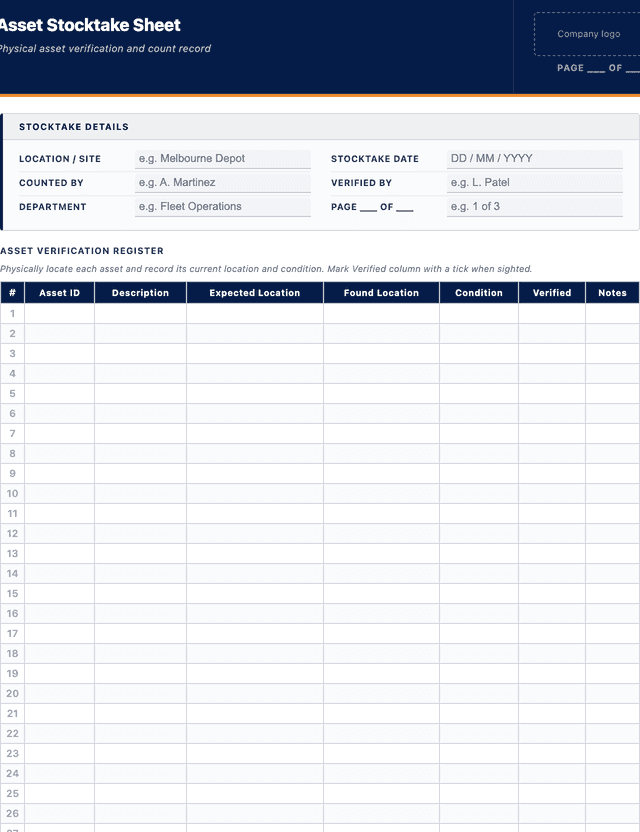
Asset Stocktake Sheet
Physically locate each asset and record its current location and condition. Mark Verified column with a tick when sighted.
| # | Asset ID | Description | Expected Location | Found Location | Condition | Verified | Notes |
|---|---|---|---|---|---|---|---|
| e.g. | EXC-102 | Excavator - 8 tonne | Depot A | Depot A | G | - | Annual service booked |
| 1 | |||||||
| 2 | |||||||
| 3 | |||||||
| 4 | |||||||
| 5 |
The PDF includes all 27 numbered rows, ready to print or fill on screen.
Counted By Sign-off
Signature
Print name
Date
Verified By Sign-off
Signature
Print name
Date
How to use: download the PDF, print or complete digitally on any device.
- PDF format, ready to print or fill on screen
- Use as-is or customise to suit your operation
- Go digital in MapTrack for photos, reminders and audit trails
Two ways to use it
Use in MapTrack →Use it digitally instead
Unlimited usersThese same 7 columns, already built.




- Scan the asset’s QR tag with any phone
- Submitted forms can trigger alerts
- Photos on fails, audit-ready records
- Export responses, PDF reports with your logo
Free trial. No credit card needed.
Trusted by teams across Australia and New Zealand
We respect your privacy. Unsubscribe anytime.
These templates are free general guides provided as-is. They do not constitute legal, safety or compliance advice. You are responsible for ensuring any form meets your specific workplace obligations, industry standards and applicable regulations.
Don't just download it - use it live. Start a free workspace with this asset stocktake sheet already built, so your crew can run it from a phone.

Co-Founder & Commercial Director
Key takeaways
- The MapTrack asset stocktake sheet has 7 columns and room for 27 entries. Columns: Asset ID, Description, Expected Location, Found Location, Condition, Verified, Notes.
Enter your email below to download this asset stocktake sheet as a ready-to-use PDF.
Used by construction, mining and field service teams











What is an asset stocktake sheet?
An asset stocktake sheet is a form used during physical asset counts to record the assets found at each location and compare them against the asset register. The sheet lists assets by location, providing columns for asset ID, description, expected quantity, actual quantity found, condition and any discrepancy notes. Stocktakes are conducted to verify that the asset register accurately reflects the physical assets on the ground.
Asset registers inevitably drift from reality over time. Assets are moved, disposed of, borrowed, damaged or lost without the register being updated. A stocktake reconciles the register against physical reality. The process identifies missing assets (which may have been stolen, lost or disposed of without documentation), unregistered assets (which should be added to the register) and location mismatches (assets that have been moved without updating the register). Regular stocktakes support accurate financial reporting, insurance valuations, depreciation calculations and operational asset management. ISO 55001 expects organisations to maintain accurate asset information, and physical verification through stocktakes is a core mechanism for achieving this.
Learn more about asset tracking in MapTrack.
Benefits of using this asset stocktake sheet
- Register accuracy: reconcile the asset register against physical reality to ensure records are current and correct.
- Loss detection: identify missing, stolen or unaccounted-for assets before losses compound.
- Financial accuracy: accurate asset counts support depreciation schedules, balance sheet valuations and insurance cover.
- Operational visibility: know exactly what assets are at each location for planning, allocation and utilisation decisions.
- Ghost asset elimination: remove assets from the register that no longer physically exist (disposed, written off, scrapped).
- Compliance: many industry standards and government contracts require periodic physical asset verification.
Benefits of digitising forms in MapTrack
When you move your forms from paper to MapTrack, you get:
- Field users can easily scan a QR code to complete a form on mobile. Unlimited users.
- Email the right people when a form is submitted, with an automation you set up.
- File every completed form against the asset, location or person it covers.
- Download any completed form as a PDF, with failed answers listed at the top.
- Fill in forms offline; they upload when the device is back online.
- Build conditional logic (show or hide questions based on answers).
- Take pictures or attach photos. Not possible with a paper-based form.
- Electronic signatures.
- Edit forms later without reprinting.
- Set who can view, fill in or edit forms with user roles.
- Upload a paper form (PDF, Word, Excel or a photo) and MapTrack's AI builds a digital version for you to check.
- Keep one asset register with each asset's location, condition and custody history.
- Schedule calibration and record certification and warranty expiry dates against each asset.
- See each asset's value over time in the Asset Depreciation report.
Book a demo to see how MapTrack handles forms.
Try MapTrack free for 30 days
Full access to every feature. No credit card required. Per-asset pricing so you scale as your fleet grows.
- No credit card required
- 30 days free trial
- Cancel anytime
1-2 days/week saved
“Bloody amazing! We used to spend 1-2 days a week tracking and managing our generators alone.”

Steve McAllister
Asset Coordinator, Saunders International
What to include in an asset stocktake sheet
This asset stocktake sheet covers 9 key areas:
- Stocktake header: date, location or area, stocktake type (full, partial, spot check), counter name, department.
- Asset rows (30+ rows): asset ID or tag, description or make/model, expected location, actual location found.
- Quantity columns: expected quantity (from register), actual quantity counted.
- Condition: brief condition note (Good, Fair, Poor, Damaged, Not Found).
- Discrepancy column: note any differences between expected and actual (missing, extra, wrong location, wrong condition).
- Unregistered assets: section for recording assets found that are not on the register.
- Summary: total assets expected, total found, total missing, total discrepancies.
- Actions: list of discrepancies requiring investigation, with assigned person and due date.
- Signatures: counter, reviewer and asset manager.
How to use this asset stocktake sheet
- Prepare by printing the asset register extract for the location being counted.: Export the expected asset list for the location from the asset register. Pre-fill the stocktake sheet with asset IDs, descriptions and expected quantities. Brief the counting team on the process, locations to cover and how to handle discrepancies.
- Physically walk the location and count every asset.: Go to each asset in the location. Verify the asset ID or tag against the sheet. Record the actual quantity found and a brief condition note. If an asset is found in an unexpected location, record the actual location. Do not skip items or count from a distance.
- Record any unregistered assets found during the count.: If you find assets that are not listed on the sheet (not on the register), record them in the unregistered assets section with a description, location and condition. These will need to be investigated and potentially added to the register.
- Complete the summary and identify discrepancies.: Total the assets expected, found, missing and with discrepancies. Review each discrepancy and note whether it is a missing asset, a location mismatch, a condition issue or an unregistered asset. Assign investigation actions for significant discrepancies.
- Submit the completed sheet to the asset manager for reconciliation.: The asset manager reviews the stocktake results, investigates discrepancies, updates the register to match physical reality and files the completed stocktake sheet. Retain stocktake records for at least five years for audit purposes.
In MapTrack, you can manage your full asset register digitally. Each submission is stored as a timestamped PDF against the asset record.
Get the free templateEnter your email above to download the full asset stocktake sheet as a PDF.Back to download formHow often should you complete this form?
Full asset stocktakes should be conducted at least annually. Spot checks or partial stocktakes of high-value or high-risk asset categories should be conducted quarterly. Some organisations conduct rolling stocktakes, counting a portion of assets each month so that the entire register is verified over the course of a year.
Frequently asked questions
Asset stocktake sheet preview
The numbers behind this asset stocktake sheet
Every figure below is sourced and dated, so you can quote it in a toolbox talk, a budget case or a board paper without having to chase the original report.
Embed this free template on your website
Run an industry blog, trade association site, or training resource? Drop a preview of this free asset stocktake sheet straight into your page. The snippet is self-contained, needs no scripts, and links readers back to the full free template.
<div style="max-width:480px;font-family:system-ui,-apple-system,'Segoe UI',Roboto,sans-serif;border:1px solid #E5E7EB;border-radius:12px;padding:20px;background:#ffffff;">
  <p style="font-size:12px;font-weight:700;letter-spacing:0.05em;text-transform:uppercase;color:#071D49;margin:0;">Free template</p>
  <p style="font-size:18px;font-weight:700;color:#071D49;margin:6px 0 0;">Asset stocktake sheet</p>
  <ul style="margin:12px 0 0;padding-left:18px;color:#374151;font-size:14px;line-height:1.6;">
    <li style="margin:4px 0;">Stocktake header: date, location or area, stocktake type (full, partial, spot check), counter name, department.</li>
    <li style="margin:4px 0;">Asset rows (30+ rows): asset ID or tag, description or make/model, expected location, actual location found.</li>
    <li style="margin:4px 0;">Quantity columns: expected quantity (from register), actual quantity counted.</li>
    <li style="margin:4px 0;">Condition: brief condition note (Good, Fair, Poor, Damaged, Not Found).</li>
    <li style="margin:4px 0;">Discrepancy column: note any differences between expected and actual (missing, extra, wrong location, wrong condition).</li>
    <li style="margin:4px 0;">Unregistered assets: section for recording assets found that are not on the register.</li>
  </ul>
  <p style="font-size:13px;color:#6B7280;margin:14px 0 0;padding-top:12px;border-top:1px solid #E5E7EB;">Free <a href="https://www.maptrack.com/templates/asset-stocktake-sheet" style="color:#071D49;font-weight:600;text-decoration:none;">Asset stocktake sheet</a> by MapTrack</p>
</div>Free to reuse, including commercially. This template is published under a Creative Commons Attribution 4.0 licence. Copy it, adapt it, put it on your own site or in your own docs. All we ask is that you credit MapTrack with a link back to this page. The snippet above already includes that credit, so if you use it as-is you’re covered.
Cite this template
Writing about this topic? You’re welcome to quote this checklist. Here’s the wording to use so your readers can find the original.
The MapTrack asset stocktake sheet has 7 columns and room for 27 entries.
- Short attribution
- MapTrack Asset stocktake sheet, https://www.maptrack.com/templates/asset-stocktake-sheet
- Reference list
- MapTrack. (2026). Asset stocktake sheet [Checklist template]. Retrieved from https://www.maptrack.com/templates/asset-stocktake-sheet
Free to reuse with credit under a Creative Commons Attribution 4.0 licence. If you’d rather link straight to it, the page is https://www.maptrack.com/templates/asset-stocktake-sheet.
Need to manage your full asset register digitally?
Register every asset in MapTrack, attach digital forms, and get a complete history of every inspection, service and compliance record.