
Free generator service log book
Free generator service log book (PDF-ready). Record diesel generator service history: running hours, oil and filters, coolant, load test and ATS checks.
Updated 5 July 2026
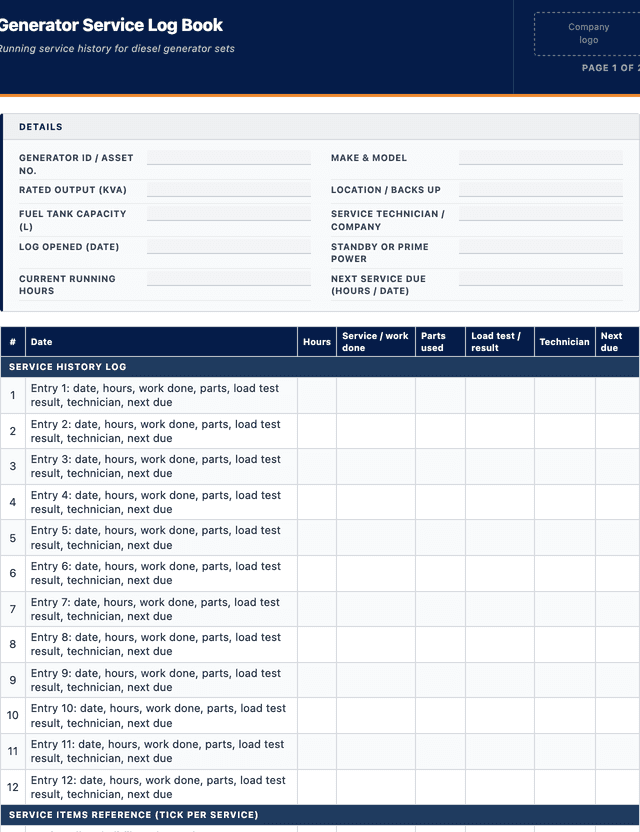
Generator Service Log Book
Running service history for diesel generator sets
SERVICE HISTORY LOG
SERVICE ITEMS REFERENCE (tick per service)
How to use: download the PDF, print or complete digitally on any device.
- PDF format, ready to print or fill on screen
- Use as-is or customise to suit your operation
- Go digital in MapTrack for photos, reminders and audit trails
Two ways to use it
Use in MapTrack →Use it digitally instead
Unlimited usersUpload this PDF and MapTrack drafts the form for you.




- Scan the asset’s QR tag with any phone
- Submitted forms can trigger alerts
- Photos on fails, audit-ready records
- Export responses, PDF reports with your logo
Free trial. No credit card needed.
Trusted by teams across Australia and New Zealand
We respect your privacy. Unsubscribe anytime.
These templates are free general guides provided as-is. They do not constitute legal, safety or compliance advice. You are responsible for ensuring any form meets your specific workplace obligations, industry standards and applicable regulations.
Don't just download it - use it live. Start a free workspace, upload this generator service log book and MapTrack drafts it as a form your crew can run from a phone.

Co-Founder & Commercial Director
Key takeaways
- The MapTrack generator service log book contains 21 checks across 2 sections. Sections covered: SERVICE HISTORY LOG, SERVICE ITEMS REFERENCE (tick per service).
Enter your email below to download this generator service log book as a ready-to-use PDF.
Used by construction, mining and field service teams











What is a generator service log book?
A generator service log book is a running record of every service, inspection and repair carried out on a diesel generator set over its life. Each entry captures the date, the running hours at service, the work done, the oil, filters, coolant and belts replaced, the results of a load test or exercise run, the state of the fuel and cooling systems, and any automatic transfer switch or control checks. Rather than a one off checklist, it is a chronological history that stays with the machine, so anyone can see at a glance when it was last serviced, what was done and when the next service falls due.
Generators are often standby or prime power assets that must start and carry load the moment they are needed, whether that is a site compound, a remote pump station or a backup for critical equipment. A generator that has not been serviced or exercised is the one that fails to start in an outage, so a disciplined service log is what proves the set is maintained and ready. Keeping the log against the machine supports the duty to maintain plant under the model Work Health and Safety (WHS) Regulations (mirrored in each state and territory except Victoria, which uses the OHS Regulations 2017 (Vic)) and the asset management discipline of ISO 55001:2024, and it is often required evidence for warranty, insurance and critical power assurance.
Learn more about maintenance and work orders in MapTrack.
Benefits of using this generator service log book
- Reliable starting: a logged schedule of servicing and exercise runs is what keeps a standby set ready to carry load on demand.
- Complete service history: a single running record shows every service, part and repair without hunting through loose sheets.
- Warranty protection: a dated log of servicing on the OEM schedule is what warranty and insurance claims rely on.
- Cost visibility: recording hours, fuel, oil and parts per service shows the true running cost of each set over time.
- Accountability: a named technician and date against every entry means each service has a clear owner and paper trail.
- Better planning: tracking running hours against the last service makes the next oil change and major service easy to forecast.
Benefits of digitising forms in MapTrack
When you move from paper or static PDFs to digital forms in MapTrack, you get:
- Field users can easily scan a QR code to complete a form on mobile. Unlimited users.
- Email the right people when a form is submitted, with an automation you set up.
- File every completed form against the asset, location or person it covers.
- Download any completed form as a PDF, with failed answers listed at the top.
- Fill in forms offline; they upload when the device is back online.
- Build conditional logic (show or hide questions based on answers).
- Take pictures or attach photos. Not possible with a paper-based form.
- Electronic signatures.
- Edit forms later without reprinting.
- Set who can view, fill in or edit forms with user roles.
- Upload a paper form (PDF, Word, Excel or a photo) and MapTrack's AI builds a digital version for you to check.
- Raise a work order from a submitted form with an automation you set up.
- Track service intervals by hours, kilometres or calendar date in one place.
- Attach supplier invoices and parts receipts to each maintenance record.
Book a demo to see how MapTrack handles forms.
Try MapTrack free for 30 days
Full access to every feature. No credit card required. Per-asset pricing so you scale as your fleet grows.
- No credit card required
- 30 days free trial
- Cancel anytime
1-2 days/week saved
“Bloody amazing! We used to spend 1-2 days a week tracking and managing our generators alone.”

Steve McAllister
Asset Coordinator, Saunders International
What to include in a generator service log book
This generator service log book covers 10 key areas:
- Generator ID or asset number, make, model and rated output (kVA)
- Location or the equipment it backs up
- Date of each service entry and running hours at service
- Service type: routine, minor, major, repair or exercise run
- Oil and oil filter, fuel filter and air filter changes
- Coolant level, condition and belt and hose checks
- Fuel level, fuel quality and tank or bund condition
- Load test or on load exercise result and any fault codes
- Automatic transfer switch and battery or charger checks
- Technician name, parts used and next service due (date or hours)
How to use this generator service log book
- Open the log against the machine: Record the generator ID, make, model, rated output and current running hours at the top of the entry so the service is tied to the right set and the hours give context to the work being logged.
- Isolate before working on the set: Put the generator into off or manual, isolate it so it cannot auto start on a mains failure, and lock out the automatic transfer switch. A standby set that auto starts while a technician is working on it is a serious hazard, so isolation comes first.
- Carry out the scheduled service: Complete the tasks for the interval reached: change oil and filters, check coolant, belts, hoses and the fuel system, inspect the battery and charger, and clean the set. Record what was actually done rather than ticking a generic list.
- Run a load test or exercise: Start the set and run it on load where possible to confirm it starts, picks up load and holds voltage and frequency, and to burn off any wet stacking. Record the load, the run time and any fault codes, then confirm it returns to auto standby.
- Log the entry and set the next service: Write up the parts used, the results and the technician name, confirm the automatic transfer switch is back in auto, and record the running hours or date at which the next service falls due so the schedule stays on track.
In MapTrack, you can schedule and track maintenance digitally, by date or meter reading. Each submission is stored as a timestamped PDF against the asset record.
Get the free templateEnter your email above to download the full generator service log book as a PDF.Back to download formHow often should you complete this form?
Follow the manufacturer schedule, which typically calls for a minor service with oil and filters at set running hours and a major service less often, plus an annual service and load test for standby sets that run few hours. Prime power sets that run continuously reach their hour based services far sooner and need more frequent attention.
Standby generators should also be exercised regularly, commonly weekly or monthly, on load where possible, so the set is proven to start and carry load and to prevent wet stacking. Log every exercise run alongside services so the record shows the set is genuinely ready, not just serviced on paper.
Frequently asked questions
Applicable regulatory standards
This template is a starting point. Check the current requirements that apply to your equipment, work and location. The template alone does not establish compliance.
- Model Work Health and Safety (WHS) Act and Regulations, as enacted in each state and territory (in Victoria, the Occupational Health and Safety Act 2004 (Vic) and OHS Regulations 2017 (Vic))
- Model WHS Regulations, regulation 213 (maintenance of plant so it stays safe and without risk to health)
- AS/NZS 3000:2018 Electrical installations (Wiring Rules) for fixed connection
- AS/NZS 3760:2022 In-service safety inspection and testing of electrical equipment (portable and connected equipment)
- ISO 55001:2024 Asset management - Asset management systems - Requirements (controlled maintenance records and asset history)
- Manufacturer (OEM) service schedule for the generator set
Check the current source
Generator Service Log Book preview
The numbers behind this generator service log book
Every figure below is sourced and dated, so you can quote it in a toolbox talk, a budget case or a board paper without having to chase the original report.
Embed this free template on your website
Run an industry blog, trade association site, or training resource? Drop a preview of this free generator service log book straight into your page. The snippet is self-contained, needs no scripts, and links readers back to the full free template.
<div style="max-width:480px;font-family:system-ui,-apple-system,'Segoe UI',Roboto,sans-serif;border:1px solid #E5E7EB;border-radius:12px;padding:20px;background:#ffffff;">
  <p style="font-size:12px;font-weight:700;letter-spacing:0.05em;text-transform:uppercase;color:#071D49;margin:0;">Free template</p>
  <p style="font-size:18px;font-weight:700;color:#071D49;margin:6px 0 0;">Generator Service Log Book</p>
  <ul style="margin:12px 0 0;padding-left:18px;color:#374151;font-size:14px;line-height:1.6;">
    <li style="margin:4px 0;">Generator ID or asset number, make, model and rated output (kVA)</li>
    <li style="margin:4px 0;">Location or the equipment it backs up</li>
    <li style="margin:4px 0;">Date of each service entry and running hours at service</li>
    <li style="margin:4px 0;">Service type: routine, minor, major, repair or exercise run</li>
    <li style="margin:4px 0;">Oil and oil filter, fuel filter and air filter changes</li>
    <li style="margin:4px 0;">Coolant level, condition and belt and hose checks</li>
  </ul>
  <p style="font-size:13px;color:#6B7280;margin:14px 0 0;padding-top:12px;border-top:1px solid #E5E7EB;">Free <a href="https://www.maptrack.com/templates/generator-service-log-book" style="color:#071D49;font-weight:600;text-decoration:none;">Generator Service Log Book</a> by MapTrack</p>
</div>Free to reuse, including commercially. This template is published under a Creative Commons Attribution 4.0 licence. Copy it, adapt it, put it on your own site or in your own docs. All we ask is that you credit MapTrack with a link back to this page. The snippet above already includes that credit, so if you use it as-is you’re covered.
Cite this template
Writing about this topic? You’re welcome to quote this checklist. Here’s the wording to use so your readers can find the original.
The MapTrack generator service log book contains 21 checks across 2 sections.
- Short attribution
- MapTrack Generator Service Log Book, https://www.maptrack.com/templates/generator-service-log-book
- Reference list
- MapTrack. (2026). Generator Service Log Book [Checklist template]. Retrieved from https://www.maptrack.com/templates/generator-service-log-book
Free to reuse with credit under a Creative Commons Attribution 4.0 licence. If you’d rather link straight to it, the page is https://www.maptrack.com/templates/generator-service-log-book.
Need to schedule and track maintenance digitally, by date or meter reading?
Register every asset in MapTrack, attach digital forms, and get a complete history of every inspection, service and compliance record.
Maintenance and work orders · All templates · Pricing · Book a demo