
Free vehicle trip sheet template
Free trip sheet format and template (printable PDF log sheet). Driver, odometer, route, hours and rest breaks. NHVR and FBT ready. Download and print free.
Updated 2 Oct 2026
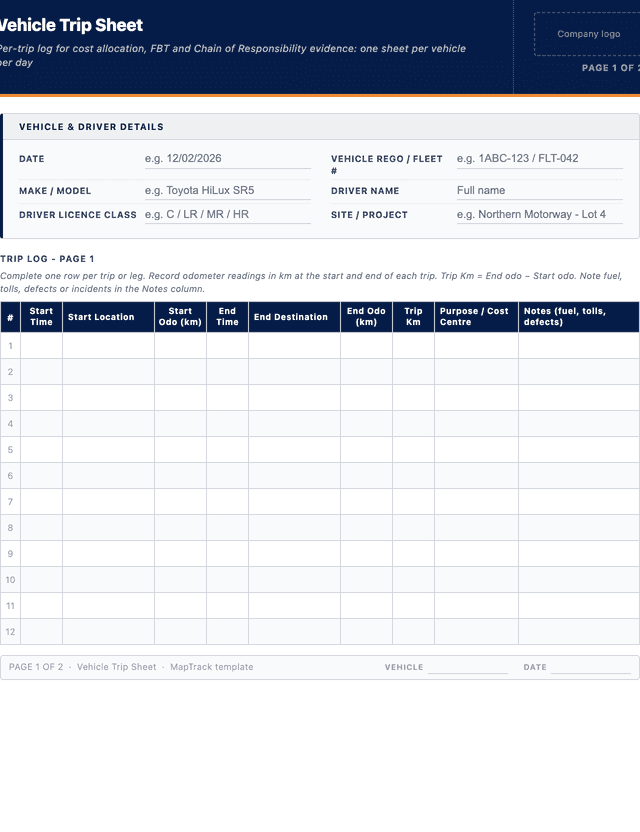
Vehicle Trip Sheet
Per-trip log for cost allocation, FBT and Chain of Responsibility evidence: one sheet per vehicle per day
| # | Start Time | Start Location | Start Odo (km) | End Time | End Destination | End Odo (km) | Trip Km | Purpose / Cost Centre | Notes (fuel, tolls, defects) |
|---|---|---|---|---|---|---|---|---|---|
| e.g. | - | Depot A | 3,120 | - | - | 3,120 | 3,120 | 145,000 | Annual service booked |
| 1 | |||||||||
| 2 | |||||||||
| 3 | |||||||||
| 4 | |||||||||
| 5 |
The PDF includes all 25 numbered rows, ready to print or fill on screen.
Driver Sign-off
Signature
Print name
Date
Supervisor / Fleet Manager Sign-off
Signature
Print name
Date
How to use: download the PDF, print or complete digitally on any device.
- PDF format, ready to print or fill on screen
- Use as-is or customise to suit your operation
- Go digital in MapTrack for photos, reminders and audit trails
Download formats
- Vehicle trip sheet PDF
PDF: Print-ready two-page trip log: one row per trip with start and end times, odometer readings, purpose and daily kilometre totals.
- Vehicle trip sheet XLSX
XLSX: Editable Excel workbook with the same trip columns plus an automatic daily kilometre total.
Two ways to use it
Use in MapTrack →Use it digitally instead
Unlimited usersUpload this PDF and MapTrack drafts the form for you.




- Scan the asset’s QR tag with any phone
- Submitted forms can trigger alerts
- Photos on fails, audit-ready records
- Export responses, PDF reports with your logo
Free trial. No credit card needed.
Trusted by teams across Australia and New Zealand
We respect your privacy. Unsubscribe anytime.
These templates are free general guides provided as-is. They do not constitute legal, safety or compliance advice. You are responsible for ensuring any form meets your specific workplace obligations, industry standards and applicable regulations.
Don't just download it - use it live. Start a free workspace, upload this vehicle trip sheet template and MapTrack drafts it as a form your crew can run from a phone.

Co-Founder & Commercial Director
Key takeaways
- The MapTrack vehicle trip sheet template has 9 columns and room for 25 entries. Columns: Start Time, Start Location, Start Odo (km), End Time, End Destination, End Odo (km), Trip Km, Purpose / Cost Centre, Notes (fuel, tolls, defects).
- A trip sheet records each journey with start and end odometer, purpose and driver. A mileage log totals distance; a daily log records duty time.
- Record the purpose of every trip. Without it, separating and substantiating business use after the fact becomes difficult.
- Chain of Responsibility duties reach everyone who influences a transport task, so trip records are evidence for the business, not only for the driver.
- Under the Heavy Vehicle National Law, fatigue-regulated work is recorded in a work diary. A trip sheet supports that record and does not replace it.
Enter your email below to download this vehicle trip sheet template as a ready-to-use PDF.
Used by construction, mining and field service teams











What is a vehicle trip sheet template?
A vehicle trip sheet is a per-journey record that captures who drove which vehicle, where they went, when and for what purpose. Each trip line shows the start and end times, start and end odometer readings, route or destination, purpose code, kilometres travelled, fuel added (if any) and the driver signature. It sits between the daily driver log and the monthly fleet report, providing the trip-level granularity needed to allocate costs to projects, reimburse mileage, monitor private use and reconstruct movements after an incident or insurance claim.
For heavy vehicle operators, trip sheets also support Chain of Responsibility evidence under the Heavy Vehicle National Law. Drivers and operators must demonstrate that fatigue, speed and load duties were met across every trip, and a structured trip sheet adds a trip-by-trip record of times and kilometres to go with each driver's work diary. Light-vehicle fleets use trip sheets primarily for cost allocation, fringe benefits tax log-book substitution, and odometer-based service scheduling. The ATO accepts a structured trip log as evidence for FBT log-book method calculations under the Fringe Benefits Tax Assessment Act 1986, provided a continuous twelve-week period is captured. Either way, the trip sheet is the source document that connects driver behaviour to vehicle cost.
Learn more about GPS and fleet tracking in MapTrack.
Keeping trip sheets for a whole fleet? Our guide to fleet management software in Australia compares the main options.
Benefits of using this vehicle trip sheet template
- Cost allocation: attributes kilometres and fuel to specific projects, sites or cost centres so each job carries the true vehicle cost it incurred.
- FBT substitution: a continuous twelve-week trip log meets ATO log-book method requirements for fringe benefits tax calculations on private use of business vehicles.
- CoR evidence: a trip-by-trip record of times and kilometres that heavy vehicle operators can keep alongside each driver's work diary when showing how fatigue duties were managed.
- Private versus business split: separates business kilometres from private use so reimbursements and tax claims reflect actual road usage rather than estimates.
- Mileage reimbursement: provides the documented kilometres required by the ATO cents-per-kilometre method for staff using personal or pool vehicles for work.
- Incident reconstruction: a complete trip history lets fleet managers and insurers reconstruct exactly where a vehicle was at the time of a damage or theft claim.
- Service scheduling: real-time odometer entries trigger preventive maintenance work orders at the correct service interval rather than guessing from monthly averages.
Benefits of digitising forms in MapTrack
When you digitise vehicle logs in MapTrack, you get:
- Field users can easily scan a QR code to complete a form on mobile. Unlimited users.
- Email the right people when a form is submitted, with an automation you set up.
- File every completed form against the asset, location or person it covers.
- Download any completed form as a PDF, with failed answers listed at the top.
- Fill in forms offline; they upload when the device is back online.
- Build conditional logic (show or hide questions based on answers).
- Take pictures or attach photos. Not possible with a paper-based form.
- Electronic signatures.
- Edit forms later without reprinting.
- Set who can view, fill in or edit forms with user roles.
- Upload a paper form (PDF, Word, Excel or a photo) and MapTrack's AI builds a digital version for you to check.
- Schedule services by odometer, engine hours or date for every vehicle.
- Keep fuel receipts and service records with each vehicle's inspections.
- Record repair costs on each work order against the vehicle.
Book a demo to see how MapTrack handles vehicle logs.
Try MapTrack free for 30 days
Full access to every feature. No credit card required. Per-asset pricing so you scale as your fleet grows.
- No credit card required
- 30 days free trial
- Cancel anytime
Intuitive for field crews
“MapTrack's a great platform - intuitive for the guys out in the field and also has fantastic support.”

Matthew Anderson
Maintenance Planning Supervisor, Supagas
What to include in a vehicle trip sheet template
This vehicle trip sheet template covers 10 key areas:
- Trip header: date, vehicle rego, vehicle make and model, fleet number and driver name with licence class.
- Per-trip start details: trip number, start time, start location and start odometer reading in kilometres.
- Per-trip end details: end time, end destination, end odometer reading and total kilometres for that leg.
- Purpose code and project / cost centre: business, private, client meeting, site visit, delivery or other classification.
- Passengers, freight or equipment carried with reference to any required permit or escort vehicle for oversize loads.
- Fatigue, work and rest hours captured per NHVR rules for heavy vehicle drivers (start, end, breaks and total work time).
- Fuel and AdBlue added during the trip with litres, cost and matching fuel card or receipt reference.
- Toll, parking and other expense entries with receipt numbers so they can be reconciled and reimbursed.
- Defect or incident notes: any pre-start defects, near misses or damage observed during the trip.
- Driver signature and supervisor sign-off at end of shift confirming the trip data is accurate.
How to use this vehicle trip sheet template
- Fill the header before starting the shift: enter the date, vehicle rego, make, fleet number, driver name and licence class so the trip sheet is tied to the correct vehicle and authorised driver from the first kilometre.
- Record start details for each leg of the trip: at the start of each leg, capture trip number, start time, start location and start odometer reading directly from the dashboard so the figures are exact rather than estimated later.
- Capture purpose, project and any passengers or freight: select a purpose code (business, private, client, delivery), name the project or cost centre, and note any passengers, freight or carried equipment along with required permits for oversize or dangerous goods.
- Track work and rest hours for heavy vehicle drivers: log start, end and break times for each driving period in line with NHVR standard hours, basic fatigue management or advanced fatigue management rules covering the vehicle and operator accreditation.
- Record end details, fuel and expenses: at the end of each leg, log end time, end destination and end odometer, calculate kilometres travelled, add any fuel or AdBlue purchased with the card or receipt reference, and capture tolls, parking and other expenses.
- Note defects, incidents or near misses observed during the trip: any pre-start defects raised, mechanical issues encountered, near misses or third-party damage observed on the road should be documented while the detail is still fresh, and a maintenance request raised where required.
- Sign off and submit the trip sheet: the driver signs each completed page to confirm the trip data is accurate, the supervisor reviews and countersigns at the end of shift, and the completed sheet is filed against the vehicle record for service scheduling, FBT and CoR purposes.
In MapTrack, you can track your fleet with GPS and digital pre-starts. Each submission is stored as a timestamped PDF against the asset record.
Get the free templateEnter your email above to download the full vehicle trip sheet template as a PDF.Back to download formHow often should you complete this log?
A vehicle trip sheet should be completed for every shift on every fleet vehicle that requires cost allocation, FBT substantiation or Chain of Responsibility coverage. Drivers record start and end details in real time at each leg, not retrospectively at end of day, so odometer and timing entries match the actual journey. For ATO log-book method substitution, the trip log must run for a continuous twelve-week period and then be retained for five years before another twelve-week sample is required. Heavy vehicle operators under the Heavy Vehicle National Law must keep work and rest hour records for three years. Completed trip sheets should be reviewed weekly by the fleet supervisor and reconciled monthly against fuel card statements and any electronic work diary or telematics feed.
Frequently asked questions
Applicable regulatory standards
This template is a starting point. Check the current requirements that apply to your equipment, work and location. The template alone does not establish compliance.
- Heavy Vehicle National Law (HVNL) Chapter 6 (fatigue management)
- NHVR Master Code 2018
- Fringe Benefits Tax Assessment Act 1986 Section 162C (log-book method)
- WHS Act 2011 Section 19
Vehicle trip sheet template preview
The numbers behind this vehicle trip sheet template
Every figure below is sourced and dated, so you can quote it in a toolbox talk, a budget case or a board paper without having to chase the original report.
Embed this free template on your website
Run an industry blog, trade association site, or training resource? Drop a preview of this free vehicle trip sheet template straight into your page. The snippet is self-contained, needs no scripts, and links readers back to the full free template.
<div style="max-width:480px;font-family:system-ui,-apple-system,'Segoe UI',Roboto,sans-serif;border:1px solid #E5E7EB;border-radius:12px;padding:20px;background:#ffffff;">
  <p style="font-size:12px;font-weight:700;letter-spacing:0.05em;text-transform:uppercase;color:#071D49;margin:0;">Free template</p>
  <p style="font-size:18px;font-weight:700;color:#071D49;margin:6px 0 0;">Vehicle trip sheet template</p>
  <ul style="margin:12px 0 0;padding-left:18px;color:#374151;font-size:14px;line-height:1.6;">
    <li style="margin:4px 0;">Trip header: date, vehicle rego, vehicle make and model, fleet number and driver name with licence class.</li>
    <li style="margin:4px 0;">Per-trip start details: trip number, start time, start location and start odometer reading in kilometres.</li>
    <li style="margin:4px 0;">Per-trip end details: end time, end destination, end odometer reading and total kilometres for that leg.</li>
    <li style="margin:4px 0;">Purpose code and project / cost centre: business, private, client meeting, site visit, delivery or other classification.</li>
    <li style="margin:4px 0;">Passengers, freight or equipment carried with reference to any required permit or escort vehicle for oversize loads.</li>
    <li style="margin:4px 0;">Fatigue, work and rest hours captured per NHVR rules for heavy vehicle drivers (start, end, breaks and total work time).</li>
  </ul>
  <p style="font-size:13px;color:#6B7280;margin:14px 0 0;padding-top:12px;border-top:1px solid #E5E7EB;">Free <a href="https://www.maptrack.com/templates/vehicle-trip-sheet-template" style="color:#071D49;font-weight:600;text-decoration:none;">Vehicle trip sheet template</a> by MapTrack</p>
</div>Free to reuse, including commercially. This template is published under a Creative Commons Attribution 4.0 licence. Copy it, adapt it, put it on your own site or in your own docs. All we ask is that you credit MapTrack with a link back to this page. The snippet above already includes that credit, so if you use it as-is you’re covered.
Cite this template
Writing about this topic? You’re welcome to quote this checklist. Here’s the wording to use so your readers can find the original.
The MapTrack vehicle trip sheet template has 9 columns and room for 25 entries.
- Short attribution
- MapTrack Vehicle trip sheet template, https://www.maptrack.com/templates/vehicle-trip-sheet-template
- Reference list
- MapTrack. (2026). Vehicle trip sheet template [Checklist template]. Retrieved from https://www.maptrack.com/templates/vehicle-trip-sheet-template
Free to reuse with credit under a Creative Commons Attribution 4.0 licence. If you’d rather link straight to it, the page is https://www.maptrack.com/templates/vehicle-trip-sheet-template.
Need to track your fleet with GPS and digital pre-starts?
Register every vehicle in MapTrack, attach digital forms, and get a complete history of every inspection, service and compliance record.
GPS and fleet tracking · All templates · Pricing · Book a demo