
Free template · PDF
Free scope of works
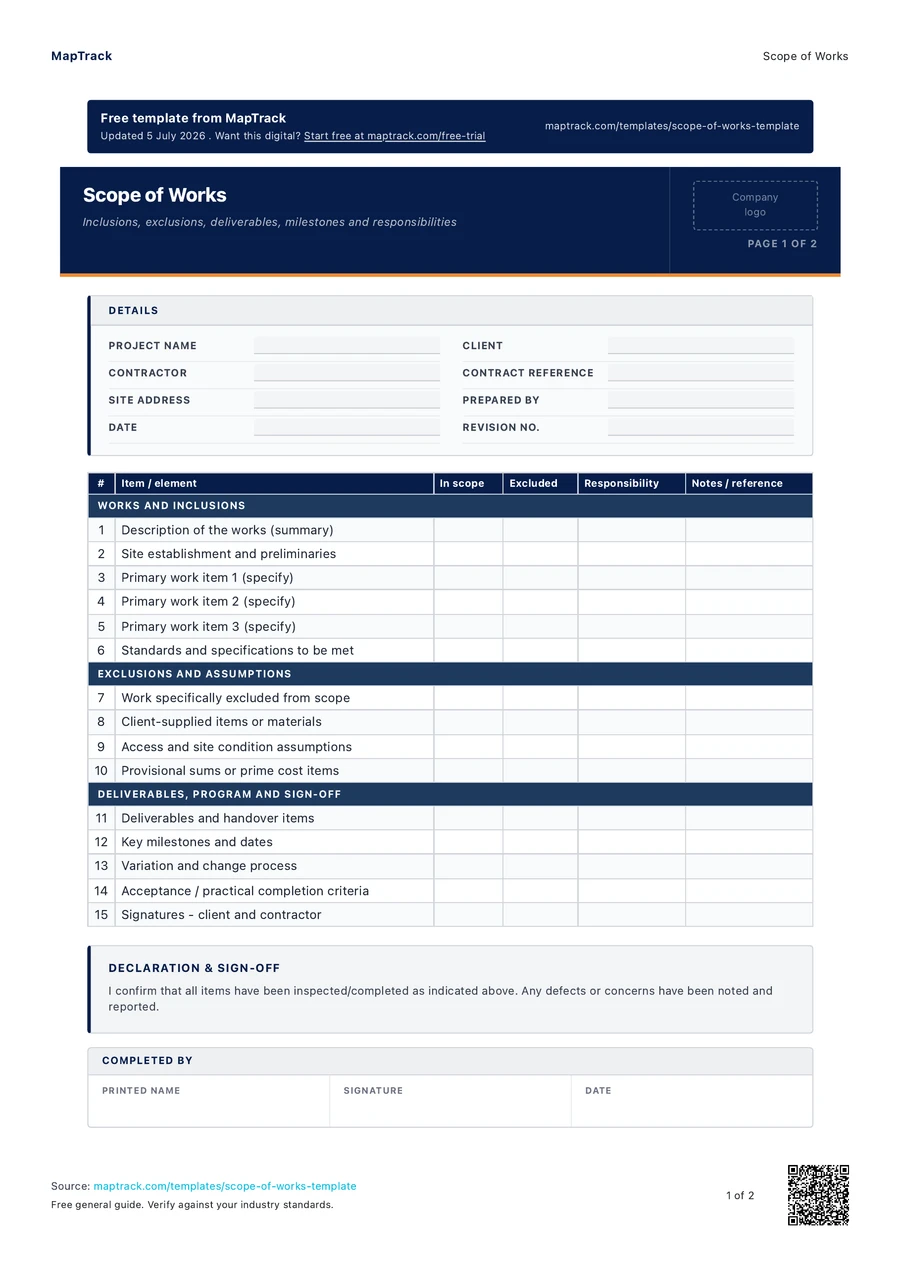
Free scope of works (PDF-ready). Define inclusions, exclusions, deliverables, milestones and responsibilities for a construction contract.
Loading PDF page...

Read the form fields
15 checks · 3 sections · Sign-off
15 checks
The fields in the printable form, in a view that fits your screen.
- Project name
- Client
- Contractor
- Contract reference
- Site address
- Prepared by
- Date
- Revision no.
WORKS AND INCLUSIONS
EXCLUSIONS AND ASSUMPTIONS
DELIVERABLES, PROGRAM AND SIGN-OFF
Declaration & Sign-Off
I confirm that all items have been inspected/completed as indicated above. Any defects or concerns have been noted and reported.
Completed By
Printed name · Signature · Date
Reviewed / Approved By
Printed name · Signature · Date
The MapTrack scope of works contains 15 checks across 3 sections.

Co-Founder & Commercial Director
Make this form your own
Add your fields and logo. Give your team a form they can use on site.
Free 30-day trial. No credit card. Work email needed.
Upload & use this form now for free



“MapTrack beat them all in every aspect.”
 Vincent Stone · HSEQ Advisor, Concept Tanks
After signup: upload this PDF, check the form MapTrack drafts, then save and publish it for your team.
General guidance only. Check the form against your equipment manual, site procedures and local requirements before using it.
Key takeaways
- The MapTrack scope of works contains 15 checks across 3 sections. Sections covered: WORKS AND INCLUSIONS, EXCLUSIONS AND ASSUMPTIONS, DELIVERABLES, PROGRAM AND SIGN-OFF.
- Project and parties: project name, client, contractor, and contract reference
- Site details and background to the works
- Description of the works: a clear, plain summary of what is to be built or done
What is a scope of works?
A scope of works is the contracting document that defines exactly what work is to be done on a project: the inclusions the contractor is responsible for, the exclusions that are specifically not part of the deal, the deliverables to be handed over, the milestones and program, and who is responsible for what. It sets out the site and background, a clear description of the works, the standards and specifications to be met, the materials and who supplies them, the program and key dates, and the acceptance or handover requirements. It is the reference everyone returns to when a question arises about whether something was in the price.
Most construction disputes and cost blowouts trace back to a vague or missing scope. When the boundary of the work is not written down, the client assumes something is included and the contractor assumes it is not, and the gap becomes a variation, a delay or an argument. A clear scope of works, tied to the contract and any drawings or specifications, sets that boundary before work starts. It defines what done looks like, what is expressly excluded, and how variations will be handled, which protects the price, the program and the relationship. It works best when the exclusions are as explicit as the inclusions, because it is the unstated assumptions that cause the trouble.
Learn more about asset tracking in MapTrack.
Choose the format that fits your team
Download the PDF
Use the original printable form for a paper workflow. Check it against your equipment and site procedure before the job.
Keep completed copies in your own record system and arrange any follow-up through your normal process.
Download free PDFCustomise a form in MapTrack
Start a free trial, upload this PDF and MapTrack drafts the form. Adjust it to your workflow, then save and publish it for your team to use.
Sample answers on this page and completed PDF records aren't imported automatically.
Upload & use this form now for freeFree 30-day trial. No credit card. Work email needed.
Benefits of using this scope of works
- Clear boundary: written inclusions and exclusions set exactly what is and is not in the contractor's price before work starts.
- Fewer variations: an explicit scope reduces the assumed-included gaps that turn into disputed variations and claims later.
- Defined deliverables: listing what will be handed over sets a shared definition of what finished and complete actually means.
- Program clarity: milestones and key dates tie the works to a timeline everyone has agreed rather than a vague finish.
- Responsibility split: recording who supplies, does and approves each part removes the who was meant to do that argument.
- Payment alignment: a scope broken into deliverables and milestones supports fair progress claims tied to real completion.
- Dispute reference: a signed scope is the document both parties return to when a question about the work arises.
What to include in a scope of works
- Project and parties: project name, client, contractor, and contract reference
- Site details and background to the works
- Description of the works: a clear, plain summary of what is to be built or done
- Inclusions: the specific works, supply and services the contractor is responsible for
- Exclusions: the works and items specifically not part of this scope
- Standards and specifications: codes, drawings and specs the work must meet
- Materials and supply: what is supplied by whom, and any nominated products
- Deliverables: the items, documents and handovers to be provided on completion
- Program and milestones: start, key dates, and completion or practical completion
- Responsibilities, assumptions, variation process, and acceptance or sign-off
How to use this scope of works
Describe the works in plain terms
Start with a clear, plain-language description of what is to be built or done and why, so anyone reading the scope understands the project without needing every drawing. This summary sets the context for the detailed inclusions and exclusions that follow, and stops the scope becoming a list of items with no sense of the whole.
List inclusions specifically
Set out exactly what work, supply and services the contractor is responsible for, item by item, referencing the relevant drawings, specifications and standards. Be specific rather than general, because a scope that says the works generally are covered leaves far too much room for one party to assume something is in and the other to assume it is out.
State exclusions just as clearly
Write down what is specifically not part of this scope, because the exclusions prevent the assumed-included disputes that cause most variations. If a related item could reasonably be thought part of the job but is not, say so explicitly. Unstated exclusions are the single biggest source of scope arguments on a project.
Define deliverables, program and responsibilities
List the deliverables and handover items, set the key milestones and dates, and record who supplies, does and approves each part of the work. Note any assumptions the scope relies on, such as access, existing conditions or client-supplied items, so the basis of the price and program is on the record if those assumptions turn out to be wrong.
Agree the variation process and sign off
Set out how changes to the scope will be requested, priced and approved, so a variation follows a process rather than a corridor conversation. Have both parties review and sign the scope, and issue it with the contract, because a scope that is agreed and signed is the reference that resolves questions instead of starting them.
How often should you complete this form?
Prepare and agree the scope of works before the contract is signed and before work starts, because it defines the price, the program and the boundary of the job. It should be issued as part of, or referenced by, the contract so it has contractual weight rather than sitting as an informal note.
Update the scope through a controlled variation process whenever the work changes, rather than letting changes accumulate as undocumented site instructions. Review it at project milestones to confirm the delivered work matches the agreed scope and that variations have been captured. A scope that is written once and then diverges quietly from what is actually being built loses the very protection it was meant to provide.
Make this form your own
From your template to your team.
Upload this PDF and MapTrack drafts the form. Adjust it for your equipment and site, then save and publish the digital form for your team.
- 01
Start your free trial
Use your work email to create your MapTrack account.
- 02
Customise, save and publish
Adjust the template fields and branding for your site.
- 03
Complete it on the job
Record checks, add photos and export a branded PDF.
Keep working offline
Load the form before you lose reception. Complete it offline and sync when you're back online.
Scan the asset. Open its form.
Use an asset's QR code to find and complete the forms that belong to it.
Show what you found
Capture photos and attach files so the next person has the details they need.
Take a branded PDF with you
Download completed forms as PDF reports with your company logo.
Completed paper records aren't imported automatically.
Frequently asked questions
Practical answers about the form, record keeping and using MapTrack.
A scope of works is a contractual document rather than a regulated form, so it is governed by the construction contract it sits under, such as an Australian Standard form like AS 4000 or AS 4902, or a bespoke agreement. It should reference the applicable building codes, drawings and specifications the work must meet. The scope defines what is included and excluded, while the contract sets the legal terms, so the two must be consistent and issued together to avoid gaps between what was promised and what was priced.
Link to this answerA scope of works defines what work is to be done, including the inclusions, exclusions, deliverables and responsibilities. A specification defines how the work is to be done and to what standard, covering materials, workmanship and technical requirements. The scope draws the boundary of the job, while the specification sets the quality within it. Most contracts use both, with the scope referencing the specifications and drawings, and they should be read together rather than in isolation.
Link to this answerMost scope disputes come from assumed-included work, where the client believes something was in the price and the contractor believes it was out. Explicitly stating exclusions closes that gap before it becomes a variation or a claim. If a related item could reasonably be thought part of the job but is not, saying so plainly in the exclusions protects both parties. Unstated exclusions are the single biggest source of arguments, delays and cost blowouts on a project.
Link to this answerThrough a controlled variation process set out in the scope and contract, not through informal site conversations. A change should be requested in writing, priced, and approved before the work is done, so the effect on cost and program is agreed rather than argued later. Letting changes accumulate as undocumented instructions is how projects lose control of both budget and timeline, so capture each variation against the original scope as it happens.
Link to this answerYes, it is completely free. It downloads as a PDF you can keep or print for the project file. You do not need a MapTrack account. MapTrack is an asset and equipment tracking platform, so use this scope for the contracting itself. If you also need to track the plant, tools and materials assigned across the works, MapTrack keeps a live asset register with history and location. Start a free trial or book a demo to see how.
Link to this answerApplicable regulatory standards
This form is a starting point. Check the current requirements that apply to your equipment, work and location. The form alone does not establish compliance.
- AS 4000-1997 General conditions of contract (construct only)
- AS 4902-2000 General conditions of contract for design and construct
- National Construction Code (NCC), incorporating the Building Code of Australia
- Security of payment legislation in each state or territory (for example the Building and Construction Industry Security of Payment Act 1999 (NSW)) for progress claims tied to scope
MapTrack publishes this template. The linked authorities publish their own guidance; they haven't endorsed this form.
The numbers behind this scope of works
Every figure below is sourced and dated, so you can quote it in a toolbox talk, a budget case or a board paper without having to chase the original report.
Cite this template
Writing about this topic? You’re welcome to quote this checklist. Here’s the wording to use so your readers can find the original.
The MapTrack scope of works contains 15 checks across 3 sections.
- Short attribution
- MapTrack Scope of Works, https://www.maptrack.com/templates/scope-of-works-template
- Reference list
- MapTrack. (2026). Scope of Works [Checklist template]. Retrieved from https://www.maptrack.com/templates/scope-of-works-template
Free to reuse with credit under a Creative Commons Attribution 4.0 licence. If you’d rather link straight to it, the page is https://www.maptrack.com/templates/scope-of-works-template.
Embed this free template on your website
Run an industry blog, trade association site, or training resource? Drop a preview of this free scope of works straight into your page. The snippet is self-contained, needs no scripts, and links readers back to the full free template.
<div style="max-width:480px;font-family:system-ui,-apple-system,'Segoe UI',Roboto,sans-serif;border:1px solid #E5E7EB;border-radius:12px;padding:20px;background:#ffffff;">
  <p style="font-size:12px;font-weight:700;letter-spacing:0.05em;text-transform:uppercase;color:#071D49;margin:0;">Free template</p>
  <p style="font-size:18px;font-weight:700;color:#071D49;margin:6px 0 0;">Scope of Works</p>
  <ul style="margin:12px 0 0;padding-left:18px;color:#374151;font-size:14px;line-height:1.6;">
    <li style="margin:4px 0;">Project and parties: project name, client, contractor, and contract reference</li>
    <li style="margin:4px 0;">Site details and background to the works</li>
    <li style="margin:4px 0;">Description of the works: a clear, plain summary of what is to be built or done</li>
    <li style="margin:4px 0;">Inclusions: the specific works, supply and services the contractor is responsible for</li>
    <li style="margin:4px 0;">Exclusions: the works and items specifically not part of this scope</li>
    <li style="margin:4px 0;">Standards and specifications: codes, drawings and specs the work must meet</li>
  </ul>
  <p style="font-size:13px;color:#6B7280;margin:14px 0 0;padding-top:12px;border-top:1px solid #E5E7EB;">Free <a href="https://www.maptrack.com/templates/scope-of-works-template" style="color:#071D49;font-weight:600;text-decoration:none;">Scope of Works</a> by MapTrack</p>
</div>Free to reuse, including commercially. This template is published under a Creative Commons Attribution 4.0 licence. Copy it, adapt it, put it on your own site or in your own docs. All we ask is that you credit MapTrack with a link back to this page. The snippet above already includes that credit, so if you use it as-is you’re covered.
About the author

Co-Founder & Commercial Director
Jarrod has spent over a decade in technology consulting and asset management, including roles at Accenture (mining and heavy industry) and CGI as an Asset Management Consultant. He co-founded MapTrack and built and scaled its original platform, then rebuilt it with Lachlan and Alex from thousands of customer conversations and 300+ user research sessions with field teams. His consulting background gives him deep insight into the operational and compliance challenges facing asset-intensive Australian businesses.
View LinkedIn profile →Ready for your next job?
Keep the PDF handy, or upload it to MapTrack and turn it into a digital form for your team.