
Free mobile plant traffic management plan template
Free mobile plant traffic management plan template (PDF-ready). Control pedestrian and mobile-plant interaction, exclusion zones, spotters and reversing.
Updated 2 Oct 2026
Mobile Plant Traffic Management Plan
Keep people on foot clear of operating mobile plant: exclusion zones, spotters and reversing
Checklist
How to use: download the PDF, print or complete digitally on any device.
- PDF format, ready to print or fill on screen
- Use as-is or customise to suit your operation
- Go digital in MapTrack for photos, reminders and audit trails
Download free PDF template
Use in MapTrack →



Trusted by teams across Australia and New Zealand
We respect your privacy. Unsubscribe anytime.
Or set it up in MapTrack
- Fill it in on a phone, attach photos to any check
- Automatic reports and audit trails
- Upload the PDF and MapTrack drafts the form for you
Free 30-day trial. No credit card. Personal email accepted.
Don't just download it - use it live. Start a free workspace, upload this mobile plant traffic management plan template and MapTrack drafts it as a form your crew can run from a phone.

Co-Founder & Commercial Director
Key takeaways
- The MapTrack mobile plant traffic management plan template contains 6 checks.
- This plan focuses on the highest risk interaction: people on foot near operating mobile plant.
- It sets exclusion zones, spotter rules, reversing controls and blind-spot measures for each machine.
- The WHS Regulation 2025 (NSW) sets specific duties for managing powered mobile plant risks.
- Separation and exclusion zones come before spotting, which is a control and not a substitute.
- A positive communication protocol must be confirmed before anyone approaches a machine.
Enter your email below to download this mobile plant traffic management plan template as a ready-to-use PDF.
Used by construction, mining and field service teams











What is a mobile plant traffic management plan template?
A mobile plant traffic management plan is a focused version of a site traffic plan that deals specifically with the interaction between people on foot and powered mobile plant such as excavators, loaders, rollers, telehandlers, forklifts and dozers. It documents how pedestrians are kept clear of operating plant, the exclusion zones around each machine, the use of spotters and traffic controllers, proximity and exclusion controls, reversing procedures, and the measures that deal with blind spots. Where a full traffic management plan covers every vehicle and route on a site, this plan zooms in on the highest consequence interaction, a person being struck or crushed by a moving machine, and sets out the layered controls that keep that from happening.
Learn more about asset tracking in MapTrack.
Benefits of using this mobile plant traffic management plan template
- Targets the worst risk: focusing on people near operating plant addresses the interaction most likely to kill or seriously injure on a yard or construction site.
- Defines exclusion zones: the plan sets a clear no-go distance around each machine type so workers, spotters and operators share one understanding of safe separation.
- Controls reversing: documented reversing rules, alarms and spotter positions tackle the blind manoeuvre behind a large share of plant strikes.
- Clarifies the spotter role: recording when a spotter is mandatory, where they stand and how they signal removes the guesswork that makes spotting unreliable.
- Manages blind spots: capturing visibility aids, cameras, mirrors and exclusion zones deals directly with the areas an operator simply cannot see from the cab.
- Supports plant duties: a dated, consulted plan is objective evidence of meeting the powered mobile plant duties in the WHS Regulation and the plant code of practice.
Benefits of digitising forms in MapTrack
When you move your plans from paper to MapTrack, you get:
- Field users can easily scan a QR code to complete a form on mobile. Unlimited users.
- Email the right people when a form is submitted, with an automation you set up.
- File every completed form against the asset, location or person it covers.
- Download any completed form as a PDF, with failed answers listed at the top.
- Fill in forms offline; they upload when the device is back online.
- Build conditional logic (show or hide questions based on answers).
- Take pictures or attach photos. Not possible with a paper-based form.
- Electronic signatures.
- Edit forms later without reprinting.
- Set who can view, fill in or edit forms with user roles.
- Upload a paper form (PDF, Word, Excel or a photo) and MapTrack's AI builds a digital version for you to check.
- Collect SWMS sign-ons as signed forms against each site.
- Track tool and plant movements between job sites as they are scanned, checked out and returned.
- Download completed site forms as PDFs when a principal contractor asks for them.
Book a demo to see how MapTrack handles plans.
Try MapTrack free for 30 days
Full access to every feature. No credit card required. Per-asset pricing so you scale as your fleet grows.
- No credit card required
- 30 days free trial
- Cancel anytime
1-2 days/week saved
“Bloody amazing! We used to spend 1-2 days a week tracking and managing our generators alone.”

Steve McAllister
Asset Coordinator, Saunders International
What to include in a mobile plant traffic management plan template
This mobile plant traffic management plan template covers 10 key areas:
- Site and project details, the plant covered, date prepared and review date
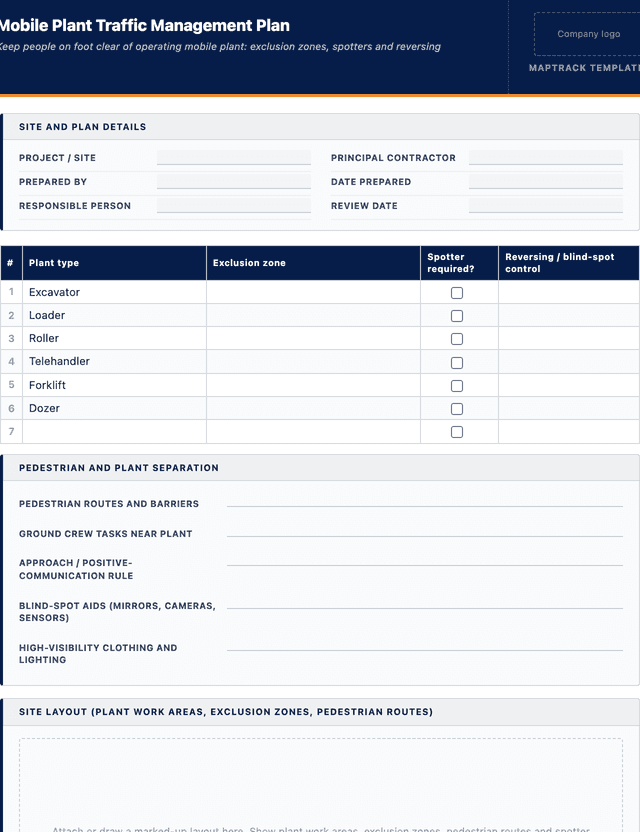
- Each plant type on site: excavators, loaders, rollers, telehandlers, forklifts and dozers
- Exclusion zone distance set for each machine type and how it is marked or enforced
- Pedestrian routes and the physical separation keeping people clear of operating plant
- Spotter and traffic controller requirements: when required, position, signals and competency
- Reversing controls: reversing alarms, cameras, spotter signals and no-go rules
- Blind-spot measures: mirrors, cameras, proximity sensors and operator line-of-sight notes
- Proximity and exclusion controls, including how operators and pedestrians communicate
- Positive communication and eye-contact protocol before anyone approaches a machine
- High-visibility clothing, lighting, isolation on approach, consultation and the review record
How to use this mobile plant traffic management plan template
- List the plant and the people near it: Identify every type of powered mobile plant on site and every task that puts a person on foot near it, such as ground crew, dogging, surveying, fuelling or measuring. These pairings of plant and pedestrian are the interactions the plan has to control, so list them before designing anything.
- Set exclusion zones for each machine: For each plant type set a clear exclusion zone based on its size, swing radius, reach and stopping distance. Decide how the zone is communicated and enforced, through barriers, ground markings or operator rules, so everyone knows the safe distance from a working machine.
- Design separation, spotting and reversing rules: Separate people and plant with dedicated routes and barriers wherever practicable. Where they must share space, define when a spotter is mandatory, where the spotter stands, the agreed signals, the reversing procedure, and the visibility aids fitted to deal with blind spots.
- Set the approach and communication protocol: Decide how a person on foot signals an operator and gets positive acknowledgement before approaching, and how the operator confirms the plant is safe and stationary. Document the eye-contact or radio rule so nobody steps into an exclusion zone on assumption rather than confirmation.
- Induct, monitor and review: Brief every operator and ground worker on the exclusion zones, spotter rules and approach protocol, then watch how it works in practice. Review the plan after any near miss, when new plant arrives, when the work changes, and at the planned review date, recording each revision.
In MapTrack, you can track construction equipment across every site. Each submission is stored as a timestamped PDF against the asset record.
Get the free templateEnter your email above to download the full mobile plant traffic management plan template as a PDF.Back to download formHow often should you complete this plan?
Prepare this plan before mobile plant starts working near people, and review it whenever the plant on site, the ground crew tasks, or the layout changes. Because plant strikes are high consequence and often involve reversing or blind spots, the controls deserve a fresh look every time a new machine arrives on hire or a new crew starts.
Always review after a near miss or incident involving plant and a pedestrian, and re-brief operators and ground workers when a control changes. Set a regular review cycle for the project so the exclusion zones and spotter rules stay matched to the work rather than drifting once the job settles in.
Frequently asked questions
Applicable regulatory standards
This template is a starting point. Check the current requirements that apply to your equipment, work and location. The template alone does not establish compliance.
- Work Health and Safety Act 2011 (primary duty of care to manage risks to health and safety)
- Work Health and Safety Regulation 2025 (NSW), powered mobile plant duties, including the risk of plant colliding with pedestrians
- Safe Work Australia Code of Practice: Managing the risks of plant in the workplace
- Safe Work Australia Code of Practice: Traffic management - guide for the construction industry
- AS 1742 Manual of uniform traffic control devices (signage and delineation)
Mobile plant traffic management plan template preview
The numbers behind this mobile plant traffic management plan template
Every figure below is sourced and dated, so you can quote it in a toolbox talk, a budget case or a board paper without having to chase the original report.
Embed this free template on your website
Run an industry blog, trade association site, or training resource? Drop a preview of this free mobile plant traffic management plan template straight into your page. The snippet is self-contained, needs no scripts, and links readers back to the full free template.
<div style="max-width:480px;font-family:system-ui,-apple-system,'Segoe UI',Roboto,sans-serif;border:1px solid #E5E7EB;border-radius:12px;padding:20px;background:#ffffff;">
  <p style="font-size:12px;font-weight:700;letter-spacing:0.05em;text-transform:uppercase;color:#071D49;margin:0;">Free template</p>
  <p style="font-size:18px;font-weight:700;color:#071D49;margin:6px 0 0;">Mobile plant traffic management plan template</p>
  <ul style="margin:12px 0 0;padding-left:18px;color:#374151;font-size:14px;line-height:1.6;">
    <li style="margin:4px 0;">Site and project details, the plant covered, date prepared and review date</li>
    <li style="margin:4px 0;">Each plant type on site: excavators, loaders, rollers, telehandlers, forklifts and dozers</li>
    <li style="margin:4px 0;">Exclusion zone distance set for each machine type and how it is marked or enforced</li>
    <li style="margin:4px 0;">Pedestrian routes and the physical separation keeping people clear of operating plant</li>
    <li style="margin:4px 0;">Spotter and traffic controller requirements: when required, position, signals and competency</li>
    <li style="margin:4px 0;">Reversing controls: reversing alarms, cameras, spotter signals and no-go rules</li>
  </ul>
  <p style="font-size:13px;color:#6B7280;margin:14px 0 0;padding-top:12px;border-top:1px solid #E5E7EB;">Free <a href="https://www.maptrack.com/templates/mobile-plant-traffic-management-plan-template" style="color:#071D49;font-weight:600;text-decoration:none;">Mobile plant traffic management plan template</a> by MapTrack</p>
</div>Free to reuse, including commercially. This template is published under a Creative Commons Attribution 4.0 licence. Copy it, adapt it, put it on your own site or in your own docs. All we ask is that you credit MapTrack with a link back to this page. The snippet above already includes that credit, so if you use it as-is you’re covered.
Cite this template
Writing about this topic? You’re welcome to quote this checklist. Here’s the wording to use so your readers can find the original.
The MapTrack mobile plant traffic management plan template contains 6 checks.
- Short attribution
- MapTrack Mobile plant traffic management plan template, https://www.maptrack.com/templates/mobile-plant-traffic-management-plan-template
- Reference list
- MapTrack. (2026). Mobile plant traffic management plan template [Checklist template]. Retrieved from https://www.maptrack.com/templates/mobile-plant-traffic-management-plan-template
Free to reuse with credit under a Creative Commons Attribution 4.0 licence. If you’d rather link straight to it, the page is https://www.maptrack.com/templates/mobile-plant-traffic-management-plan-template.
Need to track construction equipment across every site?
Register every asset in MapTrack, attach digital forms, and get a complete history of every inspection, service and compliance record.