
Free plant isolation and lockout register
Free plant isolation and lockout register (PDF-ready). Log every energy isolation, lock, tag, permit and safe restore against your plant.
Updated 5 July 2026
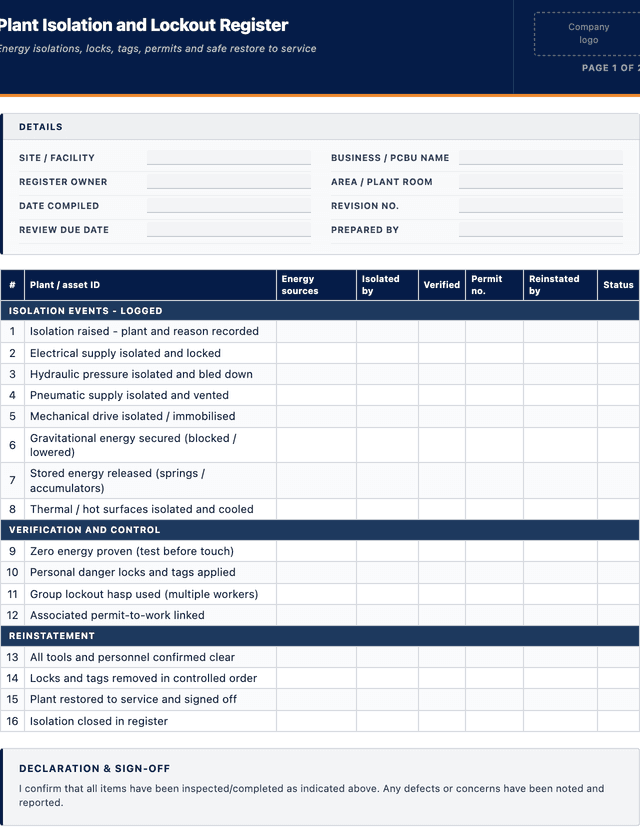
Plant Isolation and Lockout Register
Energy isolations, locks, tags, permits and safe restore to service
ISOLATION EVENTS - LOGGED
VERIFICATION AND CONTROL
REINSTATEMENT
How to use: download the PDF, print or complete digitally on any device.
- PDF format, ready to print or fill on screen
- Use as-is or customise to suit your operation
- Go digital in MapTrack for photos, reminders and audit trails
Download free PDF template
Use in MapTrack →



Trusted by teams across Australia and New Zealand
We respect your privacy. Unsubscribe anytime.
Or set it up in MapTrack
- Fill it in on a phone, attach photos to any check
- Automatic reports and audit trails
- Upload the PDF and MapTrack drafts the form for you
Free 30-day trial. No credit card. Personal email accepted.
Don't just download it - use it live. Start a free workspace, upload this plant isolation and lockout register and MapTrack drafts it as a form your crew can run from a phone.

Co-Founder & Commercial Director
Key takeaways
- The MapTrack plant isolation and lockout register contains 16 checks across 3 sections. Sections covered: ISOLATION EVENTS - LOGGED, VERIFICATION AND CONTROL, REINSTATEMENT.
Enter your email below to download this plant isolation and lockout register as a ready-to-use PDF.
Used by construction, mining and field service teams











What is a plant isolation and lockout register?
A plant isolation and lockout register is a running log of every energy isolation and lockout-tagout (LOTO) event on a site: what plant was isolated, which isolation points were used, who applied the lock and tag, under which permit, and when the plant was safely restored to service. For each isolation it captures the date, the plant and its ID, the energy sources isolated (electrical, hydraulic, pneumatic, mechanical, gravitational, stored or thermal), the isolation and lock details, the person who isolated, verification that zero energy was proven, and the reinstatement sign-off. It is the site-wide record that ties individual isolations, permits and locks together.
Isolation failures cause some of the most severe incidents in industry, because energy released while someone is working on plant can crush, electrocute or burn. The model Work Health and Safety (WHS) Regulations enacted in each state and territory (in Victoria, the Occupational Health and Safety Regulations 2017 (Vic)) require plant to be shut down and isolated so it is safe before maintenance or cleaning, and the AS/NZS 4024 Safety of machinery series covers energy isolation (for example AS/NZS 4024.1604:2014, which deals with isolation and energy dissipation). A register makes the isolation process auditable and controllable: a supervisor can see what is currently locked out, confirm nothing is restored while people are still working under a lock, and produce the evidence that isolations were verified and reinstated correctly rather than left to memory.
Learn more about compliance and inspections in MapTrack.
Benefits of using this plant isolation and lockout register
- Live lockout picture: an open-isolations view shows what plant is currently locked out and must not be started.
- Zero-energy proof: a verification column records that stored and residual energy was released and tested before work began.
- Multi-source control: listing each energy source isolated stops a machine being worked on with a hidden hydraulic or stored source live.
- Accountable restore: an isolate and reinstate sign-off means no one puts plant back into service while a lock is still on it.
- Permit linkage: tying each isolation to its permit joins the LOTO record to the wider permit-to-work system for the job.
- Audit evidence: a dated isolation register is objective proof of a controlled isolation process for WHS reviews and after incidents.
- Recurring-risk insight: seeing which plant is isolated most often highlights unreliable equipment worth investigating or replacing.
Benefits of digitising forms in MapTrack
When you move from paper or static PDFs to digital forms in MapTrack, you get:
- Field users can easily scan a QR code to complete a form on mobile. Unlimited users.
- Email the right people when a form is submitted, with an automation you set up.
- File every completed form against the asset, location or person it covers.
- Download any completed form as a PDF, with failed answers listed at the top.
- Fill in forms offline; they upload when the device is back online.
- Build conditional logic (show or hide questions based on answers).
- Take pictures or attach photos. Not possible with a paper-based form.
- Electronic signatures.
- Edit forms later without reprinting.
- Set who can view, fill in or edit forms with user roles.
- Upload a paper form (PDF, Word, Excel or a photo) and MapTrack's AI builds a digital version for you to check.
- Email safety managers when a hazard report is submitted, with an automation you set up.
- Keep every hazard and incident report against the site it came from, with photos.
- Turn a hazard report into a corrective-action work order with its own review step.
Book a demo to see how MapTrack handles forms.
Try MapTrack free for 30 days
Full access to every feature. No credit card required. Per-asset pricing so you scale as your fleet grows.
- No credit card required
- 30 days free trial
- Cancel anytime
1-2 days/week saved
“Bloody amazing! We used to spend 1-2 days a week tracking and managing our generators alone.”

Steve McAllister
Asset Coordinator, Saunders International
What to include in a plant isolation and lockout register
This plant isolation and lockout register covers 10 key areas:
- Register header: site or facility, business or PCBU name, register owner, and revision date
- Isolation reference number and date raised
- Plant or equipment name and asset ID
- Reason for isolation: maintenance, cleaning, fault, breakdown or modification
- Energy sources isolated: electrical, hydraulic, pneumatic, mechanical, gravitational, stored, thermal or chemical
- Isolation points used and isolation method (switch, valve, blank, physical disconnect)
- Lock and tag details: personal danger tag, out-of-service tag, and lock or hasp used
- Isolated by, and verification that zero energy was proven (tested and confirmed dead)
- Associated permit-to-work number, where a permit applies
- Reinstated by, date restored to service, and confirmation all locks and tags removed
How to use this plant isolation and lockout register
- Raise the isolation and identify all energy sources: Record the plant, the reason for isolation and every energy source it holds, not just the obvious electrical supply. Machines often store energy in hydraulic accumulators, springs, raised loads, compressed air and hot surfaces, and any one of those left live can injure the person working on the plant.
- Isolate, lock and tag each point: Isolate every identified source at its isolation point, then apply a personal danger lock and tag so the point cannot be re-energised. Where several people work on the same plant, each applies their own lock, so the plant cannot be restored until the last worker removes theirs. Record every point and lock in the register.
- Prove zero energy before work starts: After isolating, verify the plant is actually dead by testing, trying to start it, bleeding pressure, or discharging stored energy, and record who verified it. Isolating a switch is not the same as proving the plant is de-energised, and this test-before-touch step is what catches an isolation that did not fully work.
- Link the permit and carry out the work: Where the work also needs a permit-to-work, record the permit number against the isolation so the two records line up. Keep the isolation open and logged for the whole duration of the job, so anyone checking the register can see the plant is still locked out and must not be started.
- Reinstate and sign off the restore: When work is complete, confirm all tools and people are clear, remove locks and tags in a controlled order, and return the plant to service. Record who reinstated it and the date and time, then close the isolation in the register so the open-isolations list only ever shows plant that is genuinely still locked out.
In MapTrack, you can digitise safety inspections and compliance forms. Each submission is stored as a timestamped PDF against the asset record.
Get the free templateEnter your email above to download the full plant isolation and lockout register as a PDF.Back to download formHow often should you complete this form?
Log an isolation in the register every time plant is isolated for maintenance, cleaning, fault-finding or modification, no matter how brief. The register is updated in real time as isolations are raised, verified and reinstated, not written up after the fact from memory.
Review open isolations at every shift handover so the incoming crew knows exactly what plant is locked out and why, and never restore plant on someone else's behalf. Audit the closed entries periodically to confirm isolations are being verified for zero energy and reinstated with a sign-off, because gaps in those two steps are where isolation incidents come from.
Frequently asked questions
Applicable regulatory standards
This template is a starting point. Check the current requirements that apply to your equipment, work and location. The template alone does not establish compliance.
- Model Work Health and Safety (WHS) Regulations, Chapter 5 Part 5.1 (plant; shut down and isolation before maintenance or cleaning), as enacted in each state and territory; in Victoria, the Occupational Health and Safety Regulations 2017 (Vic)
- AS/NZS 4024 Safety of machinery series (energy isolation and dissipation, for example AS/NZS 4024.1604:2014)
- Model Code of Practice: Managing the risks of plant in the workplace (Safe Work Australia)
- ISO 45001:2018 Occupational health and safety management systems (operational control, clause 8.1)
Plant Isolation and Lockout Register preview
The numbers behind this plant isolation and lockout register
Every figure below is sourced and dated, so you can quote it in a toolbox talk, a budget case or a board paper without having to chase the original report.
Embed this free template on your website
Run an industry blog, trade association site, or training resource? Drop a preview of this free plant isolation and lockout register straight into your page. The snippet is self-contained, needs no scripts, and links readers back to the full free template.
<div style="max-width:480px;font-family:system-ui,-apple-system,'Segoe UI',Roboto,sans-serif;border:1px solid #E5E7EB;border-radius:12px;padding:20px;background:#ffffff;">
  <p style="font-size:12px;font-weight:700;letter-spacing:0.05em;text-transform:uppercase;color:#071D49;margin:0;">Free template</p>
  <p style="font-size:18px;font-weight:700;color:#071D49;margin:6px 0 0;">Plant Isolation and Lockout Register</p>
  <ul style="margin:12px 0 0;padding-left:18px;color:#374151;font-size:14px;line-height:1.6;">
    <li style="margin:4px 0;">Register header: site or facility, business or PCBU name, register owner, and revision date</li>
    <li style="margin:4px 0;">Isolation reference number and date raised</li>
    <li style="margin:4px 0;">Plant or equipment name and asset ID</li>
    <li style="margin:4px 0;">Reason for isolation: maintenance, cleaning, fault, breakdown or modification</li>
    <li style="margin:4px 0;">Energy sources isolated: electrical, hydraulic, pneumatic, mechanical, gravitational, stored, thermal or chemical</li>
    <li style="margin:4px 0;">Isolation points used and isolation method (switch, valve, blank, physical disconnect)</li>
  </ul>
  <p style="font-size:13px;color:#6B7280;margin:14px 0 0;padding-top:12px;border-top:1px solid #E5E7EB;">Free <a href="https://www.maptrack.com/templates/plant-isolation-register" style="color:#071D49;font-weight:600;text-decoration:none;">Plant Isolation and Lockout Register</a> by MapTrack</p>
</div>Free to reuse, including commercially. This template is published under a Creative Commons Attribution 4.0 licence. Copy it, adapt it, put it on your own site or in your own docs. All we ask is that you credit MapTrack with a link back to this page. The snippet above already includes that credit, so if you use it as-is you’re covered.
Cite this template
Writing about this topic? You’re welcome to quote this checklist. Here’s the wording to use so your readers can find the original.
The MapTrack plant isolation and lockout register contains 16 checks across 3 sections.
- Short attribution
- MapTrack Plant Isolation and Lockout Register, https://www.maptrack.com/templates/plant-isolation-register
- Reference list
- MapTrack. (2026). Plant Isolation and Lockout Register [Checklist template]. Retrieved from https://www.maptrack.com/templates/plant-isolation-register
Free to reuse with credit under a Creative Commons Attribution 4.0 licence. If you’d rather link straight to it, the page is https://www.maptrack.com/templates/plant-isolation-register.
Need to digitise safety inspections and compliance forms?
Register every asset in MapTrack, attach digital forms, and get a complete history of every inspection, service and compliance record.
Compliance and inspections · All templates · Pricing · Book a demo