
Free template · PDF
Free equipment fault report
Download a free equipment fault report. Document symptoms, severity, suspected cause and corrective actions. PDF ready to print.
Loading PDF page...
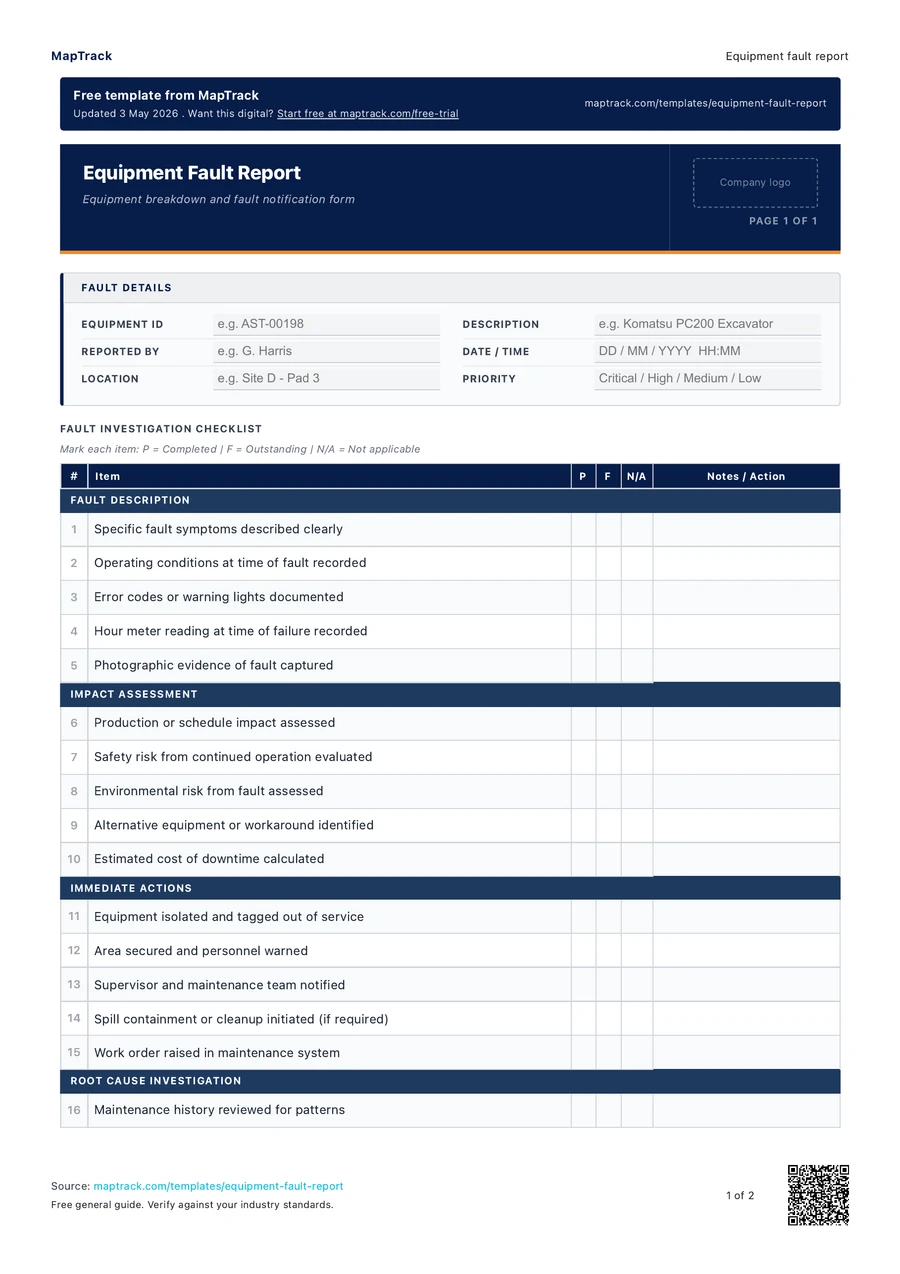

Read the form fields
25 checks · 5 sections · Sign-off
25 checks
The fields in the printable form, in a view that fits your screen.
- Equipment ID
- Description
- Reported by
- Date / Time
- Location
- Priority
Fault Description
Impact Assessment
Immediate Actions
Root Cause Investigation
Repair and Resolution
Declaration
I confirm that this fault report accurately describes the equipment failure, actions taken, and resolution. The equipment has been assessed and either returned to service or remains isolated pending further repair.
Reporter Sign-off
Signature · Print name · Date
Maintenance Manager Sign-off
Signature · Print name · Date
The MapTrack equipment fault report contains 25 checks across 5 sections.

Co-Founder & Commercial Director
Make this form your own
Add your fields and logo. Give your team a form they can use on site.
Free trial. No credit card. Work email needed.
Customise & use this form now for free



“MapTrack beat them all in every aspect.”
 Vincent Stone · HSEQ Advisor, Concept Tanks
After signup: customise the template, then save and publish it for your team.
General guidance only. Check the form against your equipment manual, site procedures and local requirements before using it.
Short answer
An equipment fault report records a fault the moment it is seen: the asset, symptoms and error codes, severity, the isolation or tag-out applied, photos, suspected cause and the repair recommended. Any operator or worker raises one whenever a fault appears; there is no set interval. Regulation 213 of the model WHS Regulations requires plant to be maintained, and section 38 of the model WHS Act covers notifiable incidents.
Checked against Model WHS Regulations as at 5 December 2025 (cited within as the Work Health and Safety Regulations 2011) on by the MapTrack templates team. How we check templates
Key takeaways
- The MapTrack equipment fault report contains 25 checks across 5 sections. Sections covered: Fault Description, Impact Assessment, Immediate Actions, Root Cause Investigation, Repair and Resolution.
- Raise a fault report whenever a fault is seen; the trigger is the observation, not a calendar interval.
- Record the isolation, tag-out or barricade applied, so the next shift knows the equipment must not be used.
- Under section 37(g), malfunction of plant required to be authorised is a dangerous incident if it exposes someone to an immediate or imminent serious risk.
- Notify the regulator immediately of a notifiable incident (section 38) and keep the record for at least 5 years.
What is an equipment fault report?
An equipment fault report is a document used to record and communicate a fault or malfunction observed on a piece of equipment. The report captures the equipment details, fault description, symptoms observed, severity assessment, suspected cause, immediate actions taken and recommended corrective actions. Fault reports are the first step in the corrective maintenance process, initiating the work flow from fault identification through diagnosis, repair and return to service.
Prompt and accurate fault reporting is essential for maintaining equipment reliability and workplace safety. Under Section 19 of the WHS Act 2011, the PCBU has a duty of care to ensure, so far as is reasonably practicable, that plant is maintained in a safe condition. If a fault creates a safety hazard and is not reported, the organisation is exposed to both WHS enforcement action and liability for any resulting injury. Beyond safety, unresolved faults lead to progressive deterioration, more expensive repairs and unplanned downtime. A structured fault reporting process ensures that faults are captured, prioritised and resolved systematically rather than being overlooked or forgotten.
Learn more about asset tracking in MapTrack.
Choose the format that fits your team
Download the PDF
Use the original printable form for a paper workflow. Check it against your equipment and site procedure before the job.
Keep completed copies in your own record system and arrange any follow-up through your normal process.
Download free PDFCustomise a form in MapTrack
Start a free trial, adjust the digital form to your workflow, then save and publish it for your team to use.
Your account uses the digital template. Sample answers on this page and completed PDF records aren't imported automatically.
Customise & use this form now for freeFree trial. No credit card. Work email needed.
Benefits of using this equipment fault report
- Early intervention: capturing faults when first observed prevents minor issues from escalating into major failures.
- Safety compliance: reporting safety-related faults immediately meets WHS obligations for maintaining safe plant and equipment.
- Maintenance efficiency: structured fault reports give maintenance teams the information they need to diagnose and plan repairs.
- Downtime reduction: prompt reporting and repair reduces the duration and impact of unplanned equipment downtime.
- Trend analysis: tracking fault reports by equipment, fault type and frequency reveals reliability issues and informs replacement decisions.
- Accountability: a signed fault report creates a documented record of who identified the fault, when and what actions were taken.
What to include in an equipment fault report
- Reporter details: name, position, department, date and time fault was observed.
- Equipment details: asset ID, description, make/model, serial number, location.
- Fault description: clear description of the fault, including symptoms, abnormal behaviour, error codes or messages.
- When the fault was first noticed: during pre-start inspection, during operation, during maintenance, after an incident.
- Severity: critical (safety hazard or complete failure), major (significant performance impact), minor (reduced performance), cosmetic.
- Immediate actions taken: equipment isolated, locked out, tagged out, barricaded, reported to supervisor.
- Suspected cause: operator observation of what may have caused the fault (overloading, wear, impact, contamination, electrical fault).
- Operational impact: is the equipment still operational (yes, with restrictions, no), estimated downtime.
- Photographs: images of the fault, error displays, damage or abnormal condition.
- Corrective action recommended: repair, replacement of component, full service, specialist assessment.
- Signatures: reporter and supervisor acknowledgement.
How to use this equipment fault report
Stop using the equipment if the fault presents a safety hazard and apply isolation controls.
If the fault could cause injury, property damage or further equipment damage, stop the equipment immediately. Apply lockout/tagout if appropriate. Barricade the equipment if it is in a high-traffic area. Do not attempt to operate faulty equipment.
Complete the fault report with a clear, specific description of the fault.
Describe what you observed: the symptoms, any abnormal sounds, smells, vibrations, error messages or visual damage. Be specific. State when the fault was first noticed and whether it was intermittent or constant. Include any error codes displayed.
Assess the severity and record the operational impact.
Rate the severity as critical, major, minor or cosmetic. Note whether the equipment can still be used (with restrictions), or whether it is completely out of service. Estimate the operational impact in terms of downtime and production loss.
Take photographs and note any suspected cause.
Photograph the fault from multiple angles. If an error code or message is displayed, photograph the screen. Record your observation of what may have caused the fault. This information helps the maintenance team plan the repair efficiently.
Submit the fault report to your supervisor and maintenance team for action.
Hand the completed report to your supervisor or submit it through the maintenance request system. The maintenance team will review the report, prioritise the repair based on severity and schedule the corrective work. Follow up if the fault is not addressed within the expected timeframe.
Try MapTrack free
Full access to every feature. No credit card required. Per-asset pricing so you scale as your fleet grows.
- No credit card required
How often should you complete this report?
An equipment fault report should be completed every time a fault or malfunction is observed. There is no scheduled interval. The trigger is the observation of a fault. Workers should be encouraged to report all faults, no matter how minor, as early detection prevents costly failures.
Make this form your own
From your template to your team.
Start with this template, adjust it for your equipment and site, then save and publish the digital form for your team.
- 01
Start your free trial
Use your work email to create your MapTrack account.
- 02
Customise, save and publish
Adjust the template fields and branding for your site.
- 03
Complete it on the job
Record checks, add photos and export a branded PDF.
Keep working offline
Load the form before you lose reception. Complete it offline and sync when you're back online.
Scan the asset. Open its form.
Use an asset's QR code to find and complete the forms that belong to it.
Show what you found
Capture photos and attach files so the next person has the details they need.
Take a branded PDF with you
Download completed forms as PDF reports with your company logo.
The trial uses a digital template. Completed paper records aren't imported automatically.
Frequently asked questions
Practical answers about the form, record keeping and using MapTrack.
Any deviation from normal operation should be reported. This includes abnormal sounds (grinding, squealing, knocking), abnormal vibration, overheating, fluid leaks, error messages, reduced performance, intermittent failures, cosmetic damage that could worsen and any condition that could affect safety. When in doubt, report it. It is better to investigate and find nothing than to miss an early warning sign of a serious failure.
Link to this answerNo, unless the fix is within your training and authorisation (such as resetting a tripped breaker or clearing a minor jam according to the operating procedure). For any fault involving safety systems, structural components, electrical systems or complex machinery, report the fault and leave the repair to qualified maintenance personnel. Attempting repairs without proper training can worsen the fault or create a safety hazard.
Link to this answerThe supervisor acknowledges the report and forwards it to the maintenance team. The maintenance team assesses the fault severity, diagnoses the issue, orders parts if needed and schedules the repair. Critical faults are addressed immediately. Major faults are prioritised within the maintenance schedule. The reporter should be informed when the repair is complete and the equipment is returned to service.
Link to this answerYes. This equipment fault report template is completely free to download and use. It downloads as a ready-to-print PDF. No MapTrack account is required. If you want digital fault reporting with photo capture, automatic routing to maintenance teams and status tracking, MapTrack can help.
Link to this answerUnder Part 3 of the WHS Act 2011 and the WHS Regulations 2011, the PCBU must notify the relevant state or territory regulator immediately of any notifiable incident involving plant, including the collapse, overturning, failure or malfunction of, or damage to, plant that is required to be authorised for use under the regulations, where it exposes a person to a serious risk. Notifiable incidents include the uncontrolled escape of pressurised gas, the collapse or partial collapse of structures, and the failure of plant that is required to be authorised for use, such as registered pressure equipment. The scene must be preserved until inspected by the regulator unless preservation creates further risk. Internal fault reports for non-notifiable faults should still be completed for the maintenance record but do not require regulator notification.
Link to this answerApplicable regulatory standards
This form is a starting point. Check the current requirements that apply to your equipment, work and location. The form alone does not establish compliance.
| Standard | Edition | Clauses this template relies on | Source |
|---|---|---|---|
| Model Work Health and Safety RegulationsPlant must be maintained, inspected and, if necessary, tested by a competent person, and its risks managed under Part 3.1. | Model WHS Regulations as at 5 December 2025 (cited within as the Work Health and Safety Regulations 2011) |
| Safe Work Australia (drafted by the Parliamentary Counsel's Committee) |
| Model Work Health and Safety Act (Model Work Health and Safety Bill)Duties for safe plant, so far as reasonably practicable, and the notification and site preservation duties when a fault becomes a notifiable incident. | Model WHS Bill as at 5 December 2025 (includes the Model WHS Legislation Amendment (Incident Notification) 2025) |
| Safe Work Australia (drafted by the Parliamentary Counsel's Committee) |
| Model Code of Practice: Managing risks of plant in the workplaceGuidance on repairing plant through competent people and isolating energy before work on a faulty machine. | November 2024 version (reviewed May 2018; amended 2021, 2023 and 2024) |
| Safe Work Australia |
| Asset management - Asset management system - RequirementsNonconformity and corrective action in an asset management system, which a fault report starts. | ISO 55001:2024 (Edition 2) |
| International Organization for Standardization (ISO)Sold by the publisher |
Model Work Health and Safety Regulations
Edition: Model WHS Regulations as at 5 December 2025 (cited within as the Work Health and Safety Regulations 2011)
Plant must be maintained, inspected and, if necessary, tested by a competent person, and its risks managed under Part 3.1.
- reg 213: Plant must be maintained, inspected and, if necessary, tested by a competent person, following manufacturer or competent person recommendations; annual inspection applies only if neither is practicable.
- reg 203: A person managing or controlling plant must manage its risks in line with Part 3.1.
Safe Work Australia (drafted by the Parliamentary Counsel's Committee)
Model Work Health and Safety Act (Model Work Health and Safety Bill)
Edition: Model WHS Bill as at 5 December 2025 (includes the Model WHS Legislation Amendment (Incident Notification) 2025)
Duties for safe plant, so far as reasonably practicable, and the notification and site preservation duties when a fault becomes a notifiable incident.
- s 19: Primary duty of care: a PCBU must ensure, so far as is reasonably practicable, the health and safety of workers and others, including safe plant, systems, training and supervision.
- s 21: The person managing or controlling fixtures, fittings or plant at a workplace must ensure, so far as reasonably practicable, they are without risks to health and safety.
- s 37: Defines a dangerous incident: one exposing someone to a serious risk from immediate or imminent exposure to listed events, such as uncontrolled escapes, fires, falling objects and collapses.
- s 38: A PCBU must notify the regulator immediately after becoming aware of a notifiable incident, by the fastest possible means, by telephone or in writing.
- s 39: The workplace's manager or controller must, so far as reasonably practicable, leave a notifiable incident site undisturbed until an inspector arrives or directs, subject to listed exceptions such as rescue.
Safe Work Australia (drafted by the Parliamentary Counsel's Committee)
Model Code of Practice: Managing risks of plant in the workplace
Edition: November 2024 version (reviewed May 2018; amended 2021, 2023 and 2024)
Guidance on repairing plant through competent people and isolating energy before work on a faulty machine.
- Section 3.6: Maintenance, repair and cleaning of plant, following manufacturer instructions and by competent people.
- Section 4.5: Isolating energy sources before maintenance, repair or cleaning, with lock-out as the most effective isolation procedure.
Asset management - Asset management system - Requirements
Edition: ISO 55001:2024 (Edition 2)
Nonconformity and corrective action in an asset management system, which a fault report starts.
- 10.2: Nonconformity and corrective action.
International Organization for Standardization (ISO)Sold by the publisher
Each source was read at its publisher and the page checked on 26 October 2026. The publisher's current text is the authority.
MapTrack publishes this template. The linked authorities publish their own guidance; they haven't endorsed this form.
The numbers behind this equipment fault report
The pages below gather the figures behind this kind of check. Each figure on them carries its source and date, so you can quote it in a toolbox talk, a budget case or a board paper without chasing the original report.
Get the free template
Enter your email above to download the full equipment fault report as a PDF.
Cite this template
Writing about this topic? You’re welcome to quote this checklist. Here’s the wording to use so your readers can find the original.
The MapTrack equipment fault report contains 25 checks across 5 sections.
- Short attribution
- MapTrack Equipment fault report, https://www.maptrack.com/templates/equipment-fault-report
- Reference list
- MapTrack. (2026). Equipment fault report [Checklist template]. Retrieved from https://www.maptrack.com/templates/equipment-fault-report
Free to reuse with credit under a Creative Commons Attribution 4.0 licence. If you’d rather link straight to it, the page is https://www.maptrack.com/templates/equipment-fault-report.
Embed this free template on your website
Run an industry blog, trade association site, or training resource? Drop a preview of this free equipment fault report straight into your page. The snippet is self-contained, needs no scripts, and links readers back to the full free template.
<div style="max-width:480px;font-family:system-ui,-apple-system,'Segoe UI',Roboto,sans-serif;border:1px solid #E5E7EB;border-radius:12px;padding:20px;background:#ffffff;">
  <p style="font-size:12px;font-weight:700;letter-spacing:0.05em;text-transform:uppercase;color:#071D49;margin:0;">Free template</p>
  <p style="font-size:18px;font-weight:700;color:#071D49;margin:6px 0 0;">Equipment fault report</p>
  <ul style="margin:12px 0 0;padding-left:18px;color:#374151;font-size:14px;line-height:1.6;">
    <li style="margin:4px 0;">Reporter details: name, position, department, date and time fault was observed.</li>
    <li style="margin:4px 0;">Equipment details: asset ID, description, make/model, serial number, location.</li>
    <li style="margin:4px 0;">Fault description: clear description of the fault, including symptoms, abnormal behaviour, error codes or messages.</li>
    <li style="margin:4px 0;">When the fault was first noticed: during pre-start inspection, during operation, during maintenance, after an incident.</li>
    <li style="margin:4px 0;">Severity: critical (safety hazard or complete failure), major (significant performance impact), minor (reduced performance), cosmetic.</li>
    <li style="margin:4px 0;">Immediate actions taken: equipment isolated, locked out, tagged out, barricaded, reported to supervisor.</li>
  </ul>
  <p style="font-size:13px;color:#6B7280;margin:14px 0 0;padding-top:12px;border-top:1px solid #E5E7EB;">Free <a href="https://www.maptrack.com/templates/equipment-fault-report" style="color:#071D49;font-weight:600;text-decoration:none;">Equipment fault report</a> by MapTrack</p>
</div>Free to reuse, including commercially. This template is published under a Creative Commons Attribution 4.0 licence. Copy it, adapt it, put it on your own site or in your own docs. All we ask is that you credit MapTrack with a link back to this page. The snippet above already includes that credit, so if you use it as-is you’re covered.
About the author

Co-Founder & Commercial Director
Jarrod has spent over a decade in technology consulting and asset management, including roles at Accenture (mining and heavy industry) and CGI as an Asset Management Consultant. He co-founded MapTrack and built and scaled its original platform, then rebuilt it with Lachlan and Alex from thousands of customer conversations and 300+ user research sessions with field teams. His consulting background gives him deep insight into the operational and compliance challenges facing asset-intensive Australian businesses.
View LinkedIn profile →Ready for your next job?
Keep the PDF handy, or customise the digital form for your team.