 vs

MapTrack vs Teletrac Navman for fleet and plant tracking
Choose Teletrac Navman when the centre of gravity is a road fleet needing telematics and heavy-vehicle compliance reporting, or when its separate equipment platform (TN360 ACM) already covers your plant. Choose MapTrack, which sells the RoadSight, DualSight and Panorama AI dash cams with GPS built in, when the operation is mixed plant, machinery, trailers and tools, and inspections, maintenance triggers and job costing have to run on the same asset record. MapTrack is one platform for every asset a field business runs: alongside vehicles with GPS and AI dash cams, it tracks the tools, plant and trailers outside the cab with QR, barcode and Data Matrix labels, Bluetooth tags and GPS trackers, and runs their pre-starts, bookings and maintenance on the same record.

Based on Teletrac Navman's public documentation, MapTrack product pages and pricing/store pages as of Oct 2026. Capabilities can vary by region and package; verify in a pilot.
Trusted by construction, mining and field service teams















Teletrac Navman vs MapTrack at a glance
- •Teletrac Navman states it lets you "review every minute of driving time and use AI simplify risk management", and publishes GPS asset tracking and equipment utilisation products.
- •It runs dedicated Australian and New Zealand sites, which matters for local support and heavy-vehicle compliance.
- •Teletrac Navman’s Australian compliance pages describe Chain of Responsibility and NHVAS obligations in connection with Mass Manager, so confirm exactly which HVNL obligations its reporting covers.
- •MapTrack puts AI dashcam events, GPS, pre-starts, maintenance and cost history on one asset record across vehicles, plant, trailers and tools.
What MapTrack covers in one platform
- Every asset, one record
- Tools on QR or barcode labels and Bluetooth tags, plant on GPS trackers, vehicles with GPS and AI dash cams, sites with boundaries: custody, inspections, maintenance and costs on the same record.
- Maintenance that runs on real usage
- Run hours and kilometres from trackers, dash cams or manual readings feed tiered service plans and next-service forecasts, every asset gets a 0 to 100 maintenance health score, and one work order can cover many assets, each with its own pass or fail.
- Easy for crews
- Pre-starts and inspections work without signal, on any phone, with shared-device PINs, single sign-on and AI help to build forms and add assets from a photo. Capterra Best Ease of Use 2026.
- Hardware and software from one vendor
- GPS trackers, AI dash cams with built-in GPS, Bluetooth tags and labels at published prices, managed in the same app, plus LightMetrics dash cam accounts and 150+ telematics, fleet and fuel-card data sources.
- Simple to buy and run
- Per-asset pricing with unlimited users, 24/7 support and month-to-month plans. Capterra Best Value 2026.
The full capability list (35)
- One register for tools, plant, equipment and vehicles
- Custody: who has what, and where
- Site boundaries on the map
- Live tracking and alerts in MapTrack Telematics
- Rate cards (Pro and Enterprise add-on)
- Finance dashboards (Pro and Enterprise add-on)
- Divisions (Pro and Enterprise add-on)
- Run hours and km from trackers, cameras, feeds or readings
- Work orders raised from meters, run hours and data feeds
- Tiered service plans
- Next-service forecasts from usage
- Stale-reading flags
- Maintenance health score
- Service board and due-soon emails
- One work order across many assets
- Batch work orders and bulk scan logging
- Labour, parts and external costs on every service
- Failed checks raise work orders by rule
- Parts and inventory by location and bin
- Offline pre-starts and inspections
- Mobile web app (Android, iPhone, iPad)
- Shared-device PINs
- SAML 2.0 single sign-on (SSO)
- AI form builder
- AI asset creation from a photo
- Equipment bookings (Requests)
- GPS trackers managed in the app
- AI dash cam video in the app
- AI dash cams with built-in GPS
- LightMetrics dash cam connection
- Bluetooth tags
- QR, barcode and Data Matrix scanning
- OEM feeds under Connections
- 150+ data sources
- Engine hours from 68 integrations
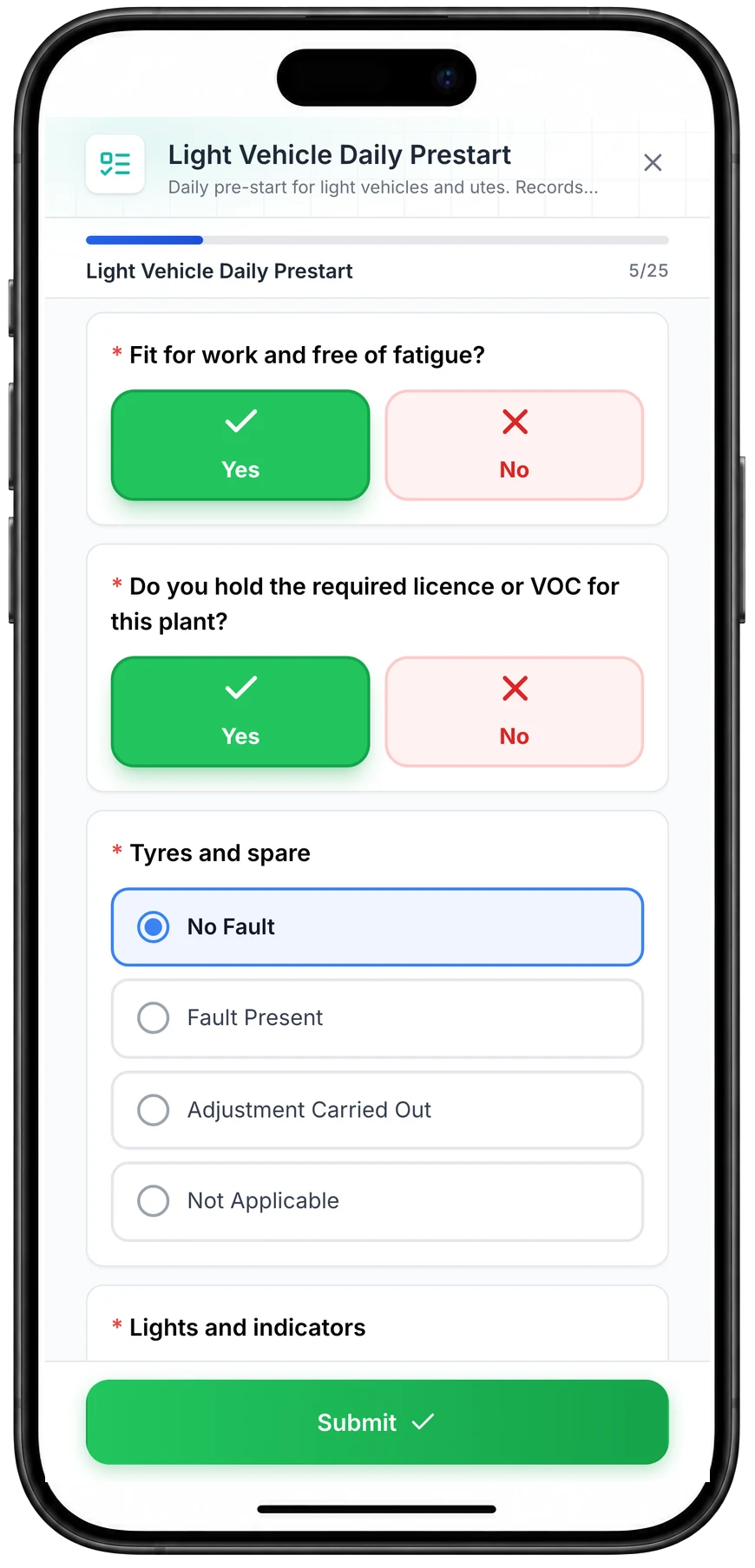
Run a vehicle pre-start on a phone
A daily pre-start for a ute, part-way through. Driver checks such as fitness for work and licence take one tap, and each vehicle check records No Fault, Fault Present, Adjustment Carried Out or Not Applicable.
MapTrack app · Demonstration data · Captured
About this screenshot
Captured at a 430 x 932 phone viewport in a demonstration workspace and shown in a phone frame; the form was closed without submitting.
Short answer
Teletrac Navman is an established fleet telematics vendor with a real Australian and New Zealand presence, offering AI video, GPS asset tracking, equipment utilisation, fleet maintenance and heavy-vehicle compliance reporting. MapTrack overlaps on asset tracking and AI dash cams but is built around the mixed-fleet jobsite: the excavator, the generator, the trailer and the tool crate alongside the vehicles.
Teletrac Navman is a credible ANZ fleet telematics incumbent with AI video and compliance reporting. MapTrack is the better fit when plant, machinery, tools and fleet have to share one operating record across pre-starts, maintenance, custody and cost, and when you want published hardware and software pricing. MapTrack covers tools, plant, trailers and vehicles on one record, from any phone, and holds Capterra’s Best Ease of Use award for 2026.
Which platform fits your GPS programme?
Use these buyer patterns to shortlist the right pilot. The answer changes depending on whether GPS is a standalone fleet layer or part of a wider jobsite operating system.
The jobsite operations team
Do you need GPS to feed run hours, pre-starts, maintenance, rate cards and asset costs?
Choose MapTrack. This is the strongest fit for plant, machinery, trailers, tools and fleet moving between sites and projects.
Learn more →The Teletrac Navman-standardised fleet
Are you already standardised on Teletrac Navman hardware, telematics or fleet workflows?
Stay close to Teletrac Navman if its existing ecosystem already solves your fleet problem. Then test whether it covers the plant, QR/BLE, pre-start, costing and maintenance workflows you need.
The mixed-asset contractor
Do you track excavators, trailers, generators, attachments, small tools and service vehicles together?
Choose MapTrack. Mixed tracking methods matter because not every asset justifies the same GPS hardware.
Learn more →The procurement team
Do you need transparent GPS hardware options and a simple software pricing model before a pilot?
Choose MapTrack first, then benchmark the quote against the incumbent. Compare device cost, data plans, implementation, user access and contract lock-in.
Learn more →MapTrack vs Teletrac Navman: commercial GPS comparison
Use this table to compare the location layer, jobsite workflows, maintenance triggers and commercial model.
| Criteria |  MapTrack |  Teletrac Navman |
|---|---|---|
| Commercial GPS coverage | ||
| Best for | Plant, machinery, tools, trailers and fleet across jobsites, with GPS tied to operations | Road fleets and equipment-heavy operations wanting telematics, AI video, equipment management and heavy-vehicle compliance reporting in one place(per Teletrac Navman, Oct 2026) |
| GPS hardware | YesTransparent industrial GPS tracker store plus compatible third-party/OEM feeds | YesFleet telematics devices, AI video hardware and GPS asset trackers(per Teletrac Navman, Jul 2026) |
| Unpowered assets | YesBattery GPS trackers for trailers, containers, generators, pumps and mobile plant | YesGPS Asset Tracking covers trailers, small powered tools and non-powered assets with battery-powered GPS trackers, plus geofencing, movement and dwell reporting and a recovery mode; confirm the trackers for your asset types(per Teletrac Navman GPS asset tracking, Oct 2026) |
| Geofencing | YesSite geofences drawn on every map in MapTrack, with entry and exit alerts in MapTrack Telematics | YesGeofences around depots, jobsites and customer locations with site-level views, plus alerts when an asset moves unexpectedly, leaves a site or sits idle(per Teletrac Navman GPS asset tracking, Oct 2026) |
| Tracking methods | YesGPS, BLE, QR, barcode and OEM telematics in one asset register | ?GPS telematics, AI video and asset trackers. BLE and QR custody on one record are not publicly positioned(per Teletrac Navman, Jul 2026) |
| Jobsite operations | ||
| Maintenance triggers | YesRuntime, odometer, fault-code, failed pre-start and schedule triggers create work orders | YesFleet Maintenance is a published product, and equipment tracking covers location, costs and maintenance schedules(per Teletrac Navman, Jul 2026) |
| Pre-starts and inspections | YesAsset-linked forms with photos, signatures, GPS stamps, offline mode and defect escalation | ?Digital pre-use inspections for equipment with instant failure notifications, alongside automated work order creation and assignment; photos, signatures, GPS stamps and offline use should be verified(per Teletrac Navman equipment management, Oct 2026) |
| Rate cards and job costing | YesTrack hire rates, internal charge-out, service cost and asset cost history by site/project | ?Jobsite cost reporting automates cost allocation and invoice reconciliation, and ownership cost analytics support replacement decisions; hire rate cards and chargeout are not publicly documented(per Teletrac Navman equipment management, Oct 2026) |
| Operator and driver identity | YesDriver/operator assignment, custody, audit trail and BLE-card-friendly field workflows | ?Equipment operator management covers licences, training and other requirements, and driver identity sits inside the fleet and Electronic Work Diary workflows; BLE site-card custody is not publicly documented(per Teletrac Navman operator safety, Oct 2026) |
| Commercial model and rollout | ||
| Pricing transparency | YesPublished software pricing path plus transparent GPS hardware store | ?No public price. A "Build Your Solution" configurator routes to a quote(per Teletrac Navman, Jul 2026) |
| Commercial model | YesPer-asset software pricing with unlimited users; GPS hardware chosen by asset class | Quote-led subscription assembled through a solution configurator(per Teletrac Navman, Jul 2026) |
| Region fit | YesAU/NZ-native with global use cases and a primary database hosted in AWS Sydney | YesDedicated Australian and New Zealand sites alongside US, UK and Mexico(per Teletrac Navman, Jul 2026) |
| Integrations | Yes150+ telematics, OEM, fleet and fuel-card data sources plus API/webhooks | YesOpen API on TN360 with a directory of partner integrations (for example JD Edwards, CMS Transport Systems F2020, FourKites, Command Alkon and GeoOp); verify every plant, OEM and finance workflow you need(per Teletrac Navman integrations, Oct 2026) |
See commercial GPS in the MapTrack workflow
Bring a real asset list, current GPS vendors and one jobsite workflow. We will map the right GPS, BLE, QR and OEM data mix.
- No credit card required
- Unlimited users
How to decide between them
Which is better for GPS across jobsites?
Teletrac Navman is fleet-first, with a separate equipment platform (TN360 ACM). MapTrack is stronger when location has to feed a mixed-asset register, cost ledger, pre-start evidence and maintenance plan.
A jobsite GPS platform has to do more than show dots on a map. It needs to understand which site, crew, project and cost centre an asset belongs to, whether that asset is inspected, and what should happen when the machine runs enough hours to need service.
How do hardware choices compare?
Both publish asset-tracking hardware. MapTrack additionally publishes its prices, and stays flexible across AI dashcams, GPS, BLE and QR on one record.
High-value machines, trailers and service vehicles often need different tracking methods. MapTrack lets teams combine hardwired GPS, battery GPS, BLE, QR labels, barcodes and OEM telematics instead of forcing every asset into one device model.
What happens after GPS data arrives?
Both do maintenance. MapTrack ties runtime, odometer and failed pre-starts to work orders on the same record as the camera and the cost history.
Location and meter data only become useful when they trigger action. MapTrack connects GPS, engine hours, odometer and fault-code feeds to pre-starts, defects, service intervals and work orders, with the evidence retained on the asset record.
Which model is easier to cost before a pilot?
MapTrack publishes hardware prices in a public store and a public software pricing page. Teletrac Navman pricing needs a configurator and a quote.
For commercial GPS, compare total cost: device purchase or rental, SIM/data plan, installation, software modules, user access, implementation, support and contract term. MapTrack separates hardware selection from the operating platform so buyers can model the rollout asset by asset.
What should a pilot prove?
Pilot a truck, an excavator, a trailer and a generator together, and check which platform still has a complete record for all four.
A good pilot should include powered and unpowered assets, at least two jobsite geofences, a pre-start form, one runtime or odometer maintenance trigger, one asset cost report and one field user who has to complete the workflow offline.
Verdict: MapTrack wins when GPS has to run the jobsite
Teletrac Navman can be a strong GPS or telematics choice. MapTrack is the better fit when plant, machinery, trailers, tools and fleet need to share one operating record across sites, inspections, maintenance and costs.
| Category | Winner |
|---|---|
| Commercial GPS hardware | Draw |
| Mixed plant, tools and fleet register | MapTrack |
| Pre-starts tied to GPS and assets, completed without signal | MapTrack |
| Runtime/odometer maintenance with tiered service plans | MapTrack |
| Rate cards and job costing with dry, wet or standby hire | MapTrack |
| Teletrac Navman ecosystem depth(per Teletrac Navman, Jul 2026) | Teletrac Navman |
| Public GPS hardware and software pricing path | MapTrack |
Pricing and total cost
MapTrack
MapTrack uses asset-based pricing with unlimited users, so operators, supervisors, mechanics and project managers can all use the system without per-seat friction.
GPS hardware is available through the public GPS tracker store, and software pricing is published on the pricing page.
Teletrac Navman
Teletrac Navman routes buyers through a "Build Your Solution" configurator to a quote, with no public price. Check hardware, AI video licensing, compliance modules, contract term, minimums, installation and data retention before signing, and confirm which obligations the compliance reporting actually covers.
Always compare hardware, SIM/data, installation, implementation, software modules, users and contract term before deciding.
Commercial GPS TCO checklist
Use the same cost categories for every vendor quote so the comparison is not just monthly software price.
Hardware and connectivity
- GPS device cost by asset class
- SIM, satellite or data-plan costs
- Installation and replacement labour
- Battery life and service interval assumptions
Software and users
- Software licence model
- Unlimited users versus per-seat pricing
- Modules required for maintenance, forms and reporting
- Contract length, minimums and cancellation terms
Workflow consolidation
- Separate tools still needed beside Teletrac Navman
- Pre-start and defect workflow coverage
- Rate-card and cost-reporting coverage
- Manual export/import work required for finance or maintenance
When to choose each platform
Choose MapTrack if you…
- You manage plant, machinery, trailers, tools and vehicles across jobsites.
- You need GPS to connect to pre-starts, work orders, run hours, rate cards and asset costs.
- You want transparent GPS hardware options and per-asset software pricing with unlimited users.
- You need QR, BLE, GPS and OEM telematics in one asset register.
- You need equipment bookings (Requests) with approvals, conflict checks and scan-to-check-out.
- You want tiered service plans on run hours, with work orders raised from meter readings.
- You want an AI form builder for pre-starts and inspections, with loaded forms that submit offline and sync after reconnection.
- You use barcode or Data Matrix labels as well as QR, scanned with the phone camera or a handheld scanner.
- You hire out equipment and need rate cards with daily, weekly and monthly rates (a Pro and Enterprise add-on).
- You want a cost ledger, budget vs actual and repair-or-replace for every asset (a Pro and Enterprise add-on).
- You run several divisions that each need their own assets and team access (a Pro and Enterprise add-on).
Consider Teletrac Navman if you…
- Your fleet is road-first and heavy-vehicle compliance reporting is a primary requirement.
- You want an established ANZ telematics vendor with local support.
- Electronic work diary, fuel tax credit and mass compliance reporting matter more to you than mixed-plant inspections and job costing.
Best Teletrac Navman alternatives for commercial GPS
Shortlist by workflow fit rather than brand size. The best choice depends on whether you need fleet telematics, construction IoT or a full jobsite asset operations layer.
- 1
MapTrack
Best when GPS needs to feed plant, machinery, pre-starts, maintenance, rate cards and costing.
- 2
Tenna
Strong construction-specific GPS and equipment tracking platform with proprietary hardware.
- 3
Teletrac Navman
Teletrac Navman covers fleet telematics, AI video review, GPS asset tracking, equipment utilisation, fleet and equipment maintenance and compliance tools (Electronic Work Diary, Fuel Tax Credits and Mass Manager on its Australian site; ELD, DVIR and IFTA on its US site), with dedicated Australian and New Zealand sites.
- 4
Geotab
Open telematics platform sold through resellers, with GO Anywhere asset trackers, inspections, work orders and maintenance scheduling on odometer and engine hours.
- 5
Samsara
Fleet and equipment IoT platform with dash cams, equipment tracking and its Connected Maintenance CMMS; its hardware pages list an operating area of the US, Canada, Mexico, the UK and the EU.
- 6
Trackunit
Construction telematics for equipment makers, rental companies and contractors, with Spot trackers for non-powered equipment, service triggers from engine hours and digital inspections launched in May 2026.
- 7
Kynection
Australian fleet and compliance system (KIM) with GPS asset tracking, an Electronic Work Diary for heavy vehicles and AI dash cams.
- 8
Verizon Connect
Fleet tracking built on Reveal; in Australia, Geotab now runs Verizon Connect’s commercial operations and is moving Reveal and Fleet customers to MyGeotab by the end of March 2027.
- 9
Motive
AI dash cams and fleet management, with a Maintenance product added in August 2026; its locale sites cover the US, Mexico, Canada and the UK.
- 10
Fleet Complete
Connected fleet and asset tracking, now under the Powerfleet brand, with AI dash cams, inspections and maintenance scheduling, operating in North America, Europe, Mexico and Australia.
- 11
EROAD
Fleet tracking, safety and compliance for Australian trucks and utes, with Clarity dash cams, pre-start checks and Etrack Where tags for tools and bins.
What our customers say
“Thanks to MapTrack we know exactly where our gear is. Hire costs reduced 25-35%.”

Denis Slaviero
Operations Manager, Hacer Group
“We used to spend 1-2 days a week tracking equipment. MapTrack gave us full visibility across every site.”

Steve McAllister
Site Manager, Saunders International
“MapTrack streamlines tracking and asset servicing across mine shutdowns. Simple, reliable and effective.”

Gordon Stennings
Maintenance Storeman, Mineral Resources
How to move from Teletrac Navman or a standalone GPS tool
You do not need to retag every asset at once. Start with the assets where location, downtime and cost leakage hurt most.
Map assets and tracking methods
Classify plant, trailers, generators, service vehicles, attachments and tools by value, movement pattern and whether they need GPS, BLE, QR or OEM telematics.
Pilot the real workflow
Run a small GPS pilot with live geofences, one pre-start, one runtime maintenance trigger, one operator assignment and one cost report.
Compare Teletrac Navman data coverage
Check which data should stay in the incumbent telemetry platform, which should flow into MapTrack and which separate spreadsheets or forms can be retired.
Roll out by asset class
Deploy the right hardware and forms by asset type, then train site teams on scan, inspect, allocate, maintain and cost workflows.
What to verify in a GPS pilot
A commercial GPS pilot should prove the operational workflow, not just whether a tracker reports a dot on a map.
- ✓MapTrack: Verify geofences, pre-starts, runtime/odometer work orders, rate cards, cost reporting, QR/BLE fallback and offline field workflows.
- ✓Teletrac Navman: Verify Teletrac Navman hardware fit, contract terms, region support, API/integration scope, pre-start depth, maintenance workflow depth and whether job costing needs another system.
Methodology and sources
Updated Oct 2026 from the Teletrac Navman public website, plus MapTrack product documentation and public pricing and store pages.
Where a Teletrac Navman capability is not documented on the pages reviewed it is marked unknown rather than absent. Product availability and packaging differ between its regional sites; verify against the Australian or New Zealand site for local terms.
Spotted something out of date or incorrect? Email corrections@maptrack.com and we will review and update this page.
MapTrack vs Teletrac Navman FAQs
More comparisons
- MapTrack vs Asset Panda
- MapTrack vs SafetyCulture
- MapTrack vs Hilti ON!Track
- MapTrack vs Milwaukee ONE-KEY
- MapTrack vs MaintainX
- MapTrack vs Fleetio
- MapTrack vs ToolSense
- MapTrack vs Tenna
- MapTrack vs Samsara
- MapTrack vs Geotab
- MapTrack vs Verizon Connect
- MapTrack vs Trackunit
- MapTrack vs ToolWatch
- MapTrack vs spreadsheets
- MapTrack vs Sortly
- MapTrack vs EZOfficeInventory
- MapTrack vs Limble
- MapTrack vs GoCodes
- MapTrack vs AssetTiger
- MapTrack vs Cheqroom
- MapTrack vs ShareMyToolbox
- MapTrack vs Gearbelt
- MapTrack vs Fiix
- MapTrack vs GoAudits
- MapTrack vs Sitemate
- MapTrack vs GoFMX
- MapTrack vs IBM Maximo
- MapTrack vs Kynection
About the author

Co-Founder & GM of Operations
Lachlan leads operations at MapTrack, bringing 10+ years of enterprise technology experience across mining, construction and heavy industry. Before MapTrack, he held senior roles at Workato (integration and automation) and AppDynamics/Cisco (application performance), working directly with ASX-listed organisations to modernise their technology stacks. His deep understanding of field operations and blue-collar workflows shapes how MapTrack solves real problems for asset-intensive teams.
View LinkedIn profile →Free templates for this workflow
Whichever platform you choose, these are free to download and use. No account needed.
Build a commercial GPS layer that runs the jobsite
MapTrack connects GPS, BLE, QR and OEM telematics to pre-starts, maintenance, run hours, rate cards and asset costs.
4.9 on G2 · 5.0 on Capterra, GetApp & Software Advice
- No credit card required
- Unlimited users