
9 best asset tracking software in Australia (2026)
Comparing asset tracking software for Australian sites? We evaluated 9 platforms on tracking methods, maintenance, pre-starts and compliance, offline use, pricing and Australian presence.

For Australian teams tracking a mix of tools, plant, equipment and vehicles across sites, the best asset tracking software keeps them in one register with QR labels, GPS where it matters, offline pre-starts and maintenance. MapTrack (built in Brisbane) fits that brief with per-asset pricing and unlimited users. Mitti (formerly SafetyCulture) suits inspection-led teams, Teletrac Navman vehicle-led fleets, Assignar crew and plant scheduling on civil jobs, and Hilti ON!Track Hilti-heavy tool fleets.
Key takeaways
- Most Australian operators need one register for tools, plant, equipment and vehicles, not a vehicle-only telematics tool plus a spreadsheet.
- Remote sites make offline pre-starts and inspections a requirement: run a demo with the phone in flight mode.
- Pricing models differ: per asset with unlimited users (MapTrack), per user (MaintainX), per user or per location (Mitti, formerly SafetyCulture) or unpublished (Teletrac Navman, Assignar, Kynection’s KIM rate card, Track'em).
- Several options are Australian: MapTrack (Brisbane), Kynection (Victoria), Track'em (Perth) and Hardcat, with Assignar and Teletrac Navman running Australian offices.
- On data hosting, ask where every sub-processor runs, not only the main database.
TL;DR
Top 3 picks at a glance
 MapTrack
Australian-built register for tools, equipment, plant and vehicles with QR labels, Bluetooth tags, GPS, AI dash cams, offline pre-starts, equipment bookings and maintenance in one system.
Jump to review ↓ Mitti (formerly SafetyCulture)
Inspection and audit powerhouse with 10,000+ templates and a free tier, priced per seat..
Jump to review ↓ Teletrac Navman
Fleet telematics platform (TN360) covering vehicles and equipment with GPS, maintenance, electronic work diaries and video telematics.
Jump to review ↓Trusted by construction, mining and field service teams













Quick verdict: best asset tracking software in Australia by category
Our picks by use case. Click any card to jump to the full review.

MapTrack
Best for mixed tools, plant and vehicles in one platform (built in Brisbane)

Mitti (formerly SafetyCulture)
Best for inspections and safety compliance

Teletrac Navman
Best for vehicle-led fleets that also track equipment

Kynection
Best for an all-in-one operations suite (Victoria-based)
Assignar
Best for scheduling crews and plant on civil jobs

Hilti ON!Track
Best for Hilti-centric tool fleets

MaintainX
Best for maintenance-first teams

Asset Panda
Best for customisable asset workflows
Track'em
Best for shutdown and major-project resource tracking
In this guide
How we evaluated these platforms
We assessed each platform on the criteria that matter to Australian field operations: how assets are identified and located (QR, GPS, Bluetooth, telematics), maintenance, pre-starts and compliance records, mobile offline use, pricing model, trial, and Australian presence. Competitor details come from each vendor's own website as of Sep 2026; where a capability is not stated publicly we say so rather than guess.
- Software Advice AU: asset tracking software
- Capterra AU: asset tracking software
- Teletrac Navman AU website
- Kynection website
- Assignar website
- Track'em website
- Hardcat website
This guide is published by MapTrack (4.9/5 from 15 reviews on G2 and 5.0/5 from 17 on Capterra, Sep 2026). We include ourselves alongside other options and do not claim to be the best fit for every operation. Shortlist two or three and trial them on real jobs.
Spotted something out of date or incorrect? Email corrections@maptrack.com and we will review and update this page.
Asset tracking software comparison (Australia)
Nine platforms side by side. Verify current features and pricing with each vendor.
| Software | Best for | Tracking | Reservations | Maintenance | Compliance | Offline | Pricing |
|---|---|---|---|---|---|---|---|
| MapTrack | Mixed assets, one platform (AU-built) | QR, GPS, Bluetooth tags, telematics, dash cams | Yes | Yes | Yes | Yes | Per asset from $1/mo; unlimited users |
| Mitti (formerly SafetyCulture) | Inspections and safety | QR, barcode, GPS | Not publicly confirmed | Yes | Yes | Yes | Per seat; from ~$24/mo |
| Teletrac Navman | Vehicle telematics + equipment | GPS, telematics(per Teletrac Navman AU website, Sep 2026) | Not publicly confirmed | Yes | Yes | Not publicly confirmed | Not published |
 Kynection Kynection | All-in-one ops suite | GPS; dashcams(per Kynection website, Sep 2026) | ? | Yes | Yes | Yes | KIM rate card not published; camera subscriptions priced online |
| Assignar | Construction scheduling | Not publicly confirmed(per Assignar website, Sep 2026) | Yes | Not publicly confirmed | Yes | Not publicly confirmed | Not published |
 Hilti ON!Track Hilti ON!Track | Hilti tool fleets | Barcode, BLE tags, NFC, GPS (AI T400 Geo) | ? | Yes | Yes | ? | Quote only |
 MaintainX MaintainX | Maintenance-first (CMMS) | QR, barcode | Not publicly confirmed | Yes | Yes | Yes | Per user; from ~$20/mo |
 Asset Panda Asset Panda | Customisable workflows | Barcode, QR | Yes | Yes | Yes | Yes | Quote-based; verify in a pilot |
| Track'em | Shutdowns and major projects | Multiple (not specified)(per Track'em website, Sep 2026) | Not publicly confirmed | Not publicly confirmed | Not publicly confirmed | Not publicly confirmed | Not published; demo |
Yes ConfirmedNot available per vendor sources Not available? Verify with vendorNot publicly confirmed Not publicly confirmed
Asset tracking software reviews
What each platform does well, where it falls short, and who it suits in Australia.

MapTrack
Best for mixed tools, plant and vehicles in one platform (built in Brisbane)Australian-built register for tools, equipment, plant and vehicles with QR labels, Bluetooth tags, GPS, AI dash cams, offline pre-starts, equipment bookings and maintenance in one system. Per-asset pricing with unlimited users. One platform for every asset, and Capterra Best Ease of Use 2026.
Pricing: Per asset from $1/mo; unlimited users · Trial: Free trial, no credit card
What you get in one platform
- Every asset, one record
- Tools on QR or barcode labels and Bluetooth tags, plant on GPS trackers, vehicles with GPS and AI dash cams, sites with boundaries: custody, inspections, maintenance and costs on the same record.
- Maintenance that runs on real usage
- Run hours and kilometres from trackers, dash cams or manual readings feed tiered service plans and next-service forecasts, every asset gets a 0 to 100 maintenance health score, and one work order can cover many assets, each with its own pass or fail.
- Easy for crews
- Pre-starts and inspections work without signal, on any phone, with shared-device PINs, single sign-on and AI help to build forms and add assets from a photo. Capterra Best Ease of Use 2026.
- Hardware and software from one vendor
- GPS trackers, AI dash cams with built-in GPS, Bluetooth tags and labels at published prices, managed in the same app, plus LightMetrics dash cam accounts and 150+ telematics, fleet and fuel-card data sources.
- Simple to buy and run
- Per-asset pricing with unlimited users, 24/7 support and month-to-month plans. Capterra Best Value 2026.
The full capability list (35)
- One register for tools, plant, equipment and vehicles
- Custody: who has what, and where
- Site boundaries on the map
- Live tracking and alerts in MapTrack Telematics
- Rate cards (Pro and Enterprise add-on)
- Finance dashboards (Pro and Enterprise add-on)
- Divisions (Pro and Enterprise add-on)
- Run hours and km from trackers, cameras, feeds or readings
- Work orders raised from meters, run hours and data feeds
- Tiered service plans
- Next-service forecasts from usage
- Stale-reading flags
- Maintenance health score
- Service board and due-soon emails
- One work order across many assets
- Batch work orders and bulk scan logging
- Labour, parts and external costs on every service
- Failed checks raise work orders by rule
- Parts and inventory by location and bin
- Offline pre-starts and inspections
- Mobile web app (Android, iPhone, iPad)
- Shared-device PINs
- SAML 2.0 single sign-on (SSO)
- AI form builder
- AI asset creation from a photo
- Equipment bookings (Requests)
- GPS trackers managed in the app
- AI dash cam video in the app
- AI dash cams with built-in GPS
- LightMetrics dash cam connection
- Bluetooth tags
- QR, barcode and Data Matrix scanning
- OEM feeds under Connections
- 150+ data sources
- Engine hours from 68 integrations
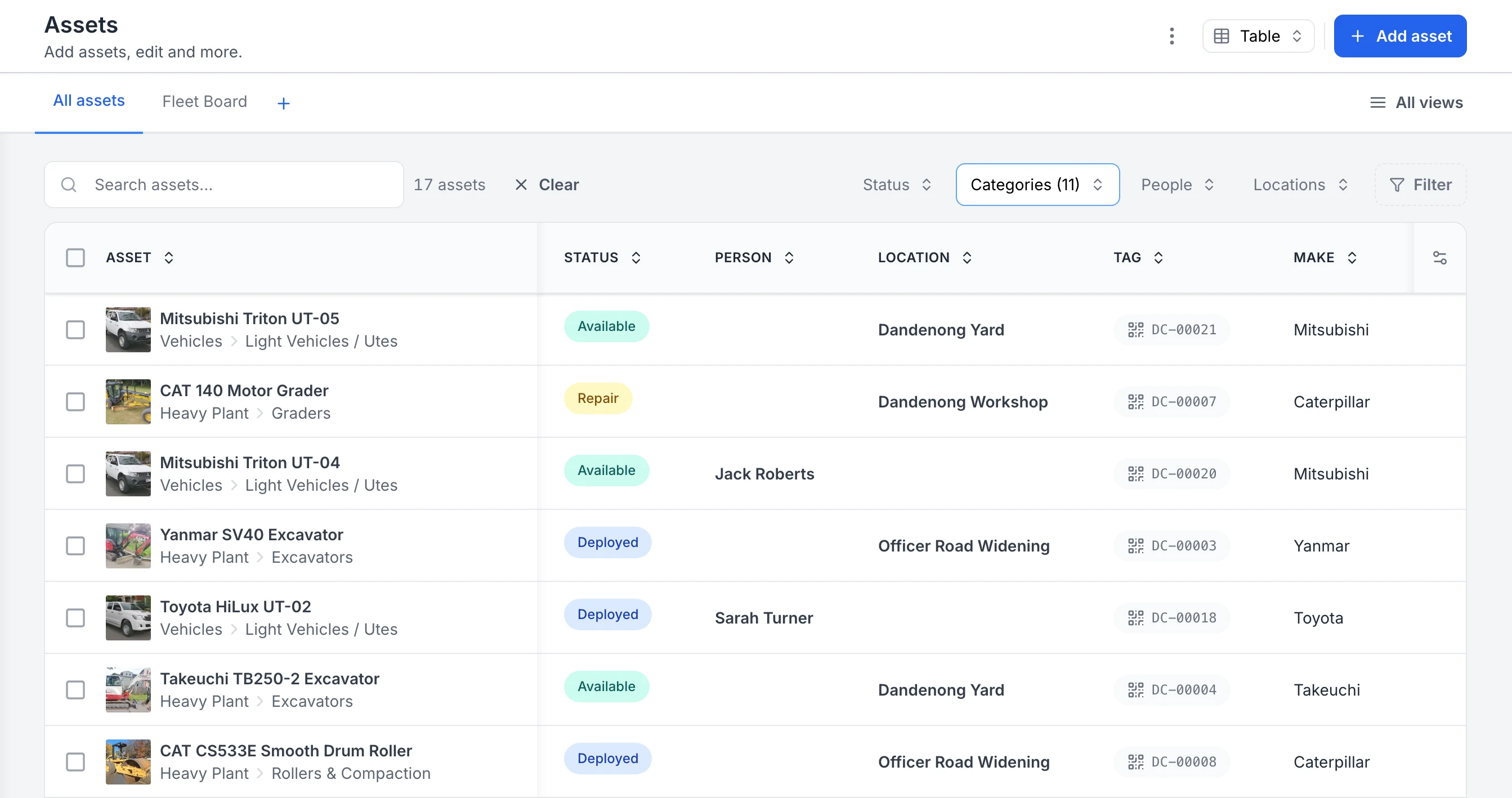
See every asset, its status and who or where it is with
The register filtered to heavy plant and vehicles. Each row shows the photo and category, whether the asset is available, deployed or in for repair, the person or site it is with, and its QR tag ID. Two utes are with named crew members; the rest are at the yard, the workshop or a project site.
MapTrack app · Demonstration data · Captured
About this screenshot
Captured in a demonstration workspace. The All assets view is filtered to the Heavy Plant and Vehicles categories and shows the Status, Person, Location, Tag and Make columns.
MapTrack is built in Brisbane for contractors and operators running a mix of tools, equipment, plant and vehicles across sites. Every asset carries its own QR label, its location or who has it, its pre-start and inspection history, and its maintenance and costs. Pre-starts and inspections complete without reception and sync when the phone is back in range. MapTrack is one platform for every asset a field business runs: tools, plant, trailers and vehicles, tracked, inspected, booked and maintained on one record, from any phone. Running a civil business? See asset tracking for civil contractors: pre starts on every machine and services on the hours.
Priced per asset with unlimited users, so the whole crew can scan, inspect and report without adding seats. GPS trackers, Bluetooth tags and AI dash cams are available as add-ons, with tracker health and dash cam video in the app, plus OEM and third-party telematics integrations (engine hours from 68 of them). The primary database and application are hosted in Sydney. Plans are month-to-month, with 24/7 support.
Key features
- ✓One platform for tools, plant, trailers and vehicles
- ✓One register for tools, equipment, plant and vehicles
- ✓QR asset labels that open the record from a phone camera
- ✓Offline pre-starts and inspections from ready-made templates
- ✓Work orders: one order across many assets, each with its own outcome
- ✓Custody and location: who has what, and where
- ✓Test and tag records, including bulk updates after a testing run
- ✓GPS trackers, Bluetooth tags and AI dash cams as add-ons, shown in the app
- ✓Unlimited users and a public REST API; SAML SSO on Enterprise
- ✓GPS trackers managed in the app: battery, signal and estimated run hours
- ✓Site geofences on every map; entry and exit alerts in MapTrack Telematics
- ✓QR, barcode and Data Matrix scanning by phone camera or handheld scanner
- ✓Tiered service plans on run hours and km
- ✓Parts and stock by location and bin
- ✓AI form builder for pre-starts and inspections
- ✓Rate cards: daily, weekly and monthly hire rates (dry, wet or standby) by category or asset; Pro and Enterprise add-on
- ✓Finance: cost ledger, budget vs actual, depreciation and repair-or-replace; Pro and Enterprise add-on
- ✓Divisions: each division’s own assets and team access; Pro and Enterprise add-on
- ✓Equipment bookings: book ahead, approve, then scan to check out
- ✓AI dash cam live view and event clips in the app

Mitti (formerly SafetyCulture)
Best for inspections and safety complianceInspection and audit powerhouse with 10,000+ templates and a free tier, priced per seat.
Pricing: Per seat; from ~$24/mo · Trial: Free tier (10 users)
Mitti (formerly SafetyCulture and iAuditor) is a mobile-first operations platform for inspections, audits, checklists and training. Used by 80,000 organisations with over 1 billion checks completed. The Assets module (launched 2023) adds asset management, pre-starts and work orders.
Strong for teams where inspections, safety and training are the priority. The free tier (up to 10 users) lowers the barrier to entry. Per-seat pricing from $24/mo adds up when every operator on every site needs access.
Key features
- ✓Inspections, audits and checklists with 10,000+ templates
- ✓Asset management with pre-starts and work orders
- ✓Training (SC Training LMS) built in
- ✓AI template builder for custom forms
- ✓Free tier (up to 10 users, 5 templates)
- ✓Full offline support; iOS and Android

Teletrac Navman
Best for vehicle-led fleets that also track equipmentFleet telematics platform (TN360) covering vehicles and equipment with GPS, maintenance, electronic work diaries and video telematics. Pricing is not published (as of Sep 2026).
Pricing: Not published · Trial: Not stated

Kynection
Best for an all-in-one operations suite (Victoria-based)Australian operations platform spanning asset and equipment management, GPS tracking, job management and QHSE. A KIM rate card is not published on kynection.com.au, though its AI camera subscriptions and hardware are priced publicly (as of Oct 2026).
Pricing: KIM rate card not published; camera subscriptions priced online · Trial: Free demo
Kynection, based in Seaford, Victoria, positions its platform as one system to manage your business, for transport and logistics, construction, manufacturing and field services. Modules cover asset and equipment management with maintenance, GPS tracking, job and task management, QHSE (risk, audits and safety management) and AI dashcams with video telematics.
A fit if you want one vendor across fleet, jobs and safety. Its asset module documents an offline mode and equipment allocation to jobs and projects; equipment check-in and check-out are not stated on its website, so confirm that in a demo.
Key features
- ✓Asset and equipment management with maintenance
- ✓GPS tracking; AI dashcams and video telematics
- ✓Job and task management
- ✓QHSE: risk, audits and safety management
- ✓iOS and Android apps
Assignar
Best for scheduling crews and plant on civil jobsConstruction operations platform for civil contractors that schedules crews and equipment against jobs, with field forms and timesheets. Asset-level tracking and maintenance are not described on its website; pricing is not published (as of Sep 2026).
Pricing: Not published · Trial: Not stated
Assignar describes itself as a construction operations margin control platform for civil contractors, used by more than 800 customers across asphalt, concrete, earthworks, rail, crane and traffic management. It schedules qualified people and available equipment against the same job, and field teams submit timesheets and custom compliance forms from a mobile app. It has offices in Australia and New Zealand and in North America.
Strong where the problem is allocating crews and plant to jobs and costing them. Asset-level tracking (GPS, QR) and a maintenance module are not described on its website; confirm both in a demo if you need them.
Key features
- ✓Drag-and-drop crew and equipment scheduling
- ✓Timesheets and job costing
- ✓Custom field forms for compliance
- ✓Mobile app for field teams
- ✓Offices in ANZ and North America

Hilti ON!Track
Best for Hilti-centric tool fleetsSolid construction tool tracking if your fleet is Hilti-heavy - Hilti-supplied tracking hardware can limit mixed-brand teams.
Pricing: Quote only · Trial: Free consultation
Hilti ON!Track is a cloud-based asset and inventory management platform for construction. Tracks tools, equipment, supplies and consumables (any brand) via barcode, Bluetooth tags and Hilti gateways. Job costing integration with Trimble Viewpoint Vista and Spectrum, listed for Canada and the United States.
Small-tool BLE tracking uses Hilti’s own tags and gateways for warehouse, vehicle and jobsite “last-seen” visibility, and Hilti also ships the AI T400 Geo GPS tag with vehicle and heavy-equipment gateways for machinery and vehicle location. Quote-only pricing and hardware costs (tags, gateways) add complexity. Free productivity analysis and on-site implementation support included.
Key features
- ✓Barcode, BLE tag and AI T400 Geo GPS tracking (Hilti hardware)
- ✓Van, warehouse and jobsite gateways
- ✓Maintenance scheduling and service history
- ✓Safety certifications and training records
- ✓Job costing via Trimble Viewpoint
- ✓On-site implementation and tagging support

MaintainX
Best for maintenance-first teamsTop-rated CMMS with strong work orders and mobile UX, priced per user rather than per asset.
Pricing: Per user; from ~$20/mo · Trial: Free Basic tier
MaintainX is an AI-powered CMMS for work orders, preventive and predictive maintenance, parts inventory and checklists. Rated #1 CMMS on G2 (Winter 2026) with strong mobile and offline support, it is popular with frontline maintenance teams in manufacturing, facilities and fleet.
A free Basic tier with unlimited requester accounts drives adoption. Best fit for maintenance-heavy operations where work orders and procedures are the priority. Less suited to teams that want per-asset pricing with unlimited users.
Key features
- ✓Work orders with preventive and meter-based triggers
- ✓Checklists, procedures and corrective actions
- ✓Parts inventory and purchase orders
- ✓Mobile-first with full offline support
- ✓Free Basic tier; unlimited requester accounts
- ✓Integrations: Samsara, Titan GPS and more

Asset Panda
Best for customisable asset workflowsHighly configurable asset management with Gantt-style reservations and GPS at scan only. Asset Panda Pro added offline in Sept 2025; pricing is quote-based (as of Jun 2026).
Pricing: Quote-based; verify in a pilot · Trial: Free 7-day trial
Asset Panda offers configurable asset and inventory tracking with barcode/QR scanning, customisable workflows and reservations with Gantt views. Serving 10,000+ organisations since 2012 across 60+ countries, including Amazon, in many industries.
Strong customisation options for multi-team operations, IT/education/healthcare asset checkout and request-fulfilment workflows. Asset Panda Pro (Sept 2025) added full mobile offline for all customers; verify offline depth in a pilot. GPS at scan only (not live tracking) may limit fit for field-heavy teams. Pricing is quote-based (not publicly listed as of Jun 2026; verify in a pilot).
Key features
- ✓Configurable workflows and custom fields
- ✓Barcode/QR scanning with audit trails
- ✓Reservations with Gantt view and approvals
- ✓Work orders and preventive maintenance
- ✓Custom forms and document storage
- ✓Integrations: Zendesk, JIRA, Slack and more
Track'em
Best for shutdown and major-project resource trackingPerth-based platform for tracking the resources on construction, shutdown, turnaround and maintenance work in mining and oil and gas. Tracking technologies and pricing are not detailed publicly (as of Sep 2026).
Pricing: Not published; demo · Trial: Demo on request
Track'em describes its platform as a way to track every resource needed to get construction, shutdown, turnaround and maintenance work done on time and on budget, for construction, engineering, mining and oil and gas. It is based in Perth, with a North American office in Houston, and says it integrates with multiple tracking technologies.
Worth a look for large projects and shutdowns where materials and resources move through a site. The website does not specify tracking technologies, mobile offline or a maintenance module; confirm them in a demo.
Key features
- ✓Resource tracking for construction and shutdowns
- ✓Integrates multiple tracking technologies
- ✓Workforce tracking
- ✓Mining, engineering, oil and gas focus
- ✓Perth head office; Houston office
Also worth considering
These did not make our nine but may suit specific needs:
- •Hardcat: Australian-owned enterprise asset management suite with barcode and RFID tracking, maintenance, audit and compliance modules. Serves defence, emergency services, law enforcement, government, mining and education. Pricing not published (as of Sep 2026).
- •Gearbelt (Sitemate): QR-code tool and equipment tracking from Sitemate, the Australian maker of Dashpivot. Native live GPS not publicly confirmed; check how it links to Sitemate's forms products.
- •ShareMyToolbox: Simple loan, borrow and transfer tracking for construction tools, with a 14-day free trial. Per-user pricing from US$100 a month; US construction focus.
- •Sortly: Visual, photo-led inventory app for small businesses tracking supplies, tools and equipment, with barcode and QR scanning and offline mobile access on every plan. Free for 100 items and one user; Advanced is US$49 a month on monthly billing for 500 items and two users. Where MapTrack goes further: GPS trackers and Bluetooth tags in the same app, maintenance on run hours with tiered service plans, and per-asset pricing with unlimited users.
- •GoCodes: QR tracking with optional GPS trackers and Bluetooth beacons, for trades and industrial teams, from a US company based in Minnesota. Annual plans start at US$500 for 200 assets and three users, with API access and offline mode sold as add-ons on most plans. Where MapTrack goes further: pre-starts and inspections that work without signal, maintenance on run hours with tiered service plans, and per-asset pricing with unlimited users.
- •EZO (formerly EZOfficeInventory): Equipment and asset management (now EZO EAM) with check-out, reservations and QR or barcode labels, plus RFID, a request portal and GPS integrations (Samsara, Trackunit) on higher plans. A strong fit where many staff need access: every plan includes unlimited users (fair use), priced in US dollars by item count. Where MapTrack goes further: pre-starts and inspections that work without signal, and maintenance on run hours with tiered service plans.
- •AssetTiger: Low-cost barcode and QR asset register from the team behind MyAssetTag, used by schools, IT teams and charities, with an iOS and Android app that works offline. A 30-day free trial covers 250 assets; paid plans start at US$20 a month for 500 assets with unlimited users. Where MapTrack goes further: GPS trackers and Bluetooth tags in the same app, and maintenance on run hours with tiered service plans.
- •Snipe-IT: Open-source (AGPL-3.0) IT asset management for teams tracking laptops, software licences and accessories, with check-in, check-out and QR code labels. Self-hosting is free; hosted plans from US$39.99 a month include unlimited users and assets, with Sydney hosting available. Where MapTrack goes further: one record per asset across tools, plant, trailers and vehicles, GPS trackers and Bluetooth tags in the same app, and pre-starts and inspections that work without signal.
Built in Brisbane for Australian sites
One register for tools, plant, equipment and vehicles, with offline pre-starts and per-asset pricing. Start a free trial. No credit card required.
- No credit card required
- Unlimited users
What Australian teams should check before choosing
Australian operations put a few specific demands on asset tracking software. Test each one in a demo rather than taking it on trust.
- Offline on remote sites. Pre-starts and inspections should complete without reception and sync later. That matters most on mine sites and remote civil jobs.
- Evidence against the asset. Each pre-start, inspection and defect should be recorded on that machine’s record, so WHS evidence is one search away.
- Test and tag in the same record. If you manage electrical equipment, keep AS/NZS 3760 results with the rest of the asset history. See test and tag in MapTrack. Running an electrical business? See test gear and tool tracking for electrical contractors.
- Servicing on run hours. Plant is serviced on hours, not only calendar dates; check the system can raise services from meter readings. See maintenance.
- Who has what, and where. Custody and location should be visible for every tool, not only vehicles with trackers. See how construction asset tracking shows who's got each tool on every site.
- Local fit. Pricing in Australian dollars, support in Australian hours, and a clear answer on where every part of the service is hosted.
How much does asset tracking software cost in Australia?
There are three common models. Per-asset pricing with unlimited users suits large crews; per-user pricing suits small teams with many assets; quote-based pricing is common for enterprise and telematics platforms. GPS trackers and tags are usually separate hardware.
MapTrack is priced per asset: tools and equipment from $1 per asset per month, and fleet, plant and heavy machinery from $12 per machine per month on Machine Plans (billed annually, with a GPS tracker included from $27), with unlimited users on every plan and a free trial with no credit card. See pricing or the Australian cost guide.
Asset tracking vs fleet management software
Fleet management software centres on vehicles: telematics, fuel, drivers and heavy-vehicle compliance. Asset tracking software covers everything you own, from hand tools to plant. If vehicles are the whole story, compare the best fleet management software in Australia; if you also run plant and tools, the broader register usually saves a second system.
Choosing asset tracking software in Australia
Start from what you actually track and where your crews work. If it is a mix of tools, plant and vehicles across remote sites, prioritise one register, offline pre-starts and maintenance on the same record, then compare pricing models on your real asset count. MapTrack covers asset tracking, pre-starts and maintenance in one system; a demo shows how it handles your own assets.
Frequently asked questions
Related software guides
- Best asset tracking software 2026
- Best asset tag suppliers Australia
- Best tool tracking software 2026
- Best CMMS for equipment 2026
- Best equipment management software 2026
- Best plant management software
- Best pre-start inspection software
- Best fleet management software Australia
- Best asset management software 2026
- Best IT asset management software 2026
- Best maintenance planning software 2026
- Best asset inspection software 2026
- Best construction equipment tracking software
- Best commercial GPS tracking software
- Best fuel management software 2026
- Best safety management software 2026
- Best health and safety software 2026
About the author

Co-Founder & GM of Operations
Lachlan leads operations at MapTrack, bringing 10+ years of enterprise technology experience across mining, construction and heavy industry. Before MapTrack, he held senior roles at Workato (integration and automation) and AppDynamics/Cisco (application performance), working directly with ASX-listed organisations to modernise their technology stacks. His deep understanding of field operations and blue-collar workflows shapes how MapTrack solves real problems for asset-intensive teams.
View LinkedIn profile →Track every tool, machine and vehicle in one place
Per-asset pricing with unlimited users. Free trial, no credit card.
4.9 on G2 · 5.0 on Capterra, GetApp & Software Advice
- No credit card required
- Unlimited users
See pricing · How asset tracking works · Test and tag in MapTrack