 vs
vs
A Geotab alternative for tools, plant and vehicles
If you’re comparing Geotab alternatives, start with how your equipment gets used. MapTrack brings tracking, bookings, custody, pre-starts and maintenance together for the tools, machines, trailers and vehicles moving between your crews.
MapTrack brings tools, plant, trailers and vehicles into one platform. Track them with QR, barcode and Data Matrix labels, Bluetooth tags, GPS trackers and AI dash cams, then keep their bookings, inspections and maintenance on the asset record.

Choose MapTrack when you want equipment bookings, custody, inspections and maintenance in one platform across a mixed asset list. Geotab also offers mixed-asset tracking, inspections, work orders and AI video, so the decision needs a workflow demonstration. If your Geotab setup is working well, scope a MapTrack integration alongside it before replacing hardware.
Prepared by MapTrack from the linked official product pages, checked on 20 October 2026. This is a workflow comparison, not a hands-on test of the other platform. Hardware, features and commercial terms vary by account, plan and region.
Trusted by construction, mining and field service teams














The short answer
- •MapTrack connects the equipment record to Requests, check-out and return, pre-starts, service plans and multi-asset work orders. Per-asset pricing includes unlimited users.
- •Geotab documents asset tracking, work orders and AI video. Its broader asset-inspection release note remains beta-labelled. Compare the workflow available to your account.
- •Keeping Geotab is an option. MapTrack publishes a Geotab integration; scope the data, setup and commercial requirements for your account.
- •Rate cards, finance and divisions are available now as add-ons on Pro and Enterprise only. Each division has its own assets and team access, while account owners can see across divisions.
What MapTrack covers in one platform
- Every asset, one record
- Tools on QR or barcode labels and Bluetooth tags, plant on GPS trackers, vehicles with GPS and AI dash cams, sites with boundaries: custody, inspections, maintenance and costs on the same record.
- Maintenance that runs on real usage
- Run hours and kilometres from trackers, dash cams or manual readings feed tiered service plans and next-service forecasts, every asset gets a 0 to 100 maintenance health score, and one work order can cover many assets, each with its own pass or fail.
- Easy for crews
- Pre-starts and inspections work without signal, on any phone, with shared-device PINs, single sign-on and AI help to build forms and add assets from a photo. Capterra Best Ease of Use 2026.
- Hardware and software from one vendor
- GPS trackers, AI dash cams with built-in GPS, Bluetooth tags and labels at published prices, managed in the same app, plus LightMetrics dash cam accounts and 150+ telematics, fleet and fuel-card data sources.
- Simple to buy and run
- Per-asset pricing with unlimited users, 24/7 support and month-to-month plans. Capterra Best Value 2026.
The full capability list (35)
- One register for tools, plant, equipment and vehicles
- Custody: who has what, and where
- Site boundaries on the map
- Live tracking and alerts in MapTrack Telematics
- Rate cards (Pro and Enterprise add-on)
- Finance dashboards (Pro and Enterprise add-on)
- Divisions (Pro and Enterprise add-on)
- Run hours and km from trackers, cameras, feeds or readings
- Work orders raised from meters, run hours and data feeds
- Tiered service plans
- Next-service forecasts from usage
- Stale-reading flags
- Maintenance health score
- Service board and due-soon emails
- One work order across many assets
- Batch work orders and bulk scan logging
- Labour, parts and external costs on every service
- Failed checks raise work orders by rule
- Parts and inventory by location and bin
- Offline pre-starts and inspections
- Mobile web app (Android, iPhone, iPad)
- Shared-device PINs
- SAML 2.0 single sign-on (SSO)
- AI form builder
- AI asset creation from a photo
- Equipment bookings (Requests)
- GPS trackers managed in the app
- AI dash cam video in the app
- AI dash cams with built-in GPS
- LightMetrics dash cam connection
- Bluetooth tags
- QR, barcode and Data Matrix scanning
- OEM feeds under Connections
- 150+ data sources
- Engine hours from 68 integrations
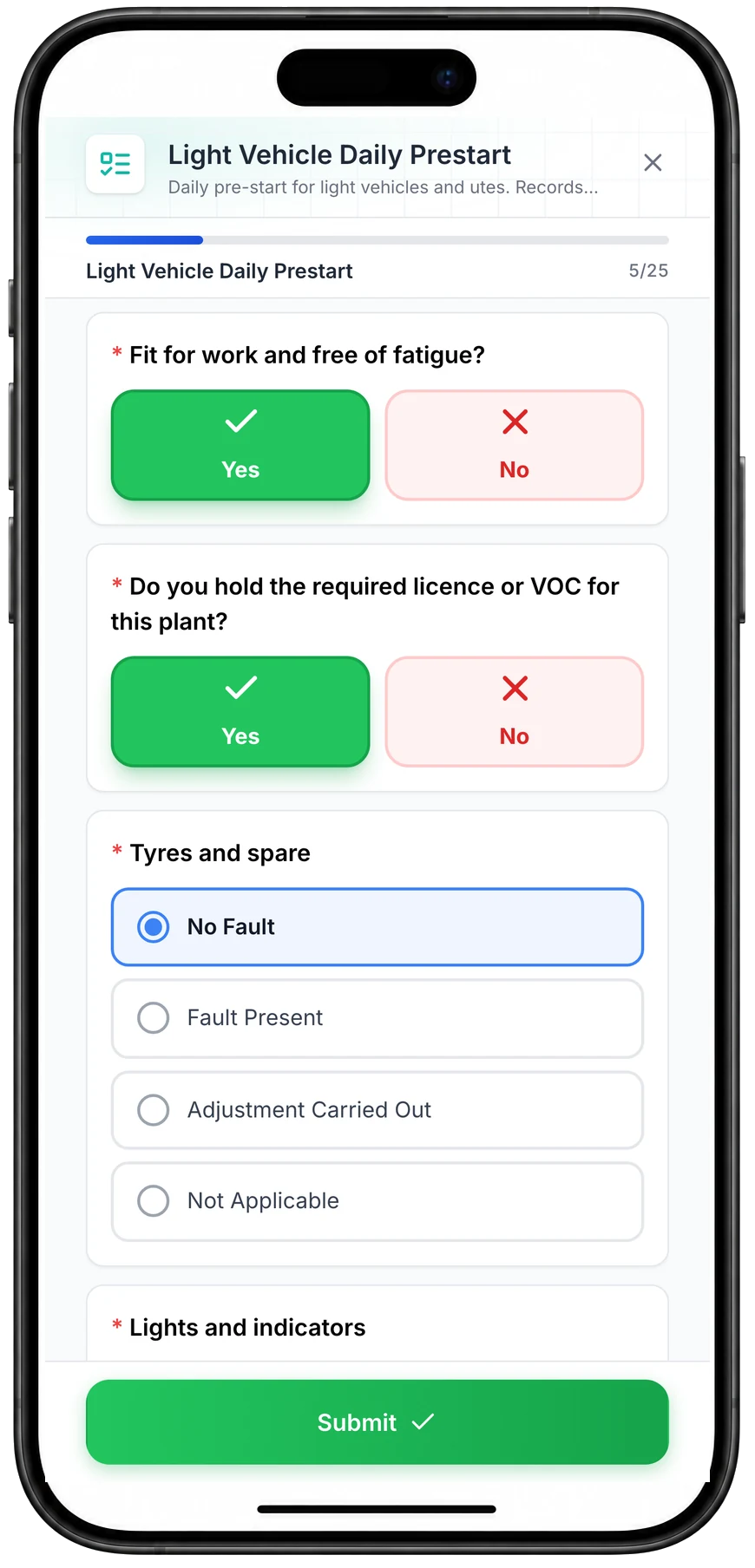
Run a vehicle pre-start on a phone
A daily pre-start for a ute, part-way through. Driver checks such as fitness for work and licence take one tap, and each vehicle check records No Fault, Fault Present, Adjustment Carried Out or Not Applicable.
MapTrack app · Demonstration data · Captured
About this screenshot
Captured at a 430 x 932 phone viewport in a demonstration workspace and shown in a phone frame; the form was closed without submitting.
What is Geotab?
Geotab provides telematics hardware and the MyGeotab platform. Its official product pages cover vehicle data, powered and non-powered assets, AI dash cameras and fleet maintenance. Work orders include maintenance costs, and its asset range includes small-tool Bluetooth tracking. See Geotab asset tracking, Geotab work order help and Geotab Australian dash cameras.
Its July 2026 asset-inspection announcement also describes QR and barcode workflows across physical assets, with defects passed to maintenance. That release note is still labelled beta and targets general availability for October 2026. Confirm the current release and account access rather than treating the target date as a shipped feature. See Geotab asset inspection release note.
When it’s worth looking at MapTrack
Start with the jobs your crew needs to get through each day. These are reasons to test MapTrack against your workflow.
Equipment needs booking as well as tracking
Your next job depends on which kit is available, who has it and when it comes back. Test MapTrack’s Requests, planning and check-out workflow with your crew.
The inspection needs to stay with the asset
Use your existing pre-start or inspection as the pilot. Build it with AI, capture the result and prove the follow-up job can be found from the same equipment record.
One maintenance job covers several assets
For test and tag, calibration or a batch inspection, MapTrack can keep a separate pass or fail for every asset within one work order.
The operation spans crews and divisions
Keep all users in the per-asset software model. Rate cards, finance and asset-scoped divisions are available as add-ons on Pro and Enterprise only.
MapTrack and Geotab: compare the work
Both platforms have real capabilities. Check the workflow, the product surface and the package you are buying.
| Criteria |  MapTrack MapTrack |  Geotab Geotab |
|---|---|---|
| Mixed assets | YesTools, plant, trailers and vehicles with QR, barcode, Data Matrix, Bluetooth, GPS and cameras. | YesPowered and non-powered equipment, plus small-tool Bluetooth tracking, are documented.(per Geotab asset tracking, 15 October 2026) |
| Inspections | YesAI-built forms, pre-starts and configured corrective follow-up linked to the asset. | ?Broader QR/barcode asset inspections are documented in a beta-labelled release note. Confirm current availability.(per Geotab asset inspection release note, 15 October 2026) |
| Maintenance and costs | YesTiered service plans, meter-raised work orders and per-asset outcomes across a multi-asset job. | YesMaintenance schedules, work orders and repair-cost tracking are documented.(per Geotab work order help, 15 October 2026) |
| Equipment bookings and custody | YesRequests, optional approval, planning, check-out and return. | Not publicly confirmedThe exact booking, approval and custodian-return workflow needs demonstration for the selected configuration.(per Geotab software packages, 15 October 2026) |
| AI video | YesIn-app live view and saved event clips, depending on camera and plan. | YesGO Focus cameras with integrated video and driver coaching are documented.(per Geotab Australian dash cameras, 15 October 2026) |
| Hire rate cards | YesDaily, weekly or monthly rates for dry, wet or standby hire; Pro and Enterprise add-on only. | Not publicly confirmedVerify hire rates and return-cost recording against the quoted configuration.(per Geotab software packages, 15 October 2026) |
| Finance and divisions | YesCost ledgers, budget vs actual and asset-scoped divisions; Pro and Enterprise add-ons only. | ?Maintenance-cost reporting is documented. Verify broader finance and divisional access requirements separately.(per Geotab fleet maintenance, 15 October 2026) |
| Keeping the existing setup | YesGeotab integration available through the MapTrack team; scope exact fields and setup. | YesMyGeotab supports a Marketplace and partner integrations.(per Geotab software packages, 15 October 2026) |
Bring one real equipment workflow
We’ll show the booking, pre-start, service history and current custodian on a sample asset. Include a vehicle, machine, trailer and tool kit.
- No credit card required
- Unlimited users
What MapTrack brings together
Who needs it next, and who has it now?
Bookings and custody sit beside the equipment record.
Book equipment through Requests, use optional approval and check the planning view for conflicts. At pick-up, turn the booking into a check-out. The crew can see who has the item before organising the next job. These actions need a connection.
Can the crew use the forms they already know?
Build forms with AI from a PDF or a short description, then review and attach them to the right assets.
Keep pre-start answers, photos and sign-offs with the machine. For a failed check, create a linked task or configure and test a form-result rule for the follow-up you need. The original inspection result stays in the record.
Can maintenance follow the hours on the machine?
Set tiered service plans and raise work orders from meter readings when configured.
Keep 250, 500 and 1,000-hour services in one plan, with the correct procedure and parts for each level. One work order can cover several assets with a pass or fail for each. For date-based work, review what is due and raise the job from the schedule.
Where do tracking and video fit?
Choose the tracking method for the asset, and keep camera footage with its operating record.
GPS trackers report location and device health; tracker-derived run hours and kilometres are estimates. AI dash cam live view and saved event clips are available in the MapTrack app, depending on camera and plan. Live GPS, trip history and geofence alerts run in MapTrack Telematics.
Can we bring hire rates and costs into the same system?
Rate cards, finance and divisions are available as Pro and Enterprise add-ons only.
Set daily, weekly or monthly hire rates for dry, wet or standby hire, by asset or category, and record the hire cost when equipment returns. Finance keeps cost ledgers for assets, locations and people, with budget vs actual, depreciation and repair-or-replace guidance. Divisions separate assets and team access, with account-owner oversight.
Where Geotab is worth considering
Keep the capabilities that already work for your operation in the decision.
Telematics and video in the current fleet
Geotab’s GO devices and GO Focus camera family are worth evaluating when vehicle data and driver coaching are central to the purchase.
Equipment and maintenance already in MyGeotab
Asset tracking and work order management are documented capabilities. Test how far your existing setup already covers the jobs you want to improve.
A partner configuration you want to keep
If you rely on a particular reseller, integration or installed device fleet, compare extending that setup with the cost and effort of replacing it.
Choose around the work you need to do
Choose MapTrack if you…
- You want tools, plant, trailers and vehicles tracked, booked, inspected and maintained in one platform.
- Your equipment moves between crews and jobs, and bookings and custody are part of the daily routine.
- You want one work order across several assets, each with its own pass or fail.
- You need hire rate cards, finance or asset-scoped divisions as Pro or Enterprise add-ons.
Consider Geotab if you…
- •Vehicle data, camera review and driver coaching are central, and your Geotab configuration meets those requirements.
- •Your existing devices and partner integrations support daily work and you want to extend that investment.
- •MyGeotab’s demonstrated inspection and work order workflows meet the requirements for your assets.
Compare the full rollout cost
MapTrack
MapTrack prices software per asset with unlimited users. Check the current plans against your asset mix and workflow. GPS hardware, cameras, connectivity and setup need to be scoped. Rate cards, finance and divisions are available now as add-ons on Pro and Enterprise only. Each division has its own assets and team access, while account owners can see across divisions.
Geotab
Geotab’s current software-packages page presents GO Core and GO Plan with a Get Pricing option. Obtain a regional quote that lists devices, software, camera services, installation and any partner products. Confirm which inspection, maintenance and reporting functions are included for your account. Plan names and availability can differ across official pages and regions.
Ask for software, hardware, installation, data, support, integrations and any overlapping subscriptions to be itemised. Compare the same assets and period. No universal contract term, saving or break-even result is assumed.
Replace Geotab, or keep it and add MapTrack
You don’t have to decide on hardware first. MapTrack’s Geotab integration gives you a route to scope alongside a full replacement. Prove the data and daily workflow before choosing.
Separate the tracking job from the equipment job
List which tasks your current Geotab setup already handles and which tasks still happen elsewhere. Include bookings, custody, pre-starts, repairs and hire costs.
Scope the integration or replacement
For an integration, agree required fields, update timing, account permissions and responsibility for setup. For a replacement, check device compatibility and contract terms before scheduling changes.
Test the complete equipment cycle
Book an item, collect it, submit its inspection and record a service. Check that the crew and workshop can find the history without copying asset IDs between records.
Roll out after the records reconcile
Confirm asset identifiers, imported records, roles and agreed data feeds. Train users on the proven workflow and expand one equipment group at a time.
Prove it with a small pilot
Use a vehicle, a machine, a trailer and a tool kit from one site. Agree what a successful booking, inspection and service record looks like before you start.
- ✓MapTrack: Book and check out equipment, submit a pre-start, test one configured defect follow-up, enter a meter reading and inspect the saved service record. Load forms and work orders while you have reception. Crews can complete forms and record procedures and per-asset pass or fail outcomes on a loaded work order offline, then sync when reconnected. Adding costs, moving a work order to Completed, bookings, check-outs and returns need a connection.
- ✓Geotab: Demonstrate the current asset-inspection release, work orders, repair costs, small-tool tracking and the exact booking or custody workflow you need. Check regional hardware availability, role access and every partner product included in the proposal.
Other routes worth comparing
A replacement is only one option. Choose the route that fits your existing equipment and the work you want to improve.
Keep Geotab and connect MapTrack
Scope the existing integration to retain the tracking setup while testing MapTrack’s equipment workflows.
Review a Verizon Connect transition
If you’re arriving from Reveal or Fleet, compare your account’s migration proposal with the equipment workflow you want next.
Methodology and sources
We compared official vendor documentation with MapTrack’s published product information and dated capability confirmations. Recommendations describe buyer fit; they are not measured performance rankings.
- Geotab asset tracking
- Geotab Australian asset tracking
- Geotab fleet maintenance
- Geotab work order help
- Geotab asset inspection release note
- Geotab software packages
- Geotab Australian dash cameras
- MapTrack maintenance and work orders
- MapTrack forms and AI builder
- MapTrack public pricing
- MapTrack AI dash cameras
- MapTrack Geotab integration
A feature that was not established by the reviewed sources is marked for verification, not treated as absent. Confirm the quoted configuration on your own assets.
Spotted something out of date or incorrect? Email corrections@maptrack.com and we will review and update this page.
Frequently asked questions: Geotab vs MapTrack
More alternatives
- Alternative to Asset Panda
- Alternative to Hilti ON!Track
- Alternative to MaintainX
- Alternative to SafetyCulture
- Alternative to Fleetio
- Alternative to Limble
- Alternative to Cheqroom
- Alternative to IBM Maximo
- Alternative to UpKeep
- Alternative to SAP EAM
- Alternative to Sortly
- Alternative to EZOfficeInventory
- Alternative to GoCodes
- Alternative to AssetTiger
- Alternative to spreadsheets
- Alternative to Toolwatch
- Alternative to ShareMyToolbox
- Alternative to Gearbelt
- Alternative to Tenna
- Alternative to Samsara
- Alternative to ToolSense
- Alternative to Milwaukee One-Key
- Alternative to Fiix
- Alternative to GoAudits
- Alternative to Dashpivot
- Alternative to GoFMX
- Alternative to Kynection
Direct comparison and category guides
About the author

Co-Founder & GM of Operations
Lachlan leads operations at MapTrack, bringing 10+ years of enterprise technology experience across mining, construction and heavy industry. Before MapTrack, he held senior roles at Workato (integration and automation) and AppDynamics/Cisco (application performance), working directly with ASX-listed organisations to modernise their technology stacks. His deep understanding of field operations and blue-collar workflows shapes how MapTrack solves real problems for asset-intensive teams.
View LinkedIn profile →See your equipment workflow in MapTrack
Bring your asset list, current tracking setup and one job you want to simplify. We’ll show how tracking, bookings, pre-starts and maintenance fit together.
4.9 on G2 · 5.0 on Capterra, GetApp & Software Advice
- No credit card required
- Unlimited users