
Free template · PDF
Free generator pre-start checklist
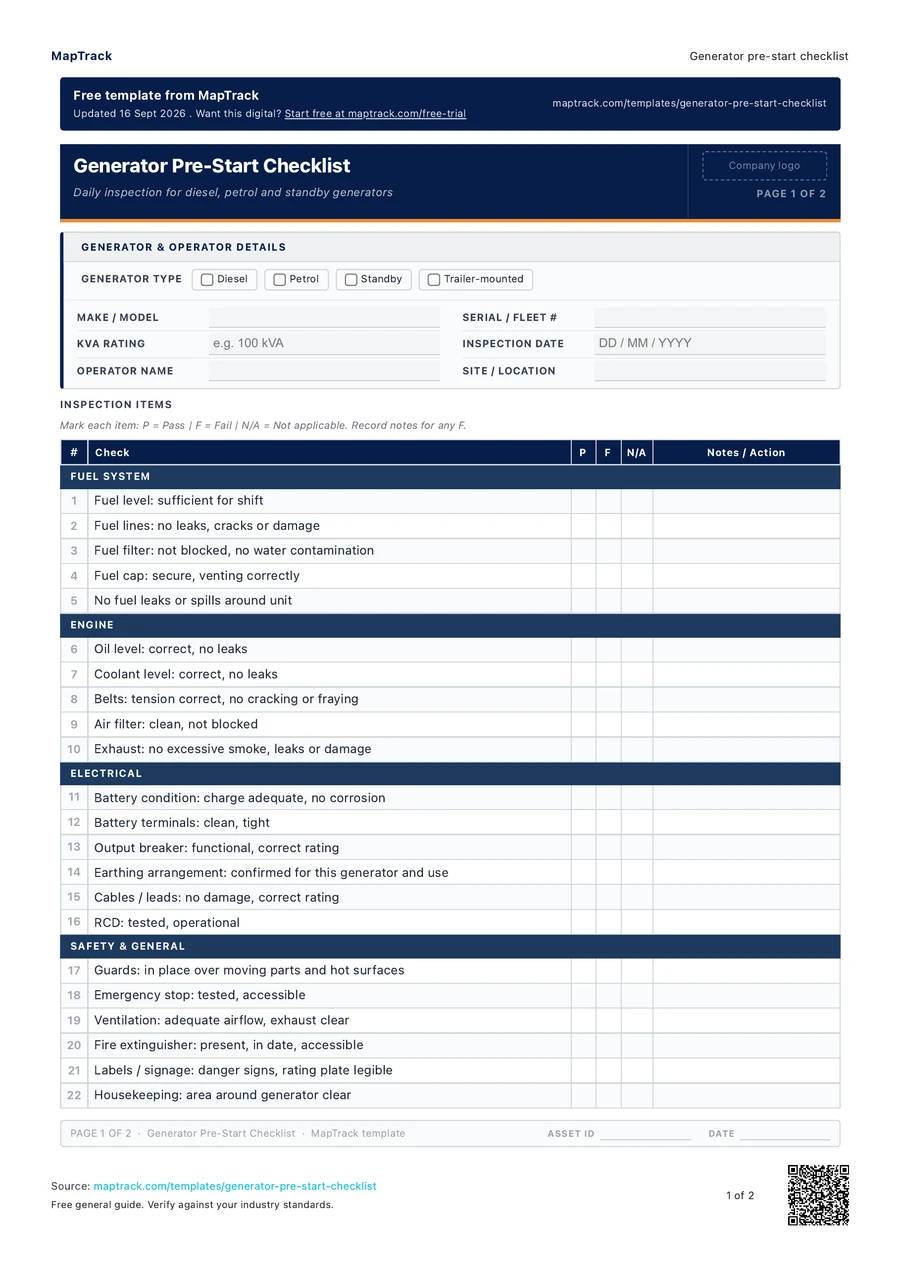
Record the generator checks and findings before use. Download the PDF or customise a digital form for your team.
Loading PDF page...

Read the form fields
22 checks · 4 sections · Sign-off
22 checks
The fields in the printable form, in a view that fits your screen.
- Make / model
- Serial / fleet #
- kVA rating
- Inspection date
- Operator name
- Site / location
Fuel System
Engine
Electrical
Safety & General
(list any item marked F: reference item # from checklist)
Defects & Action Required
- Item #
- Defect description
- Action taken / reported to
- Rectified by / date
Declaration
I declare that I have completed this generator pre-start inspection before using this equipment. I have reported any defects or non-compliant items to my supervisor and will not use this generator until any defects that affect safety have been rectified. I understand that failure to complete a pre-start check or to report defects may breach company policy and WHS obligations.
Operator Sign-off
Signature · Print name · Date & time
Supervisor / Reviewer Acknowledgement
Signature · Print name · Date
ILLUSTRATIVE RECORD
A worked record example
Sample entries, not a customer inspection or a product screenshot.
Illustrative example. Adapt the detail to your equipment, project and workplace procedures.
- Asset
- GEN-014
- Checklist item
- 15
- Observation
- Visible damage on an output cable.
- Status
- Reported; assessment pending.
- Next owner and action
- Supervisor to arrange assessment by an appropriately licensed electrician.
Keep the finding and the follow-up together; a tick alone doesn't explain an unresolved defect.
The MapTrack generator pre-start checklist contains 22 checks across 4 sections.

Make this form your own
Add your fields and logo. Give your team a form they can use on site.
Free trial. No credit card. Work email needed.
Customise & use this form now for free



“MapTrack beat them all in every aspect.”
 Vincent Stone · HSEQ Advisor, Concept Tanks
After signup: customise the template, then save and publish it for your team.
General guidance only. Check the form against your equipment manual, site procedures and local requirements before using it.
Short answer
A generator pre-start checklist records the checks made before a generator is used: fuel system, engine, electrical equipment, guards and the surrounding area, with the machine ID, operator, findings and sign-off. Operators complete it at the point the manufacturer's instructions and site procedure set. Regulation 213 of the model WHS Regulations requires plant maintenance and inspection by a competent person; it does not prescribe this form.
Checked against Model WHS Regulations as at 5 December 2025 (cited within as the Work Health and Safety Regulations 2011) on by the MapTrack templates team. How we check templates
Key takeaways
- The MapTrack generator pre-start checklist contains 22 checks across 4 sections. Sections covered: Fuel System, Engine, Electrical, Safety & General.
- Record the generator checks and findings before use. Download the PDF or customise a digital form for your team.
- Keep the finding and the follow-up together; a tick alone doesn't explain an unresolved defect.
- Keep the asset or project reference consistent across the form and its supporting records.
What is a generator pre-start checklist?
A generator pre-start checklist records the checks made before the equipment is used. This form covers fuel system, engine, electrical equipment, guards and the surrounding area, with space to identify the machine and operator and record findings. Check each applicable item against the equipment instructions and workplace process, rather than treating a ticked box as a guarantee that the machine is safe.
Electrical arrangements vary with the generator and its use. Have the required protection and earthing arrangement confirmed by an appropriately licensed electrician rather than assuming every generator needs an earth stake.
Record a defect clearly enough for the next person to understand it: identify the item, describe the observation and note who it was reported to. Follow the site's process for taking unsafe equipment out of use and arranging assessment. Keep any repair and return-to-service decision connected to the same asset ID.
The PDF is a starting point for the record, not a complete inspection procedure for every model. Review it before use, add any missing checks and explain items that don't apply. An item that couldn't be checked needs follow-up; it isn't the same as an item that is not applicable.
Learn more about pre-start inspections in MapTrack.
Running pre-starts on generators and other plant? Our guide compares the main pre-start inspection software options.
Choose the format that fits your team
Download the PDF
Use the original printable form for a paper workflow. Check it against your equipment and site procedure before the job.
Keep completed copies in your own record system and arrange any follow-up through your normal process.
Download free PDFCustomise a form in MapTrack
Start a free trial, adjust the digital form to your workflow, then save and publish it for your team to use.
Your account uses the digital template. Sample answers on this page and completed PDF records aren't imported automatically.
Customise & use this form now for freeFree trial. No credit card. Work email needed.
Benefits of using this generator pre-start checklist
- Equipment reference: recording the generator ID connects the completed check to the right machine, site and maintenance history.
- Clear findings: an item-by-item record gives the reviewer a place to look for defects, limitations and follow-up notes.
- Operator handover: a dated record helps the next person see what was checked and which findings still need attention.
- Consistent review: the same field order helps the team compare records while still allowing checks specific to each machine.
- Maintenance context: linking a reported defect to its repair record lets a reviewer follow the issue from observation to completion.
- Useful sign-off: names and dates identify who completed and reviewed the record without implying that the form certifies the equipment.
What to include in a generator pre-start checklist
- Generator details: type (diesel/petrol/standby/trailer-mounted), make/model, serial/fleet number, kVA rating.
- Operator details: name, inspection date.
- Fuel system: fuel level, fuel lines, fuel filter, fuel cap, leaks.
- Engine: oil level, coolant level, belts, air filter, exhaust.
- Electrical: battery condition, terminals, output breaker, earthing arrangement confirmed for this generator, cables/leads, RCD.
- Safety and general: guards, emergency stop, ventilation, fire extinguisher, labels, housekeeping.
- Defect register: item, description, action required.
- Sign-off: operator and supervisor.
How to use this generator pre-start checklist
Identify the equipment and operator
Record the generator ID, operator, date and the other details requested on the form. Confirm the checklist is appropriate for the machine and fitted equipment.
Use the equipment instructions
Follow the manufacturer's safe inspection procedure and your workplace requirements for each applicable check. Only perform tasks you are trained and authorised to carry out.
Record the result of each check
Mark the result using the form's columns and add a clear note for a defect or incomplete check. Explain items that don't apply rather than leaving their status ambiguous.
Report defects and arrange follow-up
Identify the equipment and affected item when reporting a finding. Follow the site's process for unsafe equipment and assessment, and keep the relevant job or defect reference with the record.
Complete and retain the record
Sign and date the completed check and obtain the required review. Keep unresolved findings visible and connect any later repair and return-to-service decision to the same asset ID.
Try MapTrack free
Full access to every feature. No credit card required. Per-asset pricing so you scale as your fleet grows.
- No credit card required
How often should you complete this checklist?
Use the generator pre-start record at the point specified by the equipment instructions and workplace procedure, including the checks required before operation. Review whether another check is needed after a change of operator, location, attachment or equipment condition. Don't use this generic form to set universal servicing or electrical-testing intervals.
Keep daily observations separate from scheduled maintenance, specialist inspection and repair records. Record the relevant hour-meter reading where the form provides for it, and use the manufacturer's schedule and applicable workplace requirements to plan the next service. Report a new fault when it is found, rather than waiting for the next scheduled form.
Which record do you need?
These records do different jobs. Keep the same asset ID across them so the history is easy to follow.
Equipment maintenance log
Keep servicing and repairs in date order..
Use the same asset ID to connect the history to this record..
Work order / job card
Record an individual maintenance task..
Keep the work completed, parts, labour and sign-off together..
Machinery breakdown report
Investigate an unplanned equipment failure..
Record the symptoms, assessment and recurrence-prevention actions..
Make this form your own
From your template to your team.
Start with this template, adjust it for your equipment and site, then save and publish the digital form for your team.
- 01
Start your free trial
Use your work email to create your MapTrack account.
- 02
Customise, save and publish
Adjust the template fields and branding for your site.
- 03
Complete it on the job
Record checks, add photos and export a branded PDF.
Keep working offline
Load the form before you lose reception. Complete it offline and sync when you're back online.
Scan the asset. Open its form.
Use an asset's QR code to find and complete the forms that belong to it.
Show what you found
Capture photos and attach files so the next person has the details they need.
Take a branded PDF with you
Download completed forms as PDF reports with your company logo.
The trial uses a digital template. Completed paper records aren't imported automatically.
Frequently asked questions
Practical answers about the form, record keeping and using MapTrack.
The PDF includes 22 numbered checks covering fuel system, engine, electrical equipment, guards and the surrounding area. It also includes equipment and operator details and sign-off. Review the individual checks against your machine and attachments before using it. Add any model-specific requirements and record findings clearly, including anything that couldn't be checked.
Link to this answerFollow the equipment instructions and your workplace's process for checks before operation. Consider changes in the machine, operator, location or attachment when deciding whether a fresh check is needed. Keep scheduled servicing and specialist testing separate; a completed generator pre-start form doesn't replace either of those records.
Link to this answerIdentify the generator and the affected item, such as item 15 for a damaged cable. Report the finding and follow the site's process for unsafe equipment. Don't use the checklist as authority to repair or modify electrical equipment. Keep the assessment, repair reference and return-to-service decision with the record.
Link to this answerThe form covers different generator types, so confirm which checks apply to this unit and connection. Explain any N/A entry, and record an incomplete electrical check as unresolved rather than passed. Have uncertain protection or earthing requirements checked by an appropriately licensed electrician using the equipment instructions and applicable requirements.
Link to this answerDon't add an earth stake solely because a generic checklist mentions one. The correct arrangement depends on the generator, protection and connection. Follow the manufacturer's instructions and have the arrangement checked by an appropriately licensed electrician. Use the checklist to record the check, not to design or modify an electrical installation.
- Queensland Electrical Safety Office generator guidance
- NT WorkSafe portable generator guidance for domestic use
No. A pre-start records checks before operation; a service record documents maintenance performed at the required interval or in response to a fault. Keep the same asset ID on both. If a pre-start finding needs repair, connect it to the relevant job card and keep the completion evidence with the history.
Link to this answerRecord the generator ID, item number and observed condition, including whether the fault has been assessed. A note such as 'cable damaged' needs an owner and current status so it isn't mistaken for a repaired defect. Keep the repair reference and authorised return-to-service decision available to the next operator.
Link to this answerYes. Use the PDF download form on this page; starting a MapTrack trial is optional. Check the full generator form before using it and adapt the checks to the equipment and workplace. Keep completed copies with the relevant asset records so findings and follow-up can be read together.
Link to this answerApplicable regulatory standards
This template is a starting point for your records. It isn't an approval, certification or replacement for the instructions and requirements that apply to your work.
| Standard | Edition | Clauses this template relies on | Source |
|---|---|---|---|
| Model Work Health and Safety RegulationsPlant maintenance and inspection by a competent person, and managing electrical risks at the workplace. | Model WHS Regulations as at 5 December 2025 (cited within as the Work Health and Safety Regulations 2011) |
| Safe Work Australia (drafted by the Parliamentary Counsel's Committee) |
| Do's and don'ts of running generatorsQueensland Electrical Safety Office guidance on running generators safely; regulator guidance, not law. | Electrical Safety Office web guidance, as published at check date | Whole instrument | Electrical Safety Office (Queensland) |
| Electrical installations - Generating setsInstallation standard for generating sets, including sets connected by a detachable connection; for the electrician, not the operator. | AS/NZS 3010:2017 (incl. Amd 1:2020) |
| Standards Australia and Standards New ZealandSold by the publisher |
| Model Code of Practice: Managing risks of plant in the workplaceModel Code guidance on maintenance and repair of plant by competent people. | November 2024 version (reviewed May 2018; amended 2021, 2023 and 2024) |
| Safe Work Australia |
Model Work Health and Safety Regulations
Edition: Model WHS Regulations as at 5 December 2025 (cited within as the Work Health and Safety Regulations 2011)
Plant maintenance and inspection by a competent person, and managing electrical risks at the workplace.
- reg 213: Plant must be maintained, inspected and, if necessary, tested by a competent person, following manufacturer or competent person recommendations; annual inspection applies only if neither is practicable.
- reg 147: A PCBU must manage electrical risks at the workplace in line with Part 3.1.
Safe Work Australia (drafted by the Parliamentary Counsel's Committee)
Do's and don'ts of running generators
Edition: Electrical Safety Office web guidance, as published at check date
Queensland Electrical Safety Office guidance on running generators safely; regulator guidance, not law.
Electrical installations - Generating sets
Edition: AS/NZS 3010:2017 (incl. Amd 1:2020)
Installation standard for generating sets, including sets connected by a detachable connection; for the electrician, not the operator.
- 4: Additional requirements for generating sets connected by a detachable connection
Standards Australia and Standards New ZealandSold by the publisher
Model Code of Practice: Managing risks of plant in the workplace
Edition: November 2024 version (reviewed May 2018; amended 2021, 2023 and 2024)
Model Code guidance on maintenance and repair of plant by competent people.
- Section 3.6: Maintenance, repair and cleaning of plant, following manufacturer instructions and by competent people.
Each source was read at its publisher and the page checked on 26 October 2026. The publisher's current text is the authority.
MapTrack publishes this template. The linked authorities publish their own guidance; they haven't endorsed this form.
The numbers behind this generator pre-start checklist
The pages below gather the figures behind this kind of check. Each figure on them carries its source and date, so you can quote it in a toolbox talk, a budget case or a board paper without chasing the original report.
Get the free template
Enter your email above to download the full generator pre-start checklist as a PDF.
Cite this template
Writing about this topic? You’re welcome to quote this checklist. Here’s the wording to use so your readers can find the original.
The MapTrack generator pre-start checklist contains 22 checks across 4 sections.
- Short attribution
- MapTrack Generator pre-start checklist, https://www.maptrack.com/templates/generator-pre-start-checklist
- Reference list
- MapTrack. (2026). Generator pre-start checklist [Checklist template]. Retrieved from https://www.maptrack.com/templates/generator-pre-start-checklist
Free to reuse with credit under a Creative Commons Attribution 4.0 licence. If you’d rather link straight to it, the page is https://www.maptrack.com/templates/generator-pre-start-checklist.
Embed this free template on your website
Run an industry blog, trade association site, or training resource? Drop a preview of this free generator pre-start checklist straight into your page. The snippet is self-contained, needs no scripts, and links readers back to the full free template.
<div style="max-width:480px;font-family:system-ui,-apple-system,'Segoe UI',Roboto,sans-serif;border:1px solid #E5E7EB;border-radius:12px;padding:20px;background:#ffffff;">
  <p style="font-size:12px;font-weight:700;letter-spacing:0.05em;text-transform:uppercase;color:#071D49;margin:0;">Free template</p>
  <p style="font-size:18px;font-weight:700;color:#071D49;margin:6px 0 0;">Generator pre-start checklist</p>
  <ul style="margin:12px 0 0;padding-left:18px;color:#374151;font-size:14px;line-height:1.6;">
    <li style="margin:4px 0;">Generator details: type (diesel/petrol/standby/trailer-mounted), make/model, serial/fleet number, kVA rating.</li>
    <li style="margin:4px 0;">Operator details: name, inspection date.</li>
    <li style="margin:4px 0;">Fuel system: fuel level, fuel lines, fuel filter, fuel cap, leaks.</li>
    <li style="margin:4px 0;">Engine: oil level, coolant level, belts, air filter, exhaust.</li>
    <li style="margin:4px 0;">Electrical: battery condition, terminals, output breaker, earthing arrangement confirmed for this generator, cables/leads, RCD.</li>
    <li style="margin:4px 0;">Safety and general: guards, emergency stop, ventilation, fire extinguisher, labels, housekeeping.</li>
  </ul>
  <p style="font-size:13px;color:#6B7280;margin:14px 0 0;padding-top:12px;border-top:1px solid #E5E7EB;">Free <a href="https://www.maptrack.com/templates/generator-pre-start-checklist" style="color:#071D49;font-weight:600;text-decoration:none;">Generator pre-start checklist</a> by MapTrack</p>
</div>Free to reuse, including commercially. This template is published under a Creative Commons Attribution 4.0 licence. Copy it, adapt it, put it on your own site or in your own docs. All we ask is that you credit MapTrack with a link back to this page. The snippet above already includes that credit, so if you use it as-is you’re covered.
About the author

Co-Founder & Commercial Director
Jarrod has spent over a decade in technology consulting and asset management, including roles at Accenture (mining and heavy industry) and CGI as an Asset Management Consultant. He co-founded MapTrack and built and scaled its original platform, then rebuilt it with Lachlan and Alex from thousands of customer conversations and 300+ user research sessions with field teams. His consulting background gives him deep insight into the operational and compliance challenges facing asset-intensive Australian businesses.
View LinkedIn profile →Ready for your next job?
Keep the PDF handy, or customise the digital form for your team.