
Free template · PDF
Free asset condition report
Download a free asset condition report template. Assess structural integrity, functionality, defects and remaining useful life. PDF download.
Loading PDF page...
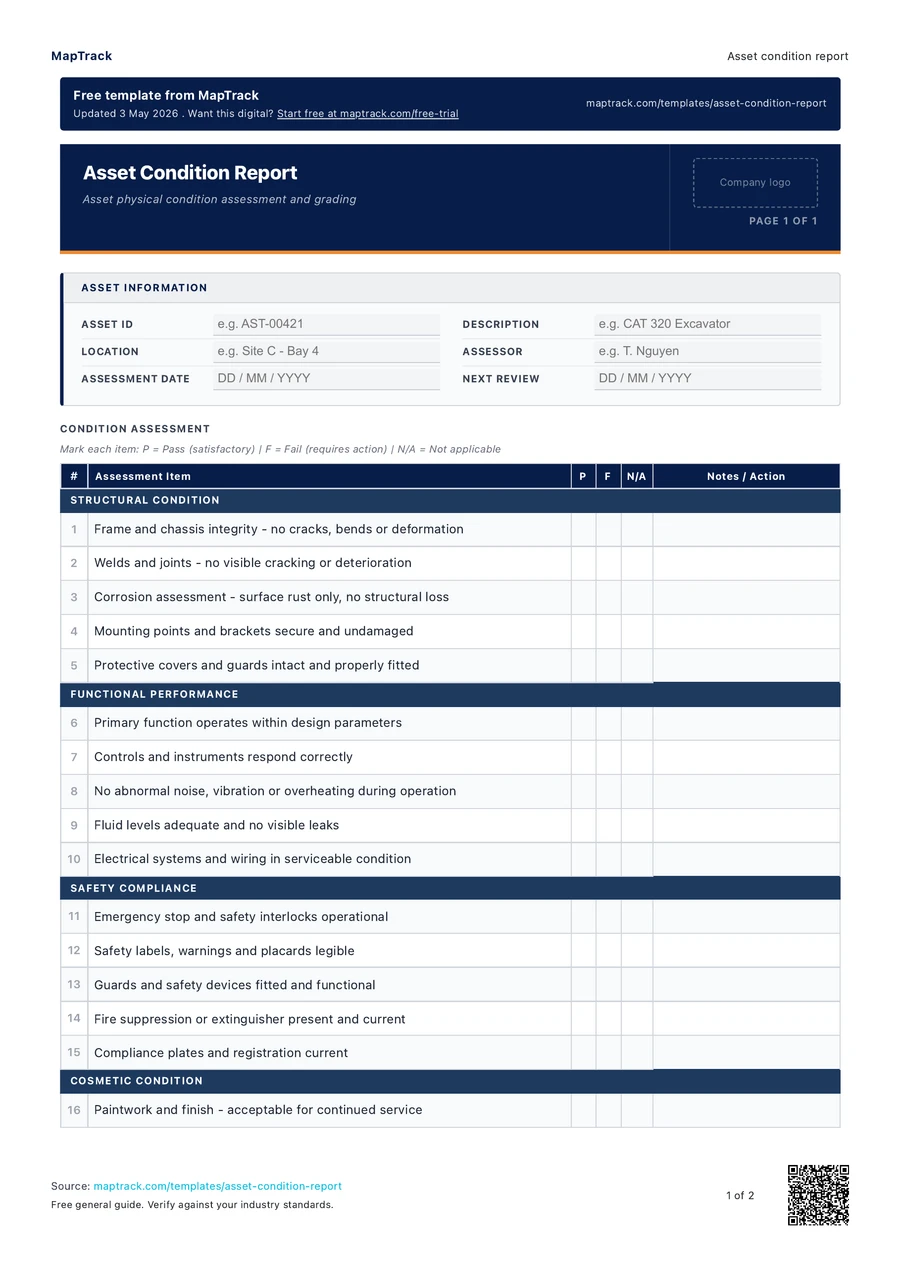

Read the form fields
25 checks · 5 sections · Sign-off
25 checks
The fields in the printable form, in a view that fits your screen.
- Asset ID
- Description
- Location
- Assessor
- Assessment date
- Next review
Structural Condition
Functional Performance
Safety Compliance
Cosmetic Condition
Recommendations
Declaration
I confirm that this condition assessment has been conducted thoroughly and the findings accurately reflect the current state of the asset. Any deficiencies identified have been reported with recommended corrective actions.
Assessor Sign-off
Signature · Print name · Date
Asset Manager Sign-off
Signature · Print name · Date
The MapTrack asset condition report contains 25 checks across 5 sections.

Co-Founder & Commercial Director
Make this form your own
Add your fields and logo. Give your team a form they can use on site.
Free 30-day trial. No credit card. Work email needed.
Customise & use this form now for free



“MapTrack beat them all in every aspect.”
 Vincent Stone · HSEQ Advisor, Concept Tanks
After signup: customise the template, then save and publish it for your team.
General guidance only. Check the form against your equipment manual, site procedures and local requirements before using it.
Key takeaways
- The MapTrack asset condition report contains 25 checks across 5 sections. Sections covered: Structural Condition, Functional Performance, Safety Compliance, Cosmetic Condition, Recommendations.
- Asset identification: asset ID or tag, description, make/model, serial number, location, date of assessment.
- Assessor details: name, position, qualifications (if relevant), date.
- Overall condition rating: a summary rating (Excellent, Good, Fair, Poor, End of Life) with clear definitions for each level.
What is an asset condition report?
An asset condition report is a structured document used to assess and record the current physical and functional condition of an asset. The report covers structural integrity, operational performance, defects observed, cosmetic condition, safety compliance and an estimate of remaining useful life. Condition reports are used during routine inspections, asset acquisitions, lease returns, insurance assessments and asset disposal planning.
Condition reporting is a core component of asset management under ISO 55001 (Asset management systems). Organisations need accurate condition data to plan maintenance, prioritise capital expenditure, forecast replacement timing and manage risk. Without condition reports, asset management decisions rely on assumptions or age-based rules that may not reflect actual asset condition. A piece of equipment that is 10 years old but well maintained may be in better condition than a 3-year-old asset that has been neglected. Condition reports provide the objective evidence needed to make these distinctions and allocate resources where they will have the most impact.
Learn more about asset tracking in MapTrack.
Reporting condition across a lot of assets? See how asset register software keeps inspections and certificates on each asset's record.
Choose the format that fits your team
Download the PDF
Use the original printable form for a paper workflow. Check it against your equipment and site procedure before the job.
Keep completed copies in your own record system and arrange any follow-up through your normal process.
Download free PDFCustomise a form in MapTrack
Start a free trial, adjust the digital form to your workflow, then save and publish it for your team to use.
Your account uses the digital template. Sample answers on this page and completed PDF records aren't imported automatically.
Customise & use this form now for freeFree 30-day trial. No credit card. Work email needed.
Benefits of using this asset condition report
- Evidence-based decisions: objective condition data supports maintenance, repair-or-replace and capital expenditure decisions.
- Maintenance planning: condition reports identify assets that need immediate attention and those that can continue in service.
- Financial accuracy: condition assessments support accurate depreciation calculations and insurance valuations.
- Risk management: identifying structural defects or safety non-compliance before failure prevents injuries and costly breakdowns.
- Lease and hire: condition reports at handover and return protect both parties by documenting the asset state.
- Audit compliance: documented condition assessments demonstrate responsible asset management for auditors and regulators.
What to include in an asset condition report
- Asset identification: asset ID or tag, description, make/model, serial number, location, date of assessment.
- Assessor details: name, position, qualifications (if relevant), date.
- Overall condition rating: a summary rating (Excellent, Good, Fair, Poor, End of Life) with clear definitions for each level.
- Structural assessment: frame or chassis integrity, corrosion, cracks, welds, fasteners, foundations.
- Functional assessment: operational performance, output quality, speed, accuracy, error rates, abnormal noise or vibration.
- Safety compliance: guarding, emergency stops, warning labels, electrical safety, compliance with relevant standards.
- Cosmetic condition: paint, surface finish, dents, scratches, labelling.
- Defects register: list of all defects found with severity rating (critical, major, minor, cosmetic).
- Photographs: at least four photos showing overall condition and any specific defects.
- Remaining useful life estimate: assessor estimate of remaining serviceable years or hours.
- Recommendations: immediate repairs, scheduled maintenance, monitoring, replacement planning.
- Signatures: assessor and asset owner or manager.
How to use this asset condition report
Review available documentation before the physical assessment.
Gather the asset register entry, maintenance history, previous condition reports, manufacturer specifications and any known defects. Understanding the asset history helps the assessor focus on areas likely to have deteriorated or previously flagged issues.
Conduct a systematic physical inspection of the asset.
Inspect the asset methodically, working from structural elements through functional components to cosmetic condition. Use a consistent approach (for example, left to right, top to bottom) to avoid missing areas. Where safe to do so, operate the asset to assess functional performance.
Record defects and assign a severity rating to each.
For each defect found, record a description, location, size and severity (critical, major, minor, cosmetic). Critical defects are those that affect safety or prevent operation. Major defects affect performance or reliability. Minor defects are functional but not urgent. Cosmetic defects affect appearance only.
Assign an overall condition rating and estimate remaining useful life.
Based on the structural, functional and safety assessment, assign an overall condition rating. Estimate the remaining useful life in years or operating hours. Factor in the defects found, the maintenance history and the operating environment.
Document recommendations, attach photographs and submit the report.
Recommend specific actions: immediate repairs for critical defects, scheduled maintenance for major defects, monitoring for minor issues and replacement planning if the asset is approaching end of life. Attach photographs of the overall condition and all significant defects. Sign and submit the report to the asset manager.
How often should you complete this report?
Asset condition reports should be conducted at least annually for critical assets, every two to three years for general assets, and at every handover, acquisition, lease return or disposal event. High-value or safety-critical assets may require more frequent condition reporting based on operating hours or risk profile.
Make this form your own
From your template to your team.
Start with this template, adjust it for your equipment and site, then save and publish the digital form for your team.
- 01
Start your free trial
Use your work email to create your MapTrack account.
- 02
Customise, save and publish
Adjust the template fields and branding for your site.
- 03
Complete it on the job
Record checks, add photos and export a branded PDF.
Keep working offline
Load the form before you lose reception. Complete it offline and sync when you're back online.
Scan the asset. Open its form.
Use an asset's QR code to find and complete the forms that belong to it.
Show what you found
Capture photos and attach files so the next person has the details they need.
Take a branded PDF with you
Download completed forms as PDF reports with your company logo.
The trial uses a digital template. Completed paper records aren't imported automatically.
Frequently asked questions
Practical answers about the form, record keeping and using MapTrack.
A maintenance inspection checks specific components against a maintenance checklist and determines whether servicing or repairs are needed now. A condition report provides a broader assessment of the overall asset condition, including structural integrity, functionality, safety compliance and remaining useful life. Condition reports inform strategic decisions like repair-or-replace, while maintenance inspections inform tactical decisions like what to service this month.
Link to this answerThe assessor should have sufficient knowledge to evaluate the asset type. For general assets, a trained maintenance technician or asset manager is usually sufficient. For structural assessments of buildings or infrastructure, a qualified engineer may be required. For electrical assets, a licensed electrician should conduct the assessment. The key is that the assessor can identify defects and accurately rate the condition.
Link to this answerRemaining useful life is estimated based on the current condition, the rate of deterioration observed over time, the operating environment, the maintenance history and the manufacturer expected service life. It is an informed estimate, not a precise prediction. Regular condition reporting over time improves the accuracy of estimates by providing trend data that shows how quickly the asset is deteriorating.
Link to this answerYes. This asset condition report template is completely free to download and use. It downloads as a ready-to-print PDF. No MapTrack account is required. If you want digital condition reporting with photo capture, condition trending and integration with your asset register, MapTrack can help.
Link to this answerRetain condition reports for the life of the asset plus a minimum of five years after disposal. Under AASB 116 (Property, Plant and Equipment) and AASB 136 (Impairment of Assets), condition reports are the supporting evidence for useful life estimates, impairment assessments and revaluation decisions, so external auditors expect to be able to trace these reports back through the full depreciation history. Section 262A of the Income Tax Assessment Act 1936 also requires records supporting depreciation deductions to be kept for five years from the latest year the records were relied on. For safety-critical or warranted assets, retain reports until at least three years after warranty expiry.
Link to this answerApplicable regulatory standards
This form is a starting point. Check the current requirements that apply to your equipment, work and location. The form alone does not establish compliance.
MapTrack publishes this template. The linked authorities publish their own guidance; they haven't endorsed this form.
The numbers behind this asset condition report
Every figure below is sourced and dated, so you can quote it in a toolbox talk, a budget case or a board paper without having to chase the original report.
Cite this template
Writing about this topic? You’re welcome to quote this checklist. Here’s the wording to use so your readers can find the original.
The MapTrack asset condition report contains 25 checks across 5 sections.
- Short attribution
- MapTrack Asset condition report, https://www.maptrack.com/templates/asset-condition-report
- Reference list
- MapTrack. (2026). Asset condition report [Checklist template]. Retrieved from https://www.maptrack.com/templates/asset-condition-report
Free to reuse with credit under a Creative Commons Attribution 4.0 licence. If you’d rather link straight to it, the page is https://www.maptrack.com/templates/asset-condition-report.
Embed this free template on your website
Run an industry blog, trade association site, or training resource? Drop a preview of this free asset condition report straight into your page. The snippet is self-contained, needs no scripts, and links readers back to the full free template.
<div style="max-width:480px;font-family:system-ui,-apple-system,'Segoe UI',Roboto,sans-serif;border:1px solid #E5E7EB;border-radius:12px;padding:20px;background:#ffffff;">
  <p style="font-size:12px;font-weight:700;letter-spacing:0.05em;text-transform:uppercase;color:#071D49;margin:0;">Free template</p>
  <p style="font-size:18px;font-weight:700;color:#071D49;margin:6px 0 0;">Asset condition report</p>
  <ul style="margin:12px 0 0;padding-left:18px;color:#374151;font-size:14px;line-height:1.6;">
    <li style="margin:4px 0;">Asset identification: asset ID or tag, description, make/model, serial number, location, date of assessment.</li>
    <li style="margin:4px 0;">Assessor details: name, position, qualifications (if relevant), date.</li>
    <li style="margin:4px 0;">Overall condition rating: a summary rating (Excellent, Good, Fair, Poor, End of Life) with clear definitions for each level.</li>
    <li style="margin:4px 0;">Structural assessment: frame or chassis integrity, corrosion, cracks, welds, fasteners, foundations.</li>
    <li style="margin:4px 0;">Functional assessment: operational performance, output quality, speed, accuracy, error rates, abnormal noise or vibration.</li>
    <li style="margin:4px 0;">Safety compliance: guarding, emergency stops, warning labels, electrical safety, compliance with relevant standards.</li>
  </ul>
  <p style="font-size:13px;color:#6B7280;margin:14px 0 0;padding-top:12px;border-top:1px solid #E5E7EB;">Free <a href="https://www.maptrack.com/templates/asset-condition-report" style="color:#071D49;font-weight:600;text-decoration:none;">Asset condition report</a> by MapTrack</p>
</div>Free to reuse, including commercially. This template is published under a Creative Commons Attribution 4.0 licence. Copy it, adapt it, put it on your own site or in your own docs. All we ask is that you credit MapTrack with a link back to this page. The snippet above already includes that credit, so if you use it as-is you’re covered.
About the author

Co-Founder & Commercial Director
Jarrod has spent over a decade in technology consulting and asset management, including roles at Accenture (mining and heavy industry) and CGI as an Asset Management Consultant. He co-founded MapTrack and built and scaled its original platform, then rebuilt it with Lachlan and Alex from thousands of customer conversations and 300+ user research sessions with field teams. His consulting background gives him deep insight into the operational and compliance challenges facing asset-intensive Australian businesses.
View LinkedIn profile →Ready for your next job?
Keep the PDF handy, or customise the digital form for your team.