 vs
vs
MapTrack vs UpKeep
UpKeep is a per-user CMMS built for maintenance execution on fixed plant, and it makes view-only and requester seats free on every tier. MapTrack is built for assets that move between sites: per-asset pricing with unlimited users, first-party GPS trackers plus 150+ telematics, fleet and fuel-card data sources, offline pre-starts without a tier condition, and a Sydney-hosted primary database. Choose UpKeep if a few technicians maintain fixed plant; choose MapTrack if crews in the field need to track, inspect and cost mobile assets. MapTrack is one platform for every asset a field business runs: it pairs work orders, tiered service plans and parts with GPS trackers, Bluetooth tags, barcode labels and AI dash cams from one vendor, so each asset’s location, inspections and service history sit on one record.

Based on UpKeep’s public documentation and named third-party reviews as of Oct 2026. How we compare · Report a correction
Trusted by construction, mining and field service teams
















At a glance
- •UpKeep prices per paid seat across four tiers, from US$24 to US$55 per user per month, with Professional and Enterprise by quote, and quotes its UpKeep Fleet add-on separately with unlimited users listed. MapTrack prices per asset with unlimited users.
- •UpKeep makes view-only and requester users free and unlimited on every tier, and vendor and customer users are included from Premium, so it is genuinely economical where few people need admin or technician access.
- •UpKeep lists Premium as online only; offline caching starts on Professional and is capped at 5 auto-cached work orders.
- •UpKeep reads location from telematics you already run, with Samsara as the confirmed connector. MapTrack sells GPS trackers and consolidates 150+ telematics, fleet and fuel-card data sources.
- •UpKeep states customer data is stored and processed in the United States exclusively.
What MapTrack covers in one platform
- Every asset, one record
- Tools on QR or barcode labels and Bluetooth tags, plant on GPS trackers, vehicles with GPS and AI dash cams, sites with boundaries: custody, inspections, maintenance and costs on the same record.
- Maintenance that runs on real usage
- Run hours and kilometres from trackers, dash cams or manual readings feed tiered service plans and next-service forecasts, every asset gets a 0 to 100 maintenance health score, and one work order can cover many assets, each with its own pass or fail.
- Easy for crews
- Pre-starts and inspections work without signal, on any phone, with shared-device PINs, single sign-on and AI help to build forms and add assets from a photo. Capterra Best Ease of Use 2026.
- Hardware and software from one vendor
- GPS trackers, AI dash cams with built-in GPS, Bluetooth tags and labels at published prices, managed in the same app, plus LightMetrics dash cam accounts and 150+ telematics, fleet and fuel-card data sources.
- Simple to buy and run
- Per-asset pricing with unlimited users, 24/7 support and month-to-month plans. Capterra Best Value 2026.
The full capability list (35)
- One register for tools, plant, equipment and vehicles
- Custody: who has what, and where
- Site boundaries on the map
- Live tracking and alerts in MapTrack Telematics
- Rate cards (Pro and Enterprise add-on)
- Finance dashboards (Pro and Enterprise add-on)
- Divisions (Pro and Enterprise add-on)
- Run hours and km from trackers, cameras, feeds or readings
- Work orders raised from meters, run hours and data feeds
- Tiered service plans
- Next-service forecasts from usage
- Stale-reading flags
- Maintenance health score
- Service board and due-soon emails
- One work order across many assets
- Batch work orders and bulk scan logging
- Labour, parts and external costs on every service
- Failed checks raise work orders by rule
- Parts and inventory by location and bin
- Offline pre-starts and inspections
- Mobile web app (Android, iPhone, iPad)
- Shared-device PINs
- SAML 2.0 single sign-on (SSO)
- AI form builder
- AI asset creation from a photo
- Equipment bookings (Requests)
- GPS trackers managed in the app
- AI dash cam video in the app
- AI dash cams with built-in GPS
- LightMetrics dash cam connection
- Bluetooth tags
- QR, barcode and Data Matrix scanning
- OEM feeds under Connections
- 150+ data sources
- Engine hours from 68 integrations
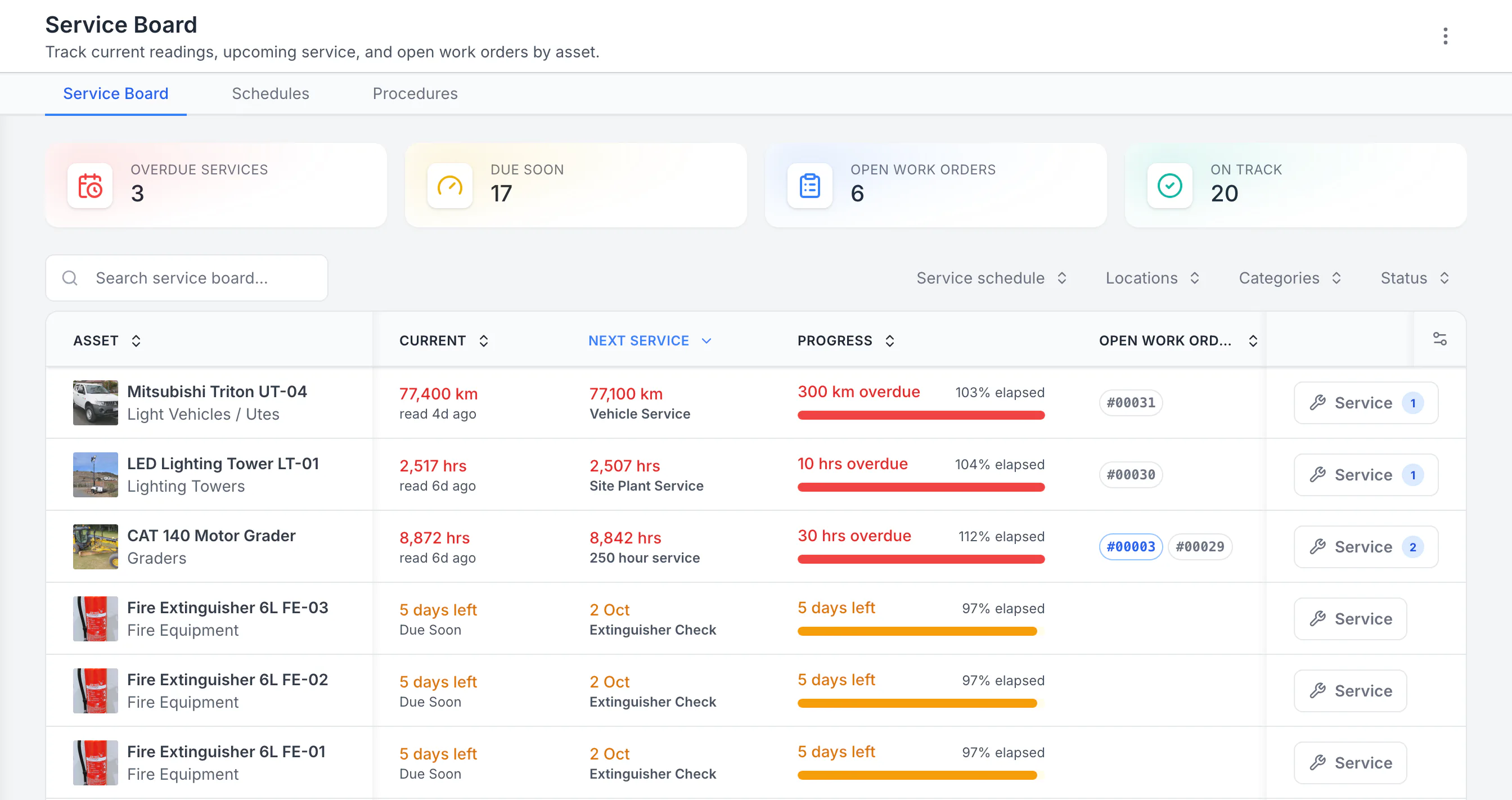
See the next service beside the current reading
Sorted by next service, the three overdue schedules come first: a ute 300 km past its service, then a lighting tower and a grader past their hour services. Each shows its open work orders. Extinguisher checks due in five days follow. Hours, kilometres and calendar checks share one board.
MapTrack app · Demonstration data · Captured
About this screenshot
Demonstration workspace with 40 schedule enrolments. Columns were chosen and resized in the board’s own display settings. Requires enrolled assets, configured schedules and an internet connection.
The short version
A sourced comparison of pricing model, offline behaviour by tier, where location data comes from, and data residency. Every UpKeep claim below links to UpKeep's own published pages.
Both platforms run maintenance well. The decision is about what your assets do. If they sit still and a small maintenance team looks after them, UpKeep's free requester seats make it a strong and often cheaper choice. If your assets move between sites, need finding, need pre-starts completed where there is no signal, and need cost tracked per machine, that is what MapTrack is built for. MapTrack covers tools, plant, trailers and vehicles on one record, from any phone, and holds Capterra’s Best Ease of Use award for 2026.
MapTrack vs UpKeep, feature by feature
Every UpKeep claim is sourced to UpKeep's own published pages and dated. Where a capability is not confirmed publicly we say so rather than assume it is absent.
| Criteria |  MapTrack MapTrack |  UpKeep UpKeep |
|---|---|---|
| Pricing and access | ||
| Best for | Mobile assets across sites: construction, civil, mining and facilities fleets, plant and tools | Maintenance execution on fixed plant and facilities: work orders, PM and technician scheduling |
| Pricing model | YesPer asset, with unlimited users | Per user across four tiers: Essential US$24 and Premium US$55 per user per month, Professional and Enterprise by quote(per UpKeep pricing page, Oct 2026) |
| Free seats for people who only request or view | YesAll users included, no seat counting | YesView-only and requester users are free and unlimited on every tier, and vendor and customer users are included from Premium; only admin and technician seats are paid(per UpKeep pricing page, Oct 2026) |
| Trial | YesFree 30-day trial | Free 7-day trial, no credit card; no free plan(per UpKeep pricing page, Oct 2026) |
| Field reality | ||
| Offline in the field | YesOffline form submission, procedures and per-asset pass or fail on loaded work orders, and selected offline asset, QR and file access, included | ?Premium is listed as online only. Offline caching starts on Professional, capped at 5 auto-cached work orders and 2 offline drafts, rising to 100 on Enterprise(per UpKeep pricing page, Oct 2026) |
| Where location data comes from | YesFirst-party GPS trackers including ultra long-life battery units, plus 150+ telematics, fleet and fuel-card data sources | ?Location is read from the telematics the customer already runs. Samsara is the confirmed shipped connector; UpKeep lists further providers as in development(per UpKeep fleet product page, Oct 2026) |
| Scan-based tracking | YesQR, barcode, BLE and GPS; assignments and bulk audits | YesBarcode scanning on every tier including the entry plan; first-party QR codes for assets and parts(per UpKeep pricing page, Oct 2026) |
| Where your data is stored | YesAustralian-operated platform serving ANZ customers | Hosted in AWS in the United States; UpKeep states customer data is stored and processed in the United States exclusively(per UpKeep trust centre, Oct 2026) |
| What each tier actually unlocks | ||
| Preventive maintenance scheduling and checklists | YesIncluded | ?Not in the entry tier; available from Premium upward(per UpKeep pricing page, Oct 2026) |
| Meter and engine-hour triggers | YesMeter readings and usage-based service triggers included; run hours and km can also be estimated from MapTrack GPS trackers | ?Meter readings from Premium upward(per UpKeep pricing page, Oct 2026) |
| API access | YesAvailable | ?UpKeep states the API is enabled only for accounts on the Enterprise plan(per UpKeep pricing page, Oct 2026) |
| Purchase orders, SSO, multi-site and workflow automation | YesAvailable | ?Enterprise tier(per UpKeep pricing page, Oct 2026) |
| Reporting history | YesFull history retained | ?Analytics history is listed as 30 days on Premium; longer retention on higher tiers(per UpKeep pricing page, Aug 2026) |
See how MapTrack works for your team
Full access to every feature. No credit card required. Per-asset pricing so you scale as your fleet grows.
- No credit card required
- Unlimited users
- Cancel anytime
The four questions that actually decide this
Which one works when the site has no signal?
MapTrack includes offline form submission, procedures and per-asset pass or fail on loaded work orders, and selected offline asset, QR and file access. UpKeep lists Premium as online only and starts offline caching on Professional, capped at 5 auto-cached work orders.
This is the difference that decides most Australian sites. A crew on a remote job does not lose connectivity politely: they lose it for the whole shift, and the pre-start still has to be completed and stored against the machine. MapTrack submits forms offline, lets crews work through a loaded work order and record pass or fail for each asset, and keeps selected asset, QR and file access available without a connection, then syncs when signal returns. UpKeep publishes offline behaviour by tier on its pricing page: Premium is listed as online only, Professional adds caching capped at 5 auto-cached work orders and 2 offline drafts, and Enterprise raises the cap to 100. If your crews work where coverage is unreliable, compare the tier that actually delivers offline rather than the entry price.
Where does each platform get asset location from?
MapTrack supplies first-party GPS trackers and consolidates 150+ telematics, fleet and fuel-card data sources. UpKeep reads location from telematics the customer already runs, with Samsara as the confirmed connector.
Both platforms let you find an asset, but they get there differently, and that difference matters when your fleet is mixed. MapTrack sells GPS trackers directly, including ultra long-life battery units for trailers and unpowered plant, and consolidates 150+ telematics, fleet and fuel-card data sources so engine hours, odometer and fault codes arrive in one place regardless of which OEM or aftermarket unit a machine carries. UpKeep approaches fleet through integration: its fleet product page names Samsara as a supported connector and lists further telematics providers as in development, so live location depends on the machine already carrying a unit from a supported provider. Note that UpKeep does track assets: barcode scanning is available on every tier including the entry plan, and QR codes for assets and parts are first party. The honest question is not whether it tracks, but whether the location data for your particular mix of plant, trailers and light vehicles has somewhere to come from.
Which is cheaper depends on who touches the system
MapTrack prices per asset with unlimited users. UpKeep prices per paid seat but makes view-only and requester users free and unlimited on every tier, so the comparison turns on how many people need admin or technician access.
Per-user pricing is often presented as straightforwardly worse, and for UpKeep that is not accurate. View-only and requester users are free and unlimited on every tier, so a site where fifty people raise requests and four technicians action them pays for four seats. That is a genuinely good fit, and if it describes your operation UpKeep may well cost less. The economics invert when the people in the field need to do more than request: complete pre-starts, update asset records, run audits, log meter readings. Those are paid seats, and at Essential US$24 or Premium US$55 per user per month the bill scales with crew size rather than with the size of the asset base. MapTrack charges per asset with unlimited users, so adding the whole crew changes nothing. Count your admin and technician seats honestly before assuming either model wins.
Does it matter where the data is stored?
UpKeep states its applications are hosted in AWS in the United States and that customer data is stored and processed in the United States exclusively. MapTrack is Australian-operated and serves ANZ customers.
For a lot of buyers this is not a factor. For Australian government, utilities, defence-adjacent contractors and anyone whose head contract carries a data-location clause, it is the first question procurement asks. UpKeep publishes its position plainly on its trust centre: applications are hosted in AWS in the United States, and customer data is stored and processed in the United States exclusively. That is a clear statement rather than an omission, which is why it is quoted here directly. If a data-residency requirement applies to your contracts, confirm it early with any vendor rather than discovering it at security review, and ask each of us in writing for our hosting and security documentation.
Where each platform wins
Scored against UpKeep's published pricing, fleet, Edge sensor and trust pages as at October 2026.
| Category | Winner |
|---|---|
| Unrestricted offline in the field(per UpKeep pricing page, Aug 2026) | MapTrack |
| First-party GPS hardware(per UpKeep fleet product page, Oct 2026) | MapTrack |
| Telematics and fleet data breadth(per UpKeep fleet product page, Oct 2026) | MapTrack |
| Hosting region(per UpKeep trust centre, Aug 2026) | MapTrack |
| Cost when most of the team only raises requests(per UpKeep pricing page, Aug 2026) | UpKeep |
| Condition-based maintenance with first-party sensors(per UpKeep Edge sensors page, Oct 2026) | UpKeep |
| Maintenance execution on fixed plant(per UpKeep pricing page, Aug 2026) | Draw |
Pricing compared
MapTrack
Per asset, with unlimited users. Adding the whole crew does not change the bill, so the cost scales with the size of your asset base rather than with headcount.
UpKeep
Four tiers. Essential US$24 and Premium US$55 per user per month, with Professional and Enterprise by quote. View-only and requester users are free and unlimited on every tier, and vendor and customer users are included from Premium. No free plan; the trial is 7 days without a credit card. UpKeep’s help centre says billing is monthly or annually; currency and any seat minimum are not stated publicly.
UpKeep pricing verified against upkeep.com/pricing in October 2026. Third-party directories still list older UpKeep tiers and prices, so check the vendor page rather than a directory.
Which should you choose?
Choose MapTrack if you…
- Your assets move between sites and you need to know where they are.
- Crews complete pre-starts where there is no mobile signal.
- You want GPS trackers supplied with the platform, including long-life units for trailers and unpowered plant.
- Your fleet spans multiple OEMs and telematics providers and you want the data in one place.
- An Australian data-residency requirement applies to your contracts.
- Most of the crew needs to do more than raise a request, so per-seat pricing would scale with headcount.
- You want site geofences drawn on every map, with entry and exit alerts in MapTrack Telematics.
- You want AI dash cams with live video and event clips in the same app as your assets.
- You use barcode or Data Matrix labels as well as QR, scanned with the phone camera or a handheld scanner.
- You want tiered service plans on run hours, with work orders raised from meter readings.
- You hire out equipment and need rate cards with daily, weekly and monthly rates (a Pro and Enterprise add-on).
- You want a cost ledger, budget vs actual and repair-or-replace for every asset (a Pro and Enterprise add-on).
- You run several divisions that each need their own assets and team access (a Pro and Enterprise add-on).
Consider UpKeep if you…
- Your problem is maintenance execution on fixed plant and facilities rather than finding assets.
- You have a small number of technicians and a large number of people who only raise requests, which its free requester seats handle well.
- You want first-party condition-monitoring sensors for condition-based maintenance.
- You run a US fleet on Samsara and need DOT and DVIR artefacts.
- You are standardising maintenance into an existing SAP, Oracle, NetSuite or Dynamics estate.
Moving from UpKeep to MapTrack
Export your data
Export your asset register, PM schedules and work order history from UpKeep as CSV.
Import and map fields
Upload into MapTrack. Our team maps your fields, sites, categories and custom fields.
Go live
Roll out to the crew with training, including offline pre-starts on the machines that need them.
What should you verify in a pilot?
Both vendors will demo well. These are the things that only show up when you use your own assets and your own site conditions.
- ✓MapTrack: Confirm GPS tracker compatibility with your specific plant, trailers and light vehicles; check your telematics or fuel-card provider is among the 150+ telematics, fleet and fuel-card data sources in MapTrack's integration directory; complete a pre-start with the phone in flight mode and confirm it syncs; review cost per asset reporting; confirm data residency in writing.
- ✓UpKeep: Price the paid seats you actually need rather than total headcount; confirm which tier delivers the offline behaviour your sites require and test it at that tier; confirm your telematics provider is a shipped connector rather than one in development; check API availability against the tier you are quoted.
How we build this comparison
UpKeep capabilities are sourced from UpKeep's public documentation, pricing pages and named third-party reviews as of Oct 2026. Competitor features and pricing change; confirm current details with each vendor and verify both platforms in a pilot with your own asset mix. MapTrack is our own product, so treat this as a vendor-authored comparison.
Where a capability is not confirmed in public sources we mark it as not publicly confirmed, not absent.
Spotted something out of date or incorrect? Email corrections@maptrack.com and we will review and update this page.
Frequently asked questions: MapTrack vs UpKeep
More comparisons
- MapTrack vs Asset Panda
- MapTrack vs SafetyCulture
- MapTrack vs Hilti ON!Track
- MapTrack vs Milwaukee ONE-KEY
- MapTrack vs MaintainX
- MapTrack vs Fleetio
- MapTrack vs ToolSense
- MapTrack vs Tenna
- MapTrack vs Samsara
- MapTrack vs Geotab
- MapTrack vs Verizon Connect
- MapTrack vs Trackunit
- MapTrack vs ToolWatch
- MapTrack vs spreadsheets
- MapTrack vs Sortly
- MapTrack vs EZOfficeInventory
- MapTrack vs Limble
- MapTrack vs GoCodes
- MapTrack vs AssetTiger
- MapTrack vs Cheqroom
- MapTrack vs ShareMyToolbox
- MapTrack vs Gearbelt
- MapTrack vs Fiix
- MapTrack vs GoAudits
- MapTrack vs Sitemate
- MapTrack vs GoFMX
- MapTrack vs IBM Maximo
- MapTrack vs Kynection
Other ways to evaluate UpKeep
About the author

Co-Founder & GM of Operations
Lachlan leads operations at MapTrack, bringing 10+ years of enterprise technology experience across mining, construction and heavy industry. Before MapTrack, he held senior roles at Workato (integration and automation) and AppDynamics/Cisco (application performance), working directly with ASX-listed organisations to modernise their technology stacks. His deep understanding of field operations and blue-collar workflows shapes how MapTrack solves real problems for asset-intensive teams.
View LinkedIn profile →Free templates for this workflow
Whichever platform you choose, these are free to download and use. No account needed.
See MapTrack against your own asset list
Join construction, mining and field service teams across Australia.
4.9 on G2 · 5.0 on Capterra, GetApp & Software Advice
- No credit card required
- Unlimited users
- Cancel anytime