 vs
vs
MapTrack vs Dashpivot
Dashpivot is Sitemate's site records and forms product, and it is very good at that. Asset management and maintenance sit in a separate Sitemate product, Gearbelt, priced per asset, so a site needing both pays on two meters. MapTrack covers the asset register, forms, maintenance and location in one platform priced per asset with unlimited users, and adds GPS trackers plus 150+ telematics, fleet and fuel-card data sources, which Sitemate does not publicly document for either product.

Based on Dashpivot’s public documentation and named third-party reviews as of Oct 2026. How we compare · Report a correction
Trusted by construction, mining and field service teams
















At a glance
- •Sitemate sells Dashpivot for site records and forms and Gearbelt for fleet and equipment, with Flowsite for integrations as a third product. Dashpivot and Gearbelt are priced on separate meters.
- •Gearbelt genuinely does asset registers, issues prompted by failed inspection checks that can be linked to a work order, and schedules triggered by hours, mileage, runtime or calendar.
- •Dashpivot Standard is AUD $32.00 per user per month with no commitment. The advertised $25.20 is a one-year-term rate at the 11 to 30 seat band.
- •Sitemate’s help centre says monthly subscriptions can be cancelled at any time, while annual contracts are fixed for the term and multi-year contracts run the full term.
- •GPS hardware, telematics ingestion and live location are not publicly documented for either product.
What MapTrack covers in one platform
- Every asset, one record
- Tools on QR or barcode labels and Bluetooth tags, plant on GPS trackers, vehicles with GPS and AI dash cams, sites with boundaries: custody, inspections, maintenance and costs on the same record.
- Maintenance that runs on real usage
- Run hours and kilometres from trackers, dash cams or manual readings feed tiered service plans and next-service forecasts, every asset gets a 0 to 100 maintenance health score, and one work order can cover many assets, each with its own pass or fail.
- Easy for crews
- Pre-starts and inspections work without signal, on any phone, with shared-device PINs, single sign-on and AI help to build forms and add assets from a photo. Capterra Best Ease of Use 2026.
- Hardware and software from one vendor
- GPS trackers, AI dash cams with built-in GPS, Bluetooth tags and labels at published prices, managed in the same app, plus LightMetrics dash cam accounts and 150+ telematics, fleet and fuel-card data sources.
- Simple to buy and run
- Per-asset pricing with unlimited users, 24/7 support and month-to-month plans. Capterra Best Value 2026.
The full capability list (35)
- One register for tools, plant, equipment and vehicles
- Custody: who has what, and where
- Site boundaries on the map
- Live tracking and alerts in MapTrack Telematics
- Rate cards (Pro and Enterprise add-on)
- Finance dashboards (Pro and Enterprise add-on)
- Divisions (Pro and Enterprise add-on)
- Run hours and km from trackers, cameras, feeds or readings
- Work orders raised from meters, run hours and data feeds
- Tiered service plans
- Next-service forecasts from usage
- Stale-reading flags
- Maintenance health score
- Service board and due-soon emails
- One work order across many assets
- Batch work orders and bulk scan logging
- Labour, parts and external costs on every service
- Failed checks raise work orders by rule
- Parts and inventory by location and bin
- Offline pre-starts and inspections
- Mobile web app (Android, iPhone, iPad)
- Shared-device PINs
- SAML 2.0 single sign-on (SSO)
- AI form builder
- AI asset creation from a photo
- Equipment bookings (Requests)
- GPS trackers managed in the app
- AI dash cam video in the app
- AI dash cams with built-in GPS
- LightMetrics dash cam connection
- Bluetooth tags
- QR, barcode and Data Matrix scanning
- OEM feeds under Connections
- 150+ data sources
- Engine hours from 68 integrations
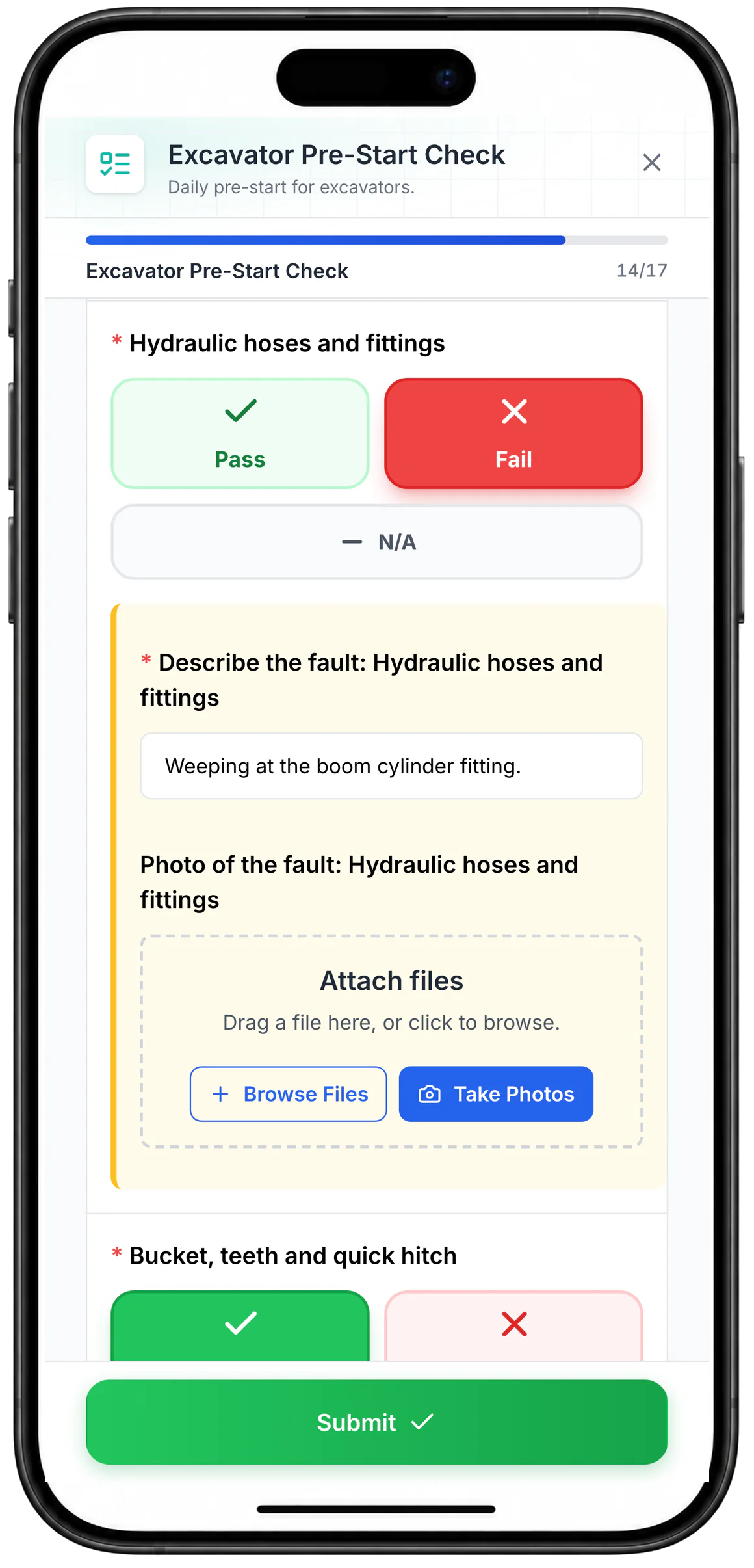
Tap Pass, Fail or N/A on a phone
A Pass, Fail or N/A question shows as large coloured buttons. Choosing Fail on the hydraulic hoses opens the fault description and photo fields.
MapTrack app · Demonstration data · Captured
About this screenshot
Captured at a 430 x 932 phone viewport in a demonstration workspace and shown in a phone frame. Questions render as buttons when their choices are a Pass/Fail-style set.
The short version
A sourced comparison covering how Sitemate packages Dashpivot and Gearbelt, what each really costs once the contract term is stripped out, and where location data comes from.
This is not a capability argument, it is a packaging one. Sitemate can do asset management, through a second product on a second meter. If forms and site records are your problem, Dashpivot alone may be all you need. If you also run plant that has to be found, serviced on engine hours and costed per machine, MapTrack does it in one platform and adds the GPS and telematics layer Sitemate does not publicly document. MapTrack covers tools, plant, trailers and vehicles on one record, from any phone, and holds Capterra’s Best Ease of Use award for 2026.
MapTrack vs Dashpivot, feature by feature
Claims are sourced to Sitemate's own published pages and dated. Where a capability is not confirmed publicly we say not publicly documented, not absent.
| Criteria |  MapTrack MapTrack |  Dashpivot Dashpivot |
|---|---|---|
| How the products are packaged | ||
| What you are buying | YesOne platform covering the asset register, forms, maintenance and location | Dashpivot for site records and forms, Gearbelt for fleet and equipment, and Flowsite for integrations, all subscribed separately (per Sitemate’s help centre). Dashpivot’s own FAQ points asset work at Gearbelt(per Sitemate Gearbelt, Aug 2026) |
| Pricing meter | YesPer asset, with unlimited users | Two meters: Dashpivot per user, Gearbelt per asset. A site needing both pays on both(per Sitemate pricing page, Aug 2026) |
| Asset register and work orders | YesIncluded in the one platform; one work order across many assets, each with its own pass or fail; batch work orders and bulk scan logging; labour, parts and external costs on every service | YesAvailable through Gearbelt: asset records, QR scan to record, issues prompted by failed checks and linkable to a work order (per its help centre)(per Sitemate Gearbelt, Oct 2026) |
| Usage-based maintenance triggers | YesMeter readings and usage-based service triggers; time or meter service schedules and tiered service plans; run hours and km estimated from your tracker | YesGearbelt schedules trigger by hours, mileage, runtime or calendar, plus custom usage units(per Sitemate Gearbelt, Oct 2026) |
| Location and field data | ||
| GPS hardware and live location | YesFirst-party GPS trackers including ultra long-life battery units; live location on a map | ?Not publicly documented for either product. The Location Tracking link resolves to a Journey Management Plan whose feature is manual driver check-ins(per Dashpivot product pages, Aug 2026) |
| Telematics and fleet data ingestion | Yes150+ telematics, fleet and fuel-card data sources feeding engine hours, odometer and fault codes | Not publicly confirmedNot publicly documented(per Dashpivot product pages, Aug 2026) |
| Offline in the field | YesOffline form submission and selected offline asset, QR and file access; drafts and per-asset results on loaded work orders | YesGenuinely strong offline. Documented cache limits relate to history depth and team switching rather than whether offline works(per Dashpivot product pages, Oct 2026) |
| Form building | YesCustom form builder with photo capture and sign-off; 25 field types, conditional logic, signatures, an AI form builder and branded PDFs | YesA core strength, plus Storm AI template generation and form fill, included on every plan and in the trial(per Dashpivot product pages, Oct 2026) |
| Commercial terms | ||
| Entry price, no commitment | YesPer asset, month to month | Dashpivot Standard is AUD $32.00 per user per month at 1 to 5 seats with no commitment. The advertised $25.20 is a one-year-term rate at the 11 to 30 seat band. Sitemate’s help centre adds that every plan carries a minimum number of licences set by company size, and licences are added or reduced in blocks(per Sitemate pricing page, Aug 2026) |
| Contract exit | YesMonth to month available | Sitemate’s help centre says monthly subscriptions can be cancelled at any time; annual contracts are fixed for the term and multi-year contracts run the full term; term discounts compound about 10% per step(per Sitemate pricing page, Aug 2026) |
| Trial | YesFree 30-day trial | 30-day free trial in a restricted Lite Workspace; no free Dashpivot tier is shown on the pricing page(per Sitemate pricing page, Aug 2026) |
See how MapTrack works for your team
Full access to every feature. No credit card required. Per-asset pricing so you scale as your fleet grows.
- No credit card required
- Unlimited users
- Cancel anytime
The four questions that actually decide this
Is this one product against one, or one against two?
Sitemate splits the job across Dashpivot for site records and forms and Gearbelt for fleet and equipment, on separate meters. MapTrack covers the register, forms, maintenance and location in one platform on one meter.
This is the honest heart of the comparison, and it is not a capability gap. Gearbelt is a real asset platform: asset records, QR scan straight to the record, issues prompted by failed checks (which can be added to a work order), and maintenance schedules that trigger by hours, mileage, runtime or calendar. Anyone claiming Sitemate cannot do asset management has not read their own site. The difference is packaging and therefore cost and administration. If your crews fill in site records AND you maintain plant, Sitemate is two products with two price meters, two sets of users to administer and a join between them. MapTrack is one register that the forms, the maintenance schedule and the location all hang off, priced per asset with unlimited users. Which is better depends on whether the forms and the plant are really the same job for you. For a builder whose site diary is the product, Dashpivot alone may be all they need.
Can either platform tell you where the machine is?
MapTrack supplies GPS trackers and consolidates 150+ telematics, fleet and fuel-card data sources. Sitemate does not publicly document GPS hardware, telematics ingestion or live location for either product.
This is the clean, defensible gap, and it is worth stating carefully. We searched Sitemate’s published product documentation for trackers, telematics ingestion, live location and geofencing and found none documented for either Dashpivot or Gearbelt. Their Location Tracking link resolves to a Journey Management Plan page whose location feature is manual driver check-ins, and device GPS appears as photo and form metadata plus a Location Field available on all Dashpivot plans, with a per-template limit that rises from 3 on Standard to 20 on Platinum. We say not publicly documented rather than absent, because a capability can exist without being published, and we would rather be corrected than overstate. What MapTrack does here is different in kind: GPS trackers supplied with the platform including long-life units for trailers and unpowered plant, and 150+ telematics, fleet and fuel-card sources feeding engine hours, odometer and fault codes into the same register the forms run against. If the question "where is it right now" matters, that is the difference.
What does Dashpivot actually cost?
The advertised AUD $25.20 per user per month is a one-year-term rate at the 11 to 30 seat band. No-commitment monthly Standard is AUD $32.00 at 1 to 5 seats, and Sitemate states annual and multi-year contracts have no opt-out.
We are quoting the term-adjusted figure rather than the headline because the headline would misrepresent them in the direction that flatters us, and a buyer would discover it in the first quote. Sitemate publishes four Dashpivot tiers with no-commitment monthly rates of AUD $32, $54, $76 and $98 at the smallest seat band, with term discounts compounding roughly 10% per step and ten volume bands. Their AUD and USD list prices are numerically identical, so there is no currency penalty for Australian buyers and we will not imply one. Gearbelt is priced separately per asset, with tools and equipment billed in batches. Two things to weigh: the annual and multi-year contracts have no opt-out, stated on their own page, and if you need both products you are on two meters. MapTrack prices per asset with unlimited users, so adding the whole crew does not change the bill.
Where is Dashpivot genuinely better?
Form building, its core strength. Storm AI template generation and form fill are included on every plan including the trial; MapTrack’s AI form builder also drafts forms from a description or a file.
A comparison page that finds nothing good in the other product is not worth reading. Dashpivot’s form building is a core strength and its offline capture is genuinely robust; the documented cache limits relate to history depth and team switching rather than whether it works without signal. Storm AI generates templates and helps fill forms, it is shipped rather than announced, and it is included on every plan and in the trial. MapTrack’s AI form builder drafts forms from a description or an uploaded file, so compare AI help while filling forms in a trial. One caution if you compare certifications yourself: Sitemate’s product page mentions ISO standards that their own security page does not list, so ask them directly which are current rather than relying on either page.
Where each platform wins
Scored against Sitemate's published pricing, product and security pages as at Oct 2026.
| Category | Winner |
|---|---|
| One platform on one meter(per Sitemate pricing page, Aug 2026) | MapTrack |
| GPS hardware and live location(per Dashpivot product pages, Aug 2026) | MapTrack |
| Telematics and fleet data breadth(per Dashpivot product pages, Aug 2026) | MapTrack |
| Month-to-month commercial flexibility with per-asset pricing(per Sitemate pricing page, Aug 2026) | MapTrack |
| AI-assisted form building(per Dashpivot product pages, Aug 2026) | Draw |
| Site records, forms and sign-off(per Dashpivot product pages, Aug 2026) | Draw |
| Offline capture in the field(per Dashpivot product pages, Aug 2026) | Draw |
Pricing compared
MapTrack
Per asset, with unlimited users, month to month. One meter covers the register, the forms, the maintenance schedule and the location.
Dashpivot
Dashpivot has four tiers. No-commitment monthly Standard is AUD $32.00 per user per month at 1 to 5 seats, rising through $54, $76 and $98; term discounts compound about 10% per step across ten volume bands. Gearbelt is priced separately per asset. Sitemate states annual and multi-year contracts have no opt-out, and its help centre adds that every plan carries a minimum number of licences set by company size.
Verified against Sitemate's published pricing page in August 2026. Their advertised per-user figure is a one-year-term rate at a mid seat band, so compare like for like. AUD and USD list prices are numerically identical, so there is no currency penalty for Australian buyers. Gearbelt's published rates carry an internal reconciliation note on Sitemate's own rate card, so treat them as indicative and confirm in a quote.
Which should you choose?
Choose MapTrack if you…
- You want the asset register, the forms, the maintenance schedule and the location in one product on one meter.
- You need to know where plant is right now, not where someone last checked in.
- Your fleet spans multiple telematics providers and you want engine hours and fault codes feeding maintenance automatically.
- You want to add the whole crew without the bill moving.
- You would rather stay month to month than sign a term with no opt-out.
- You want a failed check to raise a work order automatically, through a rule you set.
- You run test and tag or calibration rounds as one work order across many assets, each with its own pass or fail.
- You want AI dash cams with live video and event clips in the same app as your assets.
- You need equipment bookings (Requests) with approvals, conflict checks and scan-to-check-out.
- You use barcode or Data Matrix labels as well as QR, scanned with the phone camera or a handheld scanner.
- You hire out equipment and need rate cards with daily, weekly and monthly rates (a Pro and Enterprise add-on).
- You want a cost ledger, budget vs actual and repair-or-replace for every asset (a Pro and Enterprise add-on).
- You run several divisions that each need their own assets and team access (a Pro and Enterprise add-on).
Consider Dashpivot if you…
- Site records, forms, sign-off and site diaries are the actual job, and plant maintenance is somebody else’s problem.
- Storm AI template generation and form fill, included on every plan and in the trial, suit how your crews work.
- You already run Dashpivot and Gearbelt together and the two-product split suits how your teams are organised.
- Your field teams are large and mostly capture records rather than manage assets.
Moving from Dashpivot to MapTrack
Export your records
Export your asset list and form records from Dashpivot and Gearbelt as CSV.
Rebuild forms and import assets
Our team recreates your key forms in MapTrack and maps assets, sites and categories onto one register.
Go live
Roll out to the crew, including offline pre-starts and QR labels on the plant that needs them.
What should you verify in a pilot?
Both are credible Australian products. These are the things that only surface when you use your own plant and your own site conditions.
- ✓MapTrack: Confirm GPS tracker compatibility with your specific plant and trailers; check your telematics or fuel-card provider is among the 150+ telematics, fleet and fuel-card data sources in MapTrack's integration directory; complete a pre-start offline and confirm it syncs; review cost per asset reporting; and ask us in writing about our security posture and hosting.
- ✓Dashpivot: Price Dashpivot and Gearbelt together at your real seat and asset counts, on a monthly term rather than the advertised term rate; confirm the contract exit terms in writing; ask what location capability exists beyond manual check-ins; confirm which certifications are current, since their product and security pages differ.
How we build this comparison
Dashpivot capabilities are sourced from Dashpivot's public documentation, pricing pages and named third-party reviews as of Oct 2026. Competitor features and pricing change; confirm current details with each vendor and verify both platforms in a pilot with your own asset mix. MapTrack is our own product, so treat this as a vendor-authored comparison.
Where a capability is not confirmed in public sources we mark it as not publicly confirmed, not absent.
Spotted something out of date or incorrect? Email corrections@maptrack.com and we will review and update this page.
Frequently asked questions: MapTrack vs Dashpivot
More comparisons
- MapTrack vs Asset Panda
- MapTrack vs SafetyCulture
- MapTrack vs Hilti ON!Track
- MapTrack vs Milwaukee ONE-KEY
- MapTrack vs MaintainX
- MapTrack vs Fleetio
- MapTrack vs ToolSense
- MapTrack vs Tenna
- MapTrack vs Samsara
- MapTrack vs Geotab
- MapTrack vs Verizon Connect
- MapTrack vs Trackunit
- MapTrack vs ToolWatch
- MapTrack vs spreadsheets
- MapTrack vs Sortly
- MapTrack vs EZOfficeInventory
- MapTrack vs Limble
- MapTrack vs GoCodes
- MapTrack vs AssetTiger
- MapTrack vs Cheqroom
- MapTrack vs ShareMyToolbox
- MapTrack vs Gearbelt
- MapTrack vs Fiix
- MapTrack vs GoAudits
- MapTrack vs Sitemate
- MapTrack vs GoFMX
- MapTrack vs IBM Maximo
- MapTrack vs Kynection
Other ways to evaluate Dashpivot
About the author

Co-Founder & GM of Operations
Lachlan leads operations at MapTrack, bringing 10+ years of enterprise technology experience across mining, construction and heavy industry. Before MapTrack, he held senior roles at Workato (integration and automation) and AppDynamics/Cisco (application performance), working directly with ASX-listed organisations to modernise their technology stacks. His deep understanding of field operations and blue-collar workflows shapes how MapTrack solves real problems for asset-intensive teams.
View LinkedIn profile →Free templates for this workflow
Whichever platform you choose, these are free to download and use. No account needed.
See MapTrack against your own plant list
Join construction, mining and field service teams across Australia.
4.9 on G2 · 5.0 on Capterra, GetApp & Software Advice
- No credit card required
- Unlimited users
- Cancel anytime