
8 best asset management software with an MCP server for 2026
Looking for asset management software that connects to Claude, ChatGPT or Copilot? We compared 8 asset management, maintenance and fleet platforms that publish their own MCP server: what AI tools can read or change, which plans include it, how you connect and what each platform manages, with a dated source beside every row. Ten more platforms with their own MCP server are listed below.

The best asset management software with an MCP server depends on what you manage and how much your AI tools should be able to change. MapTrack fits teams that keep tools, equipment, plant and vehicles on one record. MapTrack's MCP server connects your AI tools, such as Claude and Codex, to MapTrack. It's included on the Enterprise plan and available as an add-on on Pro. Limble and MaintainX give AI tools read-only access to a CMMS, GoCodes lets them update asset records, Samsara, Geotab and Trackunit connect them to fleet and equipment telematics, and IBM Maximo brings an MCP Server to enterprise asset management.
Key takeaways
- MapTrack ranks first for teams that keep tools, equipment, plant and vehicles on one record. MapTrack's MCP server connects your AI tools, such as Claude and Codex, to MapTrack. It's included on the Enterprise plan and available as an add-on on Pro.
- Read-only is common: Limble, MaintainX, Samsara and Fleetio describe their MCP servers as read-only today, while GoCodes, Geotab, Trackunit and Motive let AI tools make some changes.
- Plans vary: Geotab includes MCP with the GO Plan, Limble puts it on Premium+ and Enterprise, MaintainX needs a plan with MaintainX Assist, and several servers are still in beta or preview.
- Before you connect live records, check whose permissions the AI tool works under, whether a person confirms changes and who sets the connection up.
TL;DR
Top 3 picks at a glance
 MapTrack
 is asset tracking, maintenance (CMMS) and compliance software for tools, equipment, plant and fleet.
Jump to review ↓A per-user CMMS whose MCP server, announced in its Winter Release on 14 January 2026, is read-only by design and comes on the Premium+ and Enterprise plans.
Jump to review ↓ MaintainX
A per-user CMMS whose MCP server, in beta, gives Claude, ChatGPT and Microsoft Copilot Studio read-only access to the MaintainX data each user can already view.
Jump to review ↓Trusted by construction, mining and field service teams










Quick verdict: best asset management software with an MCP server by use case
Our top picks by use case. Click any card to jump to the full review.

MapTrack
Best for tools, equipment, plant and vehicles on one record, with tracking, maintenance and compliance in one platform
Limble
Best for maintenance teams that want AI tools to read their CMMS data

MaintainX
Best for CMMS teams where each person connects their own AI assistant, read-only
IBM Maximo
Best for large enterprises that want to bring their own AI agents to Maximo
GoCodes
Best for asset tracking teams that want AI tools to update asset records as well as read them

Samsara
Best for fleets on Samsara hardware that want AI tools to read fleet data

Geotab
Best for Geotab fleets that want AI tools to query fleet data and take actions such as scheduling maintenance

Trackunit
Best for construction equipment fleets that want AI tools to update records and configure alerts
Which platform with an MCP server fits your team?
Start from where your asset data lives today and how much you want AI tools to change.
The maintenance manager already on a CMMS
Our work orders and service history live in our CMMS, and we want an AI assistant to answer questions about them. What should we check?
Start with the MCP server your CMMS already offers. Limble's is read-only and comes on Premium+ and Enterprise; MaintainX's is in beta, read-only and needs a plan with MaintainX Assist. If you also want assets located on a map, pre-starts and tools on the same record, compare MapTrack, which runs maintenance work orders and service plans alongside tracking.
Learn more →The fleet manager on a telematics platform
Our vehicles and machines report through telematics. Can an AI tool query that data and act on it?
Use the MCP server from the platform your hardware reports to. Samsara's is generally available and read-only; Geotab's can query and act, such as scheduling maintenance, and is included with the GO Plan; Trackunit's can update records and configure alerts with an IrisX subscription. Check whose permissions the AI tool works under before you connect it.
Learn more →The operations lead with tools, equipment, plant and vehicles across sites
We want one register for everything we own, with tracking, maintenance and inspections, and we want our AI tools connected to it. What fits?
MapTrack is asset tracking, maintenance (CMMS) and compliance software for tools, equipment, plant and fleet. MapTrack's MCP server connects your AI tools, such as Claude and Codex, to MapTrack. It's included on the Enterprise plan and available as an add-on on Pro. Talk to our sales team and we'll set it up with you.
Learn more →The IT or digital lead connecting AI tools to several systems
We are connecting Claude or Copilot to several business systems. How do we keep control?
List what each server can read and change, whether a person confirms changes, whose permissions apply and how you switch access off. The MCP specification requires AI apps to get the user's consent before sharing data with a server or running its tools, but says the protocol can't enforce that on its own. For enterprise asset management, IBM Maximo Application Suite 9.2 lets organisations bring their own agents to Maximo Manage APIs.
Learn more →Who this guide isn't for
This guide compares asset management, maintenance and fleet platforms that publish their own MCP server. It isn’t the right comparison if:
- You want a community-built MCP connector for a platform that doesn’t publish its own. This guide covers vendors’ own MCP servers only.
- You're choosing an AI assistant rather than the software it connects to. Read what an MCP server is
- You only manage IT hardware and software licences. Compare IT asset management software
- You want to build your own integration against a developer API. See the MapTrack API
In this guide
How we evaluated these platforms
We included asset management, maintenance, fleet and inspection platforms that publish their own MCP server, and left out community-built connectors. For each, we read the vendor's own MCP documentation, help articles and announcements in November 2026 and recorded what AI tools can read or change, which plans include it, its status, the AI tools it names and how you connect. Platform facts such as tracking, maintenance, inspections, offline use and pricing reuse rows we had already checked and dated on our other buyer guides and compare pages. Each row in the comparison table shows its MCP source and the month we checked it, and where a vendor's public pages don't say something, we write "verify with vendor" rather than guess.
- Anthropic: Introducing the Model Context Protocol(checked Nov 2026)
- Model Context Protocol specification(checked Nov 2026)
- Limble Winter Release 2026(checked Nov 2026)
- Limble Practical AI(checked Nov 2026)
- Limble MCP user set-up guide(checked Nov 2026)
- Limble pricing page(checked Nov 2026)
- MaintainX MCP server(checked Nov 2026)
- MaintainX: connect to the MCP server(checked Nov 2026)
- MaintainX pricing page(checked Nov 2026)
- IBM Maximo Application Suite 9.2(checked Nov 2026)
- IBM Maximo pricing(checked Nov 2026)
- GoCodes MCP server(checked Nov 2026)
- GoCodes pricing(checked Nov 2026)
- Samsara MCP documentation(checked Nov 2026)
- Introducing Samsara MCP(checked Nov 2026)
- Samsara plans(checked Oct 2026)
- Geotab MyGeotab MCP server(checked Nov 2026)
- Geotab MCP connector announcement(checked Nov 2026)
- Trackunit IrisX MCP help(checked Nov 2026)
- Trackunit AI-driven fleet intelligence announcement(checked Nov 2026)
- Trackunit equipment maintenance(checked Oct 2026)
- Fleetio MCP server(checked Nov 2026)
- Motive MCP help(checked Nov 2026)
- Mitti developer docs(checked Nov 2026)
- Sitemate MCP FAQs(checked Nov 2026)
- Facilio MCP server(checked Nov 2026)
- Ecotrak AI suite launch(checked Nov 2026)
- Fulcrum MCP connector and AI toolkit announcement(checked Nov 2026)
- Fulcrum MCP and AI toolkit docs(checked Nov 2026)
- Fulcrum AI field data collection(checked Nov 2026)
- Netradyne MCP connector(checked Nov 2026)
- A4B MCP server docs(checked Nov 2026)
- Snipe-IT v8.8.4 release(checked Nov 2026)
This guide is published by MapTrack (rated 4.9/5 on G2 and 5.0/5 on Capterra, GetApp and Software Advice). MapTrack ranks first because it keeps tools, equipment, plant and vehicles on one register with tracking, maintenance and inspections; if you want to connect an AI tool yourself without talking to anyone, a platform with self-serve set-up may suit you better. Shortlist two or three options and test the connection with your own data before deciding.
Spotted something out of date or incorrect? Email corrections@maptrack.com and we will review and update this page.
Asset management software with an MCP server: comparison table
Side-by-side overview of 8 platforms. Verify current MCP access, plans and pricing with each vendor.
| Software | Best for | MCP server | Asset tracking | Maintenance | Inspections | Offline | Pricing |
|---|---|---|---|---|---|---|---|
| MapTrack | Tools, equipment, plant and fleet in one platform | Enterprise plan or add-on, set up with our sales team(per MapTrack MCP server, Nov 2026) | Yes | Yes | Yes | Yes | Per asset, not per user; MCP on Enterprise or as an add-on |
| Limble | Read-only CMMS access | Read-only by design(per Limble Winter Release 2026, Nov 2026) | Yes | Yes | Yes | ? | Per user: Standard $28, Premium+ $69 a month (cost guide, Mar 2026); MCP on Premium+ and Enterprise |
| MaintainX | Per-user read-only access, in beta | Beta; read-only; needs MaintainX Assist(per MaintainX MCP server, Nov 2026) | Yes | Yes | Yes | ? | Per user: free Basic; Essential US$20, Premium US$65 a month billed annually; MCP needs MaintainX Assist |
| IBM Maximo | Enterprise EAM, bring your own agents | MCP Server in MAS 9.2 (June 2026); verify access and plans with IBM(per IBM Maximo Application Suite 9.2, Nov 2026) | Yes | Yes | Yes | Yes | AppPoints; Essentials from under US$40,000 a year; Standard by estimator; Premium by quote |
| GoCodes | Read and write asset tracking, in beta | Beta; 25 read and 7 write tools(per GoCodes MCP server, Nov 2026) | Yes | Yes | Not publicly confirmed | ? | Annual: Standard US$550 (200 assets) to Professional US$2,750 (2,000); Enterprise custom |
 Samsara | Fleets on Samsara hardware | Generally available; read-only(per Samsara MCP documentation, Nov 2026) | Yes | Yes | ? | ? | Quote-led; every plan reads "Get pricing" |
 Geotab | Geotab fleets: query and act | Query and act; roughly 20 tools; included with the GO Plan(per Geotab MyGeotab MCP server, Nov 2026) | Yes | Yes | Yes | ? | Through Geotab resellers |
 Trackunit | Construction equipment: read and act | Read and act; needs an IrisX subscription(per Trackunit IrisX MCP help, Nov 2026) | Yes | Yes | ? | ? | Quoted on request |
Yes ConfirmedNot available per vendor sources Not available? Verify with vendorNot publicly confirmed Not publicly confirmed
Asset management software with an MCP server: reviews
A detailed review of each platform: its MCP server, what it manages, pricing and best fit.

MapTrack
Best for tools, equipment, plant and vehicles on one record, with tracking, maintenance and compliance in one platformMapTrack is asset tracking, maintenance (CMMS) and compliance software for tools, equipment, plant and fleet. MapTrack's MCP server connects your AI tools, such as Claude and Codex, to MapTrack. It's included on the Enterprise plan and available as an add-on on Pro. Talk to our sales team and we'll set it up with you.
Pricing: Per asset, not per user; MCP on Enterprise or as an add-on · Trial: Free trial, no credit card
Not a fit if: You want to connect an AI tool yourself, without talking to anyone: our team switches the MCP server on for your account and helps you connect your AI tools.
What you get in one platform
- Every asset, one record
- Tools on QR or barcode labels and Bluetooth tags, plant on GPS trackers, vehicles with GPS and AI dash cams, sites with boundaries: custody, inspections, maintenance and costs on the same record.
- Maintenance that runs on real usage
- Run hours and kilometres from trackers, dash cams or manual readings feed tiered service plans and next-service forecasts, every asset gets a 0 to 100 maintenance health score, and one work order can cover many assets, each with its own pass or fail.
- Easy for crews
- Pre-starts and inspections work without signal, on any phone, with shared-device PINs, single sign-on and AI help to build forms and add assets from a photo. Capterra Best Ease of Use 2026.
- Hardware and software from one vendor
- GPS trackers, AI dash cams with built-in GPS, Bluetooth tags and labels at published prices, managed in the same app, plus LightMetrics dash cam accounts and 150+ telematics, fleet and fuel-card data sources.
- Simple to buy and run
- Per-asset pricing with unlimited users, 24/7 support and month-to-month plans. Capterra Best Value 2026.
The full capability list (47)
- One register for tools, plant, equipment and vehicles
- Custody: who has what, and where
- Site boundaries on the map
- Location types, zones and geofences
- Location teams and roles
- Live tracking and alerts in MapTrack Telematics
- Rate cards (Pro and Enterprise add-on)
- Finance dashboards (Pro and Enterprise add-on)
- Divisions (Pro and Enterprise add-on)
- Run hours and km from trackers, cameras, feeds or readings
- Meter readings from a photo
- Work orders raised from meters, run hours and data feeds
- Tiered service plans
- Next-service forecasts from usage
- Stale-reading flags
- Maintenance health score
- Service board and due-soon emails
- One work order across many assets
- Batch work orders and bulk scan logging
- Labour, parts and external costs on every service
- Failed checks raise work orders by rule
- Parts and inventory by location and bin
- Offline pre-starts and inspections
- Phone forms in sections, with Pass, Fail and N/A buttons
- Mobile web app (Android, iPhone, iPad)
- Shared-device PINs
- Smart overlay (AR) that scans several codes at once
- SAML 2.0 single sign-on (SSO)
- AI form builder
- AI asset creation from a photo
- Equipment bookings (Requests)
- GPS trackers managed in the app
- AI dash cam video in the app
- AI dash cams with built-in GPS
- LightMetrics dash cam connection
- AI dash cam live view: road, driver or both
- Dash cam footage requests, with blurring
- Driver scorecards and a Safety events dashboard
- Bluetooth tags
- QR, barcode and Data Matrix scanning
- RFID and NFC
- OEM feeds under Connections
- Connection library in the app
- 150+ data sources
- Engine hours from 68 integrations
- REST API with per-key access levels
- MCP server for AI tools (Enterprise plan or add-on)
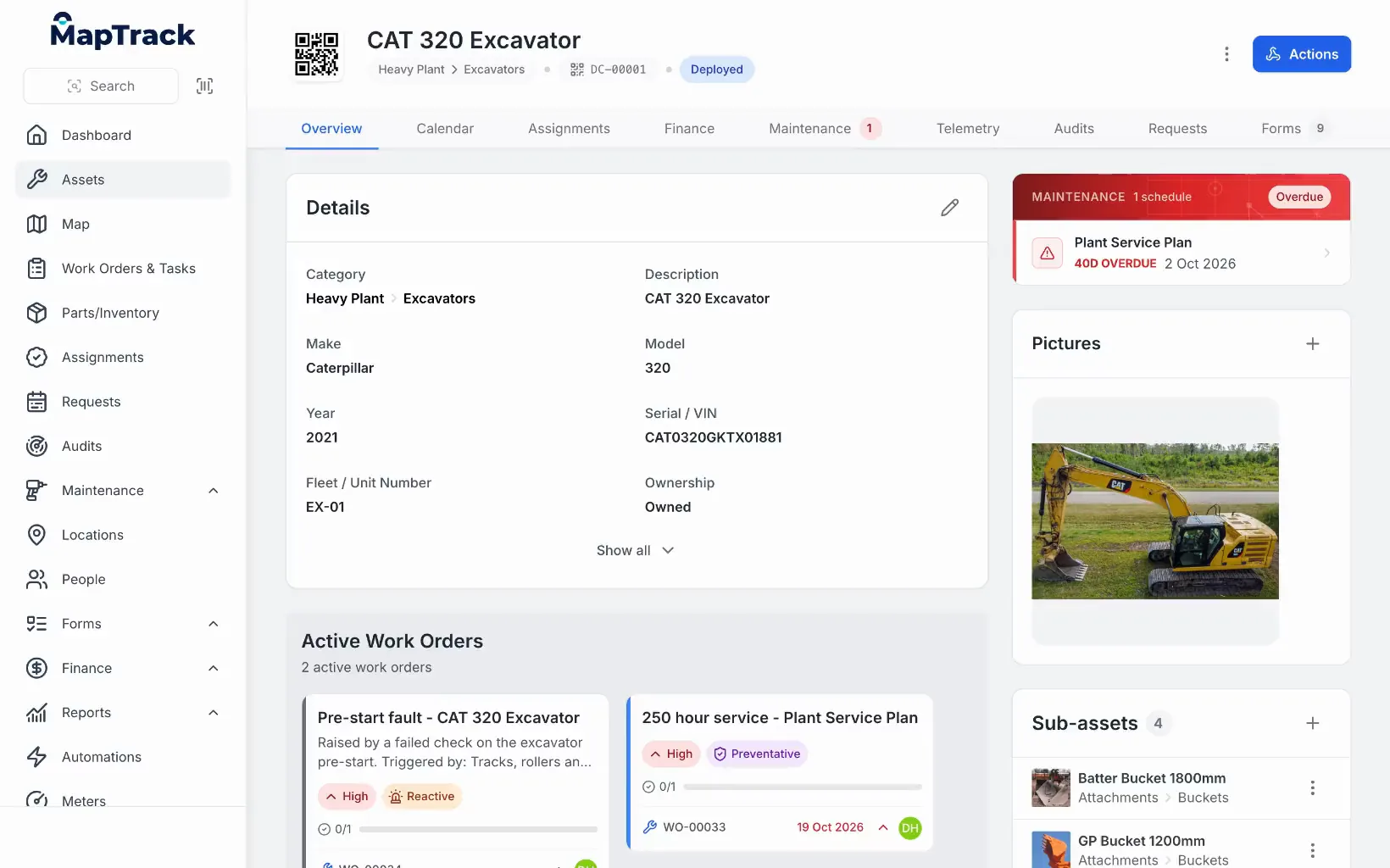
Everything about one machine
An excavator's record: its tag, details, next service and open work orders.
MapTrack app · Demonstration data · Recorded
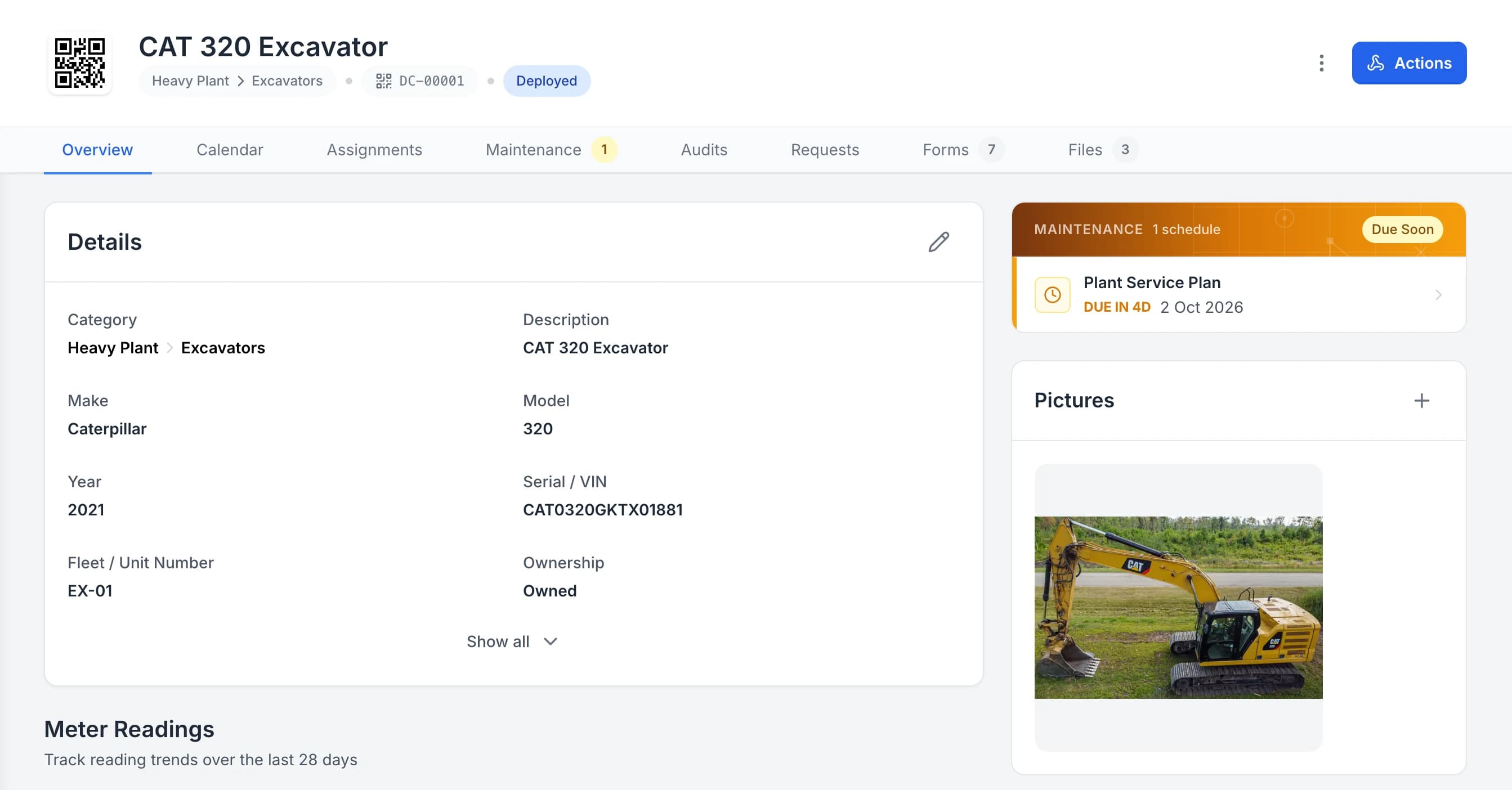
Keep the details, next service and photo on the asset
One excavator’s record. Its QR tag, status and details sit at the top, the next service is flagged Due Soon, and its assignments, maintenance, audits, requests, forms and files are each one tab away.
MapTrack app · Demonstration data · Captured
About this screenshot
Captured in a demonstration workspace on the asset’s Overview tab. Meter readings, sub-assets, parts and activity continue further down the page.
MapTrack is one platform for every asset a field business runs: tools, plant, trailers and vehicles, tracked, inspected, booked and maintained on one record, from any phone. QR codes, barcodes, GPS trackers, Bluetooth tags and AI dash cams identify and locate assets. Assignment workflows, mobile inspections and maintenance triggers run on a single register. MapTrack's MCP server connects your AI tools, such as Claude and Codex, to MapTrack. When we set up the MCP server, we'll confirm which parts of MapTrack your AI tools can work with.
It's included on the Enterprise plan and available as an add-on on Pro. Talk to our sales team and we'll set it up with you. Service plans fall due on engine hours, distance or dates, a defect report or failed inspection raises a corrective work order automatically, and each service records labour, parts and external costs. Per-asset pricing with unlimited users keeps field rollouts simple.
Key features
- ✓MCP server for AI tools such as Claude and Codex (Enterprise plan or add-on)
- ✓Switched on for your account by our team
- ✓Single register for tools, equipment, plant, fleet and IT hardware
- ✓QR, barcode, GPS and BLE tracking
- ✓QR, barcode and Data Matrix scanning by phone camera or handheld scanner; the phone camera reads 14 code types
- ✓Assignment workflows with full audit trail
- ✓Maintenance work orders with meter and schedule triggers
- ✓Pre-starts, inspections and custom forms
- ✓Loaded forms and work-order results work offline
- ✓Site geofences on every map; entry and exit alerts in MapTrack Telematics
- ✓Cost tracking and asset depreciation
- ✓Per-asset pricing; unlimited users
Limble
Best for maintenance teams that want AI tools to read their CMMS dataA per-user CMMS whose MCP server, announced in its Winter Release on 14 January 2026, is read-only by design and comes on the Premium+ and Enterprise plans. Limble says it connects to Claude Desktop, Claude Code and Cursor.
Pricing: Per user: Standard $28, Premium+ $69 a month (cost guide, Mar 2026); MCP on Premium+ and Enterprise · Trial: Demo on request
Not a fit if: You want an AI tool to raise or update work orders: Limble's MCP server is read-only by design.
Limble is a CMMS for work orders, preventive maintenance, inspections and spare parts. Its MCP server gives AI tools access to assets, work orders, schedules and inventory without changing them, and Limble's set-up guide also covers GitHub Copilot and Microsoft Copilot Studio.
Only Super Users can create the API keys the connection uses. Meter and threshold triggers, inspection procedures and offline mode for open tasks start on Premium+. Limble's March 2026 cost guide lists Standard at $28 and Premium+ at $69 per user per month, with Enterprise custom.
Key features
- ✓MCP server, read-only by design
- ✓MCP on Premium+ and Enterprise
- ✓Claude Desktop, Claude Code and Cursor; the set-up guide also covers GitHub Copilot and Microsoft Copilot Studio
- ✓API keys created by Super Users
- ✓Preventive maintenance on every plan
- ✓Meter and threshold triggers from Premium+
- ✓Inspection procedures with signature capture from Premium+
- ✓Asset QR codes on every plan

MaintainX
Best for CMMS teams where each person connects their own AI assistant, read-onlyA per-user CMMS whose MCP server, in beta, gives Claude, ChatGPT and Microsoft Copilot Studio read-only access to the MaintainX data each user can already view. It needs a MaintainX plan that includes MaintainX Assist.
Pricing: Per user: free Basic; Essential US$20, Premium US$65 a month billed annually; MCP needs MaintainX Assist · Trial: Free Basic plan
Not a fit if: You want an AI tool to raise or close work orders: MaintainX's MCP server gives read-only access.
MaintainX is a CMMS for work orders, preventive and predictive maintenance, checklists, procedures and parts, with QR and barcode scanning in a mobile-first app. Each user connects with their own MaintainX sign-in over OAuth, and a connection lasts 90 days.
MaintainX says features and behaviour may change during the beta. Meter-based maintenance starts on Premium (US$65 per user a month, billed annually), and requesters are free.
Key features
- ✓MCP server in beta
- ✓Read-only, limited to data the user can view
- ✓Claude, ChatGPT and Microsoft Copilot Studio
- ✓OAuth sign-in with MaintainX credentials; connections last 90 days
- ✓Needs a plan that includes MaintainX Assist
- ✓Work orders; preventive and predictive maintenance
- ✓Checklists and procedures on work orders
- ✓QR codes and barcodes for assets
IBM Maximo
Best for large enterprises that want to bring their own AI agents to MaximoAn enterprise asset management suite whose Maximo Application Suite 9.2, released on 25 June 2026, includes an MCP Server so organisations can bring their own agents and connect them to Maximo Manage APIs. We couldn't confirm from IBM's public pages which AI tools, access levels or plans it covers, so check those with IBM.
Pricing: AppPoints; Essentials from under US$40,000 a year; Standard by estimator; Premium by quote · Trial: Guided trial for Manage and Health
Not a fit if: You want a small team running in weeks without a systems integrator: Maximo is licensed in AppPoints, and larger rollouts usually involve a certified partner.
IBM Maximo covers work orders, MRO inventory, preventive and predictive maintenance, condition monitoring and health, safety and environment add-ons, deployed as SaaS, on-premises or hybrid. Maximo Mobile runs on iOS, Android and Windows, with online and offline modes and barcode and QR scanning.
Licensing is in AppPoints that users and installs both draw on. IBM publishes an entry price for SaaS Essentials (Maintenance from under US$40,000 a year), an online estimator for Standard and quotes for Premium, and larger rollouts usually involve a systems integrator.
Key features
- ✓MCP Server in Maximo Application Suite 9.2 (June 2026)
- ✓Bring your own AI agents to Maximo Manage APIs
- ✓Work orders, MRO inventory, preventive and predictive maintenance
- ✓Maximo Mobile on iOS, Android and Windows, online and offline
- ✓Barcode and QR scanning in Maximo Mobile
- ✓Health, Safety and Environment add-on
- ✓SaaS, on-premises or hybrid deployment
GoCodes
Best for asset tracking teams that want AI tools to update asset records as well as read themAn asset tracking platform whose MCP server, in beta, offers 32 tools: 25 that read and 7 that write, such as updating an asset. GoCodes says access is included on every plan during the beta and that it has tested Claude, ChatGPT and Microsoft Copilot.
Pricing: Annual: Standard US$550 (200 assets) to Professional US$2,750 (2,000); Enterprise custom · Trial: 15-day free trial
Not a fit if: You want AI changes to wait for a person to approve them: GoCodes says update_asset applies on call and does not stage a change for confirmation.
GoCodes tracks equipment and tools with QR and barcode tags, plus its own GPS trackers and Bluetooth beacons, with maintenance scheduling, reminders and calibration. Its MCP server signs in with OAuth 2.1 and PKCE, and writes need a role that already permits editing.
Updates apply as soon as the AI tool calls them, without a confirmation step, and the server can't delete assets or tasks. Pricing is annual and set by asset count: Standard is US$550 a year for 200 assets and Professional US$2,750 for 2,000, with Enterprise custom.
Key features
- ✓MCP server in beta: 25 read tools and 7 write tools
- ✓Tested with Claude, ChatGPT and Microsoft Copilot
- ✓OAuth 2.1 with PKCE
- ✓Writes follow the user's editing role
- ✓Updates apply on call; it can't delete assets or tasks
- ✓QR and barcode tags, GPS trackers and Bluetooth beacons
- ✓Maintenance scheduling, reminders and calibration

Samsara
Best for fleets on Samsara hardware that want AI tools to read fleet dataA connected-operations platform whose MCP server is generally available for supported Samsara organisations and gives AI tools read-only access to Samsara data. Samsara's launch post says it's available to all customers at no additional charge today, and that MCP costs will later be based on monthly usage.
Pricing: Quote-led; every plan reads "Get pricing" · Trial: Sales-led
Not a fit if: You want an AI tool to change records: Samsara's MCP server gives read-only access.
Samsara connects vehicles, trailers and equipment through its own gateways, asset tags and AI cameras, with Connected Maintenance work orders and preventive schedules on odometer and engine hours. Its MCP server has more than 40 tools, works with Claude, ChatGPT, Copilot and Cursor, and enforces the same identity, role and tag scoping as the Samsara dashboard.
Samsara announced the MCP server on 22 September 2026, and it signs in with OAuth. Hardware and software are quote-led: every plan on Samsara's plans page reads "Get pricing".
Key features
- ✓MCP server, generally available for supported organisations
- ✓Read-only access to Samsara data
- ✓More than 40 tools
- ✓Claude, ChatGPT, Copilot and Cursor
- ✓Same identity, role and tag scoping as the dashboard
- ✓No additional charge today; usage-based pricing planned
- ✓Gateways, asset tags and AI cameras
- ✓Connected Maintenance work orders and schedules

Geotab
Best for Geotab fleets that want AI tools to query fleet data and take actions such as scheduling maintenanceA fleet telematics platform whose MCP server lets AI tools query and act on MyGeotab fleet data with roughly 20 tools, included with the GO Plan subscription at no additional cost. Geotab's launch release says users can create alerts, schedule maintenance and generate reports.
Pricing: Through Geotab resellers · Trial: Contact a reseller
Not a fit if: You want to buy and set up directly with the software company: Geotab sells through its reseller network.
Geotab tracks vehicles and equipment with GO devices, battery trackers and Bluetooth beacons, with maintenance scheduling and Geotab Drive inspections. Its MCP server works under each user's own MyGeotab identity and clearances, signs in with OAuth 2.1 and PKCE through Geotab Unified Login, and works with Claude, ChatGPT, Copilot Studio, Cursor and VS Code.
Geotab announced the connector on 17 June 2026. Its documentation says removing a device, user or group through the server is blocked. Geotab sells through its reseller network.
Key features
- ✓MCP server: query and act on fleet data
- ✓Roughly 20 tools
- ✓Create alerts and schedule maintenance from an AI tool
- ✓Included with the GO Plan at no additional cost
- ✓Works under each user's own identity and clearances
- ✓OAuth 2.1 with PKCE through Unified Login
- ✓Claude, ChatGPT, Copilot Studio, Cursor and VS Code
- ✓GO devices, battery trackers and Bluetooth beacons

Trackunit
Best for construction equipment fleets that want AI tools to update records and configure alertsA construction equipment connectivity platform whose IrisX MCP lets Claude, ChatGPT or Microsoft Copilot query assets, update records and configure alerts, with an active IrisX subscription. Trackunit says actions through it take effect immediately and can't currently be undone through the MCP interface.
Pricing: Quoted on request · Trial: Sales-led
Not a fit if: You want to undo an AI change from the AI tool: Trackunit says actions through its MCP take effect immediately and cannot currently be undone through the MCP interface.
Trackunit connects construction equipment through its telematics devices, Spot, Kin tags and Beam gateways, with service triggers from engine hours and operating conditions, fault-code diagnostics and digital inspections launched in May 2026. The MCP connection signs in with OAuth 2.1.
Trackunit announced the connector on 27 April 2026. To reverse an action, Trackunit points users to the relevant section of Trackunit itself. Pricing is quoted on request.
Key features
- ✓IrisX MCP: query assets, update records, configure alerts
- ✓Claude, ChatGPT or Microsoft Copilot
- ✓Needs an active IrisX subscription
- ✓OAuth 2.1 sign-in
- ✓Actions take effect immediately
- ✓Telematics devices, Spot, Kin tags and Beam gateways
- ✓Service triggers from engine hours; fault-code diagnostics
Also worth considering
These platforms also publish their own MCP server and may suit specific teams:
- •Fleetio: Fleet maintenance software whose MCP server is read-only today, for Professional and Premium plan customers, and works with Claude (web, desktop and Code), ChatGPT and Codex.(per Fleetio MCP server, Nov 2026)
- •Motive: Fleet platform whose MCP server is available to fleet admin accounts in supported regions, with actions such as updating vehicle details and creating dispatches from Claude, ChatGPT, Replit, Cursor or Copilot Studio. Motive notes that connected users currently see fleet-wide data, regardless of their role-based permissions in Motive.(per Motive MCP help, Nov 2026)
- •Mitti (formerly SafetyCulture): Inspection and operations platform whose MCP server is in preview on the Premium and Enterprise plans. The connection is read-only unless an administrator grants write access, and works with Claude, Copilot, Gemini and ChatGPT.(per Mitti developer docs, Nov 2026)
- •Sitemate: Construction forms and asset platform whose MCP server is generally available to all Dashpivot customers, with read-only access to workspaces, assets, work orders and inspections. An Org Controller or Project Controller switches it on.(per Sitemate MCP FAQs, Nov 2026)
- •Facilio: Facilities CMMS whose MCP server is in early access for all Facilio CMMS customers, with Claude, ChatGPT, Microsoft Copilot and Cursor. Deletions and overrides always need the user’s explicit confirmation.(per Facilio MCP server, Nov 2026)
- •Ecotrak: Facilities maintenance platform that launched an AI suite on 20 July 2026 with a Claude connector and ChatGPT integration.(per Ecotrak AI suite launch, Nov 2026)
- •Fulcrum: Field inspection and data collection platform with an MCP connector and AI toolkit, announced on 15 September 2026. The toolkit is in alpha, and its query tools only read data.(per Fulcrum MCP and AI toolkit docs, Nov 2026)
- •Netradyne: Video telematics provider whose MCP connector has been available since August 2026, giving authorised users fleet context such as driver performance and risk trends. Netradyne points customers to their Netradyne representative.(per Netradyne MCP connector, Nov 2026)
- •A4B CMMS: CMMS whose MCP server offers 24 tools covering assets, workspaces, maintenance tasks, users, invites and QR codes, with separate read, write and destructive access scopes.(per A4B MCP server docs, Nov 2026)
- •Snipe-IT: Open-source IT asset management that announced a new MCP server in release v8.8.4 in November 2026. For IT hardware and software licences, see our IT asset management guide.(per Snipe-IT v8.8.4 release, Nov 2026)
Customer outcomes
Results from published MapTrack customer case studies.
Approximately 12+ separate spreadsheets
Consolidated approximately 12+ separate spreadsheets and paper-based systems into one centralised platform, eliminating duplicate records and version-control issues.
Thousands of assets
Achieved a single, real-time view of thousands of assets across multiple remote mine sites, replacing fragmented spreadsheets and legacy systems with one unified platform.
Estimated 25–35%
Better visibility of owned assets across all projects reduced unnecessary equipment hire by an estimated 25–35%
Connect your AI tools to MapTrack
It's included on the Enterprise plan and available as an add-on on Pro. Talk to our sales team and we'll set it up with you.
- No credit card required
- Unlimited users
What our customers say
“MapTrack's a great platform - intuitive for the guys out in the field and also has fantastic support.”

Matthew Anderson
Maintenance Planning Supervisor, Supagas
“Bloody amazing! We used to spend 1-2 days a week tracking and managing our generators alone.”

Steve McAllister
Asset Coordinator, Saunders International
“MapTrack easily shows us where our equipment is, what project it's on & who it is assigned to. Support is super helpful.”

Sharyn Edwards
Fleet Coordinator (Major Projects), Genus
Connected in MapTrack today
What connects to MapTrack now, and who sets it up.
GPS trackers in the device manager
Register your GPS trackers in MapTrack and see each one’s battery, signal and last report. Run hours and kilometres estimated from the tracker feed your service schedules. Other tracker brands are connected with our help.
OEM machine telematics
Cat, Komatsu, JCB and Volvo machines’ own telematics can feed engine hours, location, fault codes and fuel used into MapTrack. You send us the API or data feed details, and our team sets it up under Connections and checks it’s working.
Single sign-on and Sign in with Microsoft
SAML 2.0 single sign-on, set up by our team, works with Microsoft Entra ID (Azure AD), Okta, Google Workspace and other SAML 2.0 identity providers, and new users join automatically the first time they sign in. It’s included on Enterprise and available as a Pro add-on. People can also use Sign in with Microsoft.
LightMetrics dash cam accounts
Connect a LightMetrics dash cam account and MapTrack imports the cameras, shows their latest position and safety events, and estimates kilometres and drive hours from completed trips.
The connection library
MapTrack’s connection library lists 118 GPS, telematics, OEM machine and video providers in the app, under Settings > Devices > Connections. You connect MapTrack GPS trackers and LightMetrics dash cam accounts yourself; for the rest, you request the connection and our team sets it up.
REST API with access levels
Pull and push your MapTrack data through the REST API. MapTrack’s REST API (v1) lists, gets, creates, updates and archives assets, locations, people, categories, custom fields and users. Each API key gets an access level: Read only, Read and write, or Full. Pull MapTrack data into Power BI or Excel through the REST API.
MCP server for AI tools
MapTrack's MCP server connects your AI tools, such as Claude and Codex, to MapTrack. It's included on the Enterprise plan and available as an add-on on Pro. Talk to our sales team and we'll set it up with you.
About the MCP server
What an MCP server does in asset management software
An MCP server lets an AI tool, such as Claude, ChatGPT or Microsoft Copilot, work with a software platform's data through the Model Context Protocol, an open standard Anthropic introduced on 25 November 2024. The vendor runs the server, and an AI tool that supports MCP can connect to it without a custom integration. What an MCP server is.
In asset management, maintenance and fleet software, that means an AI tool can look up assets, work orders, inspections and fleet data where they already live, rather than in a spreadsheet someone exported. On some platforms it can also take actions: Geotab users can create alerts and schedule maintenance, Trackunit's connector can update records and configure alerts, and GoCodes offers seven write tools, such as updating an asset.
An MCP server isn't the same as an API. An API is a vendor's general programming interface that developers write code against; an MCP server is built for AI applications, which can ask it which tools it offers and then use them. Many MCP servers sit on top of the vendor's existing API.
Six things to check before you connect an AI tool
- Read or write. Limble, MaintainX, Samsara and Fleetio describe their MCP servers as read-only today. GoCodes, Geotab, Trackunit and Motive let AI tools make some changes.
- Whether a person confirms changes. Facilio says deletions and overrides always need the user’s explicit confirmation. GoCodes says updates apply on call, and Trackunit says actions take effect immediately and can’t currently be undone through MCP.
- Whose permissions apply. MaintainX limits access to data the user can view, and Samsara applies the same identity, role and tag scoping as its dashboard. Motive notes that connected users currently see fleet-wide data, regardless of their role-based permissions.
- Which plans include it. Geotab includes MCP with the GO Plan at no additional cost, Limble puts it on Premium+ and Enterprise, MaintainX needs a plan that includes MaintainX Assist, and Fleetio offers it on Professional and Premium.
- How finished it is. MaintainX and GoCodes are in beta, Mitti is in preview, Facilio is in early access and Fulcrum’s toolkit is in alpha, so features and limits can change.
- Who sets it up. On some platforms each user adds the server to their AI tool, and on others an administrator switches it on first. For MapTrack: Talk to our sales team and we'll set it up with you.
The MCP specification requires AI apps to get the user's consent before sharing their data with a server or running one of its tools, but notes that the protocol can't enforce that on its own, so those controls depend on the AI app and the software it connects to.
MCP servers by type of platform
Maintenance software (CMMS and EAM)
Limble, MaintainX, IBM Maximo, Facilio, Ecotrak and A4B CMMS publish MCP servers. Limble's and MaintainX's are read-only, IBM Maximo Application Suite 9.2 lets organisations bring their own agents to Maximo Manage APIs, and Facilio asks for confirmation before deletions and overrides. Compare CMMS for equipment.
Fleet and telematics
Samsara, Geotab, Motive, Fleetio, Trackunit and Netradyne publish MCP servers or connectors. They suit fleets whose vehicles and machines already report through that platform's hardware: Samsara's and Fleetio's are read-only today, while Geotab's can query and act and Trackunit's can update records and configure alerts. Compare construction fleet management software.
Asset tracking, inspections and field data
MapTrack, GoCodes, Mitti (formerly SafetyCulture), Sitemate and Fulcrum publish MCP servers for asset registers, inspections and field records, and Snipe-IT added one for IT assets in November 2026. GoCodes lets AI tools update asset records, while Sitemate's is read-only and Mitti's is read-only unless an administrator grants write access. Compare asset tracking software.
Where MCP sits on each plan
Each row is taken from that vendor's own page and dated. Plans and limits change often, especially while a server is in beta or preview, so confirm them with the vendor before you buy.
| Platform | Where MCP sits | Status and access |
|---|---|---|
| MapTrack | Enterprise plan or as an add-on | Set up with our sales team(per MapTrack MCP server, Nov 2026) |
| Limble | Premium+ and Enterprise plans | Model Context Protocol listed with the plan features(per Limble Practical AI, Nov 2026) |
| MaintainX | Plans that include MaintainX Assist | Beta; read-only(per MaintainX MCP server, Nov 2026) |
| IBM Maximo | Maximo Application Suite 9.2; check entitlement with IBM | Released June 2026(per IBM Maximo Application Suite 9.2, Nov 2026) |
| GoCodes | Every plan during the beta | Beta; reads and writes(per GoCodes MCP server, Nov 2026) |
| Samsara | No additional charge today; usage-based pricing planned | Available to all customers(per Introducing Samsara MCP, Nov 2026) |
| Geotab | Included with the GO Plan at no additional cost | Query and act(per Geotab MyGeotab MCP server, Nov 2026) |
| Trackunit | An active IrisX subscription | Actions take effect immediately(per Trackunit IrisX MCP help, Nov 2026) |
| Fleetio | Professional and Premium plans | Read-only(per Fleetio MCP server, Nov 2026) |
| Mitti (formerly SafetyCulture) | Premium or Enterprise plan | Preview; read-only unless an administrator grants write access(per Mitti developer docs, Nov 2026) |
| Sitemate | All Dashpivot customers | Generally available(per Sitemate MCP FAQs, Nov 2026) |
| Facilio | All Facilio CMMS customers | Early access(per Facilio MCP server, Nov 2026) |
| Fulcrum | Elite and Enterprise plans | Available now(per Fulcrum AI field data collection, Nov 2026) |
MapTrack's MCP server
MapTrack is asset tracking, maintenance (CMMS) and compliance software for tools, equipment, plant and fleet. MapTrack's MCP server connects your AI tools, such as Claude and Codex, to MapTrack.
It's included on the Enterprise plan and available as an add-on on Pro. Talk to our sales team and we'll set it up with you. When we set up the MCP server, we'll confirm which parts of MapTrack your AI tools can work with.
Read more about MapTrack's MCP server, or talk to our sales team.
Conclusion: choose on access, permissions and fit
Many of the MCP servers in this guide are read-only, in beta or tied to a higher plan, so the right choice starts with what you need your AI tools to do. If they only need to answer questions, a read-only server on the platform you already use may be enough. If they need to raise alerts, schedule maintenance or update records, check how each platform confirms and limits those changes, and whose permissions the AI tool works under.
MapTrack is asset tracking, maintenance (CMMS) and compliance software for tools, equipment, plant and fleet. MapTrack's MCP server connects your AI tools, such as Claude and Codex, to MapTrack. It's included on the Enterprise plan and available as an add-on on Pro. Talk to our sales team and we'll set it up with you.
Frequently asked questions
What is an MCP server in asset management software?
Which asset management software has an MCP server?
Does MapTrack have an MCP server?
Which CMMS has an MCP server?
Which fleet management software has an MCP server?
Can an AI tool change records through an MCP server?
Which AI tools work with asset management MCP servers?
How do I connect Claude to my asset management software?
Is an MCP server the same as an API?
Is MCP access included in the price?
How did we choose the platforms in this guide?
Related software guides
- Best asset tracking software 2026
- Best asset tag suppliers Australia
- Best tool tracking software 2026
- Best CMMS for equipment 2026
- Best equipment management software 2026
- Best plant management software
- Best pre-start inspection software
- Best fleet management software Australia
- Best asset management software 2026
- Best maintenance planning software 2026
- Best asset inspection software 2026
- Best construction equipment tracking software
- Best construction equipment maintenance software
- Best construction fleet management software
- Best commercial GPS tracking software
- Best fuel management software 2026
- Best safety management software 2026
Compare MapTrack head-to-head
About the author

Co-Founder & GM of Operations
Lachlan leads operations at MapTrack, bringing 10+ years of enterprise technology experience across mining, construction and heavy industry. Before MapTrack, he held senior roles at Workato (integration and automation) and AppDynamics/Cisco (application performance), working directly with ASX-listed organisations to modernise their technology stacks. His deep understanding of field operations and blue-collar workflows shapes how MapTrack solves real problems for asset-intensive teams.
View LinkedIn profile →See your tools, equipment, plant and fleet on one register
Tracking, maintenance and inspections in one platform, with per-asset pricing and unlimited users. Free trial, no credit card.
4.9 on G2 · 5.0 on Capterra, GetApp & Software Advice· Source: G2.com, Inc.
- No credit card required
- Unlimited users