
6 best government fleet management software options in 2026
Compare fleet management software for councils, municipalities and government agencies: mixed fleets, access by depot and role, SSO and shared devices, records for audit and how you buy. We compared 6 options across Australia, the UK and the US.
Managing IT, plant and stocktakes too? See government asset management software.

Co-Founder & GM of Operations
Government fleet management software has to cover more than vehicles: councils and agencies run pool cars, trucks, plant, mowers and tools, with records that stand up to audit and access that follows each person’s role. AssetWorks and Chevin FleetWave are built for large public-sector fleet departments; Fleetio and Samsara serve US state and local fleets through published procurement routes; Geotab sells through resellers. MapTrack fits councils and agencies that want vehicles, plant, equipment and tools in one register, with location teams, SSO and unlimited users.
Key takeaways
- Shortlist AssetWorks or Chevin FleetWave for large public-sector fleet departments, Fleetio or Samsara for US state and local fleets buying through published procurement routes, and MapTrack for councils and agencies running vehicles, plant, equipment and tools in one register.
- Public fleets are mixed: make sure mowers, plant, trailers and tools sit beside the vehicles.
- Check access by depot and role, SSO, and how crews who share devices sign in.
- Ask every vendor where data is hosted and who processes it, in writing.
- Per-user pricing grows with the workforce: count everyone who needs to log in.
TL;DR
Top 3 picks at a glance
 MapTrack
One register for pool vehicles, trucks, plant, mowers, trailers, equipment and tools, with location teams in five built-in roles, SAML SSO, a Requester role, workstation mode for shared devices and unlimited users on every plan..
Jump to review ↓FleetFocus is built for public sector operations, giving government fleet teams a view of every vehicle with upkeep records, fuel use, EV charging, GPS data and cost reporting, plus Motor Pool Management and fuel management.
Jump to review ↓Fleet management software for government bodies, councils, emergency services and trusts.
Jump to review ↓Trusted by construction, mining and field service teams




Quick verdict: best government fleet management software
Our top picks by use case. Click any card to jump to the full review.

MapTrack
Best for councils and agencies running vehicles, plant, equipment and tools together
AssetWorks
Best for large public-sector fleet departments
Chevin FleetWave
Best for UK councils and public bodies buying through G-Cloud

Fleetio
Best for US towns, cities and counties that want published per-vehicle software

Samsara
Best for US state and local agencies buying connected hardware at scale

Geotab
Best for agencies that want telematics data through a reseller
Which government fleet software fits your organisation?
Public fleets differ in size, mix and how they buy. Use these profiles to narrow your shortlist.
The regional council depot
Our depot runs utes, trucks, mowers, a grader and a shed full of tools, and crews share tablets. What fits?
Shortlist MapTrack: one register for all of it, workstation mode so crews share a tablet with a PIN each, location teams per depot and unlimited users. Its primary database and application hosting are in Sydney.
Learn more →The large fleet department
We run thousands of vehicles, a motor pool and fuel sites, with a dedicated fleet team. What fits?
AssetWorks FleetFocus and Chevin FleetWave are built for public-sector fleet departments, with motor pool and fuel management. If your depots also hand out plant, mowers and tools, MapTrack keeps them in one register with the vehicles, with location teams and unlimited users.
Learn more →The US city or county buying through a contract vehicle
We prefer to buy through GSA or a cooperative contract. Who publishes one?
Fleetio states it is on GSA’s Multiple Award Schedule, and Samsara shows GSA Advantage, Carahsoft and Sourcewell. Check each listing with the contract holder. MapTrack doesn’t claim a listing here, and can support your procurement and security questionnaire process with documentation on request.
Learn more →The agency that answers to an auditor
We need to show who had each vehicle and machine, when it was checked and what it cost.
Look for timestamped assignments, signed inspections and costs on the asset’s record. MapTrack records each, and its audits by scan record who scanned each asset and when.
Learn more →Who this guide isn't for
This guide compares fleet software for councils, municipalities and agencies. It isn’t the right comparison if:
- You need one register for IT, buildings and fixed infrastructure as well. See government asset management software
- You need dispatch or routing for waste or transit services. Fleet asset software, MapTrack included, sits beside those systems.
- You run a utility fleet. See utility asset management
- You want the full fleet shortlist across sectors. Compare fleet management software
In this guide
How we evaluated these options
We assessed each option on what it covers beyond vehicles, access by depot and role, sign-in and shared devices, records for audit, maintenance and how you buy it. Each vendor’s public-sector page was read on 22 November 2026; Teletrac Navman reuses facts already read and dated. MapTrack’s rows use our product documentation and live government page.
- AssetWorks EAM(checked Nov 2026)
- AssetWorks fleet(checked Nov 2026)
- Chevin FleetWave government(checked Nov 2026)
- Fleetio government(checked Nov 2026)
- Samsara state and local government(checked Nov 2026)
- Geotab government(checked Nov 2026)
- MapTrack government
This guide is published by MapTrack (rated 4.9/5 on G2 and 5.0/5 on Capterra, GetApp and Software Advice). Procurement listings are each vendor's own published claim. Every table row carries its source and the month we checked it; confirm with each vendor, and tell us at corrections@maptrack.com if something is out of date.
Spotted something out of date or incorrect? Email corrections@maptrack.com and we will review and update this page.
Government fleet management software comparison table
Side-by-side overview of 6 options. Verify current features, pricing and procurement status with each vendor.
| Software | Best for | Covers | Access | Maintenance | Records | Offline | Pricing |
|---|---|---|---|---|---|---|---|
| MapTrack | Mixed council and agency fleets | Vehicles, plant, equipment and tools(per MapTrack government, Nov 2026) | Yes | Yes | Yes | Yes | Per asset, unlimited users; plans on the pricing page |
| AssetWorks | Enterprise public-sector fleet | Government vehicle fleets(per AssetWorks EAM, Nov 2026) | Yes | Yes | Yes | ? | Not published |
| Chevin FleetWave | UK public sector | Public-sector fleets(per Chevin FleetWave government, Nov 2026) | ? | ? | Yes | ? | On a separate pricing page |
 Fleetio | US state and local fleets | Vehicles and equipment(per Fleetio government, Nov 2026) | Yes | Yes | Yes | ? | US$4 to US$10 a vehicle a month on standard plans |
 Samsara | Connected hardware at scale | Samsara gateways and cameras(per Samsara state and local government, Nov 2026) | ? | Yes | Yes | ? | Quote-led |
 Geotab | Telematics through resellers | Geotab telematics(per Geotab government, Nov 2026) | ? | ? | Yes | ? | Through a reseller |
Yes ConfirmedNot available per vendor sources Not available? Verify with vendorNot publicly confirmed Not publicly confirmed
Government fleet management software reviews
A detailed review of each option: coverage, access, records and where it fits a public fleet.

MapTrack
Best for councils and agencies running vehicles, plant, equipment and tools togetherOne register for pool vehicles, trucks, plant, mowers, trailers, equipment and tools, with location teams in five built-in roles, SAML SSO, a Requester role, workstation mode for shared devices and unlimited users on every plan.
Pricing: Per asset, unlimited users; plans on the pricing page · Trial: Book a demo
Not a fit if: You want customer invoicing or the general ledger run inside your fleet software: MapTrack sits alongside your finance and ERP systems rather than replacing them.
What you get in one platform
- Every asset, one record
- Tools on QR or barcode labels and Bluetooth tags, plant on GPS trackers, vehicles with GPS and AI dash cams, sites with boundaries: custody, inspections, maintenance and costs on the same record.
- Maintenance that runs on real usage
- Run hours and kilometres from trackers, dash cams or manual readings feed tiered service plans and next-service forecasts, every asset gets a 0 to 100 maintenance health score, and one work order can cover many assets, each with its own pass or fail.
- Easy for crews
- Pre-starts and inspections work without signal, on any phone, with shared-device PINs, single sign-on and AI help to build forms and add assets from a photo. Capterra Best Ease of Use 2026.
- Hardware and software from one vendor
- GPS trackers, AI dash cams with built-in GPS, Bluetooth tags and labels at published prices, managed in the same app, plus LightMetrics dash cam accounts and 150+ telematics, fleet and fuel-card data sources.
- Simple to buy and run
- Per-asset pricing with unlimited users, 24/7 support and month-to-month plans. Capterra Best Value 2026.
The full capability list (47)
- One register for tools, plant, equipment and vehicles
- Custody: who has what, and where
- Site boundaries on the map
- Location types, zones and geofences
- Location teams and roles
- Live tracking and alerts in MapTrack Telematics
- Rate cards (Pro and Enterprise add-on)
- Finance dashboards (Pro and Enterprise add-on)
- Divisions (Pro and Enterprise add-on)
- Run hours and km from trackers, cameras, feeds or readings
- Meter readings from a photo
- Work orders raised from meters, run hours and data feeds
- Tiered service plans
- Next-service forecasts from usage
- Stale-reading flags
- Maintenance health score
- Service board and due-soon emails
- One work order across many assets
- Batch work orders and bulk scan logging
- Labour, parts and external costs on every service
- Failed checks raise work orders by rule
- Parts and inventory by location and bin
- Offline pre-starts and inspections
- Phone forms in sections, with Pass, Fail and N/A buttons
- Mobile web app (Android, iPhone, iPad)
- Shared-device PINs
- Smart overlay (AR) that scans several codes at once
- SAML 2.0 single sign-on (SSO)
- AI form builder
- AI asset creation from a photo
- Equipment bookings (Requests)
- GPS trackers managed in the app
- AI dash cam video in the app
- AI dash cams with built-in GPS
- LightMetrics dash cam connection
- AI dash cam live view: road, driver or both
- Dash cam footage requests, with blurring
- Driver scorecards and a Safety events dashboard
- Bluetooth tags
- QR, barcode and Data Matrix scanning
- RFID and NFC
- OEM feeds under Connections
- Connection library in the app
- 150+ data sources
- Engine hours from 68 integrations
- REST API with per-key access levels
- MCP server for AI tools (Enterprise, or a Pro add-on)
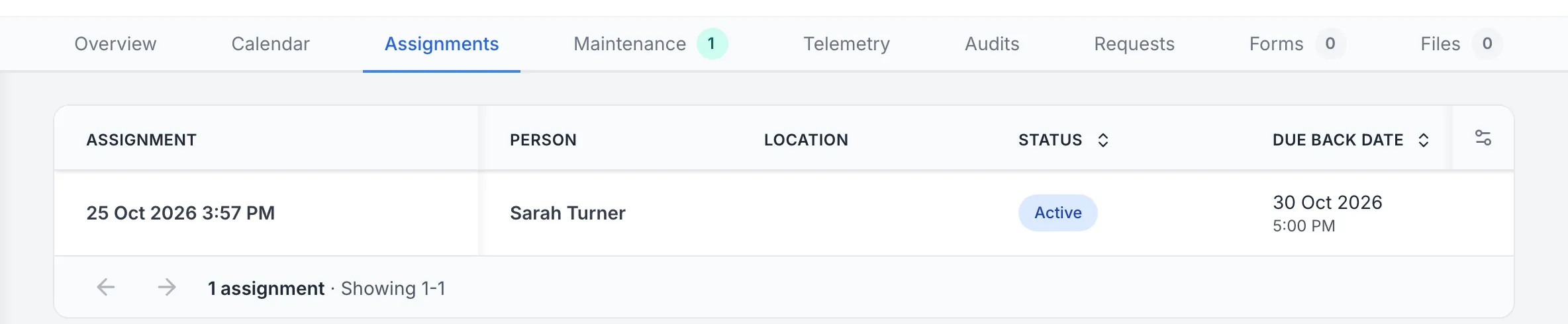
A pool car checked out, with its due-back time
A pool car out with the person who booked it, Active until it’s due back on 30 October at 5:00 pm.
MapTrack app · Demonstration data · Captured
About this screenshot
Demonstration workspace at a 1440 px desktop viewport on pool car CR-01’s Assignments tab. The car was booked through a request and checked out from it that day.
Council and agency fleets are mixed: the pool car and the tipper, plus the mower, the generator and the tools. MapTrack keeps them in one register, each with its own inspections, servicing, bookings and costs, and gives each depot or location its own team. MapTrack is one platform for every asset a field business runs: tools, plant, trailers and vehicles, tracked, inspected, booked and maintained on one record, from any phone.
Location teams come in five built-in roles: Location Manager, Maintenance Lead, Supervisor, Warehouse Manager and Safety Officer, each editable, and work routes to them. SAML 2.0 SSO is set up for the workspace by our team, and staff can sign in with Microsoft. Workstation mode turns one shared phone or tablet into a crew kiosk: each person taps their name, enters their own 4-digit PIN and works under their own role, and it locks itself when left idle. An Owner or Admin turns it on. Requests let staff book a pool vehicle or piece of equipment ahead, for approval. Every assignment and transfer is recorded with timestamps and the staff member involved. MapTrack’s primary database and application hosting are in Sydney. Some supporting services may process data outside Australia. We can provide current hosting, subprocessor, encryption and infrastructure-security documentation so your procurement and IT teams can assess the complete data flow against their requirements.
Key features
- ✓Vehicles, plant, trailers, equipment and tools in one register
- ✓Location teams in five built-in roles, with work routed to them
- ✓SAML 2.0 SSO set up by our team; Sign in with Microsoft
- ✓Requester role: view records and submit requests
- ✓Workstation mode: one shared phone or tablet, a PIN each
- ✓Requests to book pool vehicles and equipment ahead
- ✓Audits by QR or barcode scan, with who scanned and when
- ✓Unlimited users on every plan
AssetWorks
Best for large public-sector fleet departmentsFleetFocus is built for public sector operations, giving government fleet teams a view of every vehicle with upkeep records, fuel use, EV charging, GPS data and cost reporting, plus Motor Pool Management and fuel management. No public pricing.
Pricing: Not published · Trial: Sales-led
Not a fit if: You want to start quickly without an enterprise implementation, or tools and small equipment are a big part of the register.
AssetWorks positions FleetFocus for government fleet teams and public sector accountability.
Maintenance scheduling runs on mileage, engine hours or time intervals, with digital work orders. Expect an enterprise implementation; pricing is not published.
Key features
- ✓Built for public sector operations
- ✓Upkeep records, fuel use, EV charging and cost reporting
- ✓Maintenance on mileage, engine hours or time
- ✓Motor Pool Management
Chevin FleetWave
Best for UK councils and public bodies buying through G-CloudFleet management software for government bodies, councils, emergency services and trusts. Chevin says it is an approved supplier on the G-Cloud 14 framework and a validated IT supplier within the DVSA Earned Recognition scheme.
Pricing: On a separate pricing page · Trial: Book a demo
Not a fit if: You want plant, equipment and tools custody in the same register as the vehicles.
Chevin says FleetWave helps keep over 26,000 public sector assets and vehicles safe and compliant throughout the UK, with country sites for the UK, US and Canada, Australia, France and Belgium.
Pricing sits on a separate page rather than on its government page. Confirm framework status with the framework holder before you rely on it.
Key features
- ✓Government, councils, emergency services and trusts
- ✓G-Cloud 14 framework (vendor’s claim)
- ✓DVSA Earned Recognition validated IT supplier (vendor’s claim)
- ✓Country sites for the UK, US and Canada, and Australia

Fleetio
Best for US towns, cities and counties that want published per-vehicle softwareFleet maintenance software for towns and cities, counties, states, police and fire, K-12, higher education and public works, with lifecycle tracking of total asset costs, role-based permissions and SSO. Fleetio states it is on GSA’s Multiple Award Schedule.
Pricing: US$4 to US$10 a vehicle a month on standard plans · Trial: 14-day free trial, no credit card
Not a fit if: Tools and small equipment are a big part of what the depot hands out: tool management is a paid add-on.
Fleetio’s government page covers preventive maintenance by time, meter or mileage, work orders, parts inventory, digital DVIRs and fuel spend by vehicle, driver and department.
Its standard plans are per vehicle a month: Essential US$4 annual or US$5 monthly, Professional US$7, Premium US$10 (annual only), with unlimited users. Its government page shows no prices. Tools need the paid Tools add-on.
Key features
- ✓Towns, cities, counties, states, police and fire, public works
- ✓Lifecycle tracking of total asset costs
- ✓Fuel spend by vehicle, driver and department
- ✓Role-based permissions and SSO
- ✓GSA Multiple Award Schedule (vendor’s claim)

Samsara
Best for US state and local agencies buying connected hardware at scaleA connected-operations platform for state and local government. Samsara says it is an approved vendor for some of the most common government contracts and cooperative purchasing, showing GSA Advantage, Carahsoft and Sourcewell, and its FAQ calls its gateways and cameras NDAA-compliant. Quote-led.
Pricing: Quote-led · Trial: Sales-led
Not a fit if: You don’t plan to standardise on Samsara hardware, or most of your register is plant, equipment and tools.
Samsara brings vehicle telematics, AI cameras, DVIRs and Connected Maintenance to public fleets on its own hardware.
Prices are behind "Check our prices" and "Talk to sales". Plant pre-start depth and tools custody should be verified in a pilot.
Key features
- ✓Telematics, AI cameras and DVIRs
- ✓Connected Maintenance
- ✓GSA Advantage, Carahsoft and Sourcewell (vendor’s claim)
- ✓NDAA-compliant gateways and cameras (vendor’s claim)

Geotab
Best for agencies that want telematics data through a resellerFleet telematics designed for fleets of all sizes at the state and local government levels, with a Federal Government segment and an EV Suitability Assessment. Geotab sells through resellers and partners, not direct.
Pricing: Through a reseller · Trial: Through a reseller
Not a fit if: You want one vendor for software, support and the asset register.
Geotab’s government page covers inspections and compliance tools for road fleets, and its marketplace adds partner solutions.
Pricing comes from a reseller. Check which partner provides maintenance, bookings and equipment tracking, and whose support you will call.
Key features
- ✓State and local government focus
- ✓Federal Government segment
- ✓EV Suitability Assessment
- ✓Sold through resellers and partners
Also worth considering
This did not make our top 6 but may suit some public fleets:
- •Teletrac Navman: An established fleet telematics vendor with a real Australian and New Zealand presence, offering AI video, GPS asset tracking, equipment utilisation, fleet maintenance and heavy-vehicle compliance reporting.(per Teletrac Navman, Oct 2026)
Customer outcomes
Results from published MapTrack customer case studies.
Instantly retrievable
Digital forms with automatic timestamps and asset linking replaced paper records, making compliance documentation instantly retrievable for client or auditor requests.
Instantly
Safety audit documentation that previously took 2–3 days to compile can now be retrieved instantly from the platform on any device.
Estimated 70–80%
Automated scheduling and alerts for safety inspections, certifications and regulatory requirements reduced overdue compliance items by an estimated 70–80% within the first year.
See a council fleet in MapTrack
Book a demo to walk through location teams, SSO and shared devices.
- No credit card required
- Unlimited users
What our customers say
“MapTrack easily shows us where our equipment is, what project it's on & who it is assigned to. Support is super helpful.”

Sharyn Edwards
Fleet Coordinator (Major Projects), Genus
“MapTrack's a great platform - intuitive for the guys out in the field and also has fantastic support.”

Matthew Anderson
Maintenance Planning Supervisor, Supagas
Connected in MapTrack today
What connects to MapTrack now, and who sets it up.
GPS trackers in the device manager
Register your GPS trackers in MapTrack and see each one’s battery, signal and last report. Run hours and kilometres estimated from the tracker feed your service schedules. Other tracker brands are connected with our help.
OEM machine telematics
Cat, Komatsu, JCB and Volvo machines’ own telematics can feed engine hours, location, fault codes and fuel used into MapTrack. You send us the API or data feed details, and our team sets it up under Connections and checks it’s working.
Single sign-on and Sign in with Microsoft
SAML 2.0 single sign-on, set up by our team, works with Microsoft Entra ID (Azure AD), Okta, Google Workspace and other SAML 2.0 identity providers, and new users join automatically the first time they sign in. It’s included on Enterprise and available as a Pro add-on. People can also use Sign in with Microsoft.
LightMetrics dash cam accounts
Connect a LightMetrics dash cam account and MapTrack imports the cameras, shows their latest position and safety events, and estimates kilometres and drive hours from completed trips.
The connection library
MapTrack’s connection library lists 118 GPS, telematics, OEM machine and video providers in the app, under Settings > Devices > Connections. You connect MapTrack GPS trackers and LightMetrics dash cam accounts yourself; for the rest, you request the connection and our team sets it up.
See every provider in the libraryREST API with access levels
Pull and push your MapTrack data through the REST API. MapTrack’s REST API (v1) lists, gets, creates, updates and archives assets, locations, people, categories, custom fields and users. Each API key gets an access level: Read only, Read and write, or Full. Pull MapTrack data into Power BI or Excel through the REST API.
API keys and access levelsMCP server for AI tools
MapTrack's MCP server connects your AI tools, such as Claude and Codex, to MapTrack. It's included on the Enterprise plan and available as an add-on on Pro. Talk to our sales team and we'll set it up with you.
About the MCP server
What public fleets need that others don’t
A council or agency fleet looks like a contractor's fleet with more people, more depots and more scrutiny. Four things separate the right software from the rest.
- Everything the depot hands out. Pool cars, trucks, mowers, plant, trailers and tools, in one register, each with its own checks and servicing. MapTrack keeps them together.
- Access by depot and role. Parks, roads and facilities staff see what is theirs. In MapTrack, each location has its own team in five built-in roles, and a Requester role can view records and submit requests without editing them.
- Crews who share devices. Workstation mode turns one shared phone or tablet into a crew kiosk: each person taps their name, enters their own 4-digit PIN and works under their own role, and it locks itself when left idle. An Owner or Admin turns it on.
- Records that answer the auditor. Who had the vehicle, when it was last checked and by whom, what the repair cost. In MapTrack, assignments and transfers carry timestamps and the staff member involved, and each inspection keeps its signature, photo and where it was submitted.
And per-user licences add up fast across a council workforce. Every MapTrack plan includes unlimited users. See government asset management for the wider register, from IT to stocktakes.
Questions to ask in procurement
Public buyers carry obligations a private fleet doesn't. Ask every vendor the same questions, in writing, and check the answers against your own policy.
- Where is our data hosted, and who processes it? For MapTrack: MapTrack’s primary database and application hosting are in Sydney. Some supporting services may process data outside Australia. We can provide current hosting, subprocessor, encryption and infrastructure-security documentation so your procurement and IT teams can assess the complete data flow against their requirements.
- How do staff sign in? MapTrack offers SAML 2.0 SSO, set up for the workspace by our team, and Sign in with Microsoft.
- Which frameworks or contracts are you on? Ask for the listing and check it with the framework holder. This guide notes vendors’ own published listings and doesn’t claim any for MapTrack.
- Will you complete our security questionnaire? MapTrack can provide responses to vendor security questionnaires, security posture and data-handling documentation on request.
- What does it cost as the workforce grows? Per-user pricing grows with every crew member. MapTrack is priced per asset, with unlimited users on every plan.
See a council fleet in MapTrack
Genuine captures from a demonstration workspace, dated in each caption: the whole register, a signed pre start, where a check was submitted, and utes and trucks by their next service.
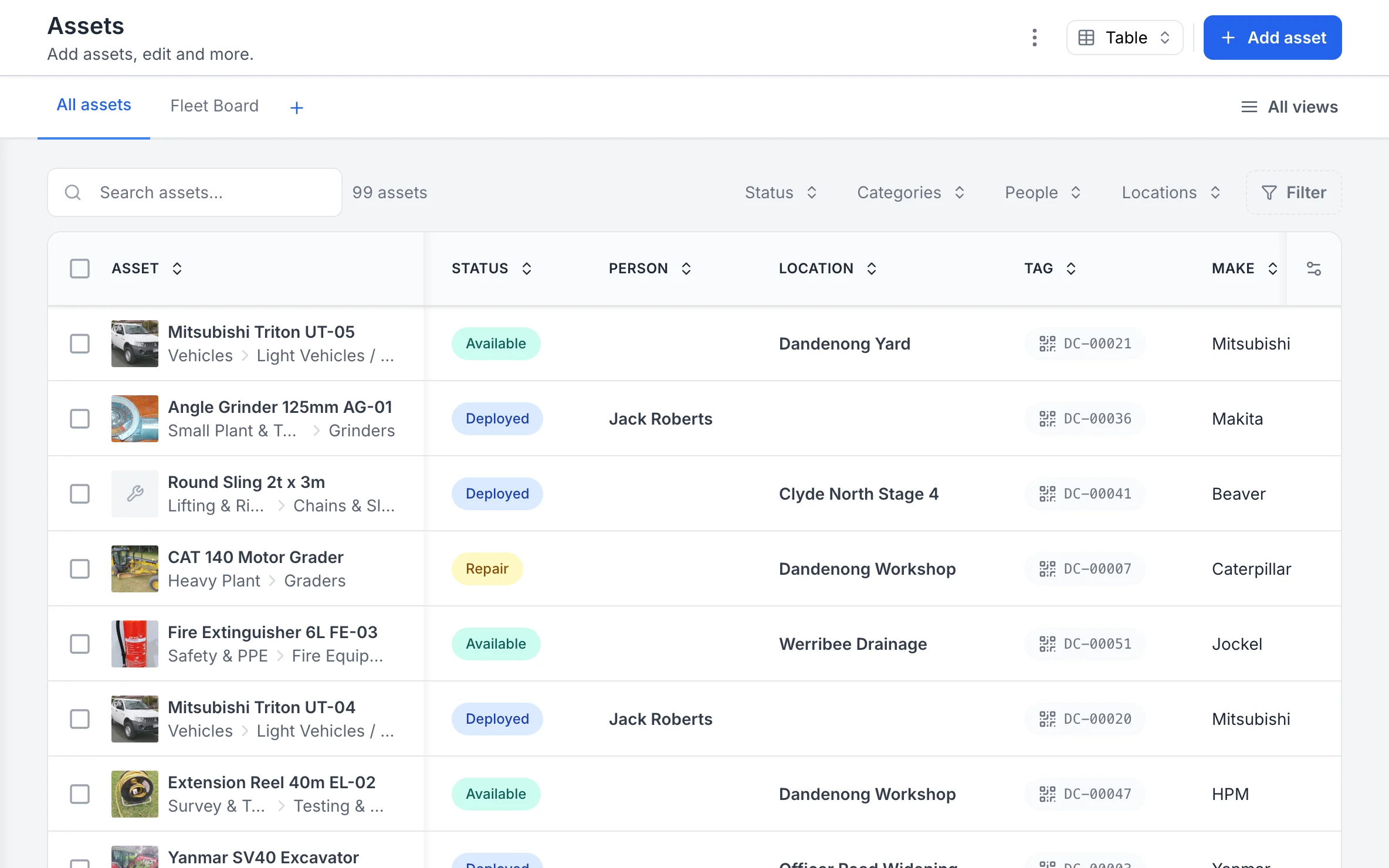
Every kind of asset in one register
Utes, plant, tools, lifting gear and safety equipment sit in one register. Each row shows the asset’s status, who or where it is with, and its QR tag.
MapTrack app · Demonstration data · Captured
About this screenshot
Captured at a 1440 x 900 desktop viewport at 2x in a demonstration workspace, right of the sidebar, in the default view and sort.
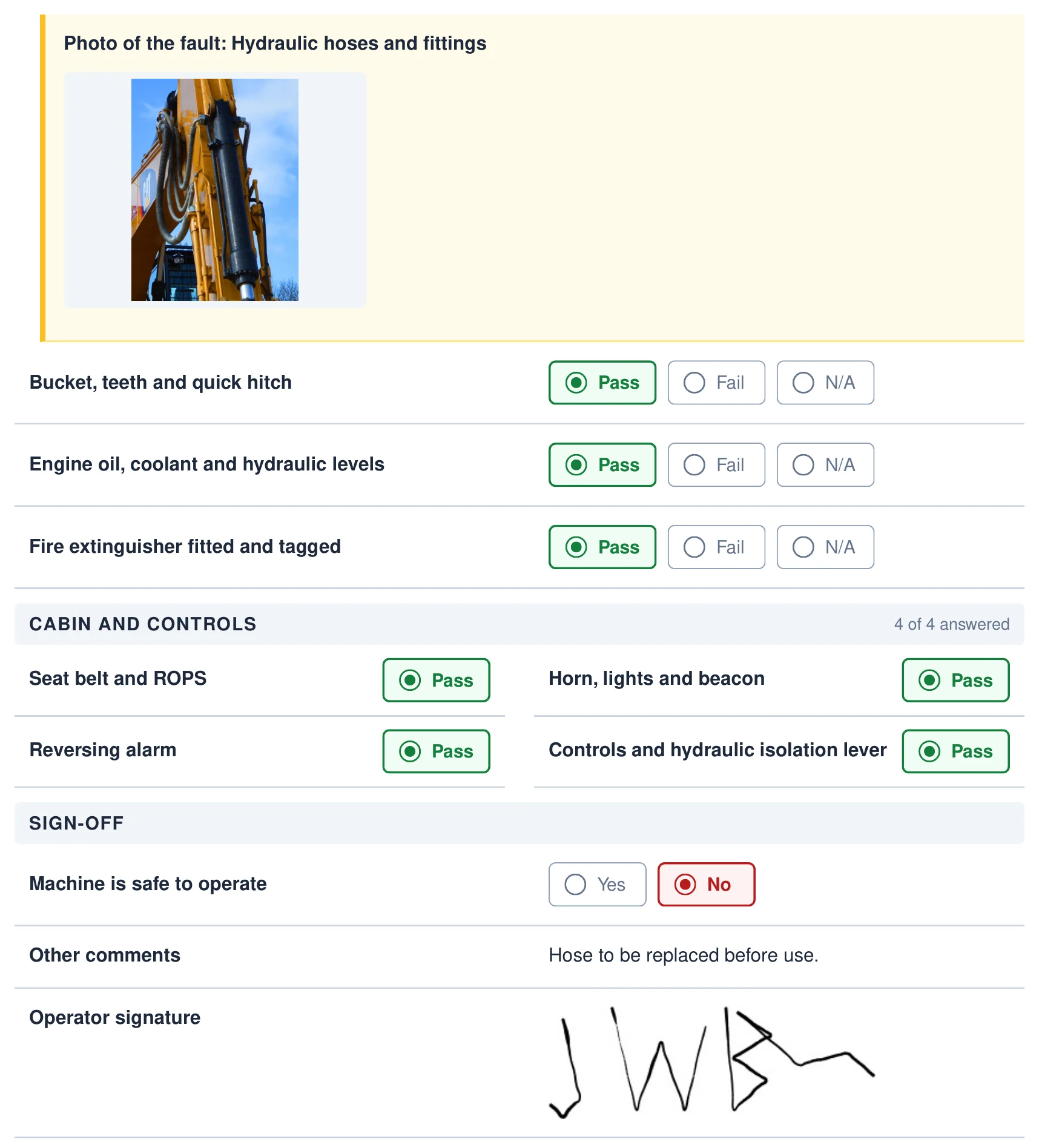
Photo, sign-off and signature in the PDF
The PDF keeps the fault photo, every answer, the sign-off and the operator’s signature.
MapTrack PDF export · Demonstration data · Captured
About this screenshot
An excerpt from page two of the three-page PDF downloaded from this saved demonstration submission.
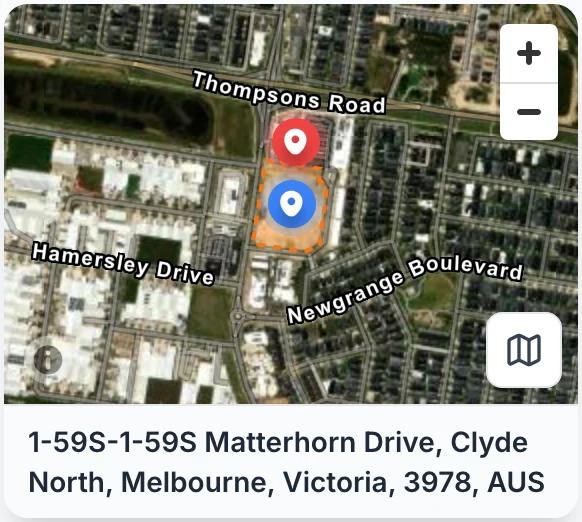
Where the pre-start was submitted
The saved pre-start pins where it was submitted and gives the street address. The map also draws your site geofences, so you can see the check was done inside the site boundary.
MapTrack app · Demonstration data · Captured
About this screenshot
Captured at a 1440 x 900 desktop viewport at 2x from the saved submission and cropped to its location card. For the demonstration, the phone’s location was set inside the Clyde North Stage 4 geofence.
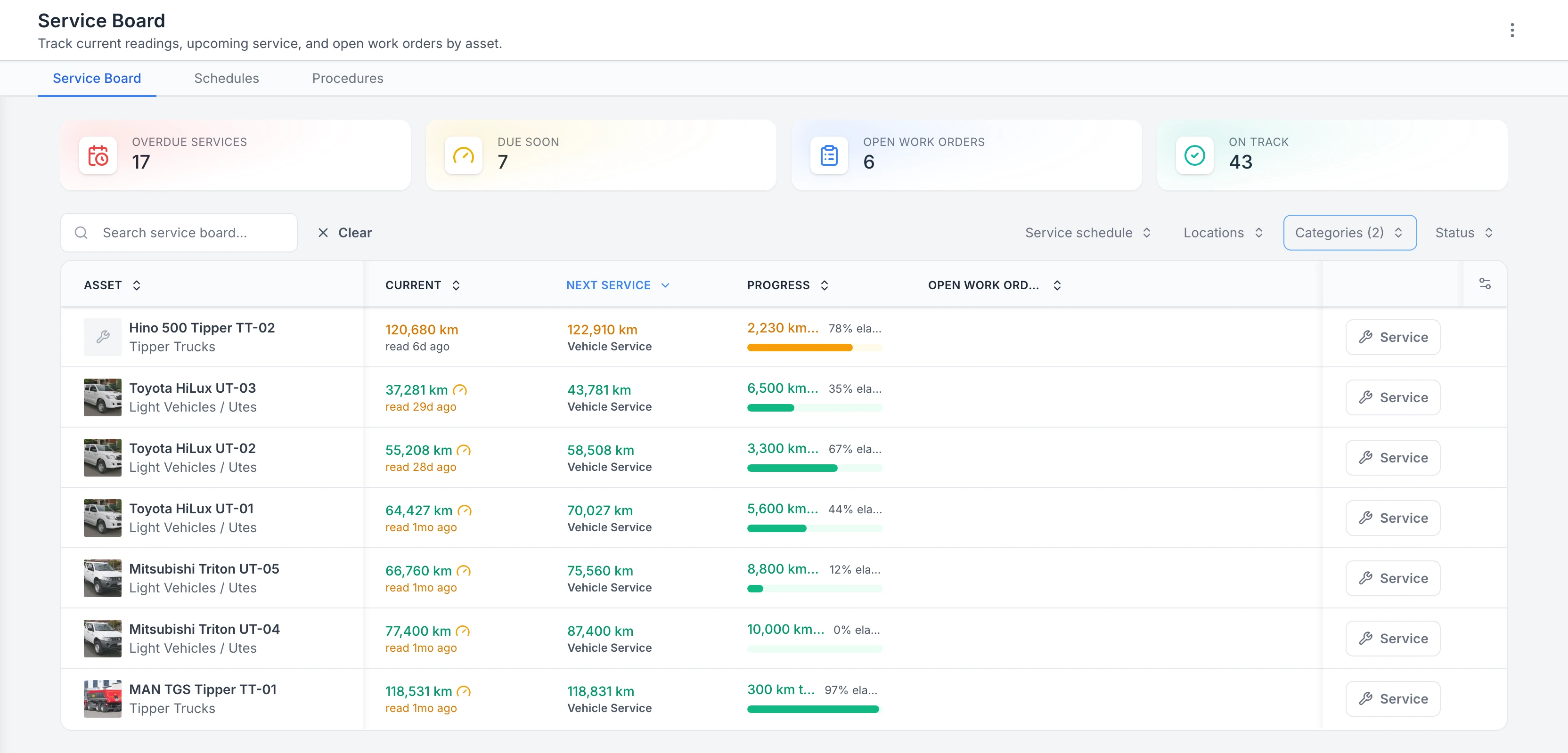
Utes and trucks by their next service
Every ute and truck on one board, ordered by the next service, with the km left on each.
MapTrack app · Demonstration data · Captured
About this screenshot
Demonstration service board filtered to the Light Vehicles / Utes and Tipper Trucks categories. The four totals at the top count the whole board, not just vehicles.
Conclusion: match the software to the depot, not just the vehicles
The best government fleet management software depends on the size of the fleet department and how you buy. Large departments that want an enterprise fleet system shortlist AssetWorks and Chevin FleetWave. US state and local fleets buying through published procurement routes look at Fleetio and Samsara, and Geotab through its resellers.
MapTrack fits the council or agency whose depot hands out vehicles, plant, mowers, trailers and tools, and wants them in one register with location teams, SSO and unlimited users. Start with government teams or enterprise features.
Frequently asked questions
What is government fleet management software?
What is the best government fleet management software?
Can council crews share devices?
How does access work across departments and depots?
Does MapTrack support single sign-on?
Where is MapTrack’s data hosted?
What records does MapTrack keep for audit?
Is MapTrack on a government procurement panel?
Why does MapTrack publish this comparison?
Related software guides
- Best asset tracking software 2026
- Best asset tag suppliers Australia
- Best tool tracking software 2026
- Best CMMS for equipment 2026
- Best equipment management software 2026
- Best plant management software
- Best pre-start inspection software
- Best fleet management software 2026
- Best fleet maintenance software 2026
- Best fleet management software Australia
- Best asset management software 2026
- Best maintenance planning software 2026
- Best asset inspection software 2026
- Best construction equipment tracking software
- Best construction equipment maintenance software
- Best construction fleet management software
- Best commercial GPS tracking software
- Best fuel management software 2026
- Best safety management software 2026
Compare MapTrack head-to-head
About the author

Co-Founder & GM of Operations
Lachlan leads operations at MapTrack, bringing 10+ years of enterprise technology experience across mining, construction and heavy industry. Before MapTrack, he held senior roles at Workato (integration and automation) and AppDynamics/Cisco (application performance), working directly with ASX-listed organisations to modernise their technology stacks. His deep understanding of field operations and blue-collar workflows shapes how MapTrack solves real problems for asset-intensive teams.
View LinkedIn profile →One register for everything the depot hands out
Vehicles, plant, equipment and tools, with location teams, SSO and unlimited users on every plan.
4.9 on G2 · 5.0 on Capterra, GetApp & Software Advice· Source: G2.com, Inc.
- No credit card required
- Unlimited users