
RFID and NFC Asset Tracking Software
One sweep of an RFID handheld picks up many tags at once, and a tap on an NFC tag opens the asset.
See pricing






Co-Founder & GM of Operations
Trusted by construction, mining and field service teams







Tap a tag, read a tag or sweep a toolbox
What is RFID and NFC asset tracking?
RFID and NFC asset tracking puts a small radio tag on each tool, machine or item, so you can identify it without typing in an asset number. NFC works up close: you tap a phone on the tag. With RFID, a handheld reader can pick up many tags in one sweep. MapTrack offers RFID and NFC alongside QR, barcode and Data Matrix labels, Bluetooth tags and GPS trackers, so each item keeps one record: who has it, its inspections and its service history.
NFC tags
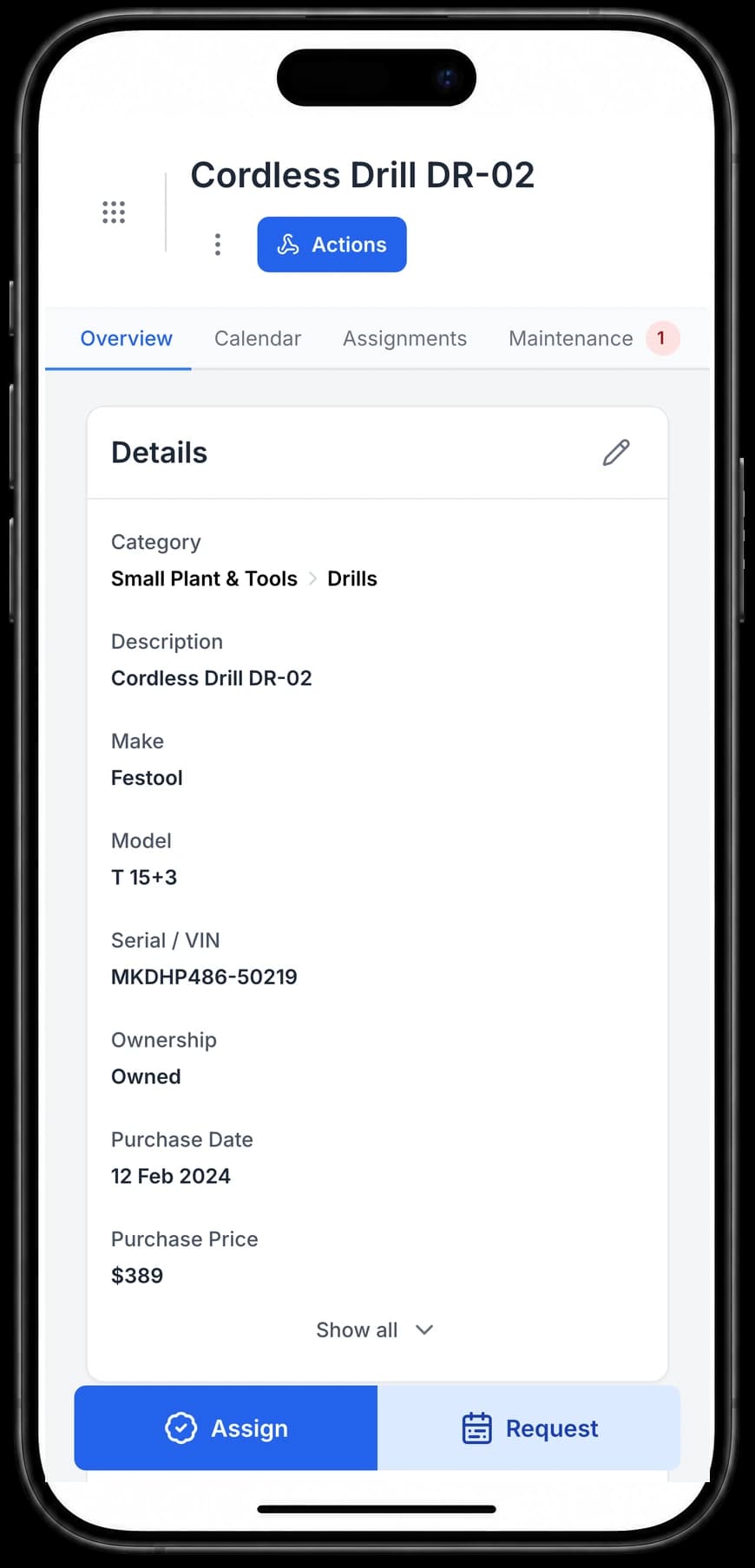
Tap an NFC tag and the asset opens
Tap an NFC tag with your phone and the asset opens in MapTrack. From its record, assign it to a person, a location or both, or request it for a job. Check-outs, returns and Requests need a connection.
The tap works on iPhone and Android. We link or encode tags to their assets before they ship.
RFID handhelds
An RFID handheld works like a barcode scanner
A Bluetooth or USB RFID handheld reads the tag and types its ID into MapTrack, the way a barcode scanner does. Bring your own handheld and tags, or we’ll source them for you by quote. Not sure what suits your gear? Talk to our team.
At the counter and everywhere else you scan
The handheld works everywhere a handheld barcode scanner does:
Check-out and return
Read the tag at the counter to scan gear out and back in.
Requests
A read at pick-up turns the Request into a check-out.
Stocktakes
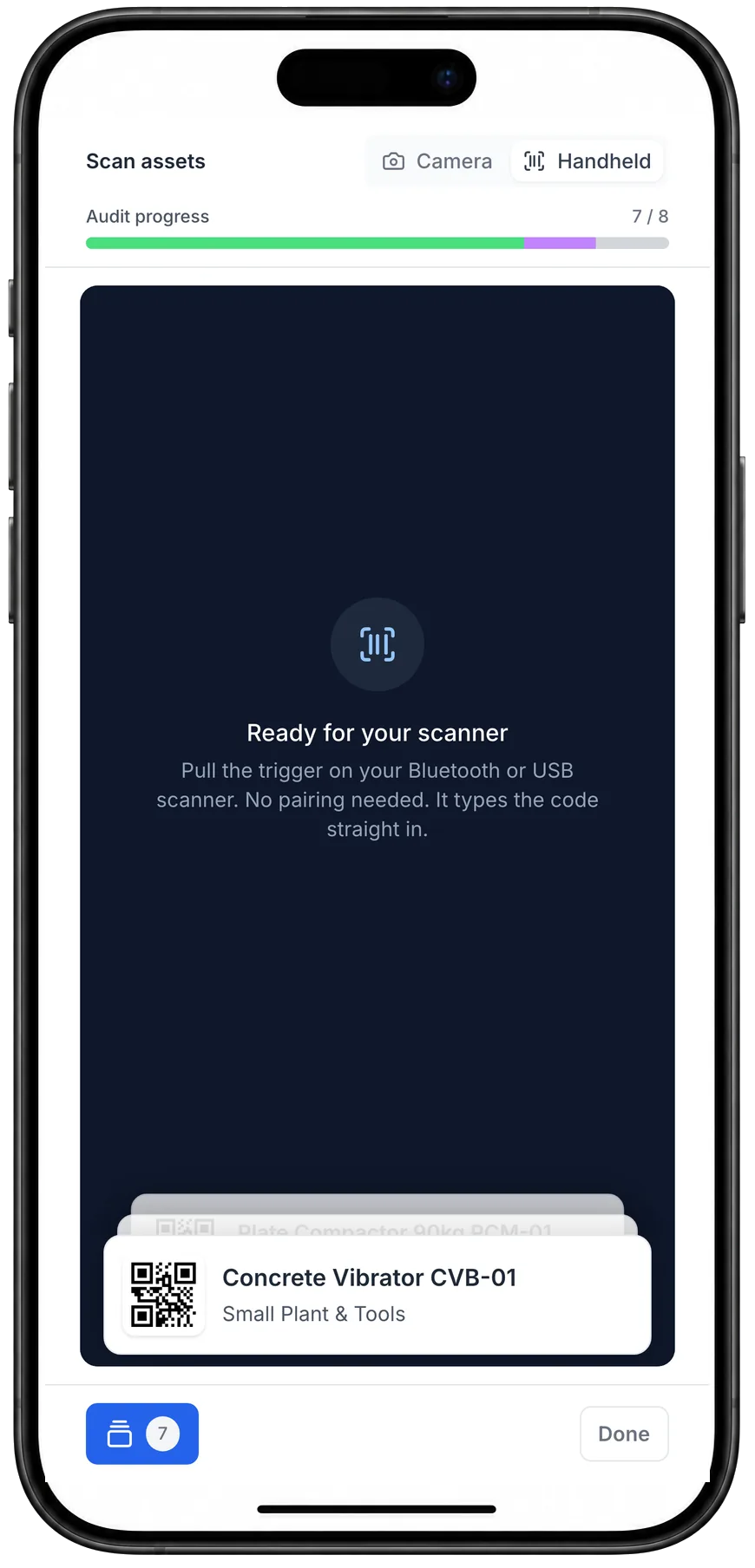
In Handheld mode, each tag read marks that asset scanned.
Service logging
Read a batch of assets and log the service for all of them at once.
Check-outs, returns, Requests, stocktakes and service logging need a connection.
Bulk reads
Count a toolbox, a cage or a stocktake in one sweep
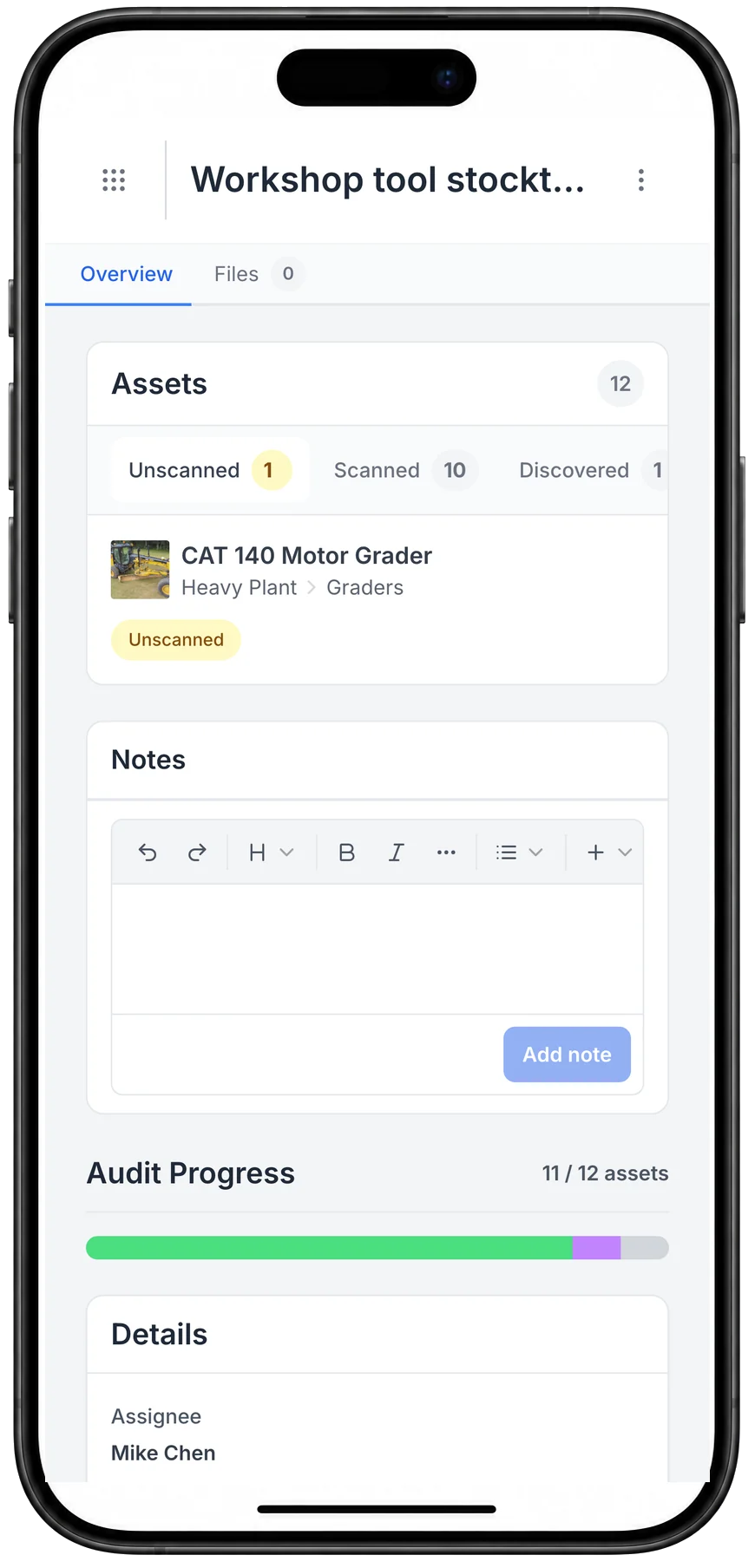
One sweep of the RFID handheld picks up many tags at once, so you’re not reading one tag at a time. Finish a stocktake in MapTrack and choose whether to skip the remaining unscanned assets or mark them missing. Stocktakes need a connection.
A stocktake on the phone
A stocktake on the phone: what has been scanned, what turned up that was not on the list, and what is still to find.
MapTrack app · Demonstration data · Captured
About this screenshot
Captured at a 430 x 932 phone viewport in a demonstration workspace and shown in a phone frame.
A completed tool stocktake
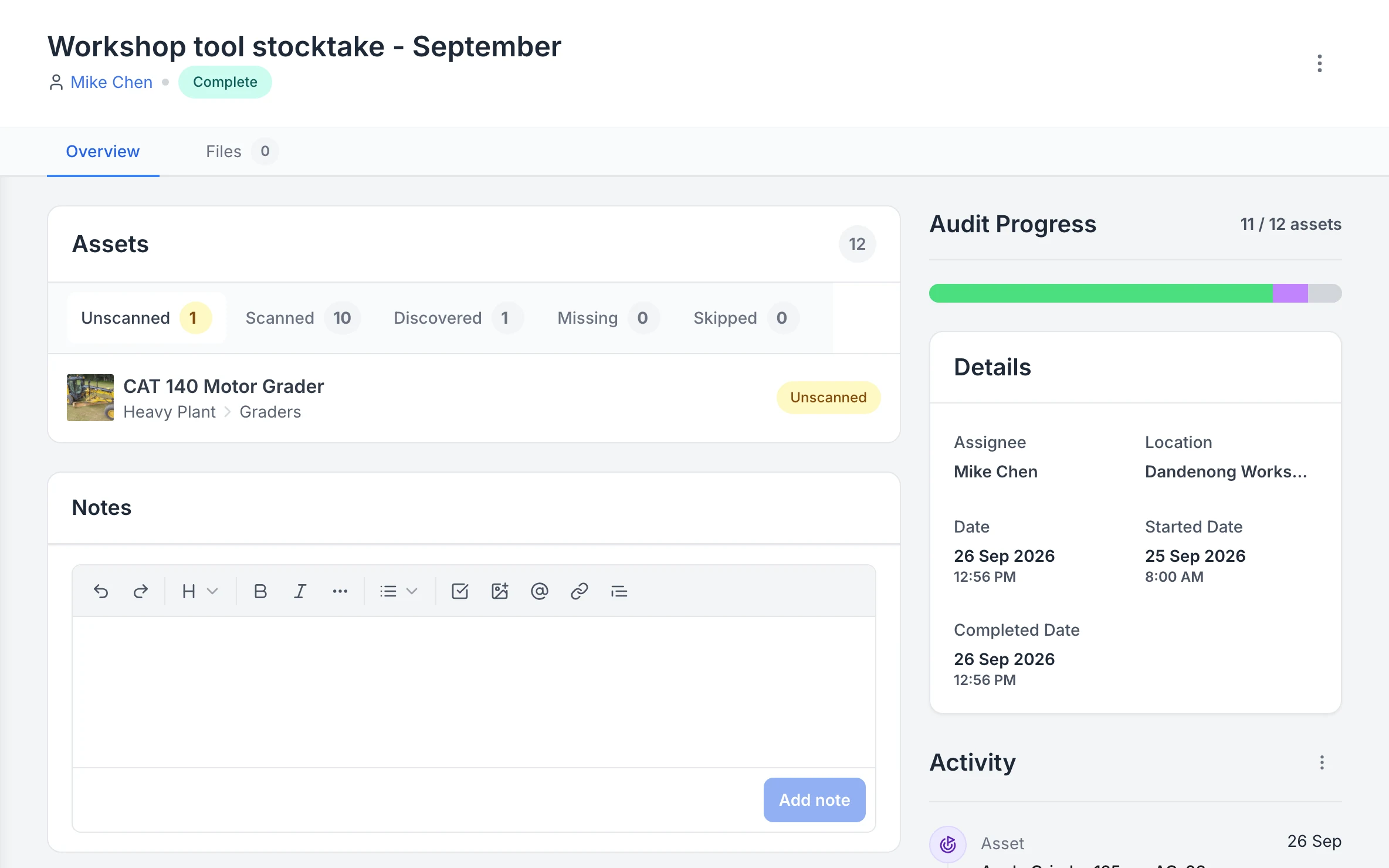
A stocktake shows what was scanned, what turned up that wasn’t on the list, what’s missing and what’s still to scan.
MapTrack app · Demonstration data · Captured
About this screenshot
Demonstration workspace at a 1440 x 900 desktop viewport, cropped right of the navigation sidebar to a 16:10 frame.
Tag types
RFID, NFC, labels, Bluetooth tags and GPS on one record
Use the tag that suits the job. Whichever tag an item carries, it keeps one record: who has it, its inspections and its service history.
| Tag | How MapTrack uses it |
|---|---|
| RFID tag | A Bluetooth or USB RFID handheld reads it and types its ID into MapTrack. One sweep picks up many tags at once. |
| NFC tag | Tap it with your phone and the asset opens in MapTrack. |
| QR, barcode and Data Matrix labels | Scan them with the phone camera or a handheld Bluetooth or USB scanner. |
| Bluetooth tag | Detections update the asset’s location in the MapTrack app. |
| GPS tracker | The app shows the asset’s latest position. Live tracking, trips and history run in MapTrack Telematics. |
Who has it
See who has it, and where it was last checked out or returned
Assign gear to a person, a location or both. A location can be a site, a store, a vehicle or anything you name, such as a job site, van, trailer or container. MapTrack shows an item’s latest GPS position if it has a tracker, or else where it was last checked out or returned.
- Confirm accessories out and back, with a reason for anything missing.
- Overdue test or calibration is flagged at check-out, and going ahead is logged.
- Check-outs and returns need a connection.
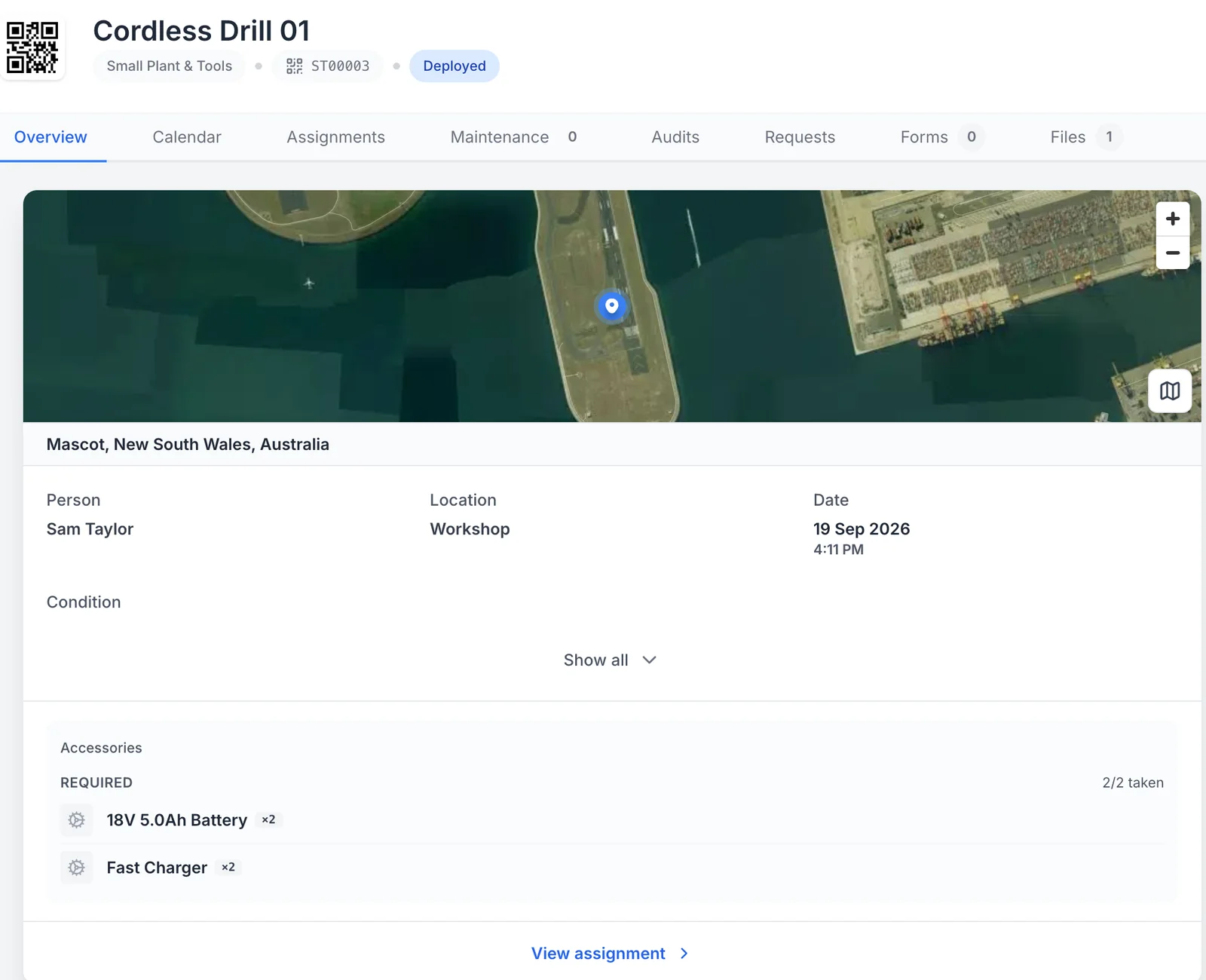
Who has it, and where it was checked out
While the drill is out, its record shows who has it, where it was checked out on the map and the accessories that went with it.
MapTrack app · Demonstration data · Captured
About this screenshot
Demonstration workspace at a desktop viewport, on the asset’s Overview tab, cropped to its header, map, assignment and accessories.
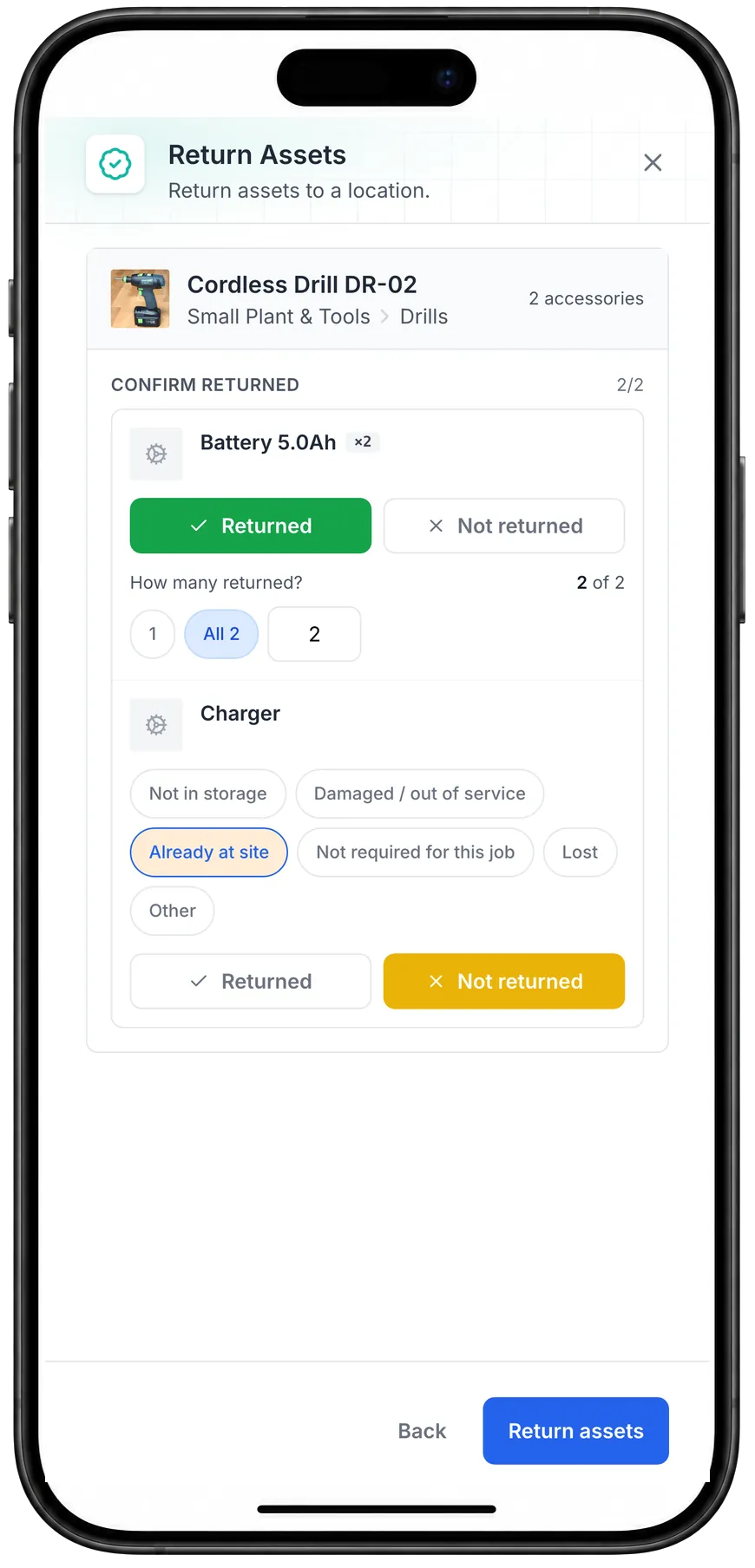
A drill’s batteries and charger confirmed at return
At return each accessory is confirmed: both batteries back, and the charger not returned, with Already at site as the reason.
MapTrack app · Demonstration data · Captured
About this screenshot
Captured at a 430 x 932 phone viewport in a demonstration workspace, during the drill’s return.
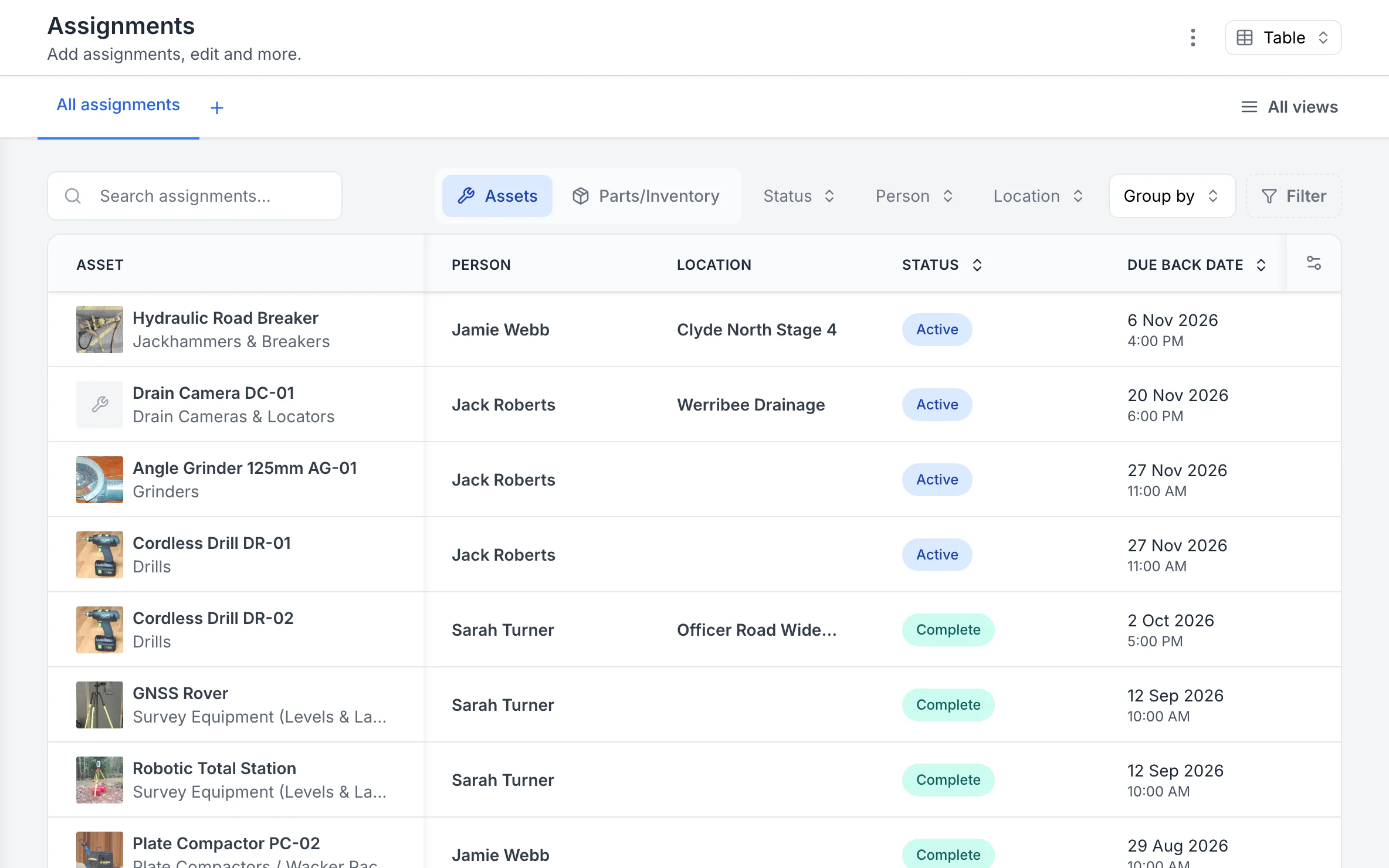
Who has each tool, and when it is due back
Every assignment shows the asset, the person or site it is with, its status and the date it is due back.
MapTrack app · Demonstration data · Captured
About this screenshot
Captured at a 1440 x 900 desktop viewport at 2x in a demonstration workspace, right of the sidebar.
The problem
Still counting gear one item at a time?
Stocktakes eat the day
Counting a store or a container item by item takes hours, and the count is out of date by the time it’s typed up.
Gear goes walkabout
Tools leave the store with nobody signing for them, and nobody knows who had them last.
Asset numbers keyed in by hand
Typing numbers off worn labels is slow, and one wrong digit puts the record on the wrong item.
Tags with nothing behind them
Some gear already carries RFID or NFC tags, but nothing reads them into your register.
Four steps to RFID and NFC tracking
Choose your tags and readers
Bring your own tags and readers, or we’ll source them for you by quote.
Tap or read
Tap an NFC tag with your phone to open the asset, or read an RFID tag with a Bluetooth or USB handheld, which types its ID in like a barcode scanner.
Sweep the toolbox
Sweep the handheld over a toolbox or a cage and pick up many tags at once.
Keep it on the record
Each item keeps one record in MapTrack: who has it, its inspections and its service history.
Talk to us about RFID and NFC
Tell us what you’re tagging and the readers you have, if any. We’ll show you how MapTrack fits, and quote tags and readers if you need them.
- No credit card required
Where a tap or a sweep saves time
Toolbox and cage checks
Sweep the handheld over a toolbox or a cage and pick up many tags at once, instead of one at a time.
Stocktakes
Run the stocktake with a sweep, then choose whether to skip the remaining unscanned assets or mark them missing.
Quick checks on site
Tap an NFC tag with your phone to open the asset and see who has it, its inspections and its service history.
Assign from the record
Once the asset is open, assign it to a person, a location or both, or request it for a job.
Gear that’s already tagged
If your gear already carries RFID or NFC tags, talk to our team about using them.
Mixed tags, one register
Use RFID where you count in bulk, NFC where a tap suits, and QR or barcode labels everywhere else.
RFID and NFC tracking FAQs
Does MapTrack do RFID and NFC?
How does an RFID handheld work with MapTrack?
Where can I use an RFID handheld in MapTrack?
Can I read many RFID tags at once?
Which tags and readers do I need?
How are tags linked to their assets?
Which phones does the NFC tap work on?
Does an RFID or NFC tag show an asset’s location?
Can I run a stocktake with RFID?
Can I mix RFID and NFC with QR codes and barcodes?
What’s the difference between RFID and NFC?
What does RFID and NFC tracking cost?
How do I get started?
Stop counting tags one at a time
RFID and NFC on the same register as your QR labels, Bluetooth tags and GPS trackers. Book a demo and we’ll show you how it fits.
4.9 on G2 · 5.0 on Capterra, GetApp & Software Advice· Source: G2.com, Inc.
- No credit card required