
6 best fleet cost management software options in 2026
Compare fleet cost management software: cost per vehicle, fuel, maintenance labour and parts, depreciation and total cost of ownership. We compared 6 options on whether costs are captured against the vehicle when the work happens.
Fuel cards and bulk tanks the main job? See fuel management software.

Co-Founder & GM of Operations
Fleet cost management software puts every cost of running a vehicle against that vehicle: fuel, maintenance labour and parts, outside repairs, depreciation, so you can see cost per vehicle and know when to replace it. Fleetio and Motive both report total cost of ownership by asset for vehicle fleets; Samsara reports maintenance cost per asset on its hardware; AssetWorks suits public-sector fleets. MapTrack fits mixed fleets that want service costs, fuel and depreciation on one record across vehicles, plant and equipment.
Key takeaways
- Shortlist Fleetio or Motive for TCO by asset on vehicle fleets, Samsara for maintenance cost per asset on its hardware, AssetWorks for public-sector fleets, and MapTrack for costs across vehicles, plant and equipment on one record.
- Capture costs against the vehicle when the work happens: on the work order and at the pump.
- Use the same cost categories for every vehicle so cost per vehicle compares like with like.
- Put depreciation beside running costs to know when to replace.
- If you run plant on hours, check that cost per hour and cost per kilometre come from the same record.
TL;DR
Top 3 picks at a glance
 MapTrack
Labour, parts and external costs on every service, rolled up into each asset’s service record across vehicles, plant, trailers and equipment.
Jump to review ↓ Fleetio
Fleet maintenance software covering inspections, maintenance, parts, fuel and total cost of ownership by asset or group, priced per vehicle with unlimited users..
Jump to review ↓ Motive
Its Maintenance product reports total cost of ownership by asset with replacement recommendations, and creates work orders from inspection defects and fault codes, on Motive hardware.
Jump to review ↓Trusted by construction, mining and field service teams



Quick verdict: best fleet cost management software
Our top picks by use case. Click any card to jump to the full review.

MapTrack
Best for mixed fleets that want service costs, fuel and depreciation on one record

Fleetio
Best for vehicle fleets that want TCO inside maintenance software

Motive
Best for truck fleets that want TCO and replacement advice beside telematics

Samsara
Best for fleets standardised on Samsara hardware
AssetWorks
Best for public-sector fleets with a large fleet department
Which fleet cost software fits your fleet?
Fleets track costs for different decisions. Use these profiles to narrow your shortlist.
The fleet manager deciding what to replace
I need to know which vehicles cost more to keep than to replace.
Look for TCO by asset with depreciation beside running costs. Fleetio and Motive report TCO by asset, and Motive adds replacement recommendations. In MapTrack, a per-asset TCO report is available in MapTrack Telematics, and the Finance ledger adds repair-or-replace guidance on the Pro and Enterprise plans, as an add-on.
Learn more →The workshop manager who wants jobs costed
Our mechanics fix things but nobody records what each job cost.
Pick software that records labour, parts and outside repairs on the work order. In MapTrack, time and costs logged on a work order roll up into each asset’s service record.
Learn more →The contractor with vehicles and plant
Half our spend is on plant on hours. Can one system cost both?
Shortlist MapTrack: vehicles, plant, trailers and equipment share one register, and service costs roll up the same way whether the asset runs on kilometres or hours.
Learn more →The council or agency fleet department
We report costs to finance and the public. What fits a government fleet?
AssetWorks FleetFocus and Chevin FleetWave are built for public-sector fleets. See also government fleet management software compared.
Learn more →Who this guide isn't for
This guide compares software for knowing what each vehicle and machine costs. It isn’t the right comparison if:
- Fuel cards, bulk tanks and cost per litre are the whole job. Compare fuel management software
- You need accounting software for invoices and the general ledger. Fleet cost tools, MapTrack included, sit beside it.
- You want depreciation schedules for fixed assets that never move. See asset depreciation
- You mainly need to schedule and run servicing. Compare fleet maintenance software
In this guide
How we evaluated these options
We assessed each option on what it tracks costs against, fuel, maintenance labour and parts, total cost of ownership and depreciation, field capture and pricing. Fleetio, Motive and Samsara rows reuse facts already read on each vendor’s own pages and dated; AssetWorks, Chevin and Simply Fleet were read on their own pages on 22 November 2026. MapTrack’s rows use our product documentation.
- Fleetio pricing(checked Nov 2026)
- Motive Maintenance(checked Oct 2026)
- Samsara plans(checked Oct 2026)
- AssetWorks EAM(checked Nov 2026)
- AssetWorks fleet(checked Nov 2026)
- Chevin FleetWave government(checked Nov 2026)
- Simply Fleet pricing(checked Nov 2026)
- MapTrack cost tracking
This guide is published by MapTrack (rated 4.9/5 on G2 and 5.0/5 on Capterra, GetApp and Software Advice). Every table row carries its source and the month we checked it. Plans change often, so confirm with each vendor, and tell us at corrections@maptrack.com if something is out of date.
Spotted something out of date or incorrect? Email corrections@maptrack.com and we will review and update this page.
Fleet cost management software comparison table
Side-by-side overview of 6 options. Verify current features and pricing with each vendor.
| Software | Best for | Costs against | Fuel | Maintenance costs | TCO | Offline | Pricing |
|---|---|---|---|---|---|---|---|
| MapTrack | Costs across vehicles, plant and equipment | Costs per asset across vehicles, plant and equipment(per MapTrack cost tracking, Nov 2026) | Yes | Yes | Yes | Yes | Per asset, unlimited users; Finance is a Pro and Enterprise add-on |
| Fleetio | TCO for vehicle fleets | Vehicles and equipment(per Fleetio pricing page, Nov 2026) | Yes | Yes | Yes | ? | US$4 to US$10 a vehicle a month |
| Motive | TCO with replacement advice | Motive gateways and dashcams(per Motive Maintenance, Oct 2026) | ? | Yes | Yes | ? | No public pricing; sales-led |
 Samsara | Maintenance cost per asset | Samsara gateways and asset tags(per Samsara plans page, Oct 2026) | ? | Yes | Yes | ? | Quote-led; "Get pricing" |
| AssetWorks | Public-sector fleet costs | Government fleets(per AssetWorks EAM, Nov 2026) | Yes | Yes | Yes | ? | Not published |
 Spreadsheets | Manual cost tracking | Manual list | Not available per vendor sources | Not available per vendor sources | Not available per vendor sources | Not available per vendor sources | Free / included |
Yes ConfirmedNot available per vendor sources Not available? Verify with vendorNot publicly confirmed Not publicly confirmed
Fleet cost management software reviews
A detailed review of each option: what it costs against, fuel, maintenance, TCO and where it fits.

MapTrack
Best for mixed fleets that want service costs, fuel and depreciation on one recordLabour, parts and external costs on every service, rolled up into each asset’s service record across vehicles, plant, trailers and equipment. Fuel logging against each asset, a per-asset total cost of ownership report in MapTrack Telematics, and a Finance ledger with budget vs actual and repair-or-replace guidance on the Pro and Enterprise plans, as an add-on.
Pricing: Per asset, unlimited users; Finance is a Pro and Enterprise add-on · Trial: Free trial, no credit card required
Not a fit if: You want invoicing or the general ledger run inside your fleet software: MapTrack records what each asset costs and sits alongside your accounting system rather than replacing it.
What you get in one platform
- Every asset, one record
- Tools on QR or barcode labels and Bluetooth tags, plant on GPS trackers, vehicles with GPS and AI dash cams, sites with boundaries: custody, inspections, maintenance and costs on the same record.
- Maintenance that runs on real usage
- Run hours and kilometres from trackers, dash cams or manual readings feed tiered service plans and next-service forecasts, every asset gets a 0 to 100 maintenance health score, and one work order can cover many assets, each with its own pass or fail.
- Easy for crews
- Pre-starts and inspections work without signal, on any phone, with shared-device PINs, single sign-on and AI help to build forms and add assets from a photo. Capterra Best Ease of Use 2026.
- Hardware and software from one vendor
- GPS trackers, AI dash cams with built-in GPS, Bluetooth tags and labels at published prices, managed in the same app, plus LightMetrics dash cam accounts and 150+ telematics, fleet and fuel-card data sources.
- Simple to buy and run
- Per-asset pricing with unlimited users, 24/7 support and month-to-month plans. Capterra Best Value 2026.
The full capability list (47)
- One register for tools, plant, equipment and vehicles
- Custody: who has what, and where
- Site boundaries on the map
- Location types, zones and geofences
- Location teams and roles
- Live tracking and alerts in MapTrack Telematics
- Rate cards (Pro and Enterprise add-on)
- Finance dashboards (Pro and Enterprise add-on)
- Divisions (Pro and Enterprise add-on)
- Run hours and km from trackers, cameras, feeds or readings
- Meter readings from a photo
- Work orders raised from meters, run hours and data feeds
- Tiered service plans
- Next-service forecasts from usage
- Stale-reading flags
- Maintenance health score
- Service board and due-soon emails
- One work order across many assets
- Batch work orders and bulk scan logging
- Labour, parts and external costs on every service
- Failed checks raise work orders by rule
- Parts and inventory by location and bin
- Offline pre-starts and inspections
- Phone forms in sections, with Pass, Fail and N/A buttons
- Mobile web app (Android, iPhone, iPad)
- Shared-device PINs
- Smart overlay (AR) that scans several codes at once
- SAML 2.0 single sign-on (SSO)
- AI form builder
- AI asset creation from a photo
- Equipment bookings (Requests)
- GPS trackers managed in the app
- AI dash cam video in the app
- AI dash cams with built-in GPS
- LightMetrics dash cam connection
- AI dash cam live view: road, driver or both
- Dash cam footage requests, with blurring
- Driver scorecards and a Safety events dashboard
- Bluetooth tags
- QR, barcode and Data Matrix scanning
- RFID and NFC
- OEM feeds under Connections
- Connection library in the app
- 150+ data sources
- Engine hours from 68 integrations
- REST API with per-key access levels
- MCP server for AI tools (Enterprise, or a Pro add-on)
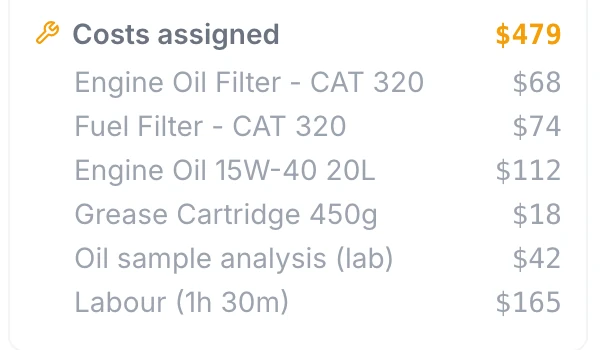
Parts, outside work and labour on the job
Part costs, an outside lab fee and logged labour add up on the work order: $479 for this 250 hour service at the time of capture. The part lines were entered as costs; this capture doesn’t show stock being drawn from the parts store.
MapTrack app · Demonstration data · Captured
About this screenshot
Demonstration workspace at a 1024 px desktop viewport, cropped to the work order’s cost summary. Costs were added with Add Cost, and labour with Log Time at $110 an hour.
Record a service cost, or break it down into labour, parts and external costs; time and costs logged on a work order roll up into each asset’s service record. MapTrack is one platform for every asset a field business runs: tools, plant, trailers and vehicles, tracked, inspected, booked and maintained on one record, from any phone.
Fuel can be logged against each asset with its GPS location, and fuel used comes through MapTrack Telematics. A per-asset total cost of ownership report is available in MapTrack Telematics. The Asset Depreciation report shows depreciation by asset on screen. The Finance ledger keeps a cost ledger for every asset, location and person, with budget vs actual, depreciation, repair-or-replace guidance and CSV export, and fuel costs in it, on the Pro and Enterprise plans, as an add-on.
Key features
- ✓Labour, parts and external costs on every service
- ✓Costs roll up into each asset’s service record
- ✓Fuel logging tied to asset records and GPS location
- ✓Per-asset total cost of ownership report in MapTrack Telematics
- ✓Asset Depreciation report
- ✓Finance ledger with budget vs actual and repair-or-replace guidance (Pro and Enterprise add-on)
- ✓Vehicles, plant, trailers, equipment and tools in one register
- ✓Unlimited users on every plan

Fleetio
Best for vehicle fleets that want TCO inside maintenance softwareFleet maintenance software covering inspections, maintenance, parts, fuel and total cost of ownership by asset or group, priced per vehicle with unlimited users.
Pricing: US$4 to US$10 a vehicle a month · Trial: 14-day free trial, no credit card
Not a fit if: Much of your spend is on plant and tools: Fleetio records machines as vehicles, and tool management is a paid add-on.
Fleetio rolls fuel, parts and service into total cost of ownership by asset or group, with telematics arriving through 40+ partner integrations.
Per vehicle a month: Essential US$4 annual or US$5 monthly, Professional US$7, Premium US$10 (annual only), with a 14-day free trial and no credit card. Work orders sit on Professional and Premium; tools need the paid Tools add-on.
Key features
- ✓Total cost of ownership by asset or group
- ✓Fuel, parts and maintenance costs
- ✓40+ telematics integrations
- ✓Per-vehicle pricing with unlimited users

Motive
Best for truck fleets that want TCO and replacement advice beside telematicsIts Maintenance product reports total cost of ownership by asset with replacement recommendations, and creates work orders from inspection defects and fault codes, on Motive hardware. No public pricing.
Pricing: No public pricing; sales-led · Trial: Sales-led
Not a fit if: You want to see a price first, or your fleet is mostly plant and tools.
Motive brings maintenance costs, TCO by asset and replacement recommendations into the same platform as its gateways and AI dashcams.
Maintenance schedules service on mileage, time and engine hours. Hardware and software are sold together on a sales-led subscription.
Key features
- ✓TCO by asset
- ✓Replacement recommendations
- ✓Work orders from inspection defects and fault codes
- ✓Maintenance on mileage, time and engine hours

Samsara
Best for fleets standardised on Samsara hardwareConnected Maintenance brings DVIR defects and per-asset maintenance cost reports into Samsara’s connected-operations platform. Quote-led: every plan on its plans page reads "Get pricing".
Pricing: Quote-led; "Get pricing" · Trial: Sales-led
Not a fit if: You want published prices or a cost system without a hardware standardisation project.
Samsara puts maintenance cost per asset beside its gateways, cameras and fleet IoT data.
Connected Maintenance schedules service on odometer and engine hours. Terms are quote-led through sales.
Key features
- ✓Per-asset maintenance cost reports
- ✓Connected Maintenance with DVIR defects
- ✓Service on odometer and engine hours
AssetWorks
Best for public-sector fleets with a large fleet departmentFleetFocus is fleet management software built for public sector operations, with upkeep records, fuel use, EV charging, GPS data and cost reporting, plus Motor Pool Management. No public pricing.
Pricing: Not published · Trial: Sales-led
Not a fit if: You want to start without an enterprise implementation, or you are not a public-sector fleet.
AssetWorks positions FleetFocus for government fleet teams, with cost reporting for public sector accountability.
Maintenance scheduling runs on mileage, engine hours or time intervals, with digital work orders and fuel management. Pricing is not published.
Key features
- ✓Built for public sector operations
- ✓Upkeep records, fuel use and cost reporting
- ✓Maintenance on mileage, engine hours or time
- ✓Motor Pool Management
Spreadsheets
The status quo for fleet costsFlexible and free, but every invoice, fuel docket and workshop job has to be typed in against the right vehicle by hand, so cost per vehicle is only as good as the last person who updated it.
Pricing: Free / included · Trial: N/A
Not a fit if: You need cost per vehicle you can trust when deciding whether to repair or replace.
Most fleets keep costs in a spreadsheet exported from accounts. It answers "what did we spend?" but rarely "what does this vehicle cost?", because costs aren’t captured against the vehicle when the work happens.
Key features
- ✓No software cost
- ✓Familiar
- ✓Flexible formulas
Also worth considering
These did not make our top 6 but may suit some fleets:
- •Simply Fleet: A low-cost vehicle maintenance app with fuel logs, maintenance reminders and service history on every plan, and a free plan for up to 5 vehicles and 3 users. Paid plans are US$3 and US$5 a vehicle a month.(per Simply Fleet pricing, Nov 2026)
- •Chevin FleetWave: Fleet management software for government bodies, councils, emergency services and trusts, on the UK’s G-Cloud 14 framework, with country sites for the UK, US and Canada, and Australia. Pricing is on a separate page.(per Chevin FleetWave government, Nov 2026)
- •Geotab: Fleet telematics with a large partner marketplace for fuel and cost reporting. Geotab doesn’t sell direct: pricing comes from a reseller.(per Geotab FAQ (no direct sales), Nov 2026)
Customer outcomes
Results from published MapTrack customer case studies.
Estimated 25–35%
Better visibility of owned assets across all projects reduced unnecessary equipment hire by an estimated 25–35%
Estimated 40-50%
Unnecessary tool purchases dropped by an estimated 40-50% in the first year as crews gained visibility over what was already available and where it was located.
Roughly 80%
Overdue service items dropped by roughly 80% within the first six months as automated scheduling and alerts replaced manual spreadsheet tracking.
See what each vehicle really costs
Book a demo, or start a free trial with no credit card required.
- No credit card required
- Unlimited users
What our customers say
“Bloody amazing! We used to spend 1-2 days a week tracking and managing our generators alone.”
Steve McAllister
Asset Coordinator, Saunders International
“MapTrack has completely transformed how we manage our tools, equipment and fleet.”

Scott Bradley
Managing Director, SPDR
Connected in MapTrack today
What connects to MapTrack now, and who sets it up.
GPS trackers in the device manager
Register your GPS trackers in MapTrack and see each one’s battery, signal and last report. Run hours and kilometres estimated from the tracker feed your service schedules. Other tracker brands are connected with our help.
OEM machine telematics
Cat, Komatsu, JCB and Volvo machines’ own telematics can feed engine hours, location, fault codes and fuel used into MapTrack. You send us the API or data feed details, and our team sets it up under Connections and checks it’s working.
Single sign-on and Sign in with Microsoft
SAML 2.0 single sign-on, set up by our team, works with Microsoft Entra ID (Azure AD), Okta, Google Workspace and other SAML 2.0 identity providers, and new users join automatically the first time they sign in. It’s included on Enterprise and available as a Pro add-on. People can also use Sign in with Microsoft.
LightMetrics dash cam accounts
Connect a LightMetrics dash cam account and MapTrack imports the cameras, shows their latest position and safety events, and estimates kilometres and drive hours from completed trips.
The connection library
MapTrack’s connection library lists 118 GPS, telematics, OEM machine and video providers in the app, under Settings > Devices > Connections. You connect MapTrack GPS trackers and LightMetrics dash cam accounts yourself; for the rest, you request the connection and our team sets it up.
See every provider in the libraryREST API with access levels
Pull and push your MapTrack data through the REST API. MapTrack’s REST API (v1) lists, gets, creates, updates and archives assets, locations, people, categories, custom fields and users. Each API key gets an access level: Read only, Read and write, or Full. Pull MapTrack data into Power BI or Excel through the REST API.
API keys and access levelsMCP server for AI tools
MapTrack's MCP server connects your AI tools, such as Claude and Codex, to MapTrack. It's included on the Enterprise plan and available as an add-on on Pro. Talk to our sales team and we'll set it up with you.
About the MCP server
Capture the cost where the work happens
Most fleets can say what they spent last year. Few can say what each vehicle cost, because the costs live in invoices, fuel dockets and workshop notes that were never tied to the vehicle. Fleet cost software earns its keep when costs are captured against the asset at the moment the work is done.
- On the work order. The mechanic records labour, parts and outside repairs on the job, so the vehicle’s service record adds up by itself.
- At the pump. Fuel logged against the vehicle, with where it was filled, beats a monthly card statement split by hand.
- Over the vehicle's life. Depreciation and running costs side by side show when a vehicle costs more to keep than to replace.
If your fleet includes plant and equipment, check that the software handles a machine on hours as well as a vehicle on kilometres, so cost per hour and cost per kilometre come from the same record. Our guide to total cost of equipment ownership goes further.
Fleet costs in MapTrack
Record a service cost, or break it down into labour, parts and external costs; time and costs logged on a work order roll up into each asset’s service record. The same register holds vehicles, plant, trailers, equipment and tools, so every asset’s costs add up the same way.
- Fuel. Fuel can be logged against each asset with its GPS location, and fuel used comes through MapTrack Telematics.
- Total cost of ownership. A per-asset total cost of ownership report is available in MapTrack Telematics.
- Depreciation. The Asset Depreciation report shows depreciation by asset on screen.
- Finance ledger. A cost ledger for every asset, location and person, with budget vs actual, depreciation, repair-or-replace guidance and CSV export, and fuel costs in it, on the Pro and Enterprise plans, as an add-on.
See cost tracking and asset depreciation for the detail.
See fleet costs in MapTrack
Genuine captures from a demonstration workspace, dated in each caption: a truck's record, adding a cost to a work order, a service record and the depreciation report.
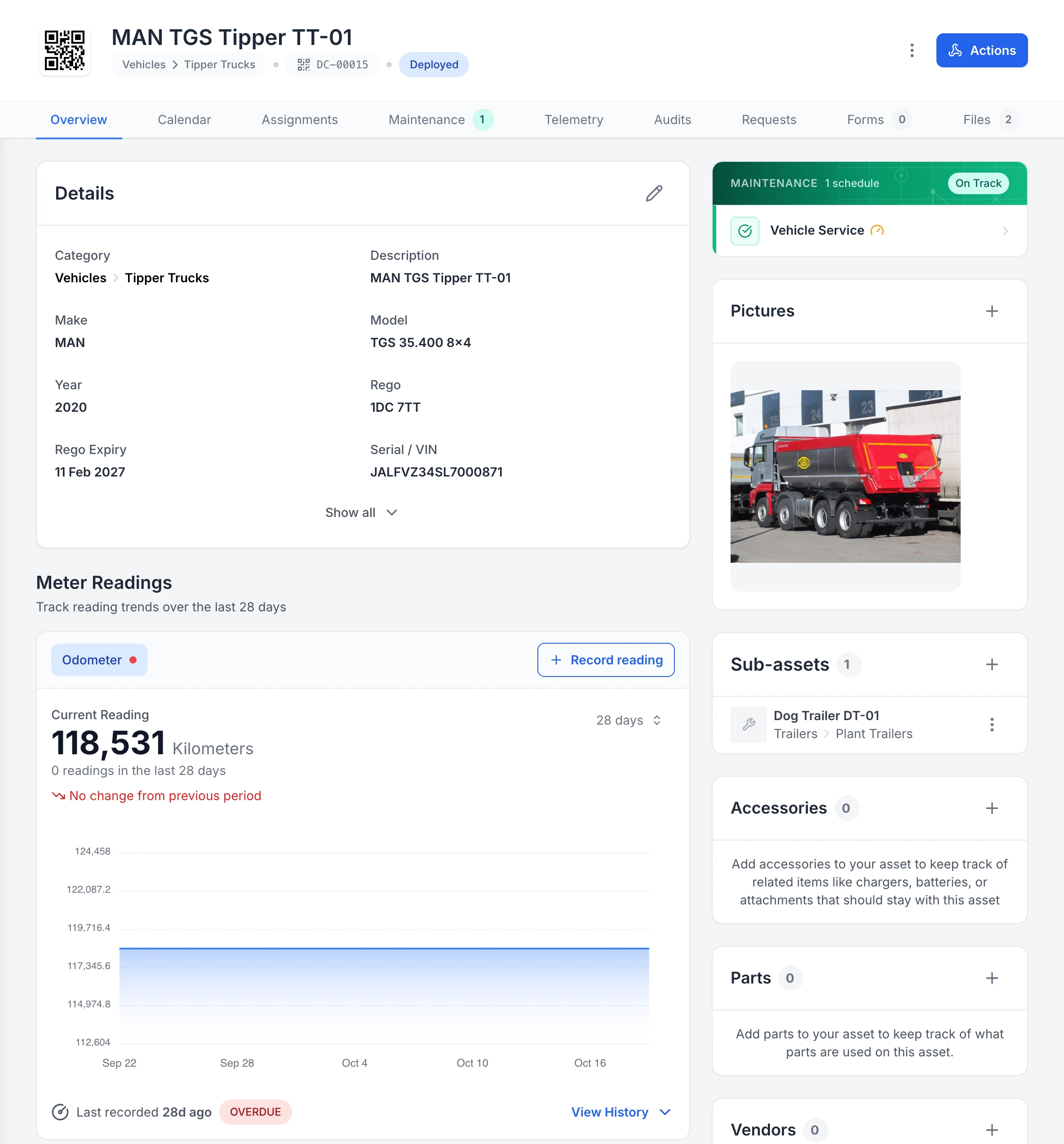
One truck’s record, its dog trailer included
Tipper TT-01’s record: its QR tag, rego and rego expiry, photo, Vehicle Service schedule and odometer, with its dog trailer, DT-01, as a sub-asset on the same record.
MapTrack app · Demonstration data · Captured
About this screenshot
Demonstration workspace at a 1440 px desktop viewport on the truck’s Overview tab, cropped right of the navigation sidebar. Accessories, parts, vendors, notes and activity continue further down the page. The dog trailer was added in the app that day.
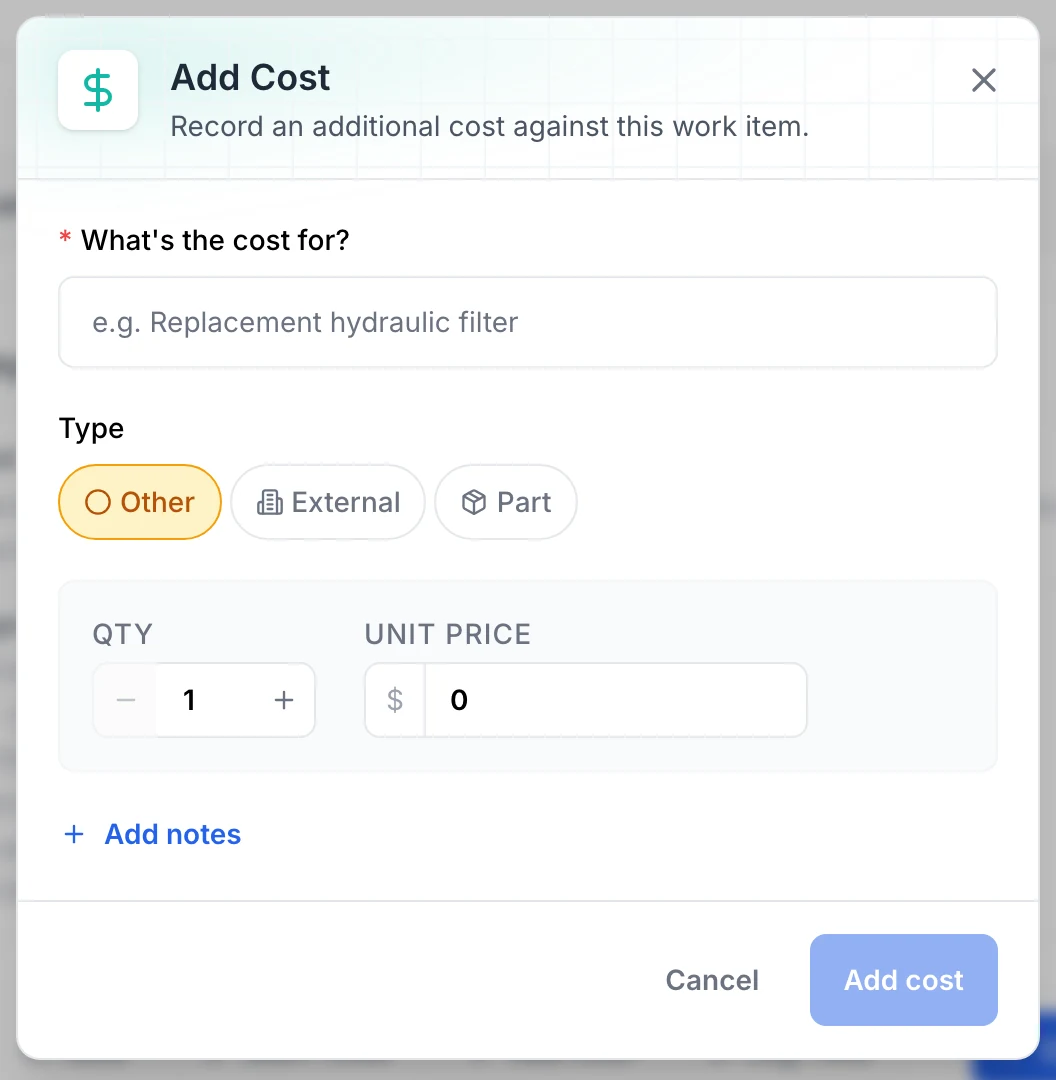
Adding a cost to a job
A cost is recorded against the job it belongs to: what it was for, whether it is a part, an outside service or something else, and the quantity and unit price.
MapTrack app · Demonstration data · Captured
About this screenshot
Demonstration workspace at a 1440 x 900 desktop viewport, the dialog opened on a service work order and cropped to the dialog; it was closed with Cancel, so nothing was saved.
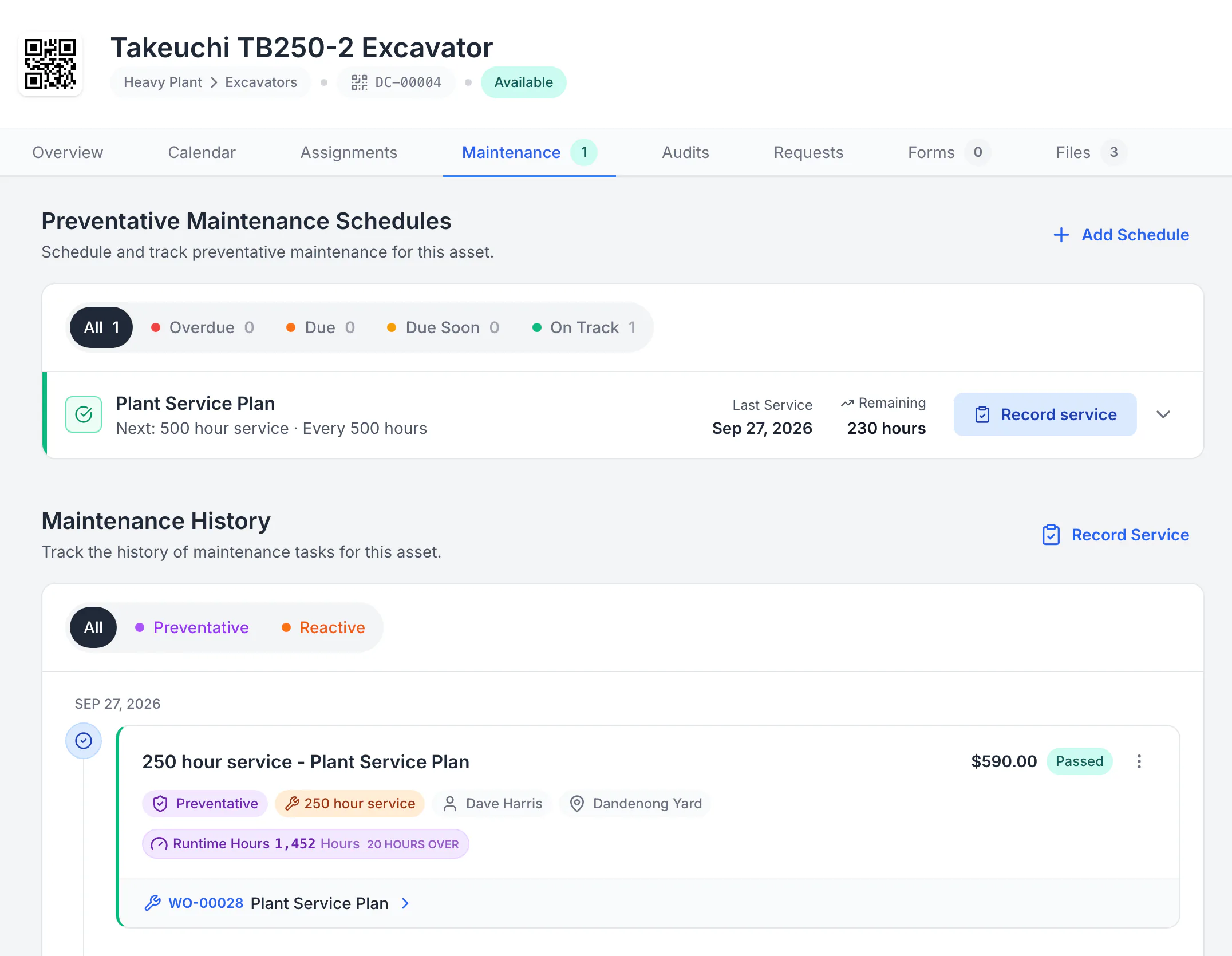
Open the saved service record on the asset
The 250-hour service was completed on work order WO-00028 at 1,452 hours, 20 hours past its service point, with $590 in logged costs. After completion the plan moved on: the 500-hour service is next, 230 hours away.
MapTrack app · Demonstration data · Captured
About this screenshot
The work order was started, time and costs were logged and it was completed in a demonstration workspace, then the record was reopened from the asset’s Maintenance tab.
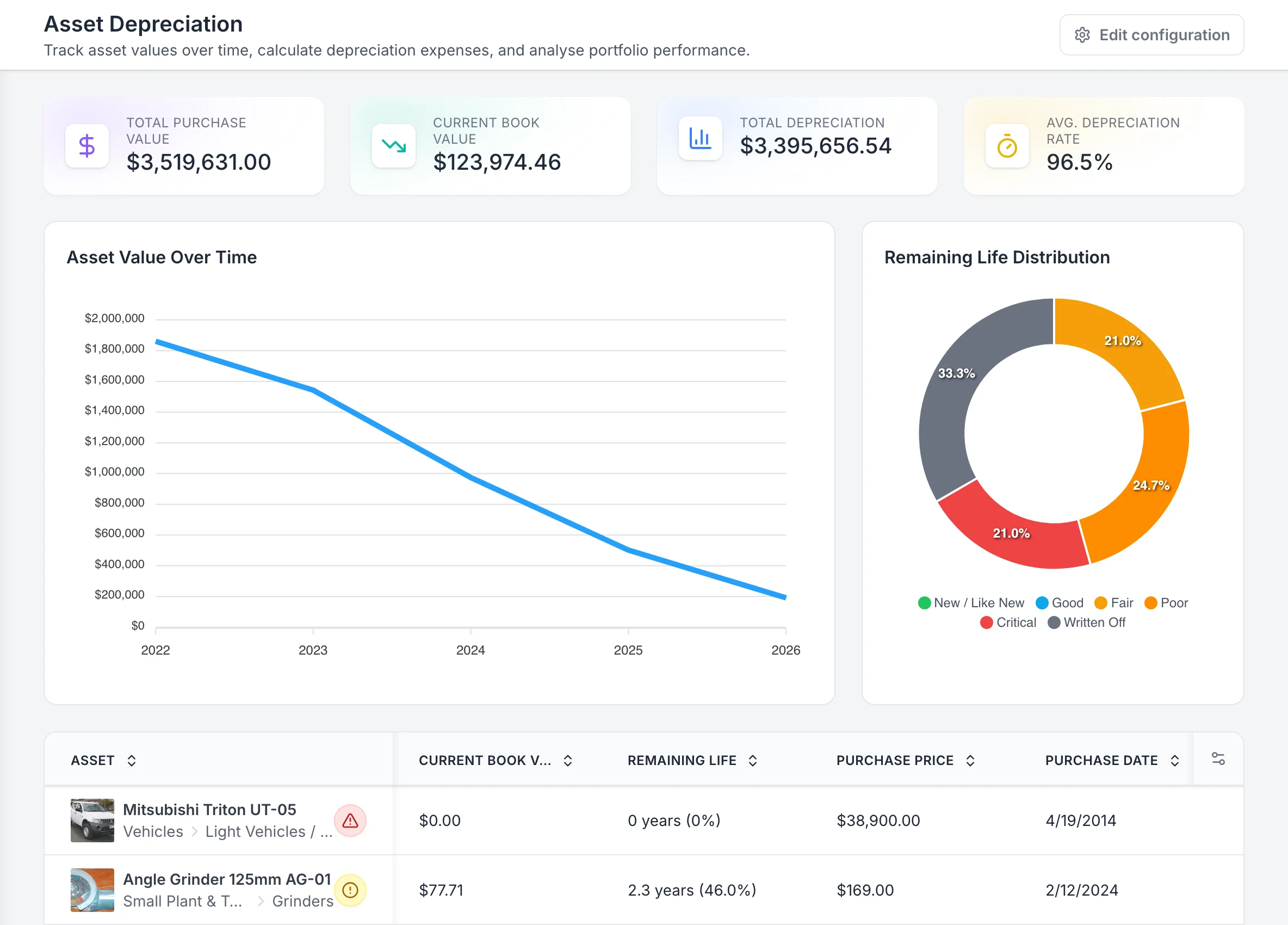
The depreciation report, totals above the rows
The summary cards, the value chart and the remaining-life split sit above the asset table, so you can review a known asset before relying on the summary.
MapTrack app · Demonstration data · Captured
About this screenshot
Demonstration report using Straight Line, AUD, the five-year default useful life and a zero residual value. These example values are not customer results or tax calculations. Captured at a 1440 x 900 desktop viewport at 2x, right of the sidebar, and cropped after the second asset row.
What goes into a vehicle’s total cost of ownership
Use the same cost categories for every vehicle, and every vendor quote, so you compare like with like.
Owning it
- Purchase or lease cost
- Depreciation over its working life
- Expected resale or trade-in value
Running it
- Fuel or charging
- Registration and insurance
- Tyres and consumables
Keeping it working
- Maintenance labour, in-house
- Parts
- External repairs and services
When it stops
- Hire while it is off the road
- Lost time on the job
- Repair-or-replace decision
Conclusion: capture costs where the work happens
The best fleet cost management software is the one that captures costs against each vehicle as the work happens. For vehicle fleets, Fleetio and Motive both report total cost of ownership by asset; Samsara reports maintenance cost per asset on its hardware; AssetWorks suits public-sector fleet departments.
MapTrack fits the mixed fleet: service costs, fuel and depreciation on the same record across vehicles, plant and equipment. Start with cost tracking or compare fleet maintenance software.
Frequently asked questions
What is fleet cost management software?
What is the best fleet cost management software?
How do you calculate total cost of ownership for a vehicle?
How does MapTrack track fleet costs?
Can MapTrack show fuel costs per vehicle?
Does MapTrack track depreciation?
Can I see costs for plant and equipment, not just vehicles?
Why does MapTrack publish this comparison?
Related software guides
- Best asset tracking software 2026
- Best asset tag suppliers Australia
- Best tool tracking software 2026
- Best CMMS for equipment 2026
- Best equipment management software 2026
- Best plant management software
- Best pre-start inspection software
- Best fleet management software 2026
- Best fleet maintenance software 2026
- Best fleet management software Australia
- Best asset management software 2026
- Best maintenance planning software 2026
- Best asset inspection software 2026
- Best construction equipment tracking software
- Best construction equipment maintenance software
- Best construction fleet management software
- Best commercial GPS tracking software
- Best fuel management software 2026
- Best safety management software 2026
Compare MapTrack head-to-head
About the author

Co-Founder & GM of Operations
Lachlan leads operations at MapTrack, bringing 10+ years of enterprise technology experience across mining, construction and heavy industry. Before MapTrack, he held senior roles at Workato (integration and automation) and AppDynamics/Cisco (application performance), working directly with ASX-listed organisations to modernise their technology stacks. His deep understanding of field operations and blue-collar workflows shapes how MapTrack solves real problems for asset-intensive teams.
View LinkedIn profile →Know what every vehicle and machine costs
Labour, parts, external costs and fuel on each asset’s record, across vehicles, plant and equipment.
4.9 on G2 · 5.0 on Capterra, GetApp & Software Advice· Source: G2.com, Inc.
- No credit card required
- Unlimited users