
Bridge crossings in WA
Main Roads WA Bridge Video Supervision (BVS)
What Main Roads WA asks you to record at each specified bridge, how long to keep the footage, and where MapTrack’s AI dash cams help.
Get pricing





600,000+ assets tracked since 2012

Read how these teams run MapTrack


What is Bridge Video Supervision?
Bridge Video Supervision (BVS) is a Main Roads WA permit condition, developed for over-mass vehicles crossing bridges, and it applies to any permit that specifies it. It lets the vehicle cross a specified bridge without a Main Roads officer supervising on site, as long as the crossing is run and recorded to the Audit Requirements and the operator keeps the footage and records for audit. You’ll need at least two accredited pilots, and more where the permit, route or operating conditions require it.
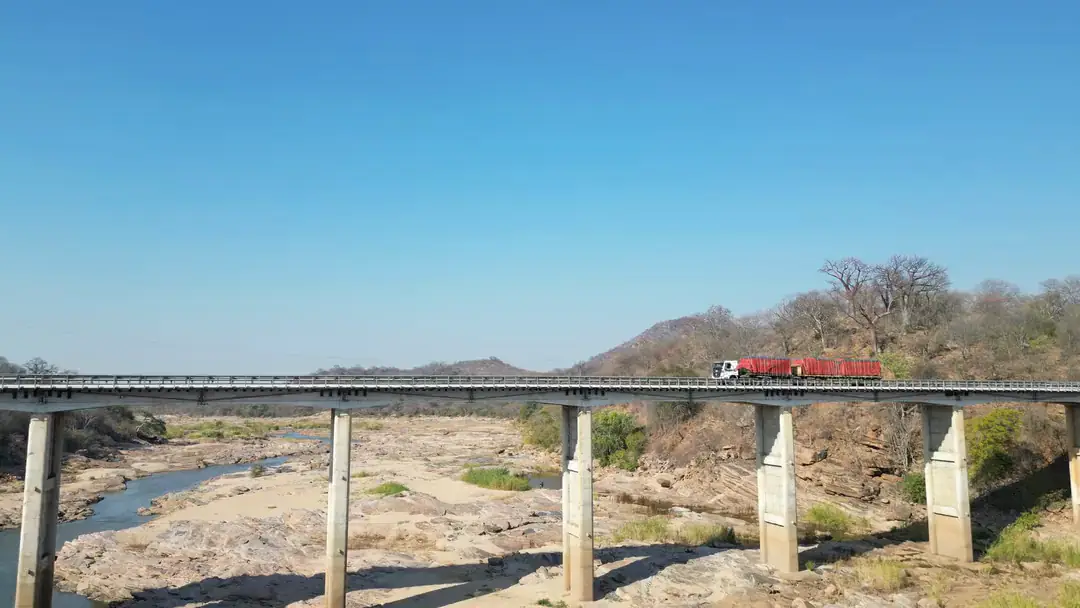
In practice it’s heavy haulage work in Western Australia: over-mass loads, oversize overmass (OSOM) moves and mobile cranes travelling over mass. Main Roads WA Heavy Vehicle Services (HVS) handles the permits and publishes the BVS Audit Requirements (D20#357426).
Main Roads lists four kinds of permit it turns up on: a specific journey Class 1 (single trip) extra mass permit, a single trip combination permit, a special purpose vehicle (motor vehicle specific, single trip) permit, such as a mobile crane travelling over mass, and a bridge crossing permit. Its route survey rules add BVS conditions to an Oversize Permit when a load can’t keep a 300 mm safety buffer under an overhead structure such as a bridge or gantry: put that in the permit application and the route survey, with a procedure for the driver and pilots. The permit’s operating conditions name the bridges, one by one or as a range, such as every bridge in a region. In BVS, a bridge also means an overpass, ramp, tunnel, culvert, causeway or similar infrastructure.
The operator named on the permit is the primary operator, and the records are theirs to keep, even when a subcontractor does the driving. If a subcontractor’s engaged, they must be the one named on the permit, their vehicle needs a fixed, complying camera, and you need a signed agreement or arrangement with them. Main Roads audits operators with these conditions from time to time, and not complying can mean no more permits that include bridge crossings.
What Main Roads WA asks you to record on a BVS trip
Five things, from the Bridge Video Supervision Audit Requirements. Each can be checked at audit, so each needs to be on the recording or on file.
1. Clause 6.1
A driver statement before you set off
Before the trip, and again before each new day of it, the driver says their full name, the permit number, the start time and date, and the start and end location addresses, recorded on the camera in the cab.
2. Section 6
Every specified bridge, continuously
The recording runs from the approach until the whole combination is fully clear of the bridge. The driver slows on approach, waits for the lead pilot to confirm the bridge is secured, and holds 10 km/h or less on the bridge until the vehicle’s fully clear or the rear pilot says it is by two-way. Follow the permit’s speed, position and traffic exclusion conditions too. Main Roads’ bridge supervision conditions, on its BVS page, set 5 km/h instead for a platform trailer with more than 16 axles or more than 12 tyres per axle.
3. Clause 7.2
Date, time and speed on the picture
The recording shows the date and time of the crossing and the vehicle’s speed, with the driver statement as audio. Latitude and longitude on the picture are optional.
4. Section 6 and clause 7.3
Each bridge named, or GPS on replay
As far as practicable, the driver names each bridge by number, name or crossing point, with the road or location, as it’s crossed. The June 2020 Audit Requirements waive that if the operator’s satisfied the camera has working GPS, shows each bridge’s latitude and longitude on replay, and meets the date, time, speed and picture-quality rules. Main Roads’ 2018 FAQ also asks for the whole trip to be recorded and a driver who’s proficient with the camera.
5. Section 4, items 9 and 17
Footage kept at least 12 months after the permit expires
Every recording from the trip, driver statements included, is stored safely for at least 12 months from the permit’s expiry date, labelled so it’s clear which permit it belongs to.
The driver also talks to the pilots on two-way for every specified bridge. Handheld footage doesn’t count: the camera is mounted in the cab, as close as practical to the vehicle’s centreline, without blocking the driver’s view, and it has to show the road and the bridge ahead clearly (clause 7.1).
Want to see how footage requests fit beside your BVS records?
Book a demo30 minutes on Microsoft Teams
Need a crossing from the trip? Request the footage
Account owners can request footage from a trip, with faces and number plates blurred. Blur is an option on each request. Camera footage and safety events are shown to account owners.
Each AI dash cam’s trips sit on the vehicle’s record in MapTrack, so you can find the drive a crossing happened on and request its footage. Do it soon after the trip, and check the request covers the whole crossing. A request can’t replace a crossing that wasn’t recorded.
Keep the camera’s original recordings for at least 12 months after the permit expires. Don’t use a requested clip as your BVS record unless you’ve checked it has the date, time, speed and audio and is in its original, compatible format.
See live view, footage requests and driver scorecards on video telematics.
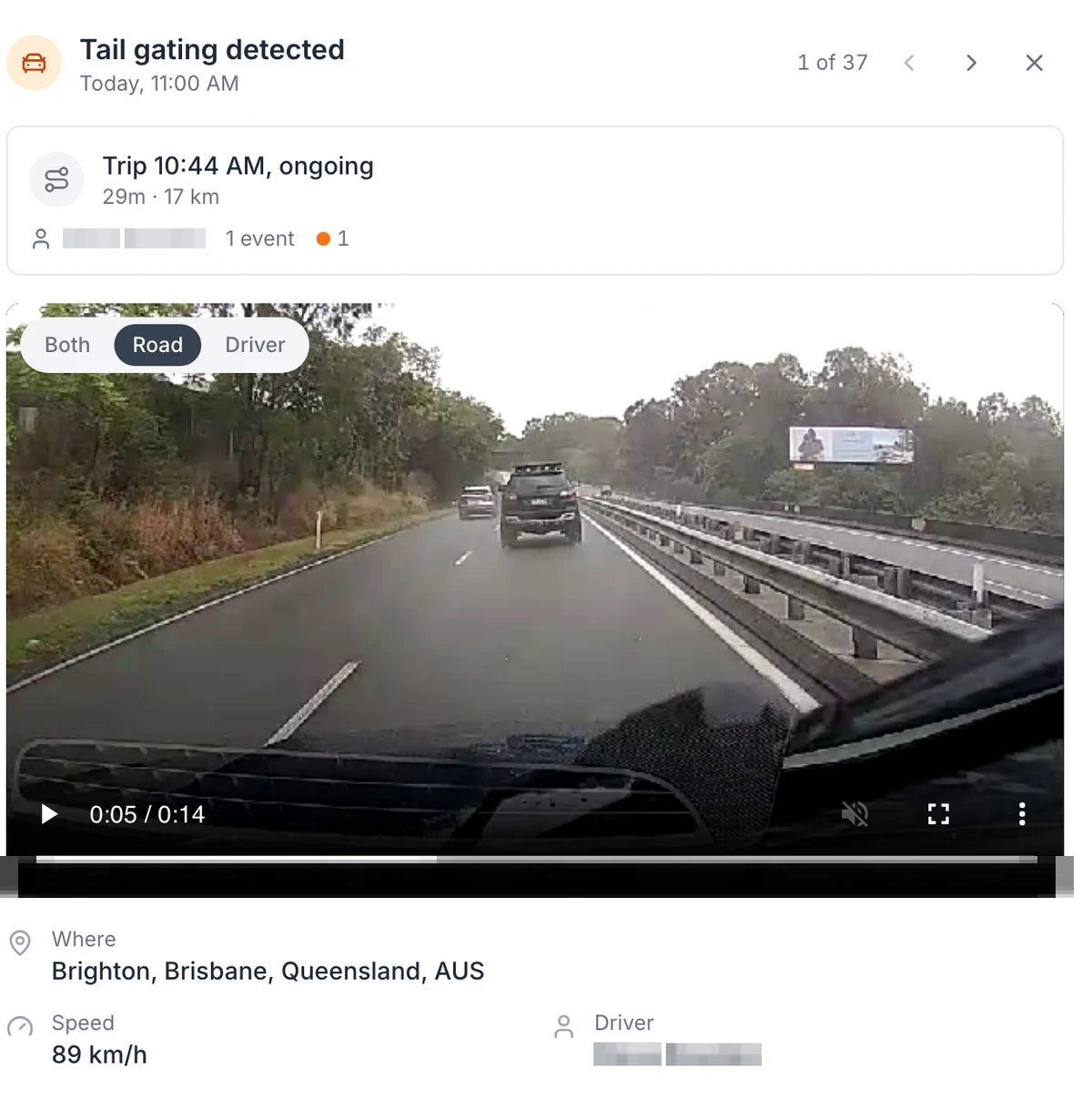
A safety event with its video, speed and place
Opening an event plays its clip beside the trip it sits on, the speed at the time and the suburb it happened in. Road and driver views are separate channels; the road view is shown here. The driver name is masked, and a clip plays from the camera provider rather than from MapTrack, so it is available for a limited time.
MapTrack app · Demonstration data · Captured
About this screenshot
Demonstration account at a 1440 px desktop viewport. The event drawer is cropped from the device page, and the clip’s burnt-in position overlay is masked.
The records Main Roads expects you to keep
The primary operator keeps five sets of BVS records, on paper, electronically or both. The video and the register are kept for at least 12 months after each permit expires; the procedures, roles and training records indefinitely, kept up to date while you use permits with BVS conditions.
BVS procedures and processes
How you’ll manage and run BVS, written before the first BVS trip (5.1).
Roles and responsibilities
Who does what, subcontractors included, written down before any BVS trip. A single owner-operator signs and dates a self-declaration of their own role, and still documents any subcontractor’s role (5.2, 5.3).
The Main Roads BVS Register
Main Roads’ own register template, with an entry for every permit that carries BVS conditions, whether you used it or not (5.4).
The recordings
Video of every specified bridge, filed by permit (section 5; section 4, item 17).
Training records
What BVS training each person had and when, their printed name and signed acknowledgement of their BVS duties, and the trainer’s or primary operator’s sign-off (5.5).
Where MapTrack helps with the paperwork
- Put the camera check and the BVS training sign-off on a phone as forms, with photos and a drawn signature.
- Keep each permit and its operating conditions on the truck’s record as files. See documents on each asset.
- Keep the Main Roads BVS Register itself up to date: Main Roads requires its own template for that, so use theirs, from the Main Roads BVS page.
- Track each permit’s expiry and keep-until dates, one row per permit, plus internal reviews, training and camera checks, in the free BVS records log. It sits beside the register, never instead of it.
- Keep the procedures, roles and training records in the free BVS training register, with a procedures checklist, a self-declaration and training sign-offs.
Ready for a Direction to Produce Records Notice
A BVS audit starts with a Direction to Produce Records Notice that lists what Main Roads wants to see. Either you present those records at an on-site audit at your premises, with equipment that plays the recordings back, or you send the records and video in their original and compatible format by the date on the Notice.
Miss it, and Main Roads can put you on a permit restriction notice. That stops further permits with over-mass and BVS provisions until the records arrive or another approved process resolves it. Breaches can also bring a corrective action request, a formal caution, an infringement or a summons, and a repeat offender’s WA Heavy Vehicle Accreditation can be suspended for six months.
A BVS audit checklist
- Every permit with BVS conditions has an entry in the Main Roads BVS Register, including permits you didn’t use.
- Every recording from the trip, driver statements included, is labelled by permit, stored safely and kept until at least 12 months after the permit expires.
- A subcontractor’s original recordings and the driver’s trip timesheets were obtained, reviewed, filed and safely stored within 7 days after the trip (section 4, item 16).
- You can play any recording back on site for an audit officer (section 8).
- The recordings are clear enough to view each crossing, and each driver had enough instruction to run BVS on every specified bridge on the trip (clause 7.3; section 4, item 8).
- Each day of each trip starts with the driver statement on the recording.
- Every BVS training record is dated, signed by the person trained, and signed off by the trainer or primary operator.
- Your BVS procedures, roles and responsibilities are written down and current.
- Internal reviews are on file, with how you fixed anything that went wrong (section 4, items 3 and 4).
- Every on-road incident involving the permitted vehicle was reported on Main Roads’ incident form within 48 hours (section 11).
- For any permit you didn’t use, you can show evidence such as a statutory declaration or a client letter confirming the job was cancelled (section 17).
Customer outcomes
Results from published MapTrack customer case studies.
Instantly retrievable
Digital forms with automatic timestamps and asset linking replaced paper records, making compliance documentation instantly retrievable for client or auditor requests.
In seconds
Test and tag records, inspection certificates and equipment compliance documentation can now be retrieved in seconds, replacing a process that previously took hours of manual searching.
Near-universal
Digital pre-start inspections for vehicles and equipment went from inconsistent paper-based compliance to near-universal daily completion across all crews.
Example dashboards, sample data
How a BVS setup looks in MapTrack
An example WA heavy haulage fleet, with sample data: permits on each truck, the camera check and training sign-off on a phone, and footage requests from a trip.
What MapTrack doesn’t do for BVS
- It isn’t a Main Roads approval. Main Roads sets the BVS conditions and audits them, and nothing on this page is endorsed by Main Roads.
- Keep the camera’s original recordings for at least 12 months after the permit expires. Don’t use a requested clip as your BVS record unless you’ve checked it has the date, time, speed and audio and is in its original, compatible format.
- A time-lapse isn’t continuous video. Keep the video of each crossing as your record.
- The date, time and speed have to be on the recording itself. Check your camera’s overlay settings and its sound recording before a BVS trip.
- The driver statement, the 10 km/h limit and the required pilots are still on the driver and the operator.
BVS isn’t the only Main Roads video rule
Pilot vehicles run their own forward camera when the vehicle they escort, including any load, is over 4.5 metres wide. Combinations on the 36.5 metre Greenmount Hill access permit run forward and rear cameras. The 36.5 metre Roelands Hill permit asks for the same pair, with the rear camera on the driver’s side, and the 53.5 metre Bindoon Hill special assistance permit asks for at least one forward-facing camera. Traffic management crews video each setup on static Main Roads worksites. On Main Roads contracts, Specification 202 (clause 202.65) sets when: in both directions at the start of each site working day, after each new or changed traffic guidance scheme, at least every four hours, at the end of the day and after any relevant incident, at 720p and 3 frames per second or better, with the time and date on it. Their keeping times differ: at least 12 months after the permit expires for BVS, at least 30 days after the journey for pilot and hill permit footage, and at least 7 days for traffic management, longer if the Superintendent, the police or WorkSafe ask for it. Compare them in Main Roads WA video recording requirements.
Each rule in full:
Running BVS permits this season? See how it would work on your trucks.
Book a demo30 minutes on Microsoft Teams
What plant and fleet teams say about MapTrack
600,000+ assets tracked since 2012

 Source: G2.com, Inc.
“Finally we've got everything in one place - I would recommend this platform to anyone.”
Ashley Sutherland
Plant & Logistics Administrator at RIX Specialist Contracting


“Thanks to MapTrack we know exactly where our gear is, who has it and when it needs servicing.”
Denis Slaviero
HSEQ Manager at Hacer Group
 Source: G2.com, Inc.
“Bloody amazing! We used to spend 1-2 days a week tracking and managing our generators alone.”
Steve McAllister
Asset Coordinator at Saunders International
Bridge Video Supervision FAQs
What is Bridge Video Supervision (BVS)?
Which permits carry BVS conditions?
How long do we have to keep BVS footage?
What does the driver statement have to include?
Does the driver have to name every bridge on the recording?
Can we film the crossing on a phone or a handheld camera?
Do we still need pilots for a BVS crossing?
Do we have to record the whole trip?
What happens at a BVS audit?
What if we can’t produce the records?
Can a clip requested in MapTrack be our BVS record?
Is a time-lapse good enough for BVS?
What can we use to manage BVS records?
Which cameras work with MapTrack?
Is BVS a new rule?
Sources
Every rule on this page comes from Main Roads WA’s own documents, checked on 25 November 2026. Clause and section numbers are the Audit Requirements’ own. Read your permit’s operating conditions for the bridges and any conditions specific to your trip.
- Bridge Video Supervision (BVS). Main Roads WA web page, with the BVS conditions and FAQ.
- Bridge Video Supervision Audit Requirements. Main Roads WA Heavy Vehicle Services, D20#357426, version 1, June 2020 (PDF).
- Bridge Video Supervision (BVS): commonly asked questions. Main Roads WA, April 2018 (PDF).
- Heavy Vehicle Pilots. Main Roads WA web page, pilot licence requirements.
- Oversize Vehicle Route Survey Audit Regime. Main Roads WA, D19#691324, August 2025 (PDF), section 2.4.
- Special Purpose Vehicle (SPV) Permits: operator information sheet. Main Roads WA, D25#1127968, June 2026 (PDF).
- Single Trip OSOM Vehicle Standard Operating Conditions. Main Roads WA, D19#696602, June 2026 (PDF), clauses 13.7.4 and 13.7.7.
- Special Purpose Vehicle Standard Operating Conditions. Main Roads WA, D15#400816, March 2026 (PDF), clause 12.7.5.
- 36.5 metre Roelands Hill Permit Eligibility and Supporting Evidence Checklist. Main Roads WA, D21#135723, 16 October 2023 (PDF).
- 53.5 metre Bindoon Hill Special Assistance Permit Eligibility and Supporting Evidence Checklist. Main Roads WA, D26#442283, April 2026 (PDF).
- Specification 202 Traffic Management. Main Roads WA, 04/10093-03, issued 5 February 2026 (PDF), clause 202.65.
Request trip footage and keep your original recordings
Book a demo to see AI dash cams, footage and each truck’s permits and records together in MapTrack, or start a free trial on your own fleet.
No credit card required