
Video telematics
Video Telematics Software for AI Dash Cams
Watch your AI dash cams live, request footage from a trip and rank drivers and vehicles by safety score, in the same system as each vehicle’s servicing and pre starts.
Get pricing





600,000+ assets tracked since 2012

Read how these teams run MapTrack




Co-Founder & GM of Operations
Trusted by construction, mining and field service teams










Watch the road, the cab or both, live
Watch the road camera, the driver camera or both, live. It usually connects in 15 to 30 seconds while the vehicle is running. Live view is for account owners.
Request footage from a trip
Request footage from a trip, with faces and number plates blurred. Camera footage and safety events are shown to account owners.
Driver scorecards and a Safety events dashboard
Driver scorecards rank drivers and vehicles by safety score, with trips, driving time, events per 100 km and top issue, plus To watch and Safest lists. A Safety events dashboard adds a heat map and a drill-down for each event type.
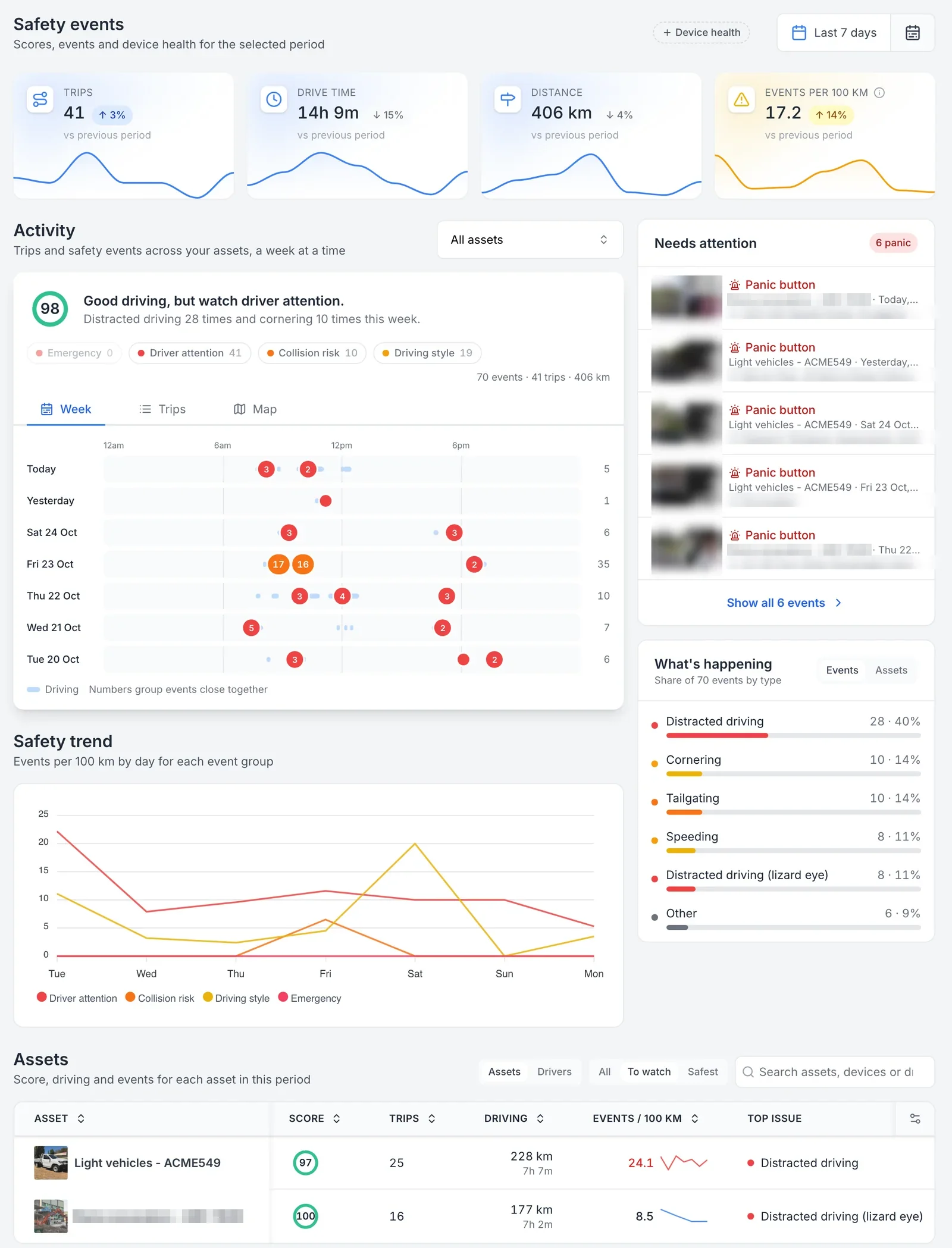
Every camera’s safety events on one page
Released on 25 October 2026: one page for every camera in the fleet. Trips, drive time, distance and events per 100 km sit against the previous period, the week shows when events happen, Needs attention lists panic button presses first, and the Assets table ranks each vehicle by its score and top issue. Thumbnails and street addresses are masked. The second vehicle’s name is masked.
MapTrack app · Demonstration data · Captured
About this screenshot
Demonstration account at a 1440 px desktop viewport, signed in as an account owner (camera data is owner-only). Settings, Devices, Safety events over the last 7 days, Assets table filtered to To watch. Event thumbnails and street addresses are pixelated. The second vehicle’s name is pixelated in this copy.
Against the previous period
Trips, drive time, distance and events per 100 km sit against the previous period.
What needs attention first
Needs attention lists panic button presses first.
Where events keep happening
A heat map shows where the fleet’s events happen and flags a spot where the same kind of event keeps happening.
One event type at a time
Open an event type to see how many, where, which vehicles or drivers, and what time of day. Pick a date range from today back to the last quarter.
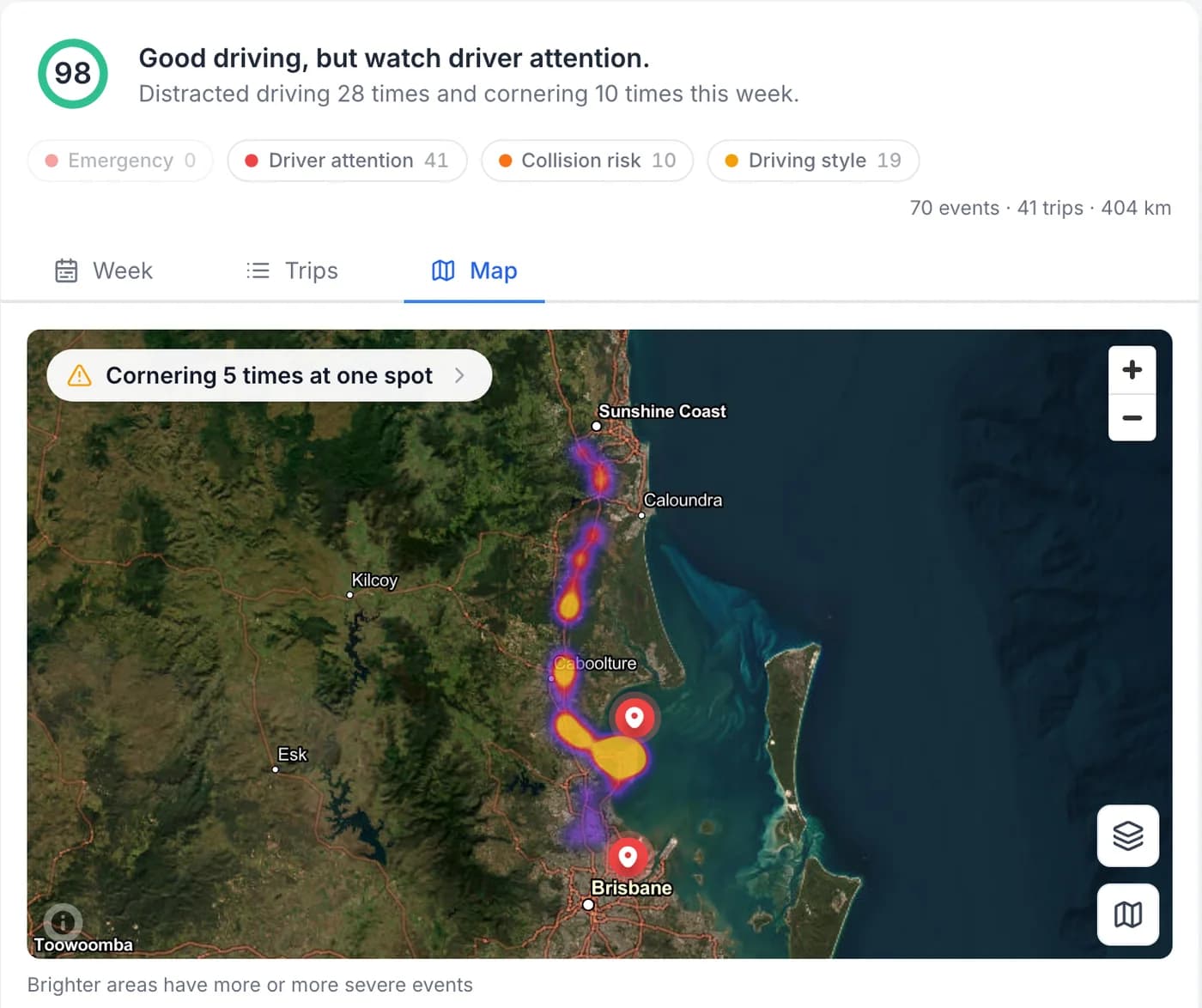
Where the fleet’s events happen, as a heat map
The same week on the map for the whole fleet. Brighter areas have more or more severe events, and when one kind of event keeps happening in the same place, MapTrack flags the spot, here cornering five times at one spot.
MapTrack app · Demonstration data · Captured
About this screenshot
Demonstration account at a 1440 px desktop viewport, signed in as an account owner. Safety events dashboard, Activity on the Map view at its opening zoom over the last 7 days.
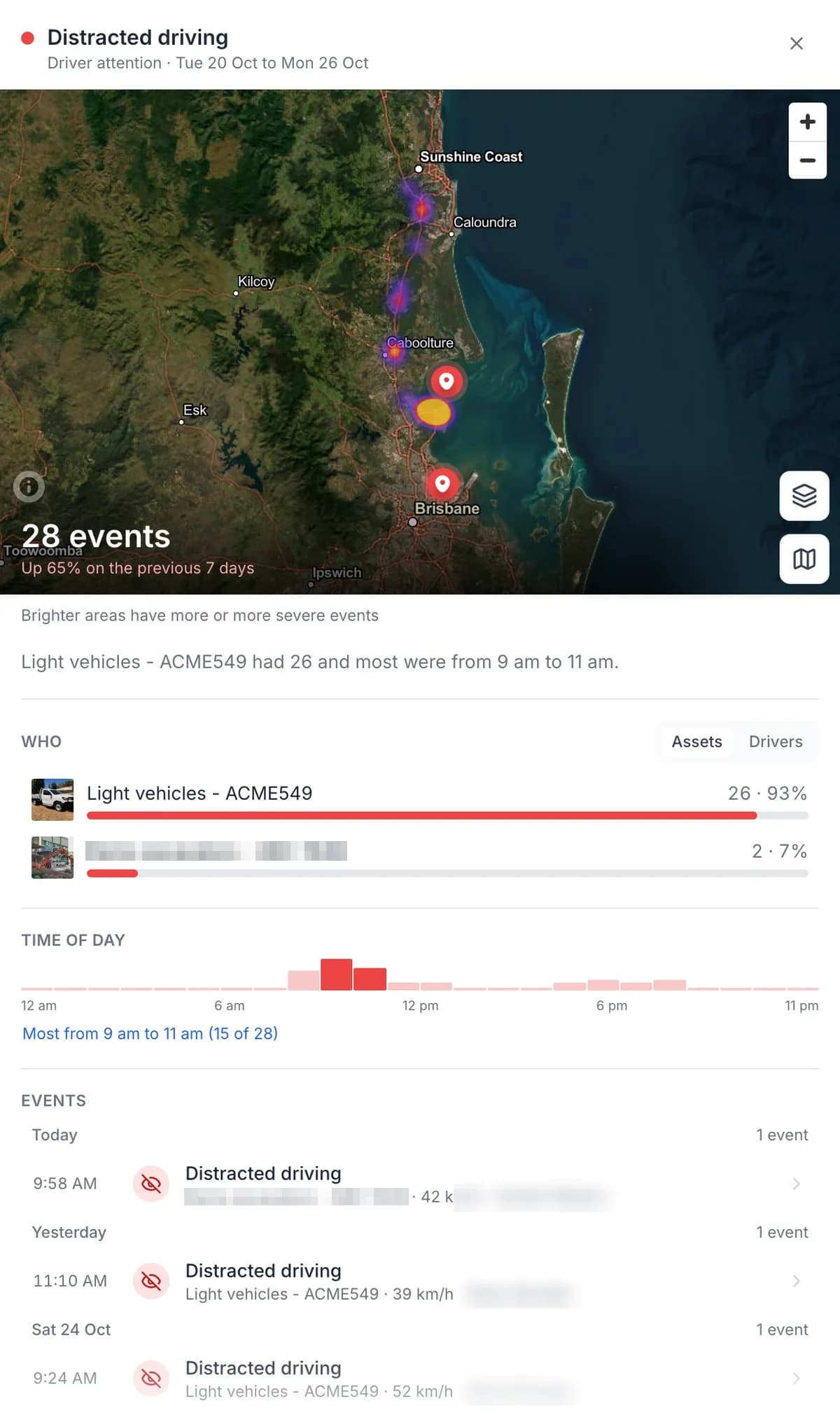
One event type: where, who and what time of day
Click an event type and MapTrack sums it up: how many and the change on the previous period, where on the map, which vehicles or drivers, and the time of day it happens. Here, most distracted driving came from one vehicle between 9 am and 11 am. Driver names are masked. The second vehicle’s name is masked too.
MapTrack app · Demonstration data · Captured
About this screenshot
Demonstration account at a 1440 px desktop viewport, signed in as an account owner. Distracted driving opened from What’s happening on the Safety events dashboard, cropped to the drawer. Driver names are pixelated. The second vehicle’s name is pixelated in this copy.
Event clips with the trip, the speed and the place
Event clips cover speeding, harsh braking, cornering, tailgating, lane departure, phone use, distraction, fatigue, seatbelt and smoking (driver-monitoring events need the DualSight on the Advanced plan). Opening an event plays its clip beside the trip it sits on, the speed at the time and the suburb it happened in.
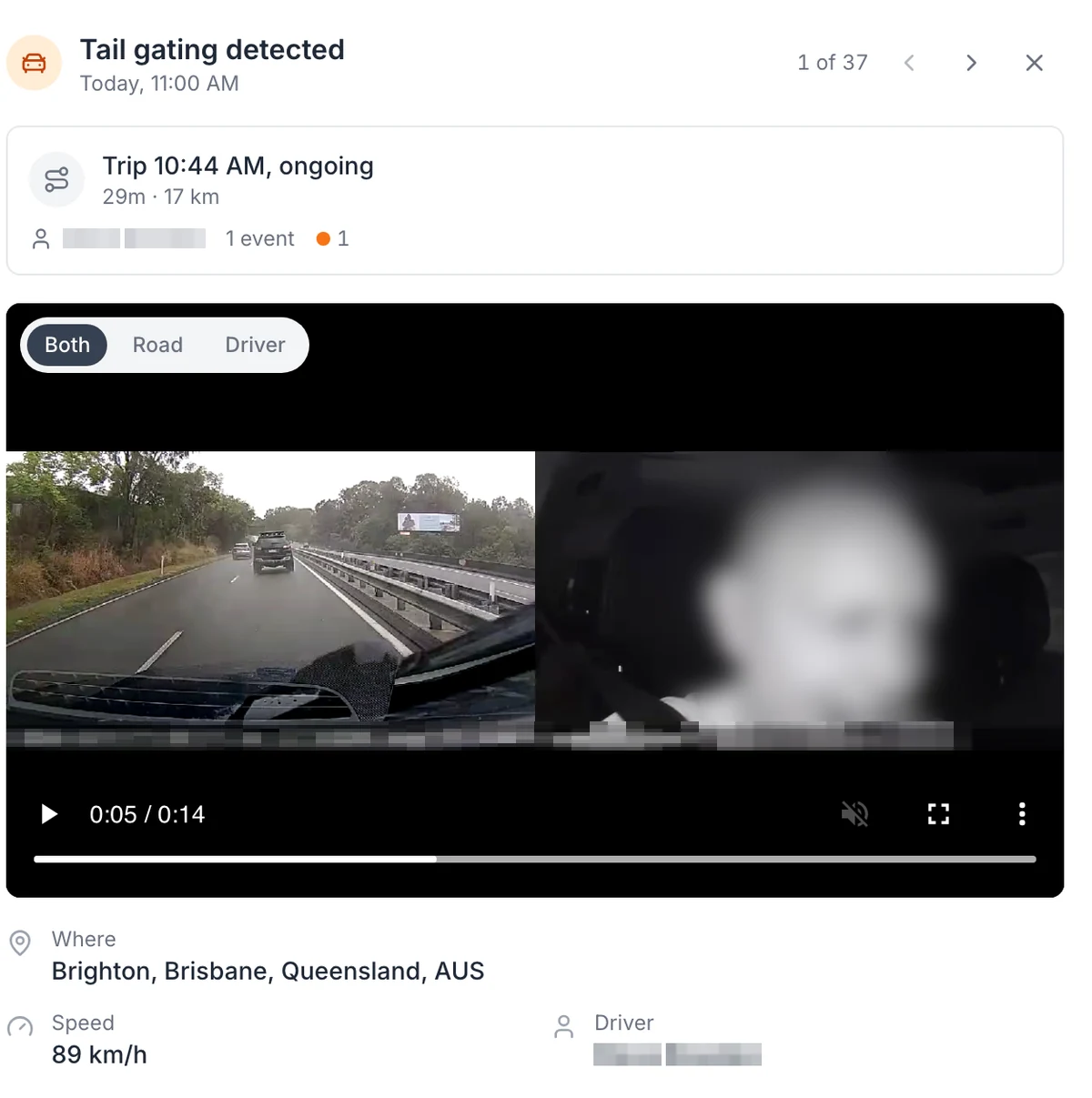
A tailgating alert, with the road and the cab side by side
An AI dash cam event as it opens in MapTrack: the clip from the road and cab cameras together, the trip it happened on, the speed at the time and the suburb. Road and Driver views are one tap away. The face is blurred in this screenshot, and the driver name is masked.
MapTrack app · Demonstration data · Captured
About this screenshot
Demonstration account at a 1440 px desktop viewport. The event drawer is cropped from the device page. The driver’s face is pixelated and blurred, and the driver name and the clip’s burnt-in position overlay are masked.
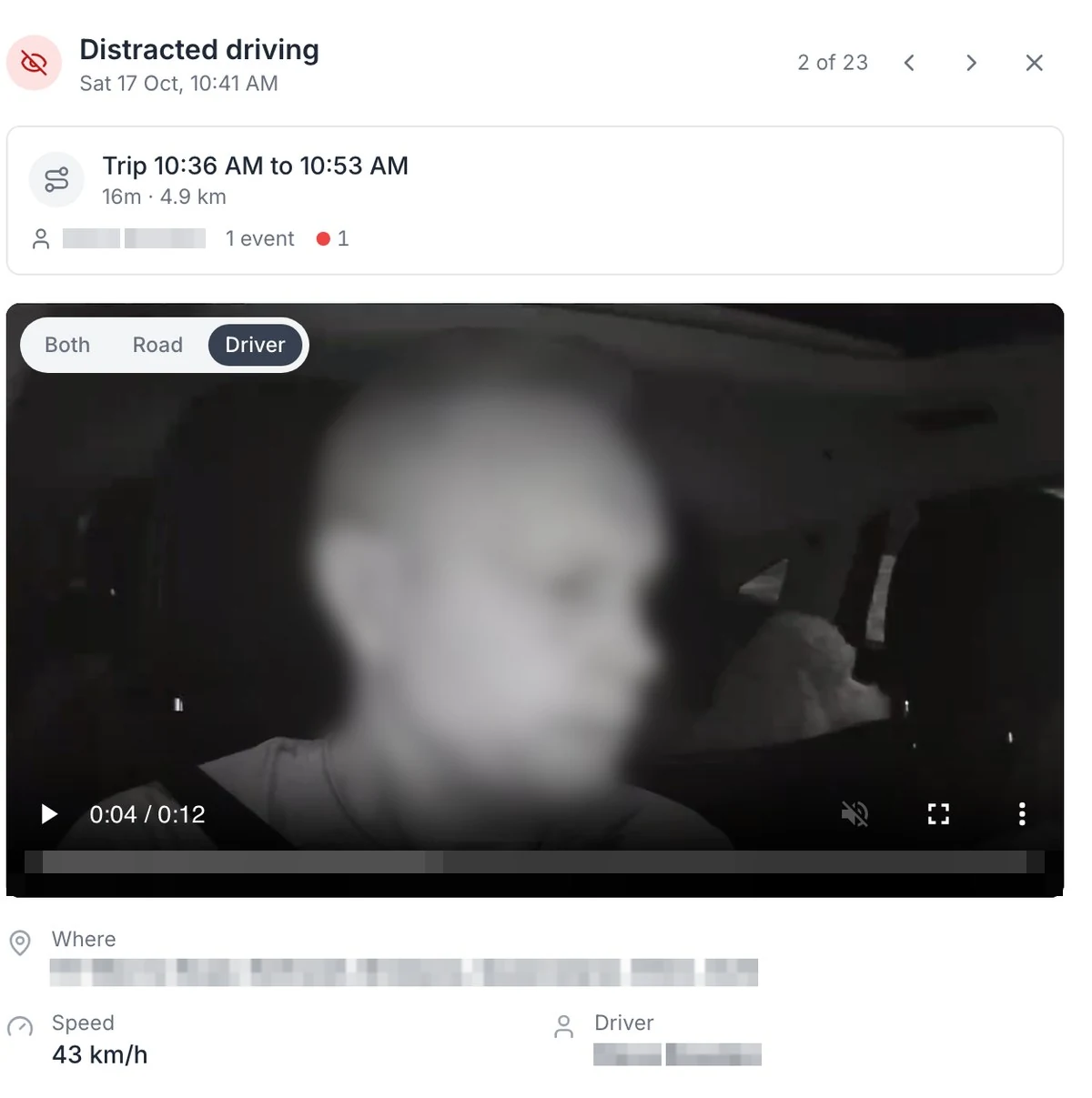
Distracted driving, on the camera facing the driver
A distracted driving alert from the camera that faces the driver, shown on the Driver view with the trip it happened on and the speed at the time. Driver monitoring, which covers distraction, fatigue and phone use, needs the DualSight’s driver-facing camera and the Advanced plan. The face is blurred in this screenshot, and the driver name and street address are masked.
MapTrack app · Demonstration data · Captured
About this screenshot
Demonstration account at a 1440 px desktop viewport. The event drawer is cropped from the device page. The driver’s face is pixelated and blurred, and the driver name, the street address and the clip’s burnt-in position overlay are masked.
The RoadSight records the road only. It has no driver-facing camera, so no driver monitoring. Driver monitoring (fatigue, distraction, phone use, seatbelt and smoking) needs the DualSight's driver-facing camera and the Advanced plan.
Trips and kilometres that feed servicing
Estimated kilometres and drive hours from trips feed service schedules, and a vehicle with an AI dash cam needs no separate GPS tracker. The camera’s location and trips land on the vehicle’s record in MapTrack, and each trip carries the events that happened on it.
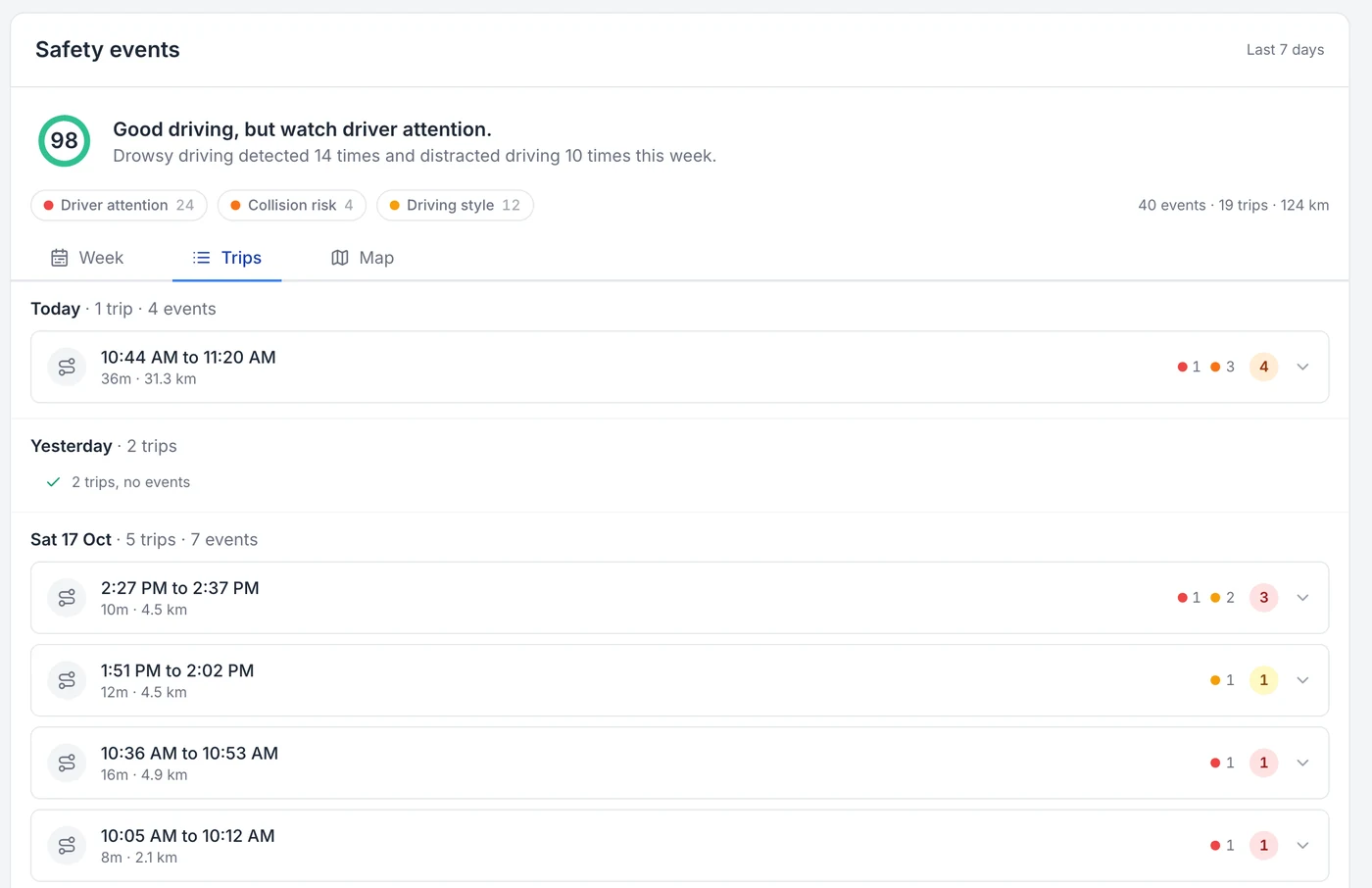
Every trip, with the events on it
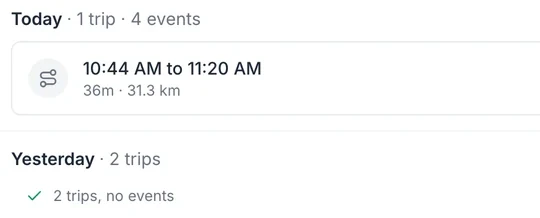
The same week read as trips, with each trip’s events attached to it, so an event can be read against the drive it happened on. A day with no events says so.
MapTrack app · Demonstration data · Captured
About this screenshot
Demonstration account at a 1440 px desktop viewport, Trips view on the device page. Trips cover the last seven days.
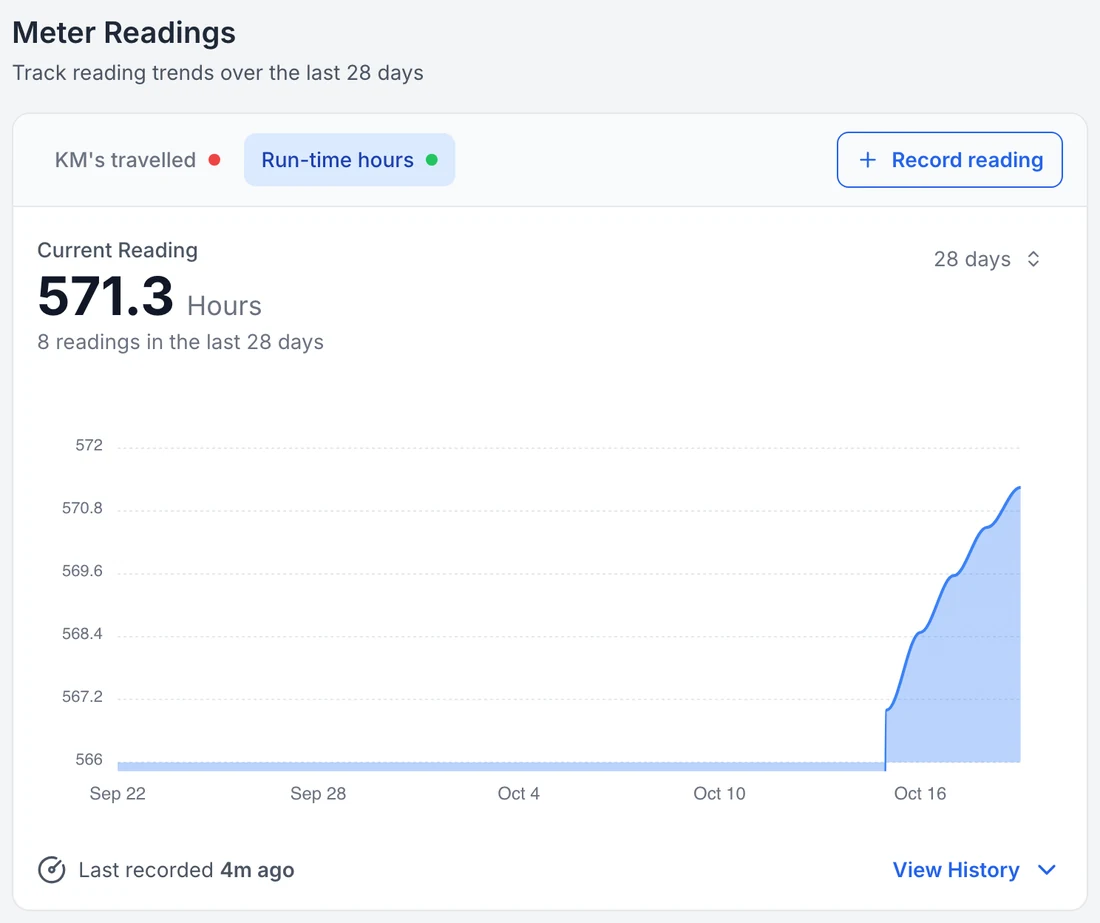
Run hours on the vehicle record
Completed trips from the camera add estimated run hours to the vehicle’s own meter, beside its servicing and costs. The flat start is the period before the camera was connected: the count begins at connection and is an estimate built from finished trips.
MapTrack app · Demonstration data · Captured
About this screenshot
Demonstration account at a 1440 px desktop viewport, Meter Readings card on the asset record with Run-time hours selected over 28 days.
Hours and distance are worked out from completed trips, so time spent idling isn’t counted, and the count starts when the camera is connected. See how those readings bring services due on fleet maintenance and meter-based maintenance.
Using GPS trackers as well? Live tracking, trips, entry and exit alerts and time on site run in MapTrack Telematics. See GPS tracking.
Each vehicle’s camera on its own record
Each vehicle’s record carries its own camera’s safety events beside its maintenance, inspections and files. Camera footage and safety events are shown to account owners.
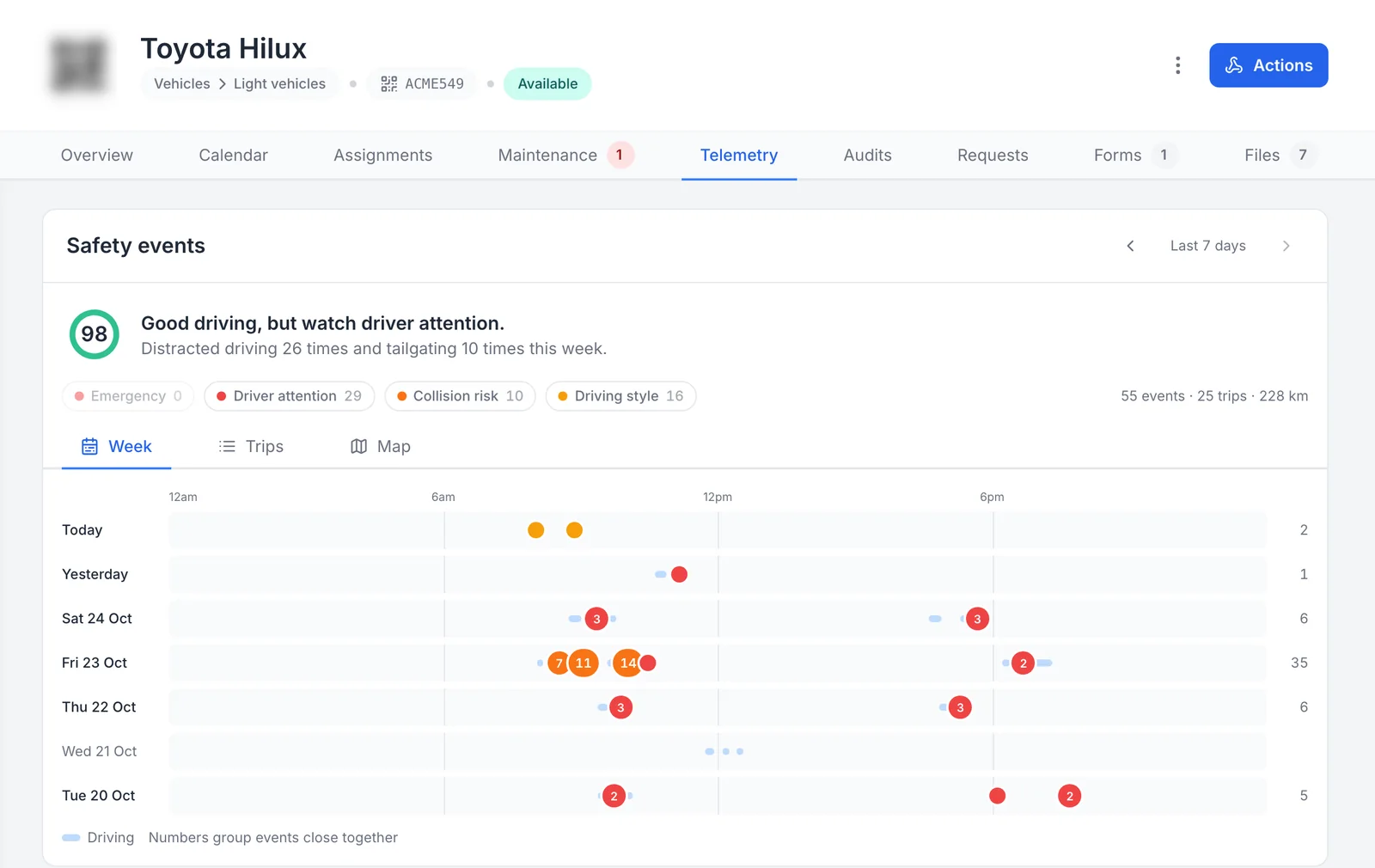
The camera’s week on the vehicle’s own record
The vehicle’s own record carries its camera’s safety events, on the Telemetry tab next to its maintenance, inspections and files. The arrows step back a week at a time.
MapTrack app · Demonstration data · Captured
About this screenshot
Demonstration account at a 1440 px desktop viewport, signed in as an account owner. Asset record, Telemetry tab, cropped to the header and the Safety events card. The asset QR code is pixelated.
The AI dash cams behind it
Compare the MapTrack RoadSight, DualSight and Panorama AI dash cams on our AI dash cams page.
MapTrack RoadSight
Road-facing AI dash cam
The RoadSight records the road only. It has no driver-facing camera, so no driver monitoring.
MapTrack DualSight
Road and driver AI dash cam
Driver monitoring (fatigue, distraction, phone use, seatbelt and smoking) needs the DualSight's driver-facing camera and the Advanced plan.
MapTrack Panorama
Multi-camera AI dash cam
For the Panorama, the camera layout, recording setup, plan features and MapTrack integration are confirmed with your quote.
Already on LightMetrics? Connect your account and MapTrack imports the cameras, their latest position and safety events, and estimates kilometres and drive hours. You connect the account yourself, in MapTrack’s connection library under Settings > Devices > Connections.
What field and fleet teams say about MapTrack
600,000+ assets tracked since 2012


“MapTrack's a great platform - intuitive for the guys out in the field and also has fantastic support.”
Matthew Anderson
Maintenance Planning Supervisor at Supagas

“Thanks to MapTrack we know exactly where our gear is, who has it and when it needs servicing.”
Denis Slaviero
HSEQ Manager at Hacer Group

 Source: G2.com, Inc.
“Bloody amazing! We used to spend 1-2 days a week tracking and managing our generators alone.”
Steve McAllister
Asset Coordinator at Saunders International
What video telematics software does in MapTrack
Video telematics pairs a vehicle’s camera footage with its GPS position, speed and time, so a driving event can be reviewed as video with the numbers that explain it. Read more on what video telematics is.
MapTrack runs it on AI dash cams, in the same system as your servicing, pre starts and costs. Account owners watch live, request footage and read driver scorecards, and each camera’s trips add estimated kilometres and drive hours to the vehicle’s meters.
Why cameras and servicing belong in one system
When the cameras sit in one system and the servicing in another, the safety picture and the service history never meet. In MapTrack, each vehicle’s record holds its camera’s safety events and trips beside its pre starts, maintenance and files.
Video telematics software FAQs
What does MapTrack’s video telematics software do?
Can we watch an AI dash cam live in MapTrack?
Can we get the footage from a trip?
Does MapTrack have driver scorecards?
Which driving events do the AI dash cams pick up?
Does a vehicle with an AI dash cam need a GPS tracker as well?
Do the camera’s kilometres feed servicing?
Who can see the footage and safety events?
Which AI dash cams can we use?
Where do GPS trackers fit in?
Put your dash cams and servicing in one system
Book a demo to see how AI dash cams, driver scorecards and servicing fit together in MapTrack, or start a free trial on your own assets.
- No credit card required