
6 best fleet management software options for small business in 2026
Compare fleet management software for small businesses: per-user, per-vehicle and per-asset pricing, inspections on a phone, servicing and how fast you can get off the spreadsheet. We compared 6 options, including the spreadsheet itself.
Running a larger fleet? See fleet management software compared for the full shortlist.

Co-Founder & GM of Operations
The best fleet management software for a small business is the one your whole crew will actually use, at a price that doesn’t climb with every login. MapTrack fits small businesses that run vans and trucks alongside trailers, equipment and tools, with unlimited users on every plan; Fleetio and Simply Fleet fit vehicle-only fleets that want published per-vehicle prices; AUTOsist fits fleets that want maintenance and GPS from one vendor; Motive fits truck fleets that want AI dash cams first.
Key takeaways
- Shortlist MapTrack for vans, trucks, equipment and tools in one register with unlimited users, Fleetio or Simply Fleet for vehicle-only fleets on published per-vehicle prices, and Motive for trucks that need AI dash cams first.
- Price the whole fleet: count trailers, equipment and the people who need to log in, not just the vehicles.
- Start from the spreadsheet you have: import it, put the daily check on the phone, then set the services.
- A failed pre start should raise the repair job by itself, so nothing sits in a paper book.
- If you can’t trial it on your own vehicles in a week, it is too slow for a small business.
TL;DR
Top 3 picks at a glance
 MapTrack
One register for vans, trucks, trailers, equipment and tools of any brand, with unlimited users on every plan.
Jump to review ↓ Fleetio
Fleet maintenance software for vehicles and equipment, priced per vehicle with unlimited users and a 14-day free trial with no credit card.
Jump to review ↓A low-cost vehicle maintenance app with a free plan for up to 5 vehicles and 3 users, and paid plans per vehicle with unlimited users.
Jump to review ↓Trusted by construction, mining and field service teams




Quick verdict: best fleet management software for small business
Our top picks by use case. Click any card to jump to the full review.

MapTrack
Best for small businesses that run vans and trucks alongside equipment and tools

Fleetio
Best for vehicle fleets that want published per-vehicle prices
Simply Fleet
Best for very small vehicle fleets starting on a free plan
AUTOsist
Best for small fleets that want maintenance and GPS from one vendor

Motive
Best for truck fleets that want AI dash cams first
Which fleet software fits your small business?
Small fleets differ in what they run and who needs to log in. Use these profiles to narrow your shortlist.
The trades business with vans, a trailer and a lot of tools
We run eight vans, a tipper and a trailer, and the tools are worth more than the vans. Can one system cover all of it?
Shortlist software that keeps vehicles, trailers, equipment and tools in one register. MapTrack does that, with QR labels to check tools out to a person or a location, pre starts on the phone and unlimited users on every plan. Vehicle-only tools such as Simply Fleet would cover the vans and leave the tools on a spreadsheet.
Learn more →The owner-operator who does the books at night
I keep the service dates in a spreadsheet and I’m the only one who updates it. What gets me out of that job?
Pick a tool that sends the reminders and lets the crew log their own checks. MapTrack imports your spreadsheet, puts services on kilometres, hours or dates, and emails the assigned person when a service falls due within 7 days. Simply Fleet’s free plan is an option for up to 5 vehicles and 3 users.
Learn more →The small trucking outfit
Most of what we run is trucks, and we want driver safety video. What fits?
Motive is built around AI dash cams with a managed review layer, and AUTOsist sells a safety camera package. If you also want each truck’s pre starts, servicing and costs on one record beside your equipment, MapTrack’s AI dash cams, sold in Australia and New Zealand, put live view and event clips on the vehicle’s record, and MapTrack works with 150+ telematics, fleet and fuel-card data sources.
Learn more →The growing contractor adding a second depot
We’re about to double the fleet and add a site. Will per-user pricing hurt us?
Check who pays per user before you sign. MapTrack includes unlimited users on every plan, and the register shows which site and person each asset is with. Fleetio and Simply Fleet include unlimited users on paid plans, priced per vehicle.
Learn more →Who this guide isn't for
This guide compares fleet software for small businesses that run a working fleet and a crew. It isn’t the right comparison if:
- You run a large or multi-region fleet and want the full shortlist. Compare fleet management software
- Your main job is servicing the fleet rather than running it. Compare fleet maintenance software
- You need routing, dispatch or electronic logging for drivers’ hours. Fleet asset software, MapTrack included, sits beside those systems. See how MapTrack works beside ERP and job systems
- You only need a pre start app for drivers. Compare pre-start inspection software
In this guide
How we evaluated these options
We assessed each option on pricing model and per-user terms, what it tracks beyond vehicles, servicing and work orders, inspections on a phone, offline use and how fast a small business can start. Fleetio and Motive rows reuse facts we had already read on the vendor’s own pages and dated; Simply Fleet, AUTOsist and Whip Around were read on their own pages on 22 November 2026. MapTrack’s rows are checked against our product documentation and pricing page.
- Fleetio pricing(checked Nov 2026)
- Simply Fleet pricing(checked Nov 2026)
- AUTOsist pricing(checked Nov 2026)
- Whip Around(checked Nov 2026)
- Motive products and devices(checked Oct 2026)
- Motive Maintenance(checked Oct 2026)
- Samsara equipment tracking(checked Oct 2026)
- Geotab FAQ (no direct sales)(checked Nov 2026)
- MapTrack pricing
- MapTrack customer case studies
This guide is published by MapTrack (rated 4.9/5 on G2 and 5.0/5 on Capterra, GetApp and Software Advice). We include ourselves alongside other options and don't claim to be the single best fit for every fleet. Every table row carries its source and the month we checked it. Plans change often, so confirm on the vendor's own page before you buy, and tell us at corrections@maptrack.com if something is out of date.
Spotted something out of date or incorrect? Email corrections@maptrack.com and we will review and update this page.
Small business fleet management software comparison table
Side-by-side overview of 6 options. Verify current features and pricing with each vendor.
| Software | Best for | Tracking | Users | Maintenance | Inspections | Offline | Pricing |
|---|---|---|---|---|---|---|---|
| MapTrack | Vehicles, equipment and tools together | QR labels; GPS and telematics connected(per MapTrack pricing, Nov 2026) | Yes | Yes | Yes | Yes | Per asset, not per user; plans on the pricing page |
| Fleetio | Per-vehicle pricing, vehicles first | Telematics partners; QR and NFC with Tools add-on(per Fleetio pricing page, Nov 2026) | Yes | Yes | Yes | ? | Per vehicle a month: Essential US$4 annual or US$5 monthly, Professional US$7, Premium US$10 (annual only) |
| Simply Fleet | Free plan for a few vehicles | Vehicle records(per Simply Fleet pricing page, Nov 2026) | Yes | Yes | Yes | ? | Free; Essential US$3, Advanced US$5 a vehicle a month |
| AUTOsist | Maintenance plus GPS packages | GPS and telematics package(per AUTOsist pricing page, Nov 2026) | Yes | Yes | Yes | ? | Maintenance US$3 to US$6; GPS US$28; cameras US$55 a vehicle a month (annual) |
 Motive | AI dash cams for trucks | GPS, Bluetooth, OEM (AEMP 2.0)(per Motive products and devices, Oct 2026) | ? | Yes | Yes | ? | No public pricing; sales-led |
 Spreadsheets | Manual tracking | Manual list | Not available per vendor sources | Not available per vendor sources | Not available per vendor sources | Not available per vendor sources | Free / included |
Yes ConfirmedNot available per vendor sources Not available? Verify with vendorNot publicly confirmed Not publicly confirmed
Small business fleet management software reviews
A detailed review of each option: features, pricing and where it fits a small fleet.

MapTrack
Best for small businesses that run vans and trucks alongside equipment and toolsOne register for vans, trucks, trailers, equipment and tools of any brand, with unlimited users on every plan. Pre starts on the phone raise a corrective work order when a check fails, services fall due on kilometres, hours or dates, and you start from the spreadsheet you already keep.
Pricing: Per asset, not per user; plans on the pricing page · Trial: Free trial, no credit card required
Not a fit if: You want routing, dispatch or driver hours of service in the same tool: MapTrack keeps the fleet’s records, checks, servicing and costs, and sits beside those systems rather than replacing them.
What you get in one platform
- Every asset, one record
- Tools on QR or barcode labels and Bluetooth tags, plant on GPS trackers, vehicles with GPS and AI dash cams, sites with boundaries: custody, inspections, maintenance and costs on the same record.
- Maintenance that runs on real usage
- Run hours and kilometres from trackers, dash cams or manual readings feed tiered service plans and next-service forecasts, every asset gets a 0 to 100 maintenance health score, and one work order can cover many assets, each with its own pass or fail.
- Easy for crews
- Pre-starts and inspections work without signal, on any phone, with shared-device PINs, single sign-on and AI help to build forms and add assets from a photo. Capterra Best Ease of Use 2026.
- Hardware and software from one vendor
- GPS trackers, AI dash cams with built-in GPS, Bluetooth tags and labels at published prices, managed in the same app, plus LightMetrics dash cam accounts and 150+ telematics, fleet and fuel-card data sources.
- Simple to buy and run
- Per-asset pricing with unlimited users, 24/7 support and month-to-month plans. Capterra Best Value 2026.
The full capability list (47)
- One register for tools, plant, equipment and vehicles
- Custody: who has what, and where
- Site boundaries on the map
- Location types, zones and geofences
- Location teams and roles
- Live tracking and alerts in MapTrack Telematics
- Rate cards (Pro and Enterprise add-on)
- Finance dashboards (Pro and Enterprise add-on)
- Divisions (Pro and Enterprise add-on)
- Run hours and km from trackers, cameras, feeds or readings
- Meter readings from a photo
- Work orders raised from meters, run hours and data feeds
- Tiered service plans
- Next-service forecasts from usage
- Stale-reading flags
- Maintenance health score
- Service board and due-soon emails
- One work order across many assets
- Batch work orders and bulk scan logging
- Labour, parts and external costs on every service
- Failed checks raise work orders by rule
- Parts and inventory by location and bin
- Offline pre-starts and inspections
- Phone forms in sections, with Pass, Fail and N/A buttons
- Mobile web app (Android, iPhone, iPad)
- Shared-device PINs
- Smart overlay (AR) that scans several codes at once
- SAML 2.0 single sign-on (SSO)
- AI form builder
- AI asset creation from a photo
- Equipment bookings (Requests)
- GPS trackers managed in the app
- AI dash cam video in the app
- AI dash cams with built-in GPS
- LightMetrics dash cam connection
- AI dash cam live view: road, driver or both
- Dash cam footage requests, with blurring
- Driver scorecards and a Safety events dashboard
- Bluetooth tags
- QR, barcode and Data Matrix scanning
- RFID and NFC
- OEM feeds under Connections
- Connection library in the app
- 150+ data sources
- Engine hours from 68 integrations
- REST API with per-key access levels
- MCP server for AI tools (Enterprise, or a Pro add-on)
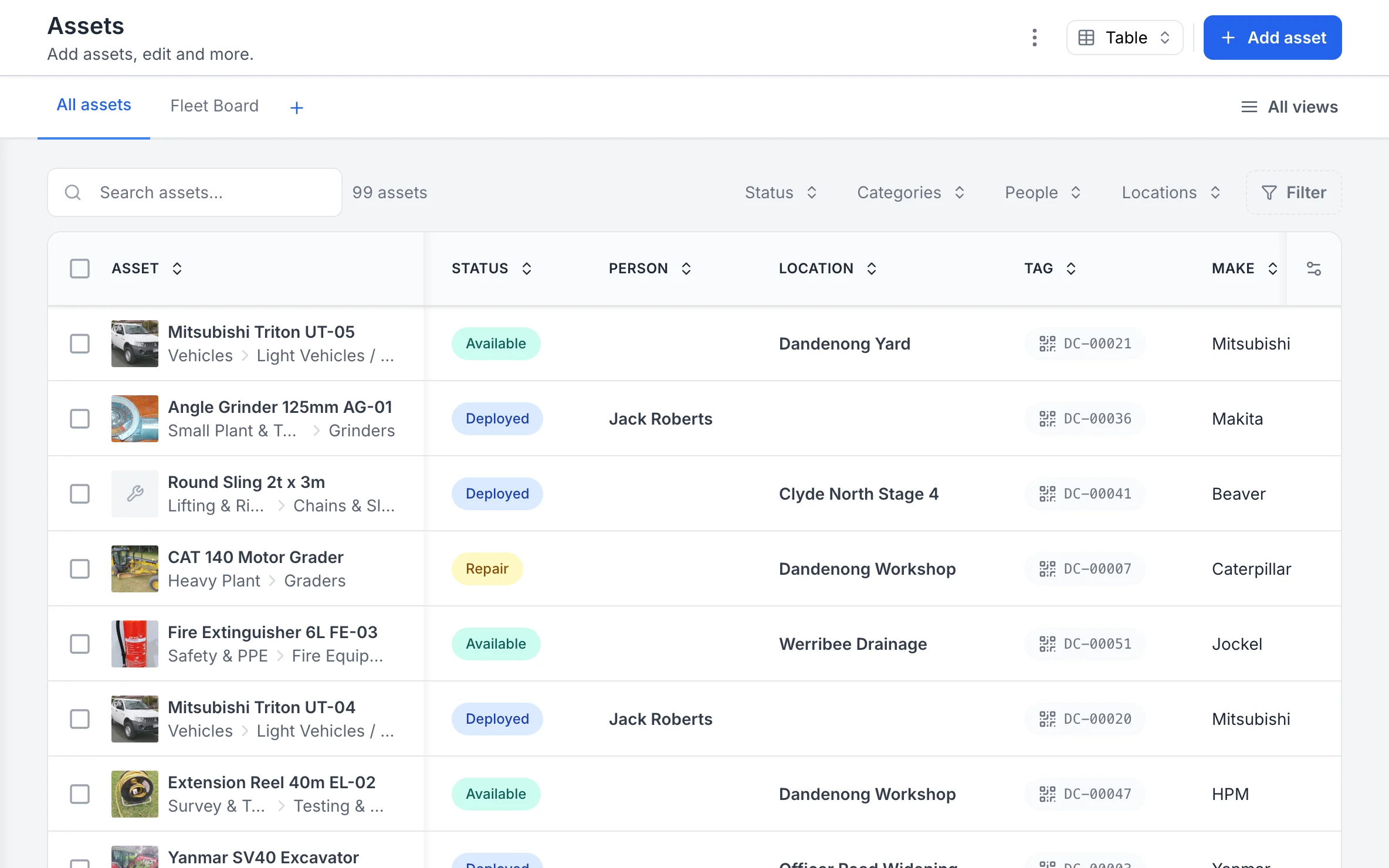
Every kind of asset in one register
Utes, plant, tools, lifting gear and safety equipment sit in one register. Each row shows the asset’s status, who or where it is with, and its QR tag.
MapTrack app · Demonstration data · Captured
About this screenshot
Captured at a 1440 x 900 desktop viewport at 2x in a demonstration workspace, right of the sidebar, in the default view and sort.
MapTrack suits the small business whose fleet is more than vehicles: the service vans and the tipper, plus the trailer, the mini excavator, the generator and the tools that ride in them. Each one has a record holding who has it, its pre starts, its service plan and its costs, and every plan includes unlimited users, so the whole crew can log their own checks. MapTrack is one platform for every asset a field business runs: tools, plant, trailers and vehicles, tracked, inspected, booked and maintained on one record, from any phone.
Import assets, locations and people from a spreadsheet, and during the free trial our team will help you import an initial asset set. Pre starts run on any phone, and forms already on the phone can be submitted without signal. Submitting a defect report, or failing an inspection, raises a corrective work order automatically, and the odometer or hours reading taken on a pre start goes onto the asset’s meter. Record a service cost, or break it down into labour, parts and external costs. Connect the telematics you already run: MapTrack works with 150+ telematics, fleet and fuel-card data sources, set up by our team.
Key features
- ✓Unlimited users on every plan
- ✓Trucks, vans, trailers, equipment and tools of any brand in one register
- ✓Import assets, locations and people from a spreadsheet
- ✓Pre starts on any phone; forms already on the phone submit without signal
- ✓A failed check raises a corrective work order automatically
- ✓Services due on kilometres, hours or dates, with an email when one falls due within 7 days
- ✓Labour, parts and external costs on every service record
- ✓QR labels to check tools out and back in
- ✓Workstation mode: one shared phone or tablet, a PIN each
- ✓150+ telematics, fleet and fuel-card data sources

Fleetio
Best for vehicle fleets that want published per-vehicle pricesFleet maintenance software for vehicles and equipment, priced per vehicle with unlimited users and a 14-day free trial with no credit card. Telematics arrive through 40+ partner integrations; tools need a paid add-on.
Pricing: Per vehicle a month: Essential US$4 annual or US$5 monthly, Professional US$7, Premium US$10 (annual only) · Trial: 14-day free trial, no credit card
Not a fit if: You run a lot of equipment and tools beside the vehicles: Fleetio records machines as vehicles, and tool management is a paid add-on.
Fleetio manages vehicles and equipment: inspections, maintenance, parts, fuel and total cost of ownership by asset or group. Failed inspection items become Issues resolved through work orders on Professional and Premium.
Telematics come through 40+ partner integrations, including Geotab, Samsara, Motive, Verizon Connect, Ford Pro, John Deere and Caterpillar; Fleetio-made GPS trackers are not publicly documented. Fleetio Go runs on iOS and Android, and its offline mode covers inspection submissions such as DVIRs. Barcodes, QR codes and NFC tags for tools need the paid Tools add-on.
Key features
- ✓Per-vehicle pricing with unlimited users
- ✓14-day free trial, no credit card
- ✓Inspections, maintenance, parts and fuel
- ✓Failed inspection items become Issues, resolved through work orders
- ✓40+ telematics integrations
- ✓Tools with the paid Tools add-on
Simply Fleet
Best for very small vehicle fleets starting on a free planA low-cost vehicle maintenance app with a free plan for up to 5 vehicles and 3 users, and paid plans per vehicle with unlimited users. Inspections, fuel logs and service reminders on every plan; work orders on Advanced.
Pricing: Free; Essential US$3, Advanced US$5 a vehicle a month · Trial: Free plan, no credit card to start
Not a fit if: Your fleet includes equipment and tools you also need to track and check out: Simply Fleet is built around vehicles.
Simply Fleet’s free plan covers up to 5 vehicles and 3 users with 6 months of data storage, and needs no credit card to start. Vehicle inspections, fuel logs, maintenance reminders and service history are on every plan.
Essential is US$3 a vehicle a month and Advanced US$5, or US$30 and US$50 a vehicle a year on annual billing, with unlimited users on paid plans. Work order and technician management is on Advanced. Its pricing page carried a "Pricing changes soon" banner when we checked, so confirm current prices before you buy.
Key features
- ✓Free plan: up to 5 vehicles and 3 users
- ✓Essential US$3 and Advanced US$5 a vehicle a month
- ✓Unlimited users on paid plans
- ✓Vehicle inspections and fuel logs
- ✓Maintenance reminders and service history
- ✓Work order and technician management on Advanced
AUTOsist
Best for small fleets that want maintenance and GPS from one vendorFleet maintenance software priced per vehicle or asset, with unlimited users and devices on its maintenance package, and packages that add GPS and telematics, then safety cameras. 14-day free trial, no credit card.
Pricing: Maintenance US$3 to US$6; GPS US$28; cameras US$55 a vehicle a month (annual) · Trial: 14-day free trial, no credit card
Not a fit if: You want monthly billing on a very small fleet: monthly billing costs 15% more, with a US$59 a month minimum.
AUTOsist’s All-in Maintenance Package lists custom DVIR digital inspection forms, maintenance reminders and scheduling, and preventative maintenance work orders, with non-vehicle assets at 50% off.
The maintenance package is US$3 to US$6 a vehicle or asset a month on annual billing, with monthly billing 15% more and a US$59 a month minimum. The GPS and telematics package is US$28 a vehicle a month and the safety camera package US$55, both on annual billing with a 5-vehicle minimum. Unlimited users and devices are listed on the maintenance package; for small teams its page offers per-user pricing on request.
Key features
- ✓Maintenance package from US$3 to US$6 a vehicle or asset a month (annual)
- ✓Unlimited users and devices on the maintenance package
- ✓Custom DVIR digital inspection forms
- ✓Maintenance reminders, scheduling and preventative work orders
- ✓GPS and telematics, and safety camera packages
- ✓14-day free trial, no credit card

Motive
Best for truck fleets that want AI dash cams firstA fleet platform built around AI driver video with a managed human review and coaching layer, plus Vehicle Gateway, Asset Gateway Mini and Beacon trackers. Its Maintenance product schedules service on mileage, time and engine hours. No public pricing.
Pricing: No public pricing; sales-led · Trial: Sales-led
Not a fit if: You want to see a price before you talk to sales: Motive publishes no prices, and hardware and software are sold together on a sales-led subscription.
Motive covers vehicles with AI Dashcam and AI Omnicam for 360-degree views, and unpowered assets such as dumpsters, containers and generators with Asset Gateway Mini and Beacon Bluetooth tags.
The Maintenance product creates work orders from inspection defects and fault codes, and customisable inspection forms in the Driver App cover vehicles and off-road assets. QR asset labels and asset check-out custody are not publicly documented. Its locales cover the US, Canada, Mexico and the UK.
Key features
- ✓AI Dashcam and AI Omnicam with managed human review
- ✓Vehicle Gateway, Asset Gateway Mini and Beacon trackers
- ✓Maintenance on mileage, time and engine hours
- ✓Work orders from inspection defects and fault codes
Spreadsheets
The status quo for most small fleetsNo software cost and everyone knows how to open one, but no checks on the phone, no service reminders and no record of who had what unless someone typed it in.
Pricing: Free / included · Trial: N/A
Not a fit if: More than one person updates the list, or a missed service costs you a vehicle off the road.
Most small fleets run on a spreadsheet and a paper book in the cab. It works while one person keeps it up to date. It stops working when two people edit copies, the service date lives in someone’s head and the pre start book is in the truck that just left.
Key features
- ✓No software cost
- ✓Familiar
- ✓Flexible for a short list
Also worth considering
These did not make our top 6 but may suit some small fleets:
- •Whip Around: Fleet inspection and maintenance software with customisable digital inspections and work orders, service schedules and preventative tasks, and a free trial. Plans and prices sit on a separate pricing page rather than in its product pages, so confirm per-vehicle and per-user terms with the vendor.(per Whip Around, Nov 2026)
- •Samsara: A connected-operations platform for vehicles, trailers and equipment on Samsara’s own gateways, asset tags and AI cameras, with Connected Maintenance scheduling service on odometer and engine hours. Public pages use "Check our prices", and terms are quote-led, so it suits growing fleets ready for a hardware contract.(per Samsara equipment tracking, Oct 2026)
- •Geotab: Fleet telematics with a large partner network. Maintenance schedules by time, distance or engine hours raise work requests that convert into work orders. Geotab doesn’t sell direct: pricing comes from a reseller.(per Geotab FAQ (no direct sales), Nov 2026)
What businesses report after moving off spreadsheets
Published outcomes from MapTrack customers, each from its case study.
Near-universal
Daily pre starts completed
SPDR, up from inconsistent paper
Down an estimated 40-50%
Unnecessary tool purchases
SPDR, first year
Down roughly 80%
Overdue service items
RIX Specialist Contracting, first six months
8-10 down to under 4
Weekly admin hours
365 Alongside
Customer outcomes
Results from published MapTrack customer case studies.
Near-universal
Digital pre-start inspections for vehicles and equipment went from inconsistent paper-based compliance to near-universal daily completion across all crews.
Estimated 40-50%
Unnecessary tool purchases dropped by an estimated 40-50% in the first year as crews gained visibility over what was already available and where it was located.
Roughly 80%
Overdue service items dropped by roughly 80% within the first six months as automated scheduling and alerts replaced manual spreadsheet tracking.
Under 4 hours
Weekly hours spent on manual data entry, form transcription and compliance reporting dropped from roughly 8–10 hours to under 4 hours after moving to digital forms and automated workflows.
Not sure which option fits? Try MapTrack free
Import your vehicle and equipment list and run a pre start this week. No credit card required.
- No credit card required
- Unlimited users
What our customers say
“MapTrack has completely transformed how we manage our tools, equipment and fleet.”

Scott Bradley
Managing Director, SPDR
“MapTrack's a great platform - intuitive for the guys out in the field and also has fantastic support.”

Matthew Anderson
Maintenance Planning Supervisor, Supagas
“I looked at many other systems.. and MapTrack beat them all in every aspect. Can't fault them.”

Vincent Stone
HSEQ Advisor, Concept Tanks
Connected in MapTrack today
What connects to MapTrack now, and who sets it up.
GPS trackers in the device manager
Register your GPS trackers in MapTrack and see each one’s battery, signal and last report. Run hours and kilometres estimated from the tracker feed your service schedules. Other tracker brands are connected with our help.
OEM machine telematics
Cat, Komatsu, JCB and Volvo machines’ own telematics can feed engine hours, location, fault codes and fuel used into MapTrack. You send us the API or data feed details, and our team sets it up under Connections and checks it’s working.
Single sign-on and Sign in with Microsoft
SAML 2.0 single sign-on, set up by our team, works with Microsoft Entra ID (Azure AD), Okta, Google Workspace and other SAML 2.0 identity providers, and new users join automatically the first time they sign in. It’s included on Enterprise and available as a Pro add-on. People can also use Sign in with Microsoft.
LightMetrics dash cam accounts
Connect a LightMetrics dash cam account and MapTrack imports the cameras, shows their latest position and safety events, and estimates kilometres and drive hours from completed trips.
The connection library
MapTrack’s connection library lists 118 GPS, telematics, OEM machine and video providers in the app, under Settings > Devices > Connections. You connect MapTrack GPS trackers and LightMetrics dash cam accounts yourself; for the rest, you request the connection and our team sets it up.
See every provider in the libraryREST API with access levels
Pull and push your MapTrack data through the REST API. MapTrack’s REST API (v1) lists, gets, creates, updates and archives assets, locations, people, categories, custom fields and users. Each API key gets an access level: Read only, Read and write, or Full. Pull MapTrack data into Power BI or Excel through the REST API.
API keys and access levelsMCP server for AI tools
MapTrack's MCP server connects your AI tools, such as Claude and Codex, to MapTrack. It's included on the Enterprise plan and available as an add-on on Pro. Talk to our sales team and we'll set it up with you.
About the MCP server
Per user, per vehicle or per asset: what a small fleet pays
Small-fleet software is priced three ways, and the model matters more than the headline number. Count your vehicles, your trailers and equipment, and the people who need to log a check or a service, then price all three on each vendor's terms.
- Per vehicle. Simply Fleet lists US$3 and US$5 a vehicle a month and Fleetio US$4 to US$10, both with unlimited users on paid plans. Cheap for vans and trucks; check what a trailer, a generator or a set of tools counts as.
- Per vehicle or asset, in packages. AUTOsist lists US$3 to US$6 a vehicle or asset for maintenance, with non-vehicle assets at 50% off, and separate packages that add GPS (US$28) and safety cameras (US$55), on annual billing.
- Quote-led with hardware. Motive and Samsara sell hardware and software together on a sales-led subscription, and Geotab sells through resellers.
- Per asset, not per user. MapTrack prices each asset you track and includes unlimited users on every plan, so every driver, tech and office person can log in. Current plans are on the MapTrack pricing page.
Vendor prices above are in US dollars, as listed on each vendor's own page in November 2026. Plans change often, so confirm before you buy.
Your first week off the spreadsheet
A small business can't stop work to set up software. The fastest path is to keep the list you have and put it to work: one register, one daily check, one service plan, then add the rest.
- Import the list. MapTrack imports assets, locations and people from a spreadsheet, so the vans, trucks, trailers and equipment you already track come straight in.
- Put the pre start on the phone. Build the check once and run it on any phone. When a check fails, a corrective work order is raised automatically, with the photo and signature saved with the pre start.
- Set the services. Services fall due on kilometres, hours or dates, and the assigned person gets an email when a service falls due within 7 days. The odometer reading on a pre start updates the vehicle’s meter.
- Label the tools. Print QR labels so tools are checked out to a person or a location and back in again.
- Bring everyone in. Every plan includes unlimited users, and a crew that shares one tablet can use workstation mode, with a PIN each.
During the free trial our team will help you import an initial asset set and test the mobile workflows. See fleet maintenance software for how servicing works.
Want to see your own vehicle and equipment list in MapTrack?
Book a demo30 minutes on Microsoft Teams
See a small fleet in MapTrack
Genuine captures from a demonstration workspace, dated in each caption: importing a list from a spreadsheet, one ute's record, a vehicle pre start on a phone, and utes and trucks by their next service. More on pre-start inspections and the mobile app.
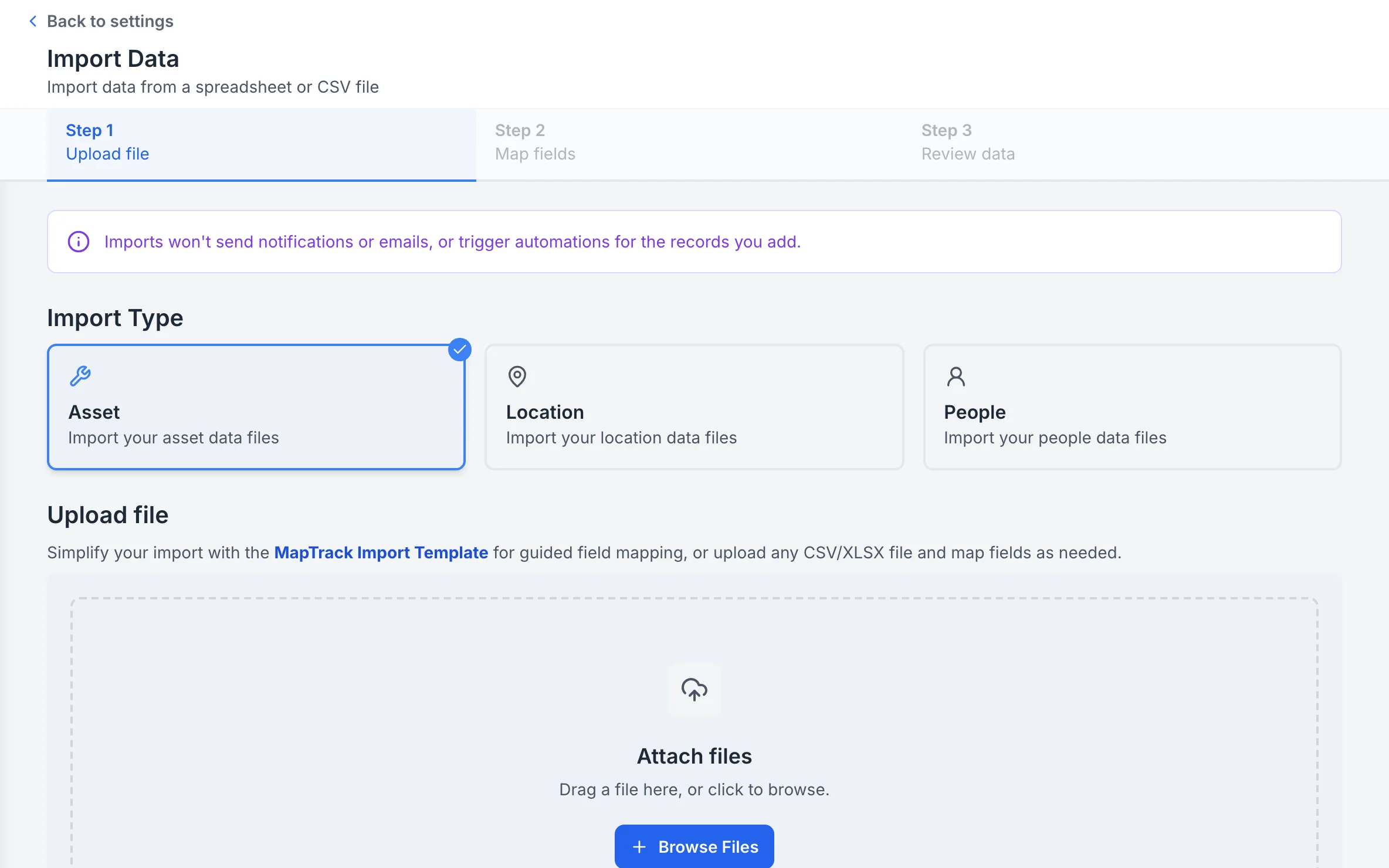
Import assets, locations or people from a spreadsheet
Imports run in three steps, upload, map the fields and review, for assets, locations or people, from a CSV or XLSX file.
MapTrack app · Demonstration data · Captured
About this screenshot
Captured at a 1440 x 900 desktop viewport at 2x in a demonstration workspace, right of the sidebar.
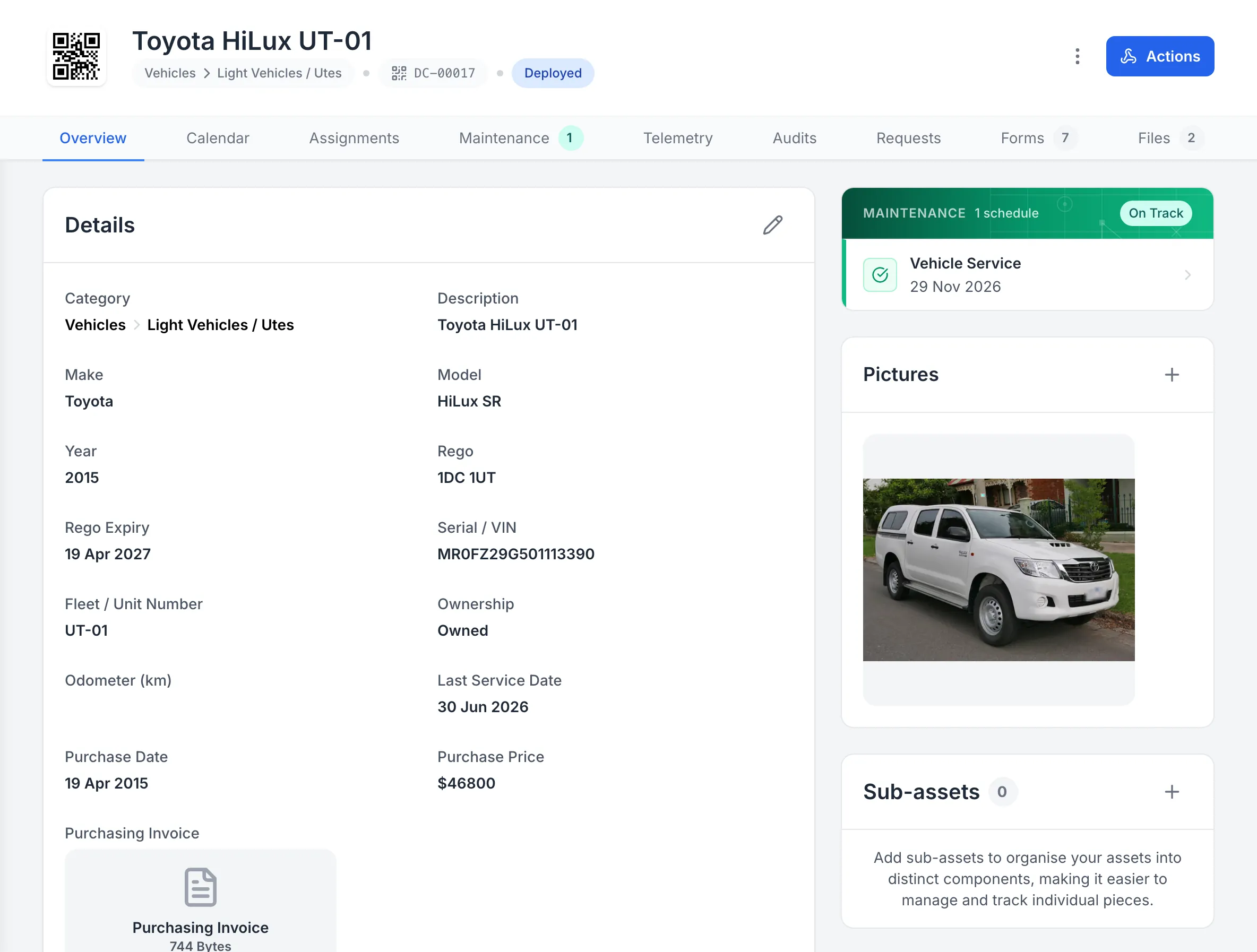
One ute’s record, rego and VIN included
Ute UT-01’s record: its QR tag, rego and rego expiry, VIN and fleet number, its purchasing invoice kept on the record, and its Vehicle Service schedule on track.
MapTrack app · Demonstration data · Captured
About this screenshot
Demonstration workspace at a 1440 px desktop viewport on the ute’s Overview tab, cropped right of the navigation sidebar. Meter readings, notes and accessories continue further down the page.
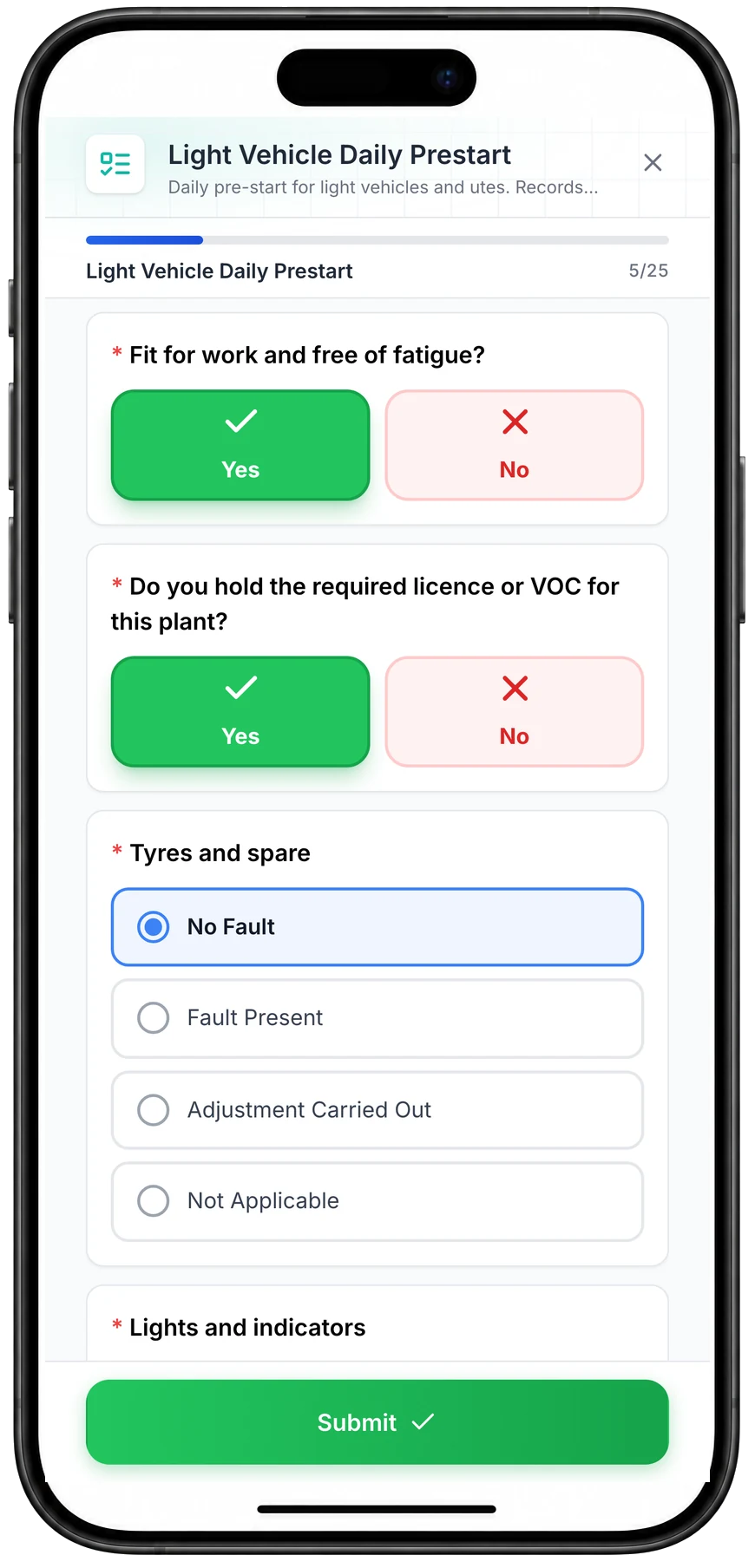
Run a vehicle pre-start on a phone
A daily pre-start for a ute, part-way through. Driver checks such as fitness for work and licence take one tap, and each vehicle check records No Fault, Fault Present, Adjustment Carried Out or Not Applicable.
MapTrack app · Demonstration data · Captured
About this screenshot
Captured at a 430 x 932 phone viewport in a demonstration workspace and shown in a phone frame; the form was closed without submitting.
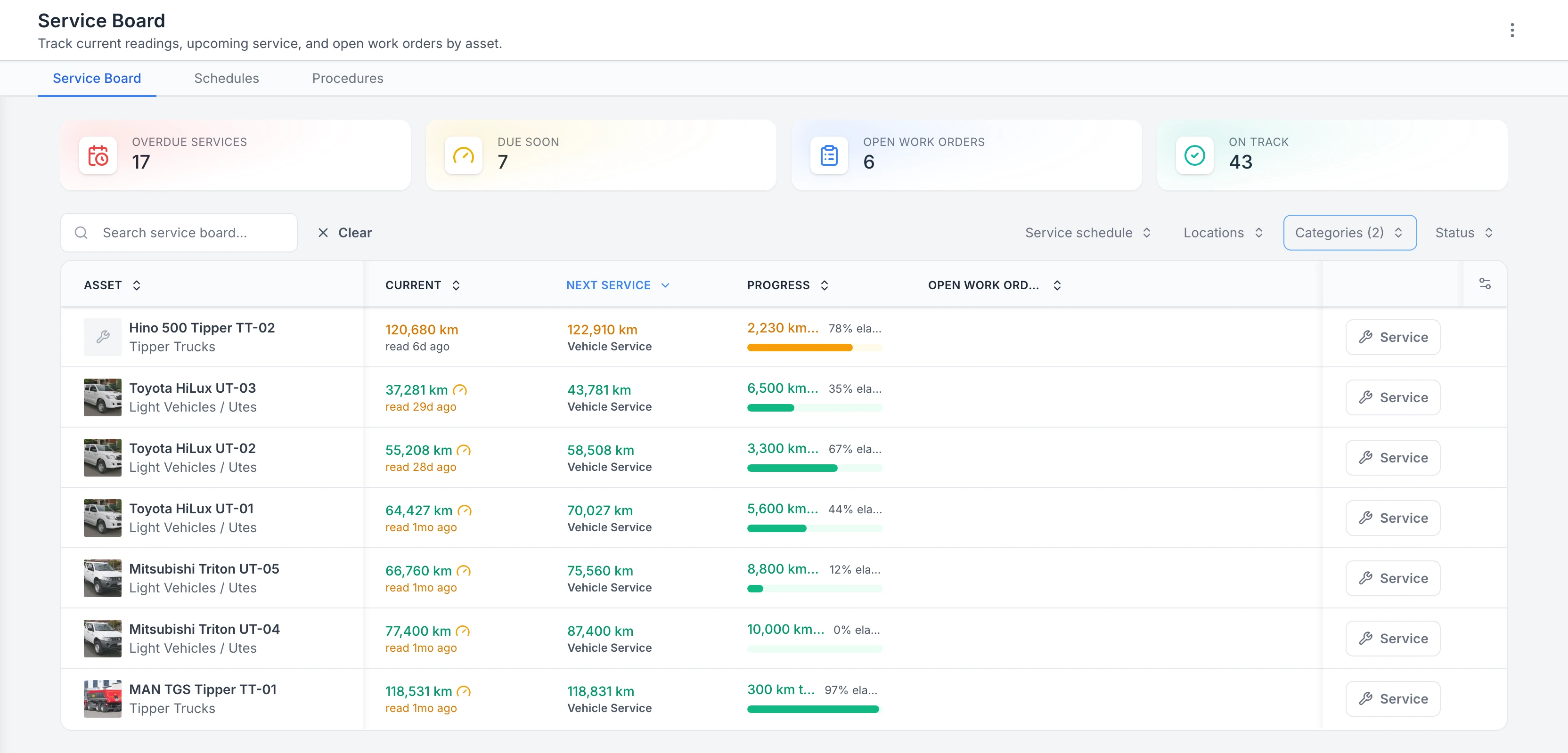
Utes and trucks by their next service
Every ute and truck on one board, ordered by the next service, with the km left on each.
MapTrack app · Demonstration data · Captured
About this screenshot
Demonstration service board filtered to the Light Vehicles / Utes and Tipper Trucks categories. The four totals at the top count the whole board, not just vehicles.
Conclusion: pick the software your whole crew will use
The best fleet management software for a small business is the one the whole crew uses every day, priced on terms that don't punish you for adding people. A vehicle-only fleet chasing the lowest per-vehicle price has good options in Simply Fleet and Fleetio. A truck fleet that wants AI dash cams first should talk to Motive.
MapTrack is built for the small business whose fleet is vans and trucks and the trailers, equipment and tools that go with them, with pre starts on the phone, servicing on kilometres and hours and unlimited users on every plan. For the full shortlist across fleet sizes, see fleet management software compared.
Frequently asked questions
What is fleet management software for small business?
What is the best fleet management software for a small business?
How much does fleet management software cost a small business?
Is there free fleet management software for small business?
Do I need GPS trackers to use fleet management software?
How long does it take to set up?
Will my drivers and techs actually use it?
Can a crew share one phone or tablet?
Why does MapTrack publish this comparison?
Explore
- Pricing
- Book a demo
- Best fleet management software
- Best fleet maintenance software
- Fleet management software in Australia
- Fleet operators
- Fleet maintenance
- Pre-start inspections
- Mobile app
- Tool tracking
- Spreadsheet alternative
- MapTrack vs Fleetio
- Best fleet cost management software
- Best DVIR software
- Daily vehicle inspection form
- Free templates
Related software guides
- Best asset tracking software 2026
- Best asset tag suppliers Australia
- Best tool tracking software 2026
- Best CMMS for equipment 2026
- Best equipment management software 2026
- Best plant management software
- Best pre-start inspection software
- Best fleet management software 2026
- Best fleet maintenance software 2026
- Best fleet management software Australia
- Best asset management software 2026
- Best maintenance planning software 2026
- Best asset inspection software 2026
- Best construction equipment tracking software
- Best construction equipment maintenance software
- Best construction fleet management software
- Best commercial GPS tracking software
- Best fuel management software 2026
- Best safety management software 2026
Compare MapTrack head-to-head
About the author

Co-Founder & GM of Operations
Lachlan leads operations at MapTrack, bringing 10+ years of enterprise technology experience across mining, construction and heavy industry. Before MapTrack, he held senior roles at Workato (integration and automation) and AppDynamics/Cisco (application performance), working directly with ASX-listed organisations to modernise their technology stacks. His deep understanding of field operations and blue-collar workflows shapes how MapTrack solves real problems for asset-intensive teams.
View LinkedIn profile →Get your small fleet off the spreadsheet
Vans, trucks, trailers, equipment and tools in one register, with pre starts, servicing and unlimited users on every plan. Free trial, no credit card required.
4.9 on G2 · 5.0 on Capterra, GetApp & Software Advice· Source: G2.com, Inc.
- No credit card required
- Unlimited users