
MapTrack for US contractors
Keep tools, equipment, trailers and trucks of any brand in one inventory. Crews scan a QR label to open an item, check it out to a person or job site, and record inspections and repairs against it.




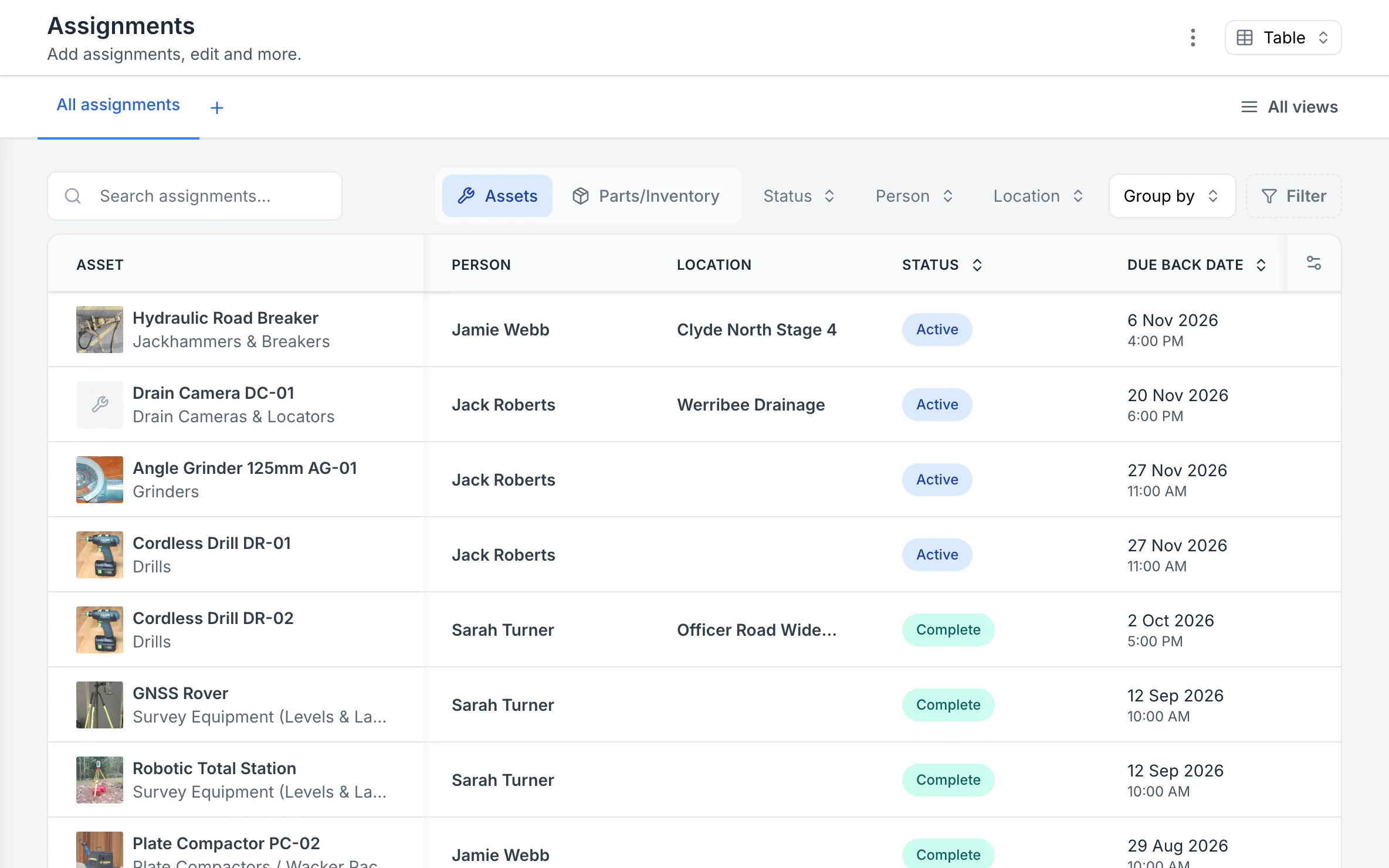
Who has each tool, and when it is due back
Every assignment shows the asset, the person or site it is with, its status and the date it is due back.
MapTrack app · Demonstration data · Captured
About this screenshot
Captured at a 1440 x 900 desktop viewport at 2x in a demonstration workspace, right of the sidebar.
Start with the job you need to fix
Know who has each tool
Check tools out to a person or job site, book them ahead, and see what is due back. If a test or calibration is overdue at check-out, MapTrack flags it.
Tool tracking software for US contractorsOpen any item with a scan
Put a QR code on each tool, machine and trailer. A phone camera opens its record, with its forms, service history and who has it.
QR code asset tracking softwareKeep equipment working
Track engine hours, see what service is due, and turn a failed inspection into a work order for the shop.
Construction equipment tracking software
OSHA construction rules that create daily checks and records
These four come from 29 CFR Part 1926, the federal construction standards. If you work in a state with its own OSHA-approved plan, check that state’s standard too.
Job sites, materials and equipment
1926.20(b) requires programs that provide for frequent and regular inspections by competent persons the employer designates. Equipment that doesn’t comply must be tagged or locked out of use, or physically removed.
In MapTrack: Run the inspection as a form on the item, with photos. A failed check can raise a corrective work order.
Vehicles on off-highway job sites
1926.601(b)(14) requires vehicles in use to be checked at the beginning of each shift, and defects corrected before the vehicle goes into service. Earthmoving equipment covered by 1926.602 has its own rules.
In MapTrack: Operators scan the vehicle and complete the shift check on a phone. A form that is already loaded works without signal.
Hand and power tools
1926.300(a) requires hand and power tools to be maintained in a safe condition, whether the employer or the employee supplies them.
In MapTrack: Each tool keeps its own inspection, repair and check-out history.
Slings and rigging
1926.251 requires rigging to be inspected before use on each shift. Alloy steel chain slings also need a thorough inspection at least every 12 months, and a record of the most recent month that was done.
In MapTrack: Give each sling its own record and due date, and download the inspection as a PDF when someone asks for it.
This is a summary, not legal advice. MapTrack keeps the records. It does not make you compliant or decide whether equipment is safe to use.
What works in the US today
- Moving off paper and spreadsheets
- Import the equipment list you already keep in a spreadsheet, then add QR codes and due dates to the items that matter first.
- The software
- MapTrack runs in a browser and on the phones your crews already carry.
- Your machines’ own telematics
- We help you connect existing feeds, including Cat, Komatsu and John Deere. MapTrack GPS tracker hardware ships to Australia and New Zealand only.
- QuickBooks
- You can connect QuickBooks to MapTrack from inside the app.
- Support
- Email and live chat are open 24/7, and we reply within 4 business hours, Brisbane time (AEST, UTC+10, no daylight saving). We're based in Australia. On plans that include it, phone support runs Monday to Friday, 8:30am to 5:30pm Brisbane time, excluding public holidays, outside most of the US working day.
Frequently asked questions
Can a US contractor use MapTrack?
Does MapTrack make us OSHA compliant?
When can we get a demo from the US?
See it with your own tools and equipment
Bring a list of what you run. We’ll walk through check-out, inspections and work orders with it.
4.9 on G2 · 5.0 on Capterra, GetApp & Software Advice· Source: G2.com, Inc.
- No credit card required